1. Produktet er slutview
The OFFNOVA Thermal Time Clock is designed for small businesses to efficiently track employee attendance. Utilizing advanced thermal print technology, it eliminates the need for ink ribbons and network connections, offering a low-maintenance and user-friendly solution for managing employee in/out times.

Image 1.1: The OFFNOVA Thermal Time Clock, accompanied by a stack of thermal time cards and two keys for secure access.
2. Nøglefunktioner
- Advanced Thermal Print Technology: Operates without ink ribbons, ensuring clean, maintenance-free printing and higher efficiency (up to 26 prints per minute). Prints are clear and have a longer retention time.
- Employee Time Tracking: Features a 24-hour clock with 6-column, two-sided time cards, allowing up to three IN/OUT print cycles per day for up to 31 days. Automatically marks late arrivals and early departures.
- Automatic Time Card Differentiation: The clock automatically distinguishes between the front and back sides of the time card. Incorrectly inserted cards are automatically ejected to prevent errors.
- Easy One-hand Operation: Automatic feeding, aligning, and printing activation simplify the process. Users simply insert the card, and the clock handles the rest.
- Tilslut og brug: Requires no monthly fees, contracts, network connection, or driver installation. Simply plug in the device to begin operation.

Image 2.1: A visual comparison highlighting the advantages of thermal printing (high efficiency, clear prints, long storage time) over traditional ribbon printing (slow, ink runs out, blurred prints over time).
3. Pakkens indhold
Kontroller venligst, at alle varer er til stede og i god stand, når du åbner pakken:
- OFFNOVA Thermal Time Clock Unit
- 50 x Specified Thermal Time Cards
- 2 x Keys for Time Clock Access
- Strømadapter
- Brugervejledning (dette dokument)
4. Opsætning
The OFFNOVA Thermal Time Clock is designed for straightforward setup. No complex network configuration or software installation is required.
- Pak enheden ud: Carefully remove the time clock unit and all accessories from the packaging.
- Vælg en placering: Select a stable, flat surface or a suitable wall for mounting the time clock. Ensure it is in a convenient location for employees to access.
- Tilslut strøm: Insert the power adapter into the DC input port on the back of the time clock. Plug the other end of the power adapter into a standard electrical outlet. The device will power on automatically.
- Indledende indstilling af tid/dato: The clock may require initial time and date adjustment. Refer to the 'Operating Instructions' section for details on setting the time and date.

Image 4.1: Illustration of connecting the power cable to the OFFNOVA Thermal Time Clock, emphasizing its plug-and-use simplicity without internet or driver requirements.
5. Betjeningsvejledning
5.1 Punching In/Out
The time clock features automatic feeding and printing for ease of use.
- Prepare Time Card: Ensure the time card is correctly oriented. The time clock is designed to automatically differentiate the front and back sides. If an incorrect side is inserted, the card will be ejected.
- Indsæt tidskort: Gently slide the time card into the card slot at the top of the time clock. The clock will automatically feed the card into the correct alignment.
- Automatisk udskrivning: The time clock will automatically print the current time and date onto the card and then eject it.
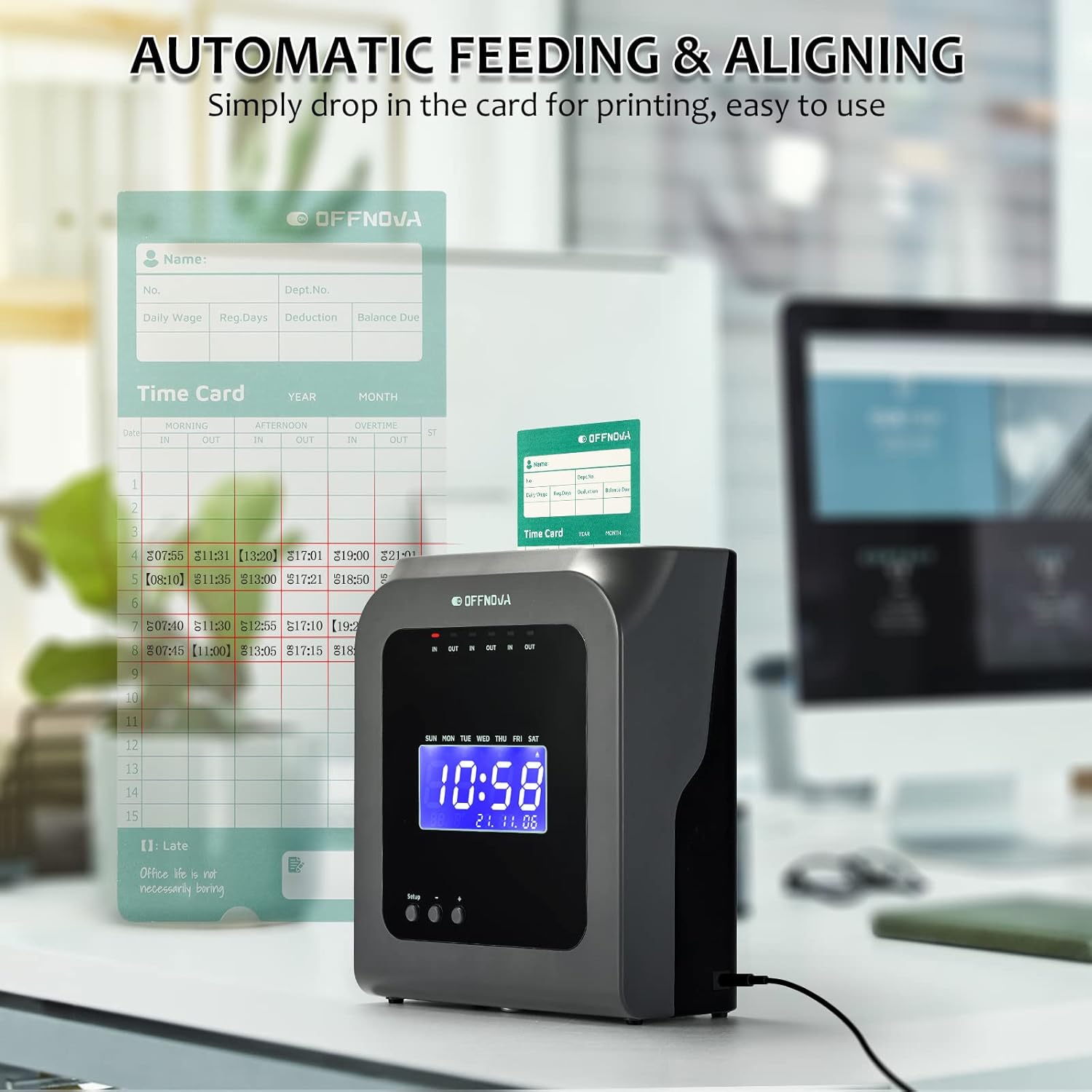
Image 5.1: A time card being automatically fed and aligned into the OFFNOVA Thermal Time Clock, demonstrating the simple, one-hand operation.

Image 5.2: The time clock's ability to automatically identify the correct side of a double-sided time card, preventing misprints.
5.2 Tracking Employee Time
The time clock records up to three IN/OUT cycles per day. It also automatically highlights late arrivals and early departures on the time card for easy identification.

Billede 5.3: En eksample of a time card with automatically marked late arrivals and early departures, simplifying employee time tracking.
5.3 Indstilling af tid og dato
To adjust the time and date, use the 'Setup' button and the '+' and '-' buttons located on the front panel of the device. Follow the on-screen prompts to navigate through the settings menu.
- Press the 'Setup' button to enter the settings mode.
- Use the '+' and '-' buttons to adjust values or select options.
- Press 'Setup' again to confirm selections and move to the next setting.
- Ensure the clock is unlocked (using the provided keys) to access full setup functions.
6. Vedligeholdelse
The OFFNOVA Thermal Time Clock requires minimal maintenance due to its thermal printing technology.
- Rensning: Periodically wipe the exterior of the device with a soft, dry cloth to remove dust. Avoid using abrasive cleaners or solvents.
- No Ink Ribbons: This model does not use ink ribbons, eliminating the need for ribbon replacement.
- Thermal Cards: Ensure you use only specified OFFNOVA thermal time cards for optimal performance and print quality.

Image 6.1: The OFFNOVA Thermal Time Clock highlighting its thermal print technology, which means no messy ink ribbons are needed, simplifying maintenance.
7. Fejlfinding
If you encounter issues with your OFFNOVA Thermal Time Clock, please refer to the following common troubleshooting tips:
- Ingen strøm: Ensure the power adapter is securely connected to both the time clock and a working electrical outlet. Try a different outlet if necessary.
- Ingen tryk/svag tryk: Verify that you are using genuine OFFNOVA thermal time cards. Ensure the time card is inserted correctly and fully into the slot. Thermal paper can degrade over time or with exposure to heat/light; try a new card from the pack.
- Forkert tidspunkt/dato: Access the setup menu using the 'Setup' button and adjust the time and date as described in Section 5.3. Ensure the clock is unlocked with the provided keys to make changes.
- Card Ejection Issues: If the card is repeatedly ejected, ensure it is inserted straight and not bent or damaged. The clock will eject cards if it detects an incorrect side or orientation.
For issues not covered here, please contact OFFNOVA customer support.
8. Specifikationer
| Feature | Specifikation |
|---|---|
| Mærke | OFFNOVA |
| Model | B09JKD1JZM |
| Farve | Grå |
| Display Type | Digital |
| Speciel funktion | Termisk tryk |
| Produktdimensioner | 7.2 cm B x 8.6 cm H |
| Strømkilde | AC |
| Materiale | Acrylonitril Butadien Styren (ABS) |
| Monteringstype | Wall/Desk Mount |
| Varens vægt | 3.45 pund (1.57 kilo) |
| Driftstilstand | Elektrisk |
| Dato først tilgængelig | 15. oktober 2021 |
9. Garanti og support
OFFNOVA is committed to providing excellent customer service for your Thermal Time Clock.
- Kundeservice: We offer lifetime customer service seven days a week. If you have any questions, concerns, or require assistance with your device, please do not hesitate to contact us.
- Kontaktoplysninger: Please refer to the contact details provided on the OFFNOVA official webwebstedet eller produktemballagen for de mest opdaterede supportkanaler.


