Rapoo Multi-Device Silent Wireless Mouse User Manual
Model: M300G
Produkt overview
This manual provides detailed instructions for the Rapoo Multi-Device Silent Wireless Mouse. This mouse is designed for versatile use across multiple devices, offering silent clicks, adjustable DPI, and an ergonomic design for comfortable, extended use.
Nøglefunktioner omfatter:
- Multi-device connectivity (USB receiver or Bluetooth) for up to 3 devices.
- Silent click design for a quiet working environment.
- 4 adjustable DPI levels (600/1000/1300/1600) for precise control.
- Ergonomic design for right-hand comfort.
- High precision optical engine for use on various surfaces.
- Extended battery life with low-power technology.
Produktdemonstrationsvideo
Video: An official product video demonstrating the features and usage of the Rapoo Multi-Device Bluetooth Mouse, including its silent clicks and multi-mode connectivity.
Opsætningsvejledning
1. Pakkens indhold
Sørg for at alle varer er til stede i pakken:
- Rapoo Multi-Device Silent Wireless Mouse
- USB Receiver (usually stored inside the mouse)
- Brugermanual
2. Batteriinstallation
The mouse uses one AA battery (not included). Open the battery compartment on the bottom of the mouse and insert the battery, ensuring correct polarity.
3. Tilslutning af musen
The Rapoo Multi-Device Mouse supports three connection modes: Bluetooth 3.0, Bluetooth 4.0, and 2.4G Wireless (via USB receiver). You can switch between these modes using the button on the bottom of the mouse.
3.1. 2.4G trådløs forbindelse (USB-modtager)
- Locate the USB receiver, typically stored in a slot on the bottom of the mouse.
- Sæt USB-modtageren i en ledig USB-port på din computer.
- Tænd for musen ved hjælp af afbryderknappen i bunden.
- The mouse should automatically connect. No driver installation is usually required.

Image: The Rapoo mouse connected to a laptop via its 2.4G USB receiver, illustrating the wireless connection.
3.2. Bluetooth Connection (Bluetooth 3.0 / Bluetooth 4.0)
- Tænd for musens strømafbryder.
- Press the Bluetooth connection switch button on the bottom of the mouse to select either Bluetooth 1 or Bluetooth 2 channel. The corresponding indicator light (blue or green) will flash slowly.
- Long press the Bluetooth button for more than 3 seconds to start pairing. The indicator light will flash rapidly.
- On your device (laptop, tablet, or smartphone), go to Bluetooth settings and search for new devices.
- Select "RAPOO BT3.0 Mouse" or "RAPOO BleMouse" (Bluetooth 4.0) from the list of available devices to pair.
- Når der er oprettet forbindelse, holder indikatorlampen op med at blinke.

Image: A diagram illustrating the steps to connect the Rapoo mouse via Bluetooth 3.0 or 4.0, showing the pairing process with indicator lights.
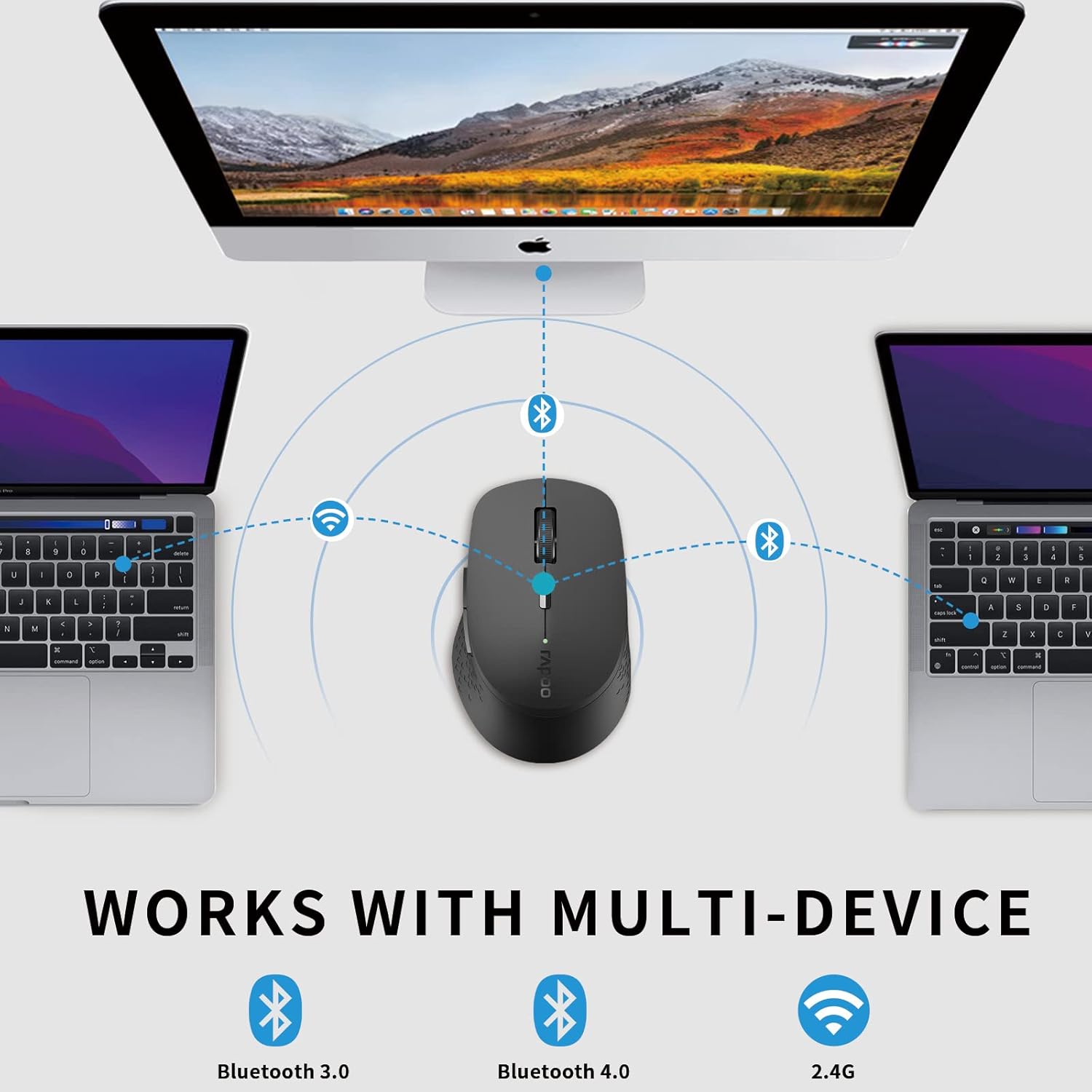
Image: An illustration demonstrating the multi-device capability of the Rapoo mouse, connecting to two laptops via Bluetooth and a desktop via 2.4G wireless.
Betjeningsvejledning
1. Knapfunktioner

Image: A labeled diagram showing the functions of each button on the Rapoo mouse, including left/right click, scroll wheel, DPI switch, multi-device indicator, and forward/backward buttons.
- Venstreklikknap: Standardvalg og aktivering.
- Højreklik-knap: Åbner kontekstmenuer.
- Scrollhjul: Scrolls through documents and web sider. Kan også trykkes ned for at bruge midterklikfunktionen.
- DPI-knap: Skifter mellem DPI-indstillinger (600/1000/1300/1600).
- Multi-device Conversion Indicator: Shows the currently active device channel.
- Frem-knap: Navigerer fremad i web browsere eller file opdagelsesrejsende.
- Baglæns knap: Navigerer baglæns i web browsere eller file opdagelsesrejsende.
2. Skift mellem enheder
To switch between connected devices (up to 3), short press the Bluetooth connection switch button on the bottom of the mouse. The indicator light will change to reflect the active channel (Bluetooth 1, Bluetooth 2, or 2.4G wireless).
3. Justering af DPI (følsomhed)
Press the DPI switch button located behind the scroll wheel to cycle through the four available DPI settings: 600, 1000, 1300, and 1600. Choose the sensitivity that best suits your task and screen resolution.

Image: A visual representation of the adjustable DPI settings (600, 1000, 1300, 1600) for the Rapoo mouse, indicating how cursor sensitivity can be changed.
4. Lydløs klikfunktion
The mouse features a silent click design, reducing click noise by 90%. This allows for a quiet working environment, ideal for offices, libraries, or late-night use.

Image: The Rapoo mouse highlighting its noiseless and durable click feature, with a sleeping baby in the background to emphasize the quiet operation.
5. Ergonomisk design
The mouse is ergonomically designed for right-hand users, with a flat radian that fits the curve of the hand, reducing fatigue during prolonged use.

Billede: En top-down view of the black Rapoo Bluetooth mouse, showcasing dens ergonomiske form.
Opretholdelse
1. Rensning
To clean the mouse, use a soft, dry cloth. For stubborn dirt, slightly dampRengør kluden med vand eller en mild rengøringsopløsning. Undgå at bruge skrappe kemikalier eller slibende materialer.
2. Udskiftning af batteri
When the mouse's performance degrades or the low battery indicator (if present) activates, replace the AA battery. Ensure the power switch is off before replacing the battery.

Image: The Rapoo mouse illustrating its low power consumption, indicating an extended battery life of up to 12 months.
3. Opbevaring
When not in use for extended periods, turn off the mouse to conserve battery life. Store the USB receiver inside the mouse's dedicated slot to prevent loss.
Fejlfinding
| Problem | Mulig årsag | Løsning |
|---|---|---|
| Musen reagerer ikke | Low battery; Power switch off; USB receiver disconnected; Bluetooth not paired. | Replace battery; Turn on power switch; Re-insert USB receiver; Re-pair Bluetooth. |
| Lagging or erratic cursor movement | Interference; Dirty optical sensor; Mouse used on unsuitable surface. | Move closer to receiver/device; Clean optical sensor; Use on a flat, non-reflective surface or mouse pad. |
| Kan ikke skifte mellem enheder | Incorrect button press; Device not properly paired. | Ensure short press of the multi-device switch button; Verify all devices are paired correctly. |
| Bluetooth-parring mislykkes | Mouse not in pairing mode; Device Bluetooth off; Interference. | Long press Bluetooth button for 3 seconds; Enable Bluetooth on device; Move away from other wireless devices. |
Specifikationer
- Mærke: Rapoo
- Model: M300G
- Forbindelse teknologi: Bluetooth (3.0/4.0), 2.4G Wireless (USB)
- Bevægelsesdetekteringsteknologi: Optisk
- DPI: 600/1000/1300/1600 adjustable
- Lydløst klik: Ja (90% støjreduktion)
- Ergonomisk design: Right-hand specific
- Batterilevetid: Up to 9-12 months (depending on usage)
- Produktdimensioner: 3.94 x 2.76 x 1.57 tommer (ca. 10.0 x 7.0 x 4.0 cm)
- Varens vægt: 3.84 ounces (ca. 108.87 gram)
- Farve: Sort
- Fabrikant: RAPOO
- Første tilgængelige: 15. april 2021

Image: The underside of the Rapoo mouse, detailing its dimensions (10.39 cm / 4.09 in length, 6.54 cm / 2.57 in width), weight (83.2g), power switch, Bluetooth connection switch, and invisible optical sensor.
Garanti og support
Rapoo provides a one-year warranty for this product. In case of any issues, please contact Rapoo customer support for assistance. The product also comes with a hassle-free 30-day return and refund or replacement policy.
For further support, visit the official Rapoo webwebstedet eller kontakt deres kundeservicekanaler.


