1. Introduktion
This user manual provides comprehensive instructions for the safe and effective operation of your Retevis RT45P Waterproof Two-Way Radio. Please read this manual thoroughly before using the device and retain it for future reference. The RT45P is designed for reliable communication in various outdoor and challenging environments, featuring IP67 waterproofing, NOAA weather alerts, and emergency functions.

Figure 1: Retevis RT45P Two-Way Radio and included accessories.
2. Pakkens indhold
Bekræft at alle varer er til stede i din pakke:
- 2 x RT45P IP67 Waterproof Walkie Talkies
- 6 x 1000mAh AA Rechargeable NiMH Batteries
- 1 x 2-i-1 USB-C-kabel
- 2 x bælteclips
- 1 x brugermanual
3. Produktet er slutview
The Retevis RT45P is built for durability and ease of use, featuring a robust design and essential communication functions.
3.1 Nøglefunktioner
- IP67 Waterproof and Dust-proof: Designed to withstand immersion in water up to 1 meter for 30 minutes, suitable for marine and wet environments.
- 22 FRS-kanaler: Standard Family Radio Service channels for general use.
- NOAA Vejralarm: Access to 11 NOAA channels for real-time weather updates and alerts.
- SOS-nødalarm: Local and remote alarm with an integrated LED flashlight for emergency situations.
- VOX Håndfri: Voice-activated transmission with adjustable sensitivity (0-5 levels).
- CTCSS/DCS-koder: Sub-codes for enhanced privacy and reduced interference.
- Lang batterilevetid: Powered by 3 AA 1000mAh rechargeable NiMH batteries, offering up to 60 hours standby time.
- USB-C opladning: Convenient charging via a USB Type-C port.
- Justerbar lydstyrke: 0 to 7 levels, with real-time display.
3.2 Komponentidentifikation

Figur 2: Forside og side view of the RT45P with labeled components.
- Antenne: Til at sende og modtage signaler.
- Headset-stik: Til tilslutning af et eksternt headset (medfølger ikke).
- LED lys: Integreret lommelygte.
- PTT-knap (Push-to-Talk): Tryk og hold nede for at sende din stemme.
- MENU/Tænd/sluk-knap: Press to access menu, hold to power on/off.
- Låseknap: Låser tastaturet for at forhindre utilsigtede ændringer.
- Lydstyrke/kanal op/ned-knapper: Adjust volume or navigate channels/menu options.
- Mikrofon: Optager din stemme under transmissionen.
- MON Button (Monitor): Deaktiverer midlertidigt squelch for at lytte efter svage signaler.
- SCAN knap: Starter kanalscanning.
- LED Torch Button: Aktiverer den indbyggede lommelygte.
- USB-C opladningsport: Til opladning af enheden.
4. Opsætning
4.1 Batteriinstallation
- Sørg for, at radioen er slukket.
- Find batteridækslet på bagsiden af radioen.
- Åbn låget.
- Insert the 3 AA 1000mAh rechargeable NiMH batteries, observing the correct polarity (+/-) as indicated inside the compartment.
- Close the battery compartment cover securely to maintain IP67 water resistance.

Figure 3: Battery installation and USB-C charging port.
4.2 Opladning af batterierne
- Connect the provided 2-in-1 USB-C cable to the USB-C charging port on the side of the radio.
- Tilslut den anden ende af USB-C-kablet til en kompatibel USB-strømadapter (medfølger ikke) eller en USB-port på computeren.
- Batteriikonet på displayet viser opladningsstatus.
- Charging typically takes several hours. Disconnect the cable once charging is complete.
4.3 Montering af bælteclipsen
Align the belt clip with the designated slots on the back of the radio and slide it down until it clicks securely into place.
5. Betjeningsvejledning
5.1 Tænd/sluk
For at tænde radioen skal du trykke på og holde MENU/Power knappen, indtil displayet lyser. For at slukke skal du trykke på og holde MENU/Power knappen igen, indtil displayet slukker.
5.2 Justering af lydstyrke
Tryk på UP or NED arrow buttons to adjust the listening volume from level 0 to 7. The current volume level will be displayed on the screen.
5.3 Kanalvalg
- Når radioen er tændt, skal du trykke på MENU én gang. Kanalnummeret blinker på displayet.
- Brug UP or NED pileknapperne til at vælge den ønskede kanal (1-22).
- Tryk på MENU button again to confirm your selection and exit the channel setting mode.
5.4 Afsendelse og modtagelse
To communicate, ensure all radios are set to the same channel. The maximum talking range is approximately 1.5 km (1 mile) in open environments.
- At sende: Tryk og hold på PTT knappen på siden af radioen. Tal tydeligt ind i mikrofonen. Slip PTT button to stop transmitting.
- At modtage: Sørg for PTT button is not pressed. The radio will automatically receive transmissions on the selected channel.

Figure 4: Clear sound and squelch system for effective communication.
5.5 VOX håndfri betjening
VOX (Voice Operated Exchange) allows you to transmit without pressing the PTT button. This feature is adjustable from 0 (off) to 5 (most sensitive) levels.
- Tryk på MENU button multiple times until the VOX icon appears on the display.
- Brug UP or NED arrow buttons to select the desired VOX sensitivity level.
- Tryk på MENU knappen for at bekræfte og afslutte.
5.6 CTCSS/DCS-koder
CTCSS (Continuous Tone-Coded Squelch System) and DCS (Digitally Coded Squelch) codes help filter out unwanted transmissions from other users on the same channel. To communicate, both radios must have the same channel and CTCSS/DCS code selected.
- Tryk på MENU button multiple times until the CTCSS or DCS icon appears on the display.
- Brug UP or NED arrow buttons to select the desired code.
- Tryk på MENU knappen for at bekræfte og afslutte.
5.7 NOAA Vejralarm
The RT45P can receive NOAA Weather Alerts on 11 dedicated channels, keeping you informed of severe weather conditions.
- Tryk og hold på MAN button to enter the weather forecast receiving mode.
- Brug UP or NED arrow buttons to adjust the volume.
- Tryk på MENU key to select NOAA channel CH1-CH11.
- Tryk på MENU key again, then use UP or NED to turn on/off the automatic receiving function.

Figure 5: NOAA Weather Alert system for safety.
5.8 Emergency Alarm and LED Flashlight
In an emergency, the radio offers a local and remote alarm function along with a built-in LED flashlight.
- Nødalarm: Tryk på den dedikerede SOS button (often located on the side or front, refer to Figure 2) to activate the alarm. This will alert other radios within range.
- LED lommelygte: Tryk på LED-lommelygte button (refer to Figure 2) to turn the flashlight on or off.
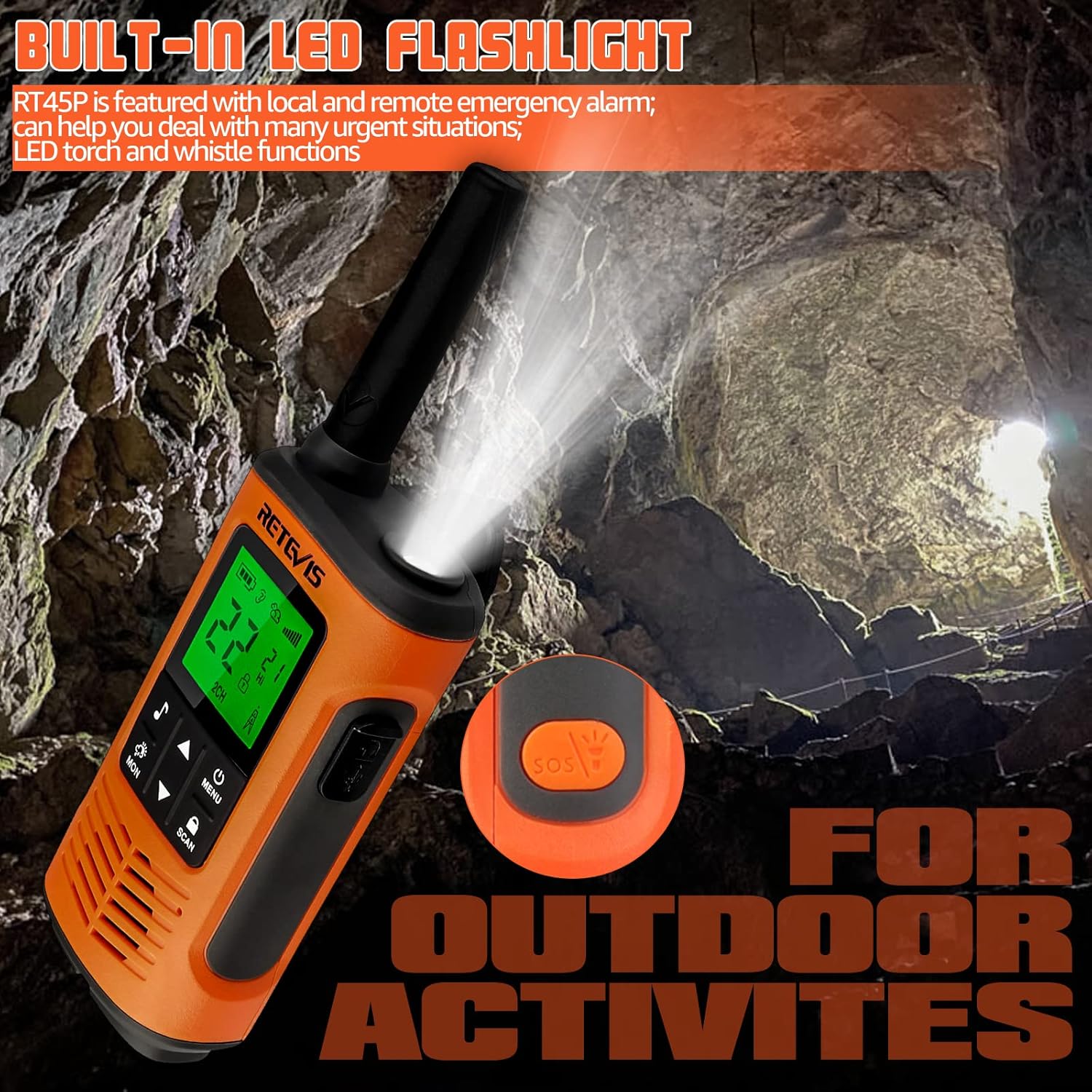
Figure 6: Built-in LED flashlight for visibility in low-light conditions.

Figure 7: SOS Emergency function for urgent situations.
6. Vedligeholdelse
6.1 Rengøring
Rengør radioens yderside med en blød, tør klud.amp cloth. Do not use harsh chemicals or abrasive cleaners. Ensure the USB-C port cover is securely closed after cleaning to maintain water resistance.
6.2 Pleje af batterier
To maximize battery life, fully charge the batteries before first use and after extended periods of non-use. Avoid overcharging or completely draining the batteries regularly. Store the radio and batteries in a cool, dry place.
6.3 Vandtæthed (IP67)
The RT45P is rated IP67, meaning it is protected from dust and can withstand immersion in 1 meter of water for up to 30 minutes. Ensure the battery compartment cover and USB-C port cover are properly sealed before exposing the radio to water.

Figure 8: IP67 Waterproof feature in action.
7. Fejlfinding
- Ingen strøm: Check battery installation and charge level. Ensure batteries are correctly inserted and fully charged.
- Kan ikke sende eller modtage: Verify both radios are on the same channel and CTCSS/DCS code. Ensure the PTT button is fully pressed when transmitting and released when receiving. Check for obstructions or excessive distance.
- Dårlig lydkvalitet: Adjust volume. Check for interference from other electronic devices. Ensure microphone and speaker are clear of debris.
- NOAA Weather Alert Not Working: Ensure you are in an area with NOAA signal coverage. Try switching between the 11 NOAA channels manually.
- Kort rækkevidde: Range is affected by terrain, buildings, and other obstructions. For optimal range, use in open areas with clear line of sight.
8. Specifikationer
| Feature | Specifikation |
|---|---|
| Modelnummer | RT45P |
| Varens vægt | 7.8 ounces (220 gram) |
| Produktdimensioner | 2.36 x 1.34 x 7.24 tommer |
| Batterier | 6 AA batteries required (included) - 1000mAh NiMH rechargeable |
| Display Type | LCD |
| Antal kanaler | 22 |
| Vandmodstandsniveau | IP67 vandtæt |
| Frekvensområde | 462.5500 - 467.7125 MHz |
| Maksimal talerækkevidde | 1.5 Kilometer (approx. 1 mile) |
| Voltage | 3.6 volt |
| Særlige funktioner | Emergency Alarm, Integrated Flashlight, Rechargeable, Weather Alert |
9. Officielle produktvideoer
Retevis RT45P MUST KNOW for kitesurfing and beach!
Denne video giver en kort gennemgangview of the Retevis RT45P's features, specifically highlighting its suitability for water sports like kitesurfing and beach activities due to its waterproof design. (Duration: 0:25)
How about Retevis RT45P walkie talkies?
This video offers a general review and demonstration of the Retevis RT45P walkie-talkies, showcasing their design and basic functionality. (Duration: 2:11)
10. Garanti og support
Retevis provides a 2-year warranty for the radio body and a 1-year warranty for accessories. A 30-day no-reason return policy is also offered. For service beyond the warranty period, corresponding costs may apply.
Ved spørgsmål eller support, kontakt venligst Retevis kundeservice på Amazon. De bestræber sig på at svare inden for 12 timer.


