Indledning
The WOLFANG GA300 Action Camera is a versatile device designed to capture high-quality video and photos in various environments. Featuring 4K/60FPS video recording and 24MP photo capabilities, it ensures crisp and detailed visuals. Its robust design includes 40M waterproofing with a dedicated dive mode, 6-axis EIS stabilization for smooth footage, and support for an external microphone for clear audio. The sensitive touchscreen and extensive functions like slow-motion, time-lapse, and burst recording make it an ideal companion for all your adventures.
Hvad er der i æsken
- 1* WOLFANG GA300 Action Cam
- 1* Waterproof Case
- 1* Mikrofon
- 1* Fjernbetjening
- 2* 1350mAh Batteries
- 1* USB-kabel
- 1* Bicycle Mount
- 1* Helmet Mount
- 1* Extension Mount
- 1* J-hook Mount
- 1* Dust cover
- 1* Frame
- 1* Long Thumbscrew
- 1* Short Thumbscrew
- 1* 360° Rotating Screw
- 1* Backpack Clip
- 2* Adhesive Pads
- 2* Flat Adhesive Pads
- 4* Bandage
- 1* Release Buckle
- 1* Insurance Tether
- 1* Brugervejledning
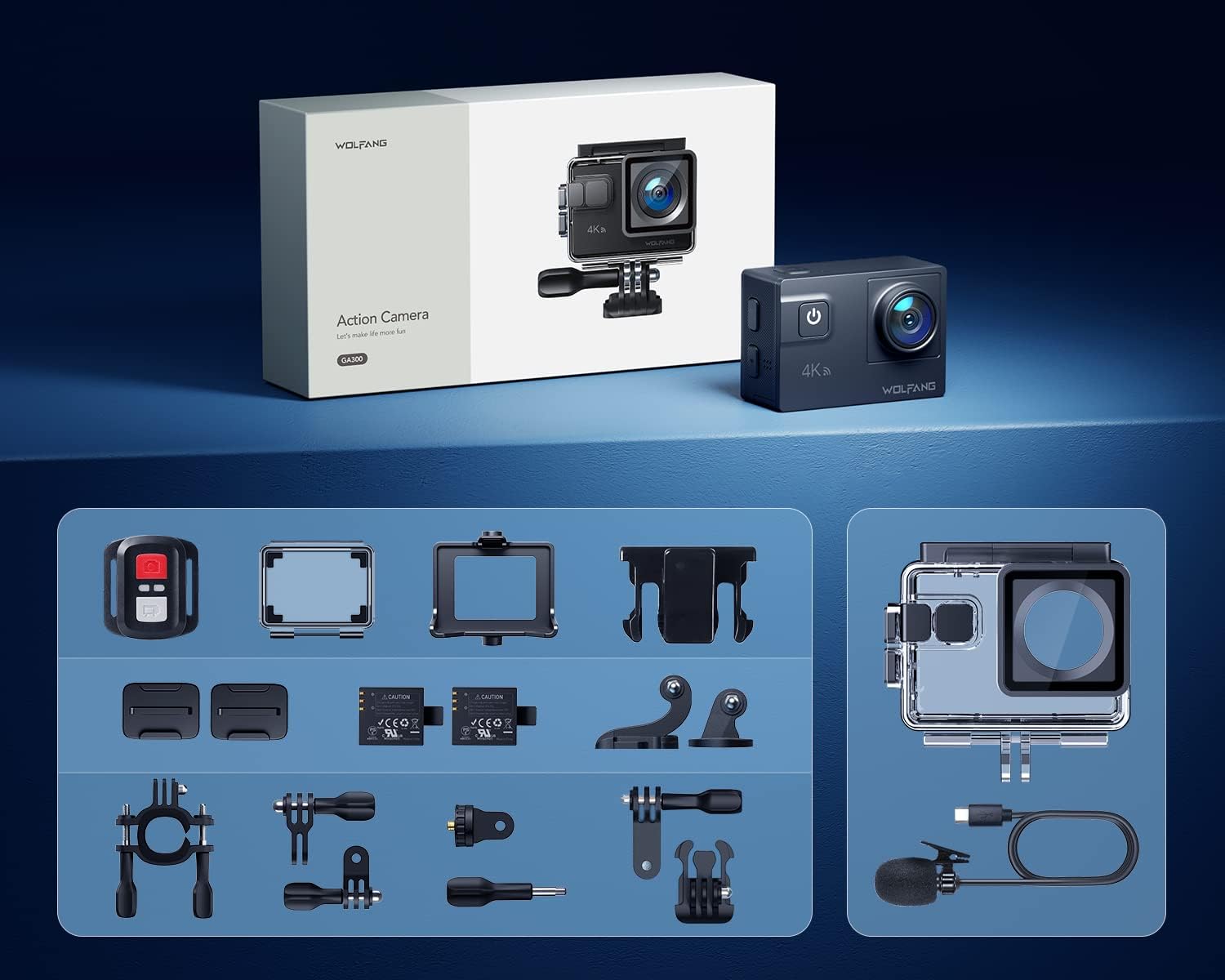
Image: All accessories included with the WOLFANG GA300 Action Camera, neatly arranged.
Opsætning
Indledende kameraopsætning
Before first use, ensure the included 1350mAh batteries are fully charged using the provided USB cable. Insert a compatible Micro SD card (not included) into the camera's slot. Power on the camera and follow the on-screen prompts to set the language, date, and time.

Image: Illustration of the pop-up battery cover for easy battery insertion.
Connecting to Mobile App (Wi-Fi)
To control your WOLFANG GA300 remotely and view footage, download the iSmartDV2 app on your smartphone. Activate Wi-Fi on your camera and connect your phone to the camera's Wi-Fi network. The network name (SSID) and password will be displayed on the camera screen.
Video: Demonstrates how to connect the WOLFANG GA300 to a smartphone via Wi-Fi using the iSmartDV2 app for remote control and viewing.
Betjeningsvejledning
Grundlæggende betjening
The WOLFANG GA300 features a sensitive touchscreen for easy navigation. Use the power/mode button to switch between video and photo modes. The up/down buttons on the side allow for menu navigation and digital zoom adjustments. Ensure the protective film is removed from the lens and screen for optimal clarity.

Image: The WOLFANG GA300 camera displayed next to a smartphone showing its connected app interface, highlighting remote control capabilities.
Videooptagelse
Record stunning 4K video at 60 frames per second. The advanced 6-axis EIS stabilization ensures smooth footage even during strenuous activities. Utilize the 8x digital zoom to capture distant subjects. For underwater recording, use the included waterproof case and activate Dive Mode for color correction.
Video: En detaljeret gengivelseview of the WOLFANG GA300 Action Camera, showcasing its 4K 60FPS video capabilities and EIS stabilization in various scenarios.

Image: Icon representing the 6-axis Electronic Image Stabilization (EIS) feature of the WOLFANG GA300.

Image: Icon representing the 8x digital zoom capability of the WOLFANG GA300.
Lydoptagelse
The GA300 comes with an external noise-canceling microphone for clearer sound capture in noisy environments. This is particularly useful for vlogging or recording in windy conditions.
Video: An audio test of the Wolfang GA300, demonstrating the sound quality with and without the external microphone.

Image: Icon representing the external microphone feature of the WOLFANG GA300.
Fotografering
Capture high-resolution 24MP photos. The camera supports various photo modes including time-lapse photography, slow-motion, and long exposure for creative shots.

Billede: Visuelt eksempelamples of Time Lapse, Slow Motion, and Long Exposure modes captured with the WOLFANG GA300.
Opretholdelse
- Rensning: Use a soft, lint-free cloth to clean the camera lens and screen. For the waterproof case, rinse with fresh water after saltwater use and allow to air dry.
- Batteripleje: Opbevar batterier et køligt og tørt sted. Undgå at aflade batterierne helt i længere perioder.
- Opbevaring: When not in use, store the camera in a dry, dust-free environment. Remove batteries if storing for a long duration.
Fejlfinding
- Kamera tænder ikke: Sørg for, at batterierne er fuldt opladet og korrekt isat.
-
Relaterede dokumenter - GA300

Wolfang GA100 Actionkamera: Ofte stillede spørgsmål
Svar på almindelige spørgsmål om Wolfang GA100 actionkameraet, herunder genkendelse af hukommelseskort, mobiltelefonforbindelse, vandtætning, batterikøbasing, brug af fjernbetjening og håndtering af pakkeproblemer eller defekt tilbehør.
Brugermanual til actionkamera - WOLFANG GA200
Omfattende brugermanual til WOLFANG GA200 actionkameraet, der beskriver funktioner, indstillinger og betjening af 4K-videooptagelse, vandtæthed, EIS-stabilisering og Wi-Fi-forbindelse.
Spørgsmål og svar om Wolfang GA200 actionkamera
Ofte stillede spørgsmål og svar til Wolfang GA200 actionkameraet, der dækker app-forbindelse, vandtæthed, fjernbetjening, formatering af hukommelseskort, videokvalitet og emballageproblemer.
WOLFANG GA300 Action Camera Brugervejledning
Omfattende brugermanual til WOLFANG GA300 actionkameraet, der dækker installation, opladning, brug af TF-kort, produktdiagrammer, specifikationer og betjening af tilstande.
Spørgsmål og svar om Wolfang GA200 actionkamera
Ofte stillede spørgsmål og svar til Wolfang GA200 actionkameraet, der dækker app-tilslutning, brug under vand, fjernbetjening, formatering af hukommelseskort, videokvalitet og pakkeindhold.
Wolfang GA420 Actionkamera Spørgsmål og svar samt brugervejledning
Ofte stillede spørgsmål og brugervejledning til Wolfang GA420 actionkameraet, der dækker app-tilslutning, EIS-funktion, brug af fjernbetjening og formatering af hukommelseskort.