Indledning
The HTC True Wireless Earbuds 2 offer a seamless audio experience with advanced features designed for comfort and convenience. These earbuds utilize the latest Bluetooth 5.1 technology for instant pairing and stable connections across various devices. Enjoy extended listening times, intuitive touch controls, and a comfortable, ergonomic fit for all-day use.

Image: HTC True Wireless Earbuds 2 in their pink charging case, showcasindet kompakte design.

Image: A display of HTC True Wireless Earbuds 2 in three available colors: white, black, and pink.
Video: En officiel overview of the HTC True Wireless Bluetooth Earbuds, highlighting key features and design.
Hvad er der i æsken
Your HTC True Wireless Earbuds 2 package includes the following items:
- HTC True Wireless Earbuds 2 (Left and Right)
- USB-C ladekabel
- Rubber Eartips (Two pairs: Large and Small sizes, in addition to the pre-installed medium size)
- Opladningsetui
Video: An unboxing video for the HTC True Wireless Earbuds 2, showing the contents of the package.
Opsætning
1. Opladning af øretelefoner og etuiet
Before first use, ensure both the earbuds and the charging case are fully charged. Connect the provided USB-C cable to the charging port on the case and plug the other end into a compatible USB power source. The indicator light on the case will show charging status. A full charge provides up to 8 hours of listening time for the earbuds and up to 32 hours total with the charging case.

Image: Pink HTC True Wireless Earbuds 2 and their charging case, illustrating the 30-hour combined battery life.
2. Parring med din enhed
- Åbn opladningsetuiet. Ørepropperne går automatisk i parringstilstand.
- Gå til Bluetooth-indstillinger på din enhed (smartphone, tablet, bærbar computer).
- Select "HTC True Wireless Earbuds 2" from the list of available devices.
- Når der er oprettet forbindelse, hører du en lydmeddelelse, og indikatorlampen på ørepropperne skifter.
The earbuds utilize Bluetooth 5.1 for quick and stable connections. They are compatible with iOS, Android, and Windows devices.

Image: A diagram illustrating the quick pairing process and wide compatibility of the HTC True Wireless Earbuds 2 with various devices.
3. Achieving Optimal Comfort
The earbuds are ergonomically crafted for a secure and comfortable in-ear fit. Experiment with the included rubber eartips (small, medium, large) to find the size that provides the best seal and comfort for your ears. A proper fit enhances sound quality and noise isolation.

Image: A woman wearing pink HTC True Wireless Earbuds 2 while working on a laptop, emphasizing the ultra-lightweight comfort and ergonomic design.
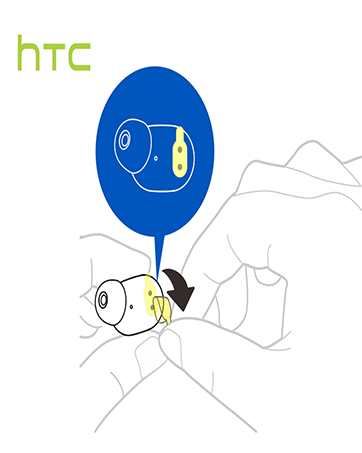
Image: A diagram illustrating the correct method for inserting an earbud to ensure a secure and comfortable fit.
Betjeningsvejledning
Tryk på kontrolelementer
The HTC True Wireless Earbuds 2 feature intuitive touch controls on each earbud for easy management of your audio and calls:
- Afspil/pause: Tryk én gang på venstre/højre øreprop.
- Besvar opkald: Tryk én gang på venstre øreprop.
- Afslut opkald: Tryk én gang på højre øreprop.
- Afvis opkald: Tap and hold left/right earbud for 2 seconds.
- Forrige nummer: Tap and hold left earbud for 2 seconds.
- Næste nummer: Tap and hold right earbud for 2 seconds.
- Lydstyrke op: Tap left earbud twice.
- Skrue ned for lyden: Tap right earbud twice.
- Aktiver stemmeassistent: Tap left/right earbud three times.

Image: A visual guide detailing the simple touch controls for the pink HTC True Wireless Earbuds 2.

Image: A visual guide detailing the simple touch controls for the black HTC True Wireless Earbuds 2.
Brug af enkelt ørepropper
You can use either earbud independently for mono audio or calls. Simply take one earbud out of the case, and it will automatically connect to your device. This feature allows for versatility depending on your listening needs.

Image: Two smartphones connected to individual pink HTC True Wireless Earbuds 2, showcasing the versatility of using one or both earbuds.

Image: A diagram illustrating the versatility of using one or both black HTC True Wireless Earbuds 2 with different devices.
Opretholdelse
Rengøring og pleje
- Rengør regelmæssigt ørepropperne og opladningsetuiet med en blød, tør klud.
- Fjern ørepropperne, og rengør dem med mild sæbe og vand, hvis det er nødvendigt. Sørg for, at de er helt tørre, før du sætter dem på igen.
- Undgå at bruge slibende materialer eller skrappe kemikalier.
Vandmodstand
The HTC True Wireless Earbuds 2 are IPX5 waterproof, meaning they are protected against low-pressure water jets from any direction. This makes them suitable for workouts and light rain. However, they are not designed for submersion in water.
Fejlfinding
Hvis du støder på problemer med dine HTC True Wireless Earbuds 2, kan du bruge følgende almindelige løsninger:
| Problem | Løsning |
|---|---|
| Øretelefoner parrer ikke | Ensure earbuds are charged. Place them back in the case, close, then reopen to re-enter pairing mode. Check your device's Bluetooth settings and forget/remove previous connections if necessary. |
| Ingen lyd fra et ørepropp | Sørg for, at begge ørepropper er opladet. Prøv at sætte begge tilbage i etuiet og tage dem ud igen. Par dem med din enhed igen. |
| Berøringskontroller reagerer ikke | Ensure earbuds are clean and dry. Restart your device and re-pair the earbuds. |
| Dårlig lydkvalitet | Adjust the eartips for a better seal. Ensure your device is within the 10m Bluetooth range. Check for interference from other wireless devices. |
Specifikationer
| Feature | Detalje |
|---|---|
| Modelnavn | HTC True Wireless Earbuds 2 |
| Varemodelnummer | HTC TWS3 |
| Forbindelsesteknologi | Trådløs (Bluetooth 5.1) |
| Batterilevetid (ørepropper) | Op til 8 timer på en enkelt opladning |
| Batterilevetid (med opladningsetui) | Op til 32 timer |
| Opladningsetui Batterikapacitet | 500 mAh |
| Vandmodstandsniveau | IPX5 (vandtæt) |
| Kontroltype | Touch Control (Volume, Play/Pause, Call Management, Voice Assistant) |
| Øreplacering | In Ear |
| Frekvensområde | 20-20,000 Hz |
| Varens vægt | 2.82 ounce |
| Produktdimensioner | 1.71 x 1.71 x 1.36 tommer |
Garanti og support
HTC provides a 12-month warranty for the True Wireless Earbuds 2. For any support inquiries or warranty claims, please contact HTC customer service through their official webwebstedet eller forhandleren, hvor produktet blev købt.
For mere information, besøg den officielle HTC-butik på Amazon.


