1. Introduktion
This manual provides essential information for the safe and efficient operation of your SHINCO WIFI Portable Dehumidifier, model SDZ1-50D. Please read it thoroughly before using the appliance and retain it for future reference. This dehumidifier is designed to remove excess moisture from the air, helping to create a healthier and more comfortable indoor environment. It features a powerful compressor, multiple drainage options, and smart control capabilities.

Figur 1.1: Front view of the SHINCO WIFI Portable Dehumidifier SDZ1-50D. This image displays the unit's compact design, control panel, and visible water tank level indicator.

Figur 1.2: Overview of key features including 50L/day dehumidification, 24-hour timer, automatic humidity capture, and quiet operation.
2. Sikkerhedsinstruktioner
Overhold følgende sikkerhedsforanstaltninger for at forhindre personskade eller beskadigelse af apparatet:
- Tilslut altid enheden til en jordet stikkontakt med den korrekte lydstyrke.tage (220V).
- Brug ikke affugteren med en beskadiget netledning eller stik.
- Hold apparatet væk fra vand og andre væsker. Må ikke nedsænkes i køleskabet.
- Sørg for tilstrækkelig ventilation omkring enheden. Bloker ikke luftindtag eller -udtag.
- Stik ikke genstande ind i ventilationsåbningerne.
- Tag stikket ud af enheden, før du rengør eller udfører vedligeholdelse.
- Dette apparat er ikke beregnet til brug af personer med nedsatte fysiske, sensoriske eller mentale evner, medmindre de er under opsyn.
- Brug ikke affugteren i områder, hvor der opbevares brandfarlige gasser eller væsker.
3. Produktkomponenter
Gør dig bekendt med hoveddelene i din affugter:
- Kontrolpanel med digitalt display
- Luftudtag
- Luftindtag med filter
- Vandtank (7 liters kapacitet)
- Kontinuerligt dræningsafløb
- Lift Pump Drainage Outlet
- Strømledning
- Hjul for mobilitet

Figur 3.1: Bag view showing the continuous drainage port and a top view with the water tank removed, illustrating internal components.
3.1 Kontrolpanel
Kontrolpanelet giver dig mulighed for at styre alle affugterens funktioner.

Figur 3.2: Close-up of the control panel, displaying buttons for power, mode selection, humidity adjustment, fan speed, internal cleaning, and timer.

Figur 3.3: Detail of the power button and digital display, which shows current humidity levels or timer settings.
4. Opsætning
4.1 Udpakning
- Tag forsigtigt affugteren ud af emballagen.
- Fjern alt emballagemateriale, og sørg for, at der ikke mangler nogen komponenter.
- Inspect the unit for any damage incurred during shipping. If damaged, do not operate and contact customer support.
4.2 Placering
- Placer affugteren på en flad, stabil overflade.
- Sørg for, at der er mindst 20 cm (8 tommer) plads omkring enheden for at sikre korrekt luftgennemstrømning.
- Avoid placing the unit near heat sources, in direct sunlight, or in areas exposed to splashing water.
- The unit is equipped with casters for easy movement.
4.3 Strømtilslutning
- Sæt netledningen i en passende 220V jordet stikkontakt.
- Do not use extension cords or multi-plugs.
5. Betjeningsvejledning
5.1 Tænd/sluk
- Tryk på Magt knap (
 ) på kontrolpanelet for at tænde eller slukke enheden.
5.2 Valg af tilstand
Tryk på Mode knap () for at gennemgå tilgængelige tilstande:
- Automatisk tilstand: The unit will automatically operate to maintain the set humidity level (30% to 80% RH). It will turn off when the target humidity is reached and restart if humidity rises.
- Vasketøjstilstand: Designed to absorb excess moisture from clothes, reducing drying time.
- Afrimningstilstand: The unit features an automatic defrost mode for efficient operation even at low temperatures (down to 5°C).
5.3 Fugtindstilling
- I automatisk tilstand skal du trykke på Fugtighed knap () to adjust the desired humidity level between 30% and 80% in 5% increments.
5.4 blæserhastighed
- Tryk på Blæserhastighed knap () for at vælge mellem høj og lav ventilatorhastighed.
5.5 Timer funktion
- Tryk på Timer knap () to set the operating time from 1 to 24 hours. The unit will automatically turn off after the set time.

Figur 5.1: Illustration of the timer function, allowing scheduled operation for convenience.
5.6 Internal Cleaning Function
- Tryk på Ren knap () to activate the internal drying function, which helps prevent mold and odors inside the unit.
5.7 WIFI Control (Smart Home App)
Control your dehumidifier remotely using the Smart Home application on your smartphone.
- Download the "Smart Home" app from your device's app store.
- Follow the in-app instructions to pair your dehumidifier with your Wi-Fi network.
- Once connected, you can power on/off, change modes, set humidity, and manage the timer from your phone.

Figur 5.2: Screenshot of the Smart Home app interface, demonstrating remote control capabilities for the dehumidifier.
6. Dræningsmuligheder
Your dehumidifier offers three methods for water removal:
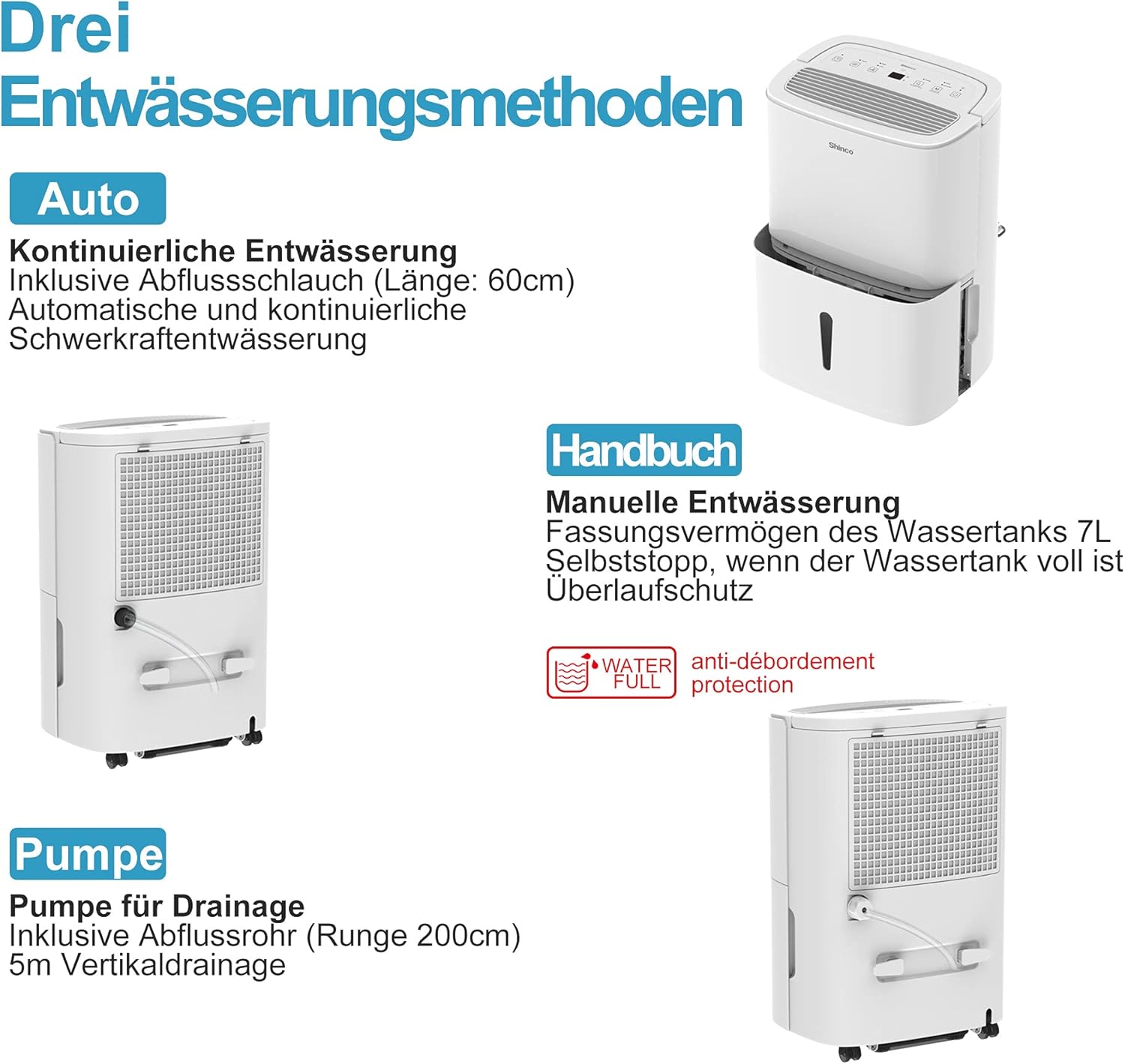
Figur 6.1: Visual representation of the three drainage options: manual tank, continuous gravity drainage, and lift pump drainage.
6.1 Manuel tømning (vandtank)
- The dehumidifier collects water in its removable 7-liter tank.
- When the tank is full, the unit will automatically stop operating, and an indicator light will illuminate.
- Carefully remove the tank, empty the collected water, and reinsert it securely.

Figur 6.2: The display showing a 'Full' indicator, signaling that the water tank needs to be emptied.
6.2 Continuous Gravity Drainage
- For continuous operation without emptying the tank, attach the provided 60 cm drainage hose to the continuous drainage outlet on the back of the unit.
- Ensure the hose is sloped downwards to allow water to drain by gravity into a floor drain or suitable container.
6.3 Lift Pump Drainage
- The unit includes a lift pump and a 2-meter drainage hose for situations where gravity drainage is not possible.
- Connect the 2-meter hose to the lift pump drainage outlet. The pump can discharge water vertically up to 5 meters.
7. Vedligeholdelse
Regelmæssig vedligeholdelse sikrer optimal ydeevne og levetid for din affugter.
7.1 Rengøring af luftfilteret
The dehumidifier is equipped with an active carbon filter to purify the air. Clean the filter regularly.
- Sluk og tag stikket ud af enheden.
- Fjern luftfilteret fra bagsiden af enheden.
- Clean the filter with a vacuum cleaner or wash it with warm, soapy water. Rinse thoroughly and allow it to air dry completely before reinserting.
- Udskift filteret.

Figur 7.1: Illustration of how to remove and clean the air filter, showing both the pre-filter and the active carbon filter.
7.2 Rengøring af enhedens yderside
- Tør ydersiden af enheden af med en blød, damp klæde.
- Brug ikke skrappe kemikalier, slibende rengøringsmidler eller opløsningsmidler.
8. Fejlfinding
If you encounter issues, refer to the following table before contacting customer support:
| Problem | Mulig årsag | Løsning |
|---|---|---|
| Enheden tænder ikke | Ingen strømforsyning Netledningen er ikke korrekt tilsluttet | Kontroller stikkontakt og stikforbindelse Sørg for, at stikkontakten er funktionel |
| Ingen affugtning | Vandtank fuld Luftfilter tilstoppet Stuetemperatur for lav | Tøm vandtank Rens luftfilteret Sørg for, at rumtemperaturen er over 5°C |
| Enheden er støjende | Enheden står ikke på en plan overflade Luftfilter tilstoppet | Placer enheden på en flad, stabil overflade Rens luftfilteret |
| Vand lækker | Water tank not properly inserted Continuous drainage hose loose or blocked | Reinsert water tank correctly Check hose connection and clear any blockages |
| WiFi-forbindelse mislykkes | Forkert Wi-Fi-adgangskode Routeren er for langt væk App ikke opdateret | Bekræft Wi-Fi-adgangskode Flyt enheden tættere på routeren, eller brug en Wi-Fi-forstærker Update Smart Home app |
9. Specifikationer
Technical details for the SHINCO WIFI Portable Dehumidifier SDZ1-50D:
| Feature | Specifikation |
|---|---|
| Modelnummer | SDZ1-50D |
| Affugtningskapacitet | 50 liter/dag |
| Nominel effekt | 750 watt |
| Voltage | 220 volt |
| Vandtankkapacitet | 7 liter |
| Støjniveau | 49 dB |
| Dimensioner (L x B x H) | 29 x 39.5 x 52 cm |
| Vægt | 19 kilo |
| Kølemiddel | R290 |
| Anbefalet rumstørrelse | Op til 55 m² (ca. 592 kvm) |
| Inkluderede komponenter | Dehumidifier, Drain Hose, Instruction Manual |

Figur 9.1: Diagram illustrating the physical dimensions of the dehumidifier and a summary of its technical specifications.
10. Garanti og support
For warranty information or technical support, please refer to the warranty card included with your product or contact SHINCO customer service through their official website or the contact details provided in your purchase documentation. Please have your model number (SDZ1-50D) and purchase date ready when contacting support.


