Produkt overview
The Centurion PHOTON infrared barrier photoelectric sensors are designed to provide an integral safety element for automated gate systems. The wireless transmitter, powered by two AA alkaline batteries, eliminates the need for extensive trenching and cabling, offering significant installation flexibility and reducing material and labor costs. This system ensures reliable operation and enhanced perimeter security for your property.
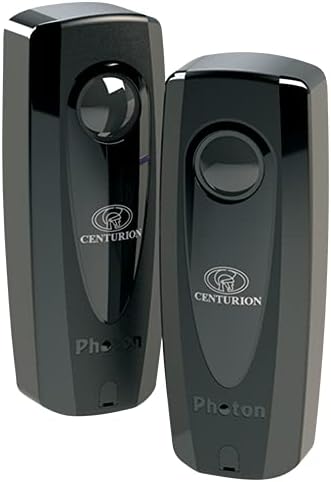
Image: Two Centurion Photon wireless photoelectric sensors, showcasing their sleek black design and compact form factor. These sensors are key components for automated gate safety systems.

Image: The Centurion Photon sensors are depicted in a composite image, highlighting their role in enhancing home security and safety, particularly for families with children, by preventing accidents at automated gates.
Nøglefunktioner
- Trådløs sender: Battery-operated transmitter saves time and installation costs.
- Lang batterilevetid: Approximately 2 years of battery life using two AA alkaline batteries (included).
- Udvidet driftsområde: Up to 30 meters (98 feet) operating range, suitable for various gate sizes.
- Holdbar Casing: Ant-proof and weather-resistant housing ensures reliability in diverse environmental conditions.
- Audible Feedback: Transmitter provides audible feedback for easy setup and low battery indication.
- Lavt strømforbrug: Designed for energy efficiency across the entire system.
- Installationstilstand: Features an installer mode with audible feedback for simplified alignment.
- Kompakt design: Elegant and attractive construction, only 50mm wide.
- Intruder Detection Compatibility: Compatible with intruder detection alarms for enhanced perimeter security.
Opsætning og installation
Proper installation is crucial for the optimal performance and safety of your PHOTON sensors. Follow these guidelines carefully.
Tjekliste før installation
- Ensure all components are present: Transmitter unit, Receiver unit, mounting hardware, 2 x AA alkaline batteries.
- Verify the gate area is clear of obstructions and suitable for sensor mounting.
- Confirm power supply (12V) is available for the receiver unit.
Montering af sensorer
- Choose a suitable mounting location on stable, vertical surfaces on either side of the gate opening. The sensors should be mounted at the same height, typically between 0.5m and 1m from the ground.
- Securely attach the mounting brackets to the chosen surfaces using appropriate fasteners.
- Mount the receiver unit on one side and the transmitter unit on the opposite side, ensuring they face each other directly.
- Insert the two AA alkaline batteries into the transmitter unit.
- Connect the receiver unit to the 12V power supply and the gate automation system's safety input terminals, following the gate system's specific wiring diagram.
Justeringsprocedure
The PHOTON sensors feature an installer mode with audible feedback to assist with precise alignment.
- Activate the installer mode on the transmitter (refer to the specific button/switch on the device, usually a small button on the side or back).
- Adjust the angle of both the transmitter and receiver units until a continuous audible tone is heard from the transmitter. This indicates optimal alignment.
- Once aligned, secure the sensors firmly in place.
- Test the alignment by passing an object (e.g., your hand) through the beam path. The audible tone should stop, and the gate system's safety input should register the interruption.
Betjeningsvejledning
Once installed and aligned, the PHOTON sensors operate automatically as a safety device for your automated gate.
Normal drift
- The infrared beam continuously transmits between the receiver and transmitter.
- When the beam is uninterrupted, the gate automation system operates normally.
- If an object or person breaks the infrared beam while the gate is closing, the sensors will signal the gate automation system to stop or reverse, preventing potential injury or damage.
- The sensors are designed for continuous operation and require no user intervention during normal use.
Batteristatus
The transmitter unit provides an audible indication for low battery levels. When you hear intermittent beeps from the transmitter during normal operation, it indicates that the batteries are nearing the end of their life and should be replaced promptly.
Opretholdelse
Regular maintenance ensures the longevity and reliable operation of your PHOTON sensors.
Rensning
- Periodically inspect the sensor lenses for dirt, dust, spiderwebs, or other obstructions.
- Clean the lenses gently with a soft, damp klæde. Brug ikke slibende rengøringsmidler eller opløsningsmidler.
- Ensure the area around the sensors is clear of vegetation or debris that could block the beam.
Udskiftning af batteri
- When the transmitter indicates a low battery (audible beeps), replace both AA alkaline batteries immediately.
- Open the battery compartment on the transmitter unit.
- Fjern de gamle batterier og bortskaf dem i henhold til lokale regler.
- Isæt to nye AA alkaline-batterier, og sørg for at polariteten vender korrekt.
- Luk batterirummet forsvarligt.
- After battery replacement, it is recommended to re-check the sensor alignment.
Funktionstest
- Regularly test the sensors by activating the gate and intentionally breaking the beam with an object (e.g., a cardboard box) to ensure the gate stops or reverses as expected.
- Perform this test at least once a month.
Fejlfinding
If you experience issues with your PHOTON sensors, refer to the following common problems and solutions.
| Problem | Mulig årsag | Løsning |
|---|---|---|
| Sensors not responding / Gate not stopping |
|
|
| Transmitter beeping intermittently |
|
|
| False triggers / Gate stopping without obstruction |
|
|
Specifikationer
| Attribut | Detalje |
|---|---|
| Modelnummer | PHOTON1V2 |
| Fabrikant | CENTURION SYSTEMS |
| Stil | Trådløs |
| Slutte | Sort |
| Materiale | Polymer |
| Form | Oval |
| Strømkilde | Battery (Transmitter), 12V (Receiver) |
| Voltage | 12 volt |
| Installationsmetode | Overflademonteret |
| Coverage / Operating Range | 30 meter (ca. 98 fod) |
| Plug Profile | Væg |
| Særlige funktioner | Wireless, Audible Feedback, Installer Mode, Weather-resistant |
| Tilsigtet brug | Sensor for Automatic Gate Automation |
| Batterier medfølger | Ja (2 x AA) |
| Batteritype | AA alkalisk |
| Vægt | 300 Grams (approx. 0.66 lbs) |
| Pakkedimensioner | 14 x 7.5 x 6 cm (ca. 5.5 x 3 x 2.4 tommer) |
Garanti og support
For warranty information and technical support, please contact Centurion Systems directly or refer to their official webwebsted.
- Fabrikant: CENTURION SYSTEMS
- Webwebsted: www.centsys.com
- Produkt ASIN: B09FNTBFCL
When contacting support, please have your product model number (PHOTON1V2) and ASIN (B09FNTBFCL) ready for faster assistance.


