1. Vigtige sikkerhedsoplysninger
Please read all safety instructions before using this product. Failure to follow these instructions may result in electric shock, fire, or other injuries.
- Do not disassemble or modify the device. Unauthorized repairs can void the warranty and pose safety risks.
- Keep the device away from water and moisture. Do not use in wet environments.
- Ensure the power adapter is compatible with your local power supply and meets the device's voltage-krav (5V DC).
- Avoid direct eye exposure to the laser projection.
- Opbevares utilgængeligt for børn og kæledyr for at forhindre utilsigtet skade eller personskade.
- Do not cover the projector during operation to prevent overheating. Ensure adequate ventilation.
- Unplug the device during lightning storms or when unused for extended periods.
2. Produktet er slutview
The One Fire Galaxy Projector WH-E14 is a versatile device designed to create a soothing and dynamic ambiance. It features galaxy light projection, a built-in white noise machine, and a Bluetooth speaker. It is controlled via touch buttons on the unit or a remote control, and includes an auto-off timer function.

Image 2.1: The One Fire Galaxy Projector, its remote control, and a smartphone connected via Bluetooth, projecting a vibrant galaxy pattern onto a room's ceiling and walls.
3. Pakkens indhold
Tjek venligst pakken for følgende varer:
- One Fire Galaxy Projector (Model WH-E14)
- Fjernbetjening
- USB strømkabel
- Brugervejledning (dette dokument)
4. Opsætningsvejledning
4.1 Strømtilslutning
- Tilslut USB-strømkablet til projektorens strømindgang.
- Plug the other end of the USB cable into a compatible 5V/2A USB power adapter (not included) or a USB port.
- The projector will power on automatically or can be turned on using the power button.
4.2 Opsætning af fjernbetjening
The remote control requires 2 AAA batteries (not included). Open the battery compartment on the back of the remote and insert the batteries, ensuring correct polarity.
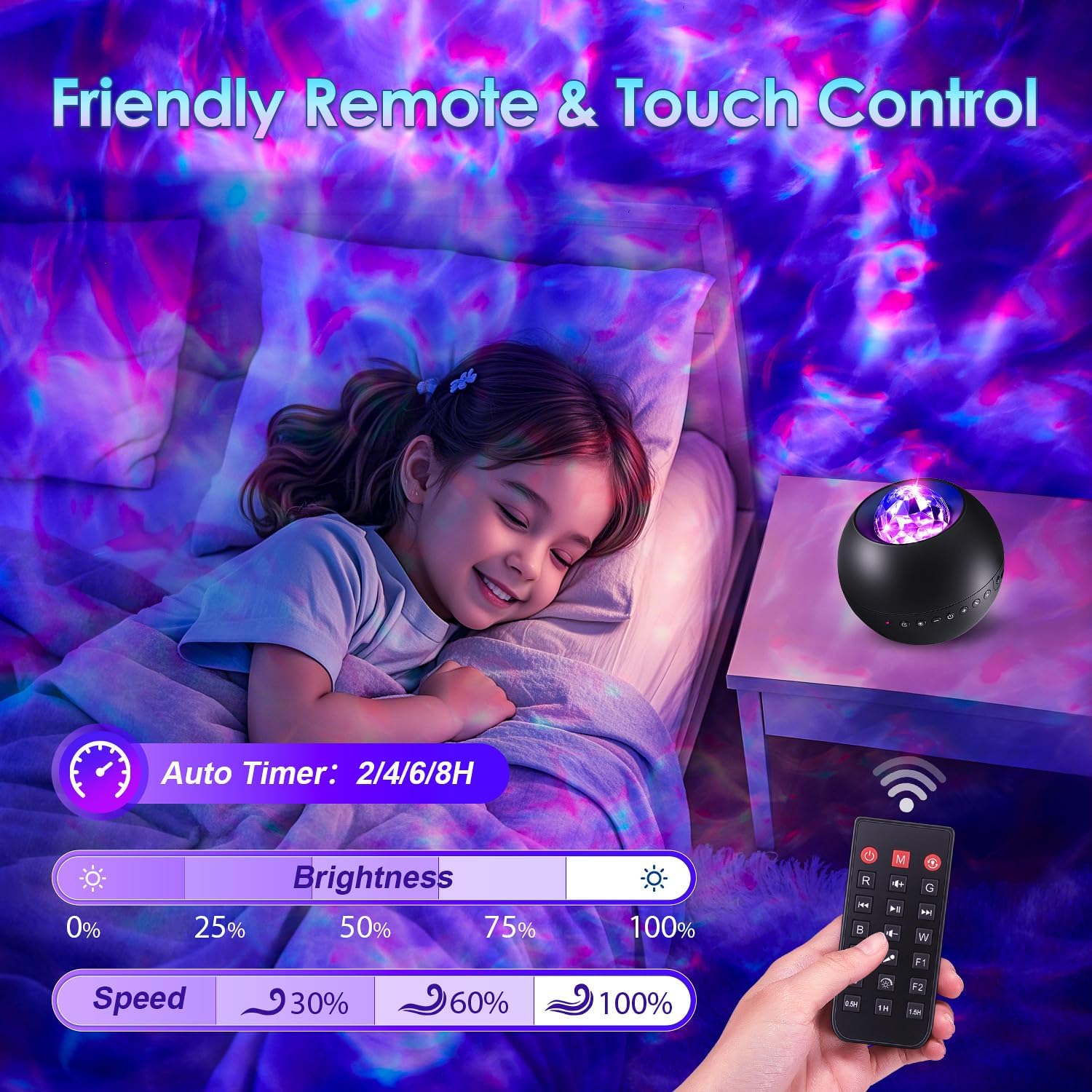
Image 4.2: A child sleeping peacefully in a room illuminated by the galaxy projector, with the remote control visible on a bedside table, demonstrating the timer and brightness functions.
4.3 Placering
Place the projector on a stable, flat surface. The projection angle can be adjusted by rotating the top sphere of the projector up to 90 degrees or 360 degrees horizontally to achieve the desired coverage on walls or ceilings.

Image 4.3: A visual representation of the projector's adjustable angles, showing it can be tilted 45 degrees and rotated 360 degrees for flexible projection.
5. Betjeningsvejledning
5.1 Tænd/sluk
- På enheden: Tryk på tænd/sluk-knappen på projektoren.
- Fjernbetjening: Tryk på Magt knap.
5.2 Light Projection Modes
The projector offers various color combinations, brightness levels, and rotation speeds.
- Farvevalg: Use the R (Red), G (Green), B (Blue), W (White) buttons on the remote to select individual colors or combine them.
- Justering af lysstyrke: Brug lysstyrkeknapperne (+ / -) on the remote to cycle through 4 brightness levels (25%, 50%, 75%, 100%).
- Rotationshastighed: Use the speed buttons on the remote to adjust the rotation speed of the galaxy effect (30%, 60%, 100%).
- Lystilstande: The remote may have preset light mode buttons (e.g., F1, F2) for quick selection of dynamic patterns.

Image 5.2: The projector showcasing a range of vibrant lighting modes and color combinations, illustrating its extensive coverage.
5.3 White Noise Function
The projector includes 15 built-in white noise sounds to aid relaxation and sleep.
- Activate White Noise: Tryk på Hvid støj knappen på fjernbetjeningen.
- Change Sounds: Brug << / >> buttons on the remote to cycle through the available white noise tracks.
- Lydstyrkejustering: Brug + / - lydstyrkeknapperne på fjernbetjeningen.

Image 5.3: A child sleeping soundly, accompanied by the projector's soothing white noise and gentle galaxy light, with icons representing various white noise sounds like fans, rain, and ocean waves.
5.4 Bluetooth-højttalerfunktion
Connect your smartphone or other Bluetooth-enabled device to play music through the projector's speaker.
- Aktiver Bluetooth: The projector's Bluetooth function is usually active upon power-on. A voice prompt may indicate "Bluetooth mode."
- Parring: On your device, search for Bluetooth devices and select "WH-E14" (or similar name). A voice prompt will confirm successful pairing.
- Afspil musik: Once paired, play audio from your device. The projector's lights can synchronize with the music rhythm.
- Lydstyrkekontrol: Adjust volume via your connected device or the volume buttons on the remote control.

Image 5.4: A person relaxing on a couch, enjoying music streamed via Bluetooth to the galaxy projector, which casts dynamic lights on the ceiling.
5.5 Automatisk sluk-timer
Set the projector to automatically turn off after a specified duration.
- Indstil timer: Use the 2H, 4H, or 6H buttons on the remote control to set the timer. The default auto-off is 8 hours if no timer is set.
- Annuller timer: Press the timer off button (often labeled with a clock icon and "OFF") on the remote.
- Hukommelsesfunktion: The projector remembers the last light settings when restarted.
6. Vedligeholdelse
- Rensning: Use a soft, dry cloth to clean the surface of the projector. Do not use liquid cleaners or abrasive materials.
- Opbevaring: Når projektoren ikke er i brug, skal den opbevares køligt og tørt, væk fra direkte sollys og ekstreme temperaturer.
7. Fejlfinding
| Problem | Mulig årsag | Løsning |
|---|---|---|
| Projektoren tænder ikke. | Ingen strøm, defekt kabel eller adapter. | Check power connection. Ensure USB cable and adapter are working. Try a different power source. |
| Fjernbetjening virker ikke. | Dead batteries, incorrect battery insertion, or obstruction. | Replace remote batteries. Ensure correct polarity. Remove any obstructions between remote and projector. |
| Bluetooth-forbindelse mislykkes. | Device not in pairing mode, too far, or already connected to another device. | Ensure projector is in Bluetooth mode. Keep devices within range. Disconnect from other Bluetooth devices. Restart both devices. |
| Projektionen er svag eller uklar. | Brightness setting is low, or lens is dirty. | Increase brightness using the remote. Gently clean the projection lens with a soft, dry cloth. |
| Unwanted noise from the mechanism. | Internt motorproblem. | If the noise is persistent and disruptive, contact customer support. |
8. Specifikationer
| Feature | Detalje |
|---|---|
| Modelnummer | WH-E14 |
| Mærke | Én Ild |
| Strømkilde | Elektrisk med ledning |
| Voltage | 5 volt (DC) |
| Wattage | 5 Watts (Light Source: 10 Watts) |
| Materiale | Acrylonitril Butadien Styren (ABS) |
| Lyskildetype | LED |
| Varens vægt | 5.6 ounce (158.76 gram) |
| Produktdimensioner | 9.9 cm L x 9.9 cm B x 8.9 cm H (3.9" L x 3.9" B x 3.5" H) |
| Særlige funktioner | White Noise, Adjustable Angles, Color Changing, Bluetooth Speaker, Remote Control, Auto-Off Timer |
9. Garanti og support
One Fire provides a 3-year quality promise for this product. If you encounter any issues or have questions regarding your One Fire Galaxy Projector, please contact our customer support for assistance.
For support, besøg venligst One Fire-butik på Amazon eller se de kontaktoplysninger, der blev oplyst ved dit køb.


