Produkt overview
The Hugolog Keyless Entry Door Lock provides convenient and secure access to your home or office. This manual outlines the installation, operation, maintenance, and troubleshooting for your device.

Billede: Forside og bagside view of the Hugolog Keyless Entry Door Lock, showcasing the keypad on one side and the interior assembly on the other.
Pakkens indhold
Før installationen påbegyndes, skal du kontrollere, at alle komponenter er til stede i pakken:

Image: All components included in the Hugolog Keyless Entry Door Lock package, laid out on a white surface. This includes the exterior keypad assembly, interior assembly, latch, strike plate, mounting plate, screws, backup keys, and installation guide.
- Udvendig tastatursamling
- Indvendig montage
- Lås
- Monteringsplade
- Håndtag
- Låsecylinder
- Backup Key(s)
- Nulstil værktøj
- Slagplade
- Various Screws (Latch Screws, Mounting Screws, Interior Assembly Screws)
- Installation Guide / Programming Instruction
- Drilling Drawing (if needed for new installations)
Opsætning og installation
Follow these steps carefully to install your Hugolog Keyless Entry Door Lock. For visual guidance, please refer to the installation video provided below.
Kontrol før installation
- Sørg for, at din dørtykkelse er mellem 35-50 mm.
- Verify the backset of your door (distance from door edge to center of bore hole) is compatible. The latch is self-adjusting for bolt side distance.
- If drilling is required for a new door, refer to the drilling drawing provided in the package.

Image: Diagram showing door dimensions and lock measurements, including backset and bore hole diameter, to ensure compatibility.
Installationstrin
- Installer låsen: Insert the latch into the door edge. Ensure the angle of the latch faces the door jamb. Adjust the backset if necessary, making sure the hole is in the horizontal position.
- Installer låsepladen: Secure the strike plate onto the door jamb using the provided screws. Ensure the latch angle faces the door jamb.
- Monter den udvendige enhed: Slide the shaft of the exterior assembly smoothly through the hole in the latch. Ensure the notch of the lock cylinder is facing away from the door frame. The cable must go through the door hole above the latch.
- Placer monteringspladen: Route the cable and connector through the hole in the mounting plate. Position the mounting plate against the door.
- Secure Assemblies: Secure both the exterior assembly and the mounting plate using the mounting screws.
- Monter den indvendige enhed: Route the cable and connector through the cable hole on the interior assembly. Connect the cable. It is recommended to insert the PCB wire into the door hole after connection. Install the interior assembly and secure it using flat head screws.
- Installer håndtaget: Push the lever into the base until the catch pin is engaged. Ensure the tip of the handle points down.
- Load Batteries and Reset: Install 4x AA batteries into the interior assembly.
- Installer batteridækslet: Put back the lid of the battery pack.
Installationsvideoguide
Video: A detailed step-by-step guide on how to install the Hugolog Keyless Entry Door Lock. This video covers all physical installation aspects from preparing the door to securing the lock components.
Initial Programming - Change Master Code
The default master code is 12345678. It is required that you change it to a code of your own before programming other features.
- Trykke Hugolog button twice, then enter the default master code (12345678), and press Hugolog button again. Wait for a long green light flash.
- Trykke 1. Wait for a green light flash.
- Enter your new master code, then press Hugolog button. Succeed green light flash.
- Enter the new master code again, then press Hugolog button. Succeed green light flash.
Betjeningsvejledning
Låse op og låse
Your Hugolog lock offers multiple ways to unlock and lock for your convenience:
- Tastatur: Enter your user code on the keypad.
- Fysisk nøgle: Use the provided backup key for manual unlocking.
- Tommelfingerdrejning: Rotate the interior thumb turn to manually lock or unlock the door from the inside.
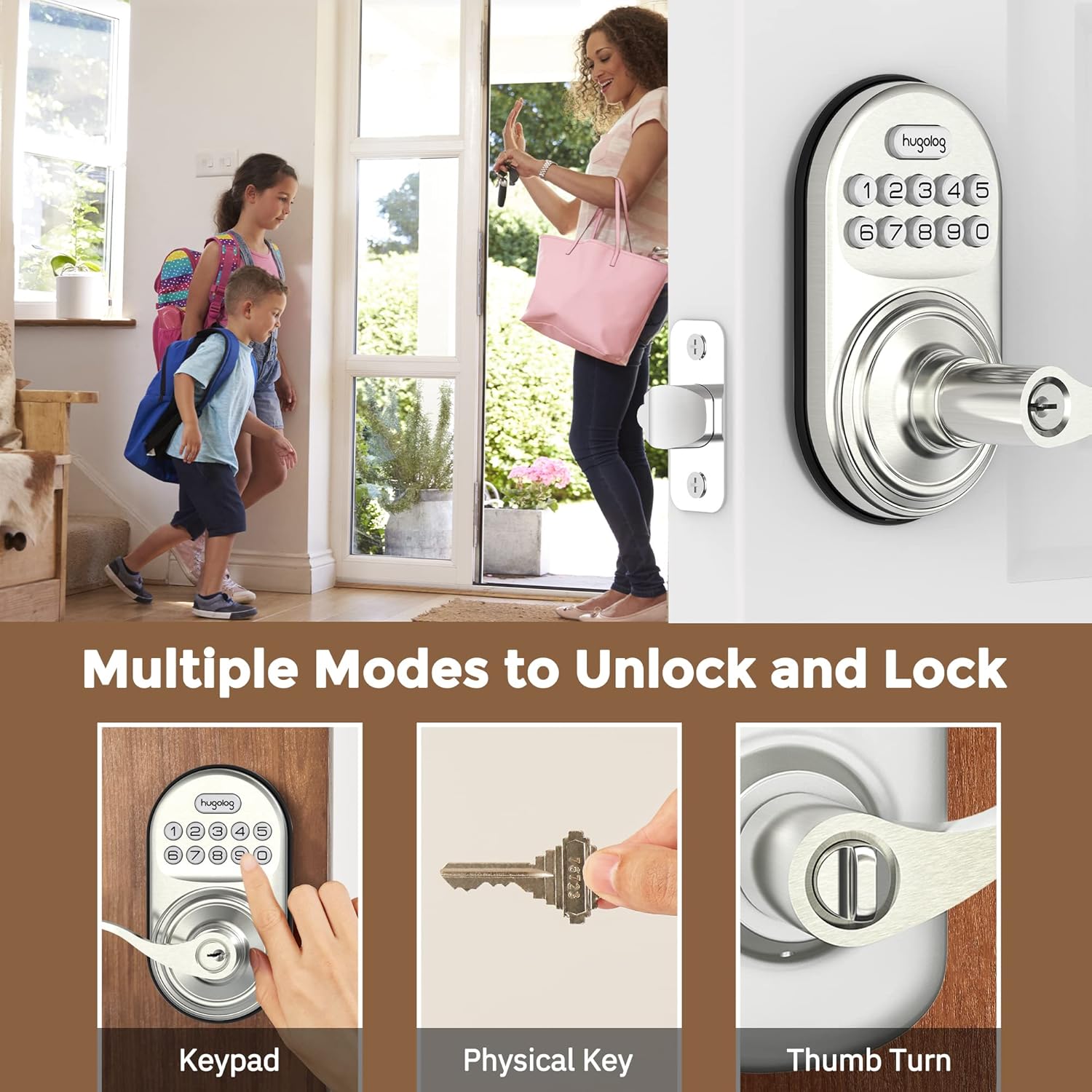
Image: Illustrates three methods of unlocking the door: using the keypad, a physical key, and the interior thumb turn.

Image: Diagram showing how to rotate the interior knob to manually lock or unlock the door, indicating ON and OFF positions.
Tilføjelse af brugerkoder
You can add up to 20 user codes for family members or guests.
- Trykke Hugolog button twice, then enter your master code, and press Hugolog button again. Wait for a green light flash.
- Trykke 2. Wait for a green light flash.
- Enter the new user code, then press Hugolog button. Succeed green light flash.
- Enter the new user code again, then press Hugolog button. Succeed green light flash.

Image: Depicts two individuals communicating about setting one-time codes for friend visits, highlighting the ability to set up to 20 temporary codes.
Sletning af brugerkoder
To remove an unwanted user code:
- Trykke Hugolog button twice, then enter your master code, and press Hugolog button again. Wait for a green light flash.
- Trykke 3. Wait for a green light flash.
- Enter the unwanted user code, then press Hugolog button. Succeed green light flash.
Auto-Lock-funktion
The auto-lock feature automatically locks the door after a set period (10-99 seconds) for added peace of mind.

Image: Shows the auto-lock feature, indicating it allows for a delay from 10 to 99 seconds before automatically locking the door.
Aktiver Auto-Lock
- Trykke Hugolog button twice, then enter your master code, and press Hugolog button again. Wait for a green light flash.
- Trykke 5. Wait for a green light flash.
- Trykke 1, og tryk derefter på Hugolog button. Succeed green light flash.
Deaktiver automatisk lås
- Trykke Hugolog button twice, then enter your master code, and press Hugolog button again. Wait for a green light flash.
- Trykke 5. Wait for a green light flash.
- Trykke 2, og tryk derefter på Hugolog button. Succeed green light flash.
Indstil Auto-Lock Time Delay
- Trykke Hugolog button twice, then enter your master code, and press Hugolog button again. Wait for a green light flash.
- Trykke 8. Wait for a green light flash.
- Enter the new duration time (10-99 seconds), then press Hugolog button. Succeed green light flash.
Anti-Peep Password
The anti-peep feature allows you to enter random digits before or after your actual code to prevent others from guessing your code by observing your hand movements.

Image: Illustrates the Anti-Peep Password feature, showing how random digits can be entered before or after the correct code to safeguard against prying eyes.
Lydløs tilstand
Enable silent mode to disable keypad beeps for quiet operation.
Aktiver lydløs tilstand
- Trykke Hugolog button twice, then enter your master code, and press Hugolog button again. Wait for a green light flash.
- Trykke 4. Wait for a green light flash.
- Trykke 2, og tryk derefter på Hugolog button. Succeed green light flash.
Deaktiver lydløs tilstand
- Trykke Hugolog button twice, then enter your master code, and press Hugolog button again. Wait for a green light flash.
- Trykke 4. Wait for a green light flash.
- Trykke 1, og tryk derefter på Hugolog button. Succeed green light flash.
Ferietilstand
Vacation mode disables all user codes, allowing entry only with the master code or physical key. This is useful for extended absences.
Aktiver ferietilstand
- Trykke Hugolog button twice, then enter your master code, and press Hugolog button again. Wait for a green light flash.
- Trykke 6. Wait for a green light flash.
- Trykke 1, og tryk derefter på Hugolog button. Succeed green light flash.
Deaktiver ferietilstand
- Trykke Hugolog button twice, then enter your master code, and press Hugolog button again. Wait for a green light flash.
- Trykke 6. Wait for a green light flash.
- Trykke 2, og tryk derefter på Hugolog button. Succeed green light flash.
Tilføj engangskode
Create a temporary code that can be used only once.
- Trykke Hugolog button twice, then enter your master code, and press Hugolog button again. Wait for a green light flash.
- Trykke 7. Wait for a green light flash.
- Enter the new user code, then press Hugolog button. Succeed green light flash.
- Enter the new user code again, then press Hugolog button. Succeed green light flash.
Opretholdelse
Udskiftning af batteri
The lock requires 4x AA batteries. When the battery level is low, the lock will indicate this with a visual or audible alert. Replace all four batteries simultaneously to ensure optimal performance.
Image: Close-up of the lock's keypad showing a low battery indicator, reminding users to replace the 4x AA batteries for a 1-year battery life.
Sådan udskiftes batterier:
- Fjern batteridækslet på den indvendige del.
- Fjern de gamle batterier.
- Insert new 4x AA batteries, ensuring correct polarity (+/-).
- Sæt batteridækslet på igen.
Note: Always use new, high-quality alkaline batteries for best performance and longevity.
Fejlfinding
If you encounter issues with your Hugolog Keyless Entry Door Lock, please refer to the common problems and solutions below:
| Problem | Mulig årsag | Løsning |
|---|---|---|
| Låsen reagerer ikke på indtastning på tastaturet. | Low batteries or incorrect code entry. | Replace batteries. Ensure correct master code or user code is entered. Check for silent mode if no sound. |
| Automatisk låsefunktion virker ikke. | Auto-lock is disabled or time delay is set too long. | Enable auto-lock via programming. Adjust auto-lock time delay. |
| Lock is stuck or not engaging properly. | Improper installation or door alignment issues. | Re-check installation steps, especially latch and strike plate alignment. Ensure door frame is not warped. |
| Keypad lights up but lock doesn't operate. | Internal mechanism issue or cable connection problem. | Verify internal cable connection. If issue persists, contact customer support. |
| Cannot change master code or add user codes. | Incorrect master code entered or incorrect programming sequence. | Ensure you are using the correct master code. Follow programming steps precisely. |
Specifikationer
| Feature | Detalje |
|---|---|
| Mærke | Hugolog |
| Modelnummer | 192728012011 |
| Låsetype | Tastatur |
| Materiale | Metal |
| Speciel funktion | Anti-Peeping Password |
| Anbefalede anvendelser | Dør |
| Brugerkoder | Up to 20 user codes, plus one-time temporary codes. |
| Timer for automatisk låsning | Programmable from 10-99 seconds. |
| Strømkilde | 4x AA batterier (medfølger ikke) |
| Dørtykkelseskompatibilitet | 35-50 mm |
| Forbindelsesprotokol | Wi-Fi (for potential future smart home integration, based on product data) |
Garanti og support
Hugolog provides technical support for hassle-free ownership. For any questions, issues, or warranty claims, please contact Hugolog customer service through their official channels. Please refer to the product packaging or the official Hugolog webwebstedet for de mest opdaterede kontaktoplysninger og garantioplysninger.


