Mixx EX1 Wireless Bluetooth Over Ear Headphones User Manual
Model: HEX1-CG-CP-183
Indledning
Thank you for choosing the Mixx EX1 Wireless Bluetooth Over Ear Headphones. This manual provides essential information for setting up, operating, maintaining, and troubleshooting your headphones to ensure a long-lasting and enjoyable audio experience. The Mixx EX1 headphones are designed for comfort and superior sound, offering up to 40 hours of playtime and versatile connectivity options.

Image: Mixx EX1 Rose Gold Wireless Bluetooth Over Ear Headphones, showcasing deres elegante design.
Opsætning
Hvad er der i æsken
- Mixx EX1 Wireless Bluetooth Over Ear Headphones
- USB opladningskabel
- 3.5 mm lydkabel
- Brugermanual
Opladning af hovedtelefoner
Before first use, fully charge your Mixx EX1 headphones. Connect the provided USB charging cable to the charging port on the headphones and to a USB power source. The LED indicator will show charging status. A full charge provides up to 40 hours of playtime. For quick power, a 15-minute charge can provide an additional 8 hours of playtime.

Image: Graphic indicating up to 40 hours of total playtime.
Bluetooth-parring
- Sørg for, at hovedtelefonerne er opladet og slukket.
- Tryk på tænd/sluk-knappen, og hold den nede, indtil LED-indikatoren blinker, hvilket angiver parringstilstand.
- Aktiver Bluetooth på din enhed (smartphone, tablet, computer) og søg efter tilgængelige enheder.
- Select "Mixx EX1" from the list of devices.
- Once connected, the LED indicator will show a steady light.
Kablet tilslutning
The Mixx EX1 headphones can also be used with a wired connection. Simply plug the 3.5mm audio cable into the headphone jack on the earcup and the other end into your audio device. This is useful when the battery is low or for devices without Bluetooth connectivity.

Image: Close-up of the Mixx EX1 headphone showing the 3.5mm audio cable connected to the earcup.
Betjeningsvejledning
Kontrol overview
The Mixx EX1 headphones feature intuitive touch controls located on the earcup for easy management of your audio and calls.
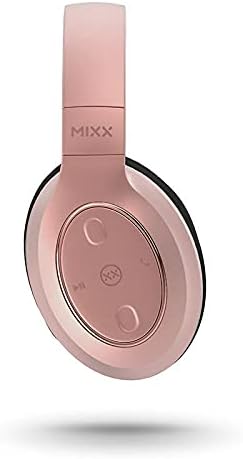
Billede: Detaljeret view of the touch controls on the Mixx EX1 headphone earcup.
- Tænd/sluk: Tryk og hold tænd/sluk-knappen nede.
- Afspil/pause: Single tap the play/pause button.
- Lydstyrke op/ned: Tap the respective volume buttons.
- Næste nummer: Double tap the next track button.
- Forrige nummer: Triple tap the previous track button.
- Besvar/afslut opkald: Single tap the call button.
- Afvis opkald: Tryk på opkaldsknappen, og hold den nede.
- Aktivér stemmeassistent (Siri/Google Assistant): Press the voice assistant button.
EQ-tilstande
The Mixx EX1 headphones offer three preset EQ modes to optimize your listening experience:
- Musiktilstand: Balanceret lyd til generel musiklytning.
- Bass Boost-tilstand: Enhances low frequencies for a richer bass sound.
- Stemmetilstand: Optimizes audio for clear voice reproduction, ideal for podcasts or calls.
Refer to the quick start guide included with your headphones for specific button presses to cycle through EQ modes.
Dobbelt mikrofonsystem
The integrated dual microphone system ensures clear phone calls and accurate voice command recognition for your device's virtual assistant.
Opretholdelse
Rensning
Sådan vedligeholder du dine hovedtelefoners tilstand:
- Tør ørekopperne og hovedbøjlen af med en blød, tør og fnugfri klud.
- Brug ikke slibende rengøringsmidler, opløsningsmidler eller spray direkte på hovedtelefonerne.
- Keep charging ports and audio jacks free of dust and debris.
Opbevaring
When not in use, store your headphones in a cool, dry place away from direct sunlight and extreme temperatures. The adjustable headband and cushioned over-ear pads are designed for comfort and can be folded for compact storage.
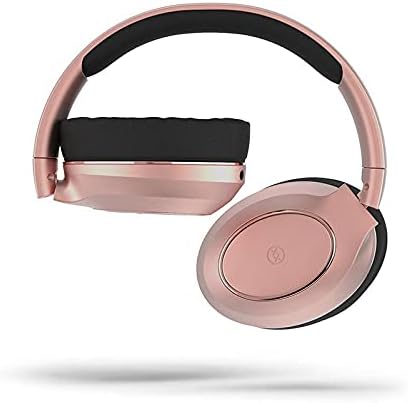
Image: Mixx EX1 headphones shown in a folded position, demonstrating their portability.
Fejlfinding
If you encounter issues with your Mixx EX1 headphones, please refer to the following common solutions:
| Problem | Mulig løsning |
|---|---|
| Hovedtelefonerne tænder ikke | Ensure the headphones are fully charged. Connect to a power source and wait a few minutes before attempting to turn on. |
| Kan ikke parres via Bluetooth | Make sure the headphones are in pairing mode (flashing LED). Turn off and on Bluetooth on your device. Ensure no other devices are connected to the headphones. Try forgetting the device on your phone and re-pairing. |
| Audio cutting in/out or skipping | Ensure your device is within the Bluetooth range (typically 10 meters/33 feet) and there are no significant obstructions. Avoid strong Wi-Fi signals or other wireless interference. |
| Ingen lyd | Check the volume level on both the headphones and your connected device. Ensure the headphones are properly paired or the 3.5mm cable is fully inserted. |
| Mikrofon virker ikke | Ensure the headphones are connected and selected as the audio input device on your computer or smartphone. Check application permissions for microphone access. |
Hvis disse trin ikke løser dit problem, skal du se afsnittet Garanti og support for yderligere hjælp.
Specifikationer
| Feature | Detalje |
|---|---|
| Mærke | Mixx |
| Modelnavn | HEX1-CG-CP-183 |
| Farve | Rose guld |
| Øreplacering | Over Ear |
| Formfaktor | Over Ear |
| Forbindelsesteknologi | Bluetooth, Kablet (3.5 mm jack) |
| Trådløs kommunikationsteknologi | Bluetooth |
| Batterier | 1 Lithium Polymer batteri (medfølger) |
| Produktdimensioner | 18 x 17.5 x 8.5 cm |
| Vægt | 560 g |
| Fabrikant | Mixx Ltd |
| ASIN | B09F6QG189 |
| Inkluderede komponenter | Ear cushions (pre-installed), USB charging cable, 3.5mm audio cable |
| Aldersinterval (beskrivelse) | Voksen |
Garanti og support
Garantioplysninger
The Mixx EX1 Wireless Bluetooth Over Ear Headphones come with a 2 års garanti when purchased directly through Mixx on Amazon. This warranty covers manufacturing defects and ensures your product performs as expected under normal use. Please retain your proof of purchase for warranty claims.
Kundesupport
For further assistance, technical support, or warranty claims, please visit the official Mixx website or contact Mixx customer service through the platform where you purchased the product. Detailed contact information can typically be found on the manufacturer's webwebstedet eller din købskvittering.


