Indledning
This manual provides detailed instructions for the assembly, operation, and maintenance of your FLEXISPOT E4 Classic Electric Standing Desk. Please read this manual thoroughly before use to ensure proper function and longevity of your product.

Figure 1: The FLEXISPOT E4 Classic Electric Standing Desk, featuring a bamboo contour desktop and silver frame, set up with dual monitors in an office environment.
Sikkerhedsoplysninger
- Sørg for, at alle komponenter er forsvarligt fastgjort før brug.
- Hold børn og kæledyr væk fra skrivebordet under drift.
- Do not overload the desk beyond its specified weight capacity (220 lbs).
- Undgå at placere væsker direkte på kontrolpanelet eller motorkomponenterne.
- Afbryd strømmen før rengøring eller vedligeholdelse.
- Brug kun den medfølgende strømadapter.
Pakkens indhold
Kontroller venligst, at alle dele er til stede, før monteringen påbegyndes. Hvis der mangler eller er beskadigede dele, skal du kontakte kundesupport.
- Bamboo Contour Whole-Piece Desktop (55"x28")
- Silver Frame Legs (Dual Motor)
- Kontrolpanel
- Strømadapter og kabel
- Monteringshardware (skruer, værktøj osv.)
- Instruktionsmanual (dette dokument)
Opsætning og montering
Assembly is required for this product. Please follow these steps carefully.
- Udpak komponenter: Tag forsigtigt alle dele ud af emballagen, og læg dem på en ren, blød overflade for at forhindre ridser.
- Fastgør ben til skrivebordet: Position the desktop upside down. Align the leg frames with the pre-drilled holes on the underside of the desktop. Secure them using the provided screws and tools.
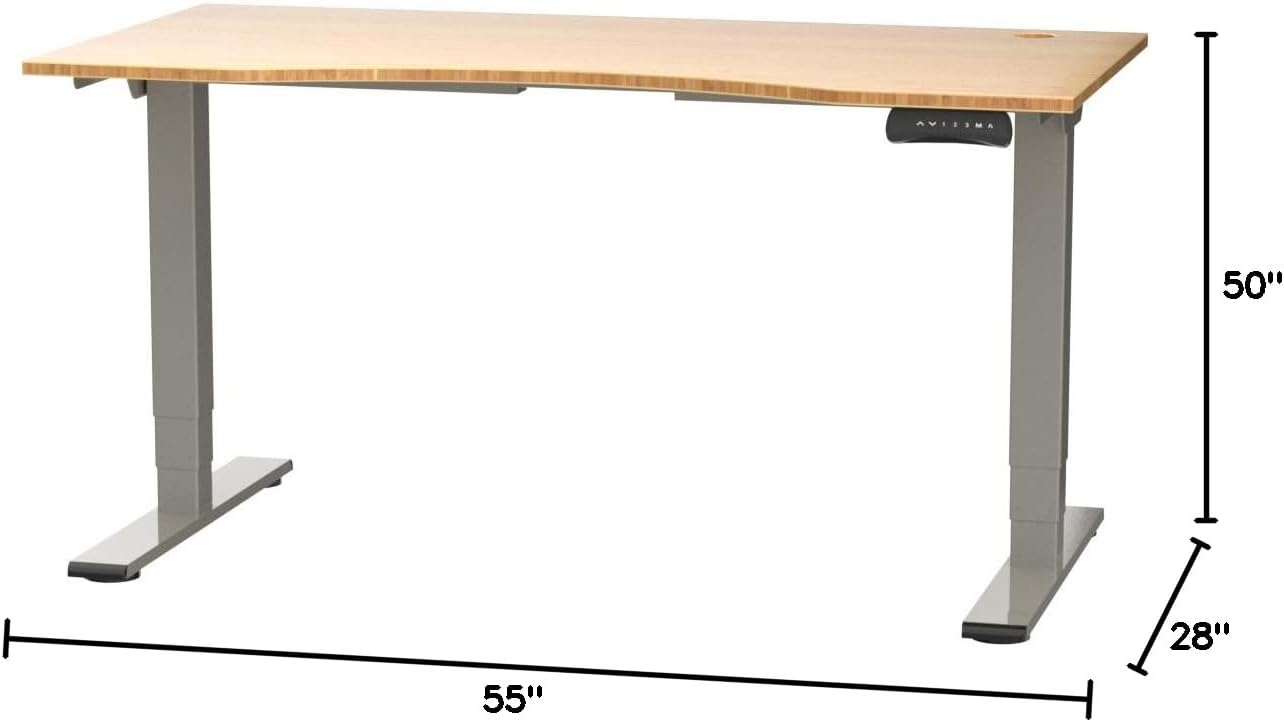
Figure 2: Desk dimensions indicating 55 inches width, 28 inches depth, and adjustable height up to 50 inches.
- Installer kontrolpanel: Mount the control panel to the desired location on the underside of the desktop, typically on the front edge for easy access. Connect the control panel cable to the motor control box.

Figure 3: The programmable control panel with LED display, up/down buttons, and memory presets (1, 2, 3, M, A).
- Tilslut strøm: Plug the power adapter into the control box, and then plug the power cable into a standard electrical outlet.
- Kabelstyring: Utilize the two cable management holes on the desktop to route and organize your cables, preventing clutter.

Figure 4: Detail showing the integrated cable management holes and the water-resistant surface of the bamboo desktop.
- Indledende kalibrering: After assembly and power connection, the desk may require an initial calibration. Refer to the "Operating Instructions" section for details on resetting or calibrating the desk.
Betjeningsvejledning
Højdejustering
The FLEXISPOT E4 Classic desk features a dual-motor lift system for smooth and quiet height adjustments.
- Løft skrivebordet: Tryk og hold på Pil op button (▲) on the control panel. The desk will move upwards.
- Nederste skrivebord: Tryk og hold på Pil ned button (▼) on the control panel. The desk will move downwards.
- Release the button at your desired height. The desk can adjust from 24.4 inches to 50 inches.
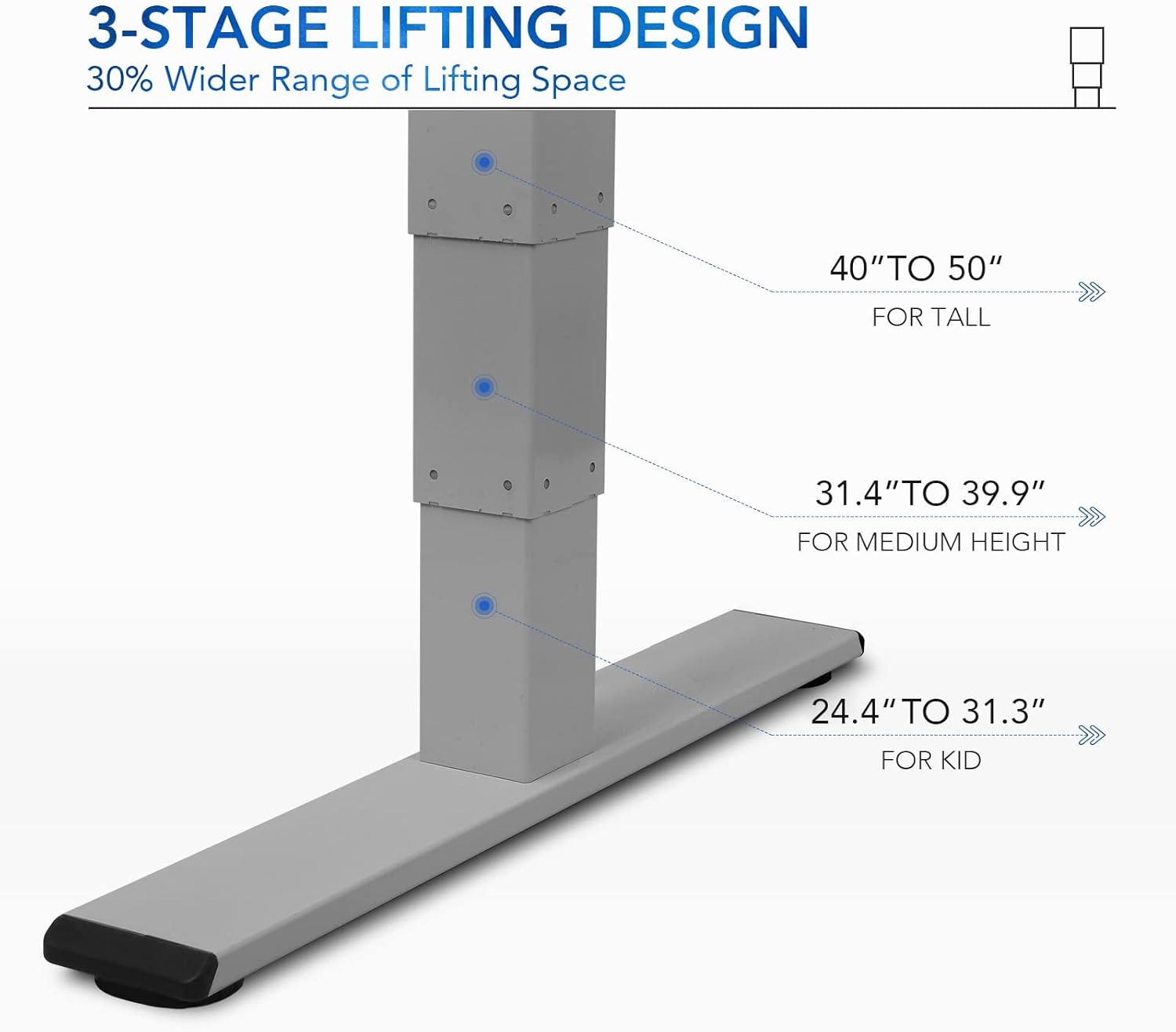
Figur 5: 3-ernetage lifting design provides a wide range of height adjustments, suitable for various user heights, from 24.4" (kid) to 50" (tall).
Programmable Memory Presets
The control panel allows you to save up to three preferred height settings for quick adjustments.
- Indstil en hukommelsesposition:
- Juster skrivebordet til den ønskede højde ved hjælp af Op/Ned-knapperne.
- Tryk på "M" button. The LED display will show "S-".
- Within 3 seconds, press one of the number buttons ("1", "2", eller "3") to save the current height to that preset. The display will show "S-1", "S-2", or "S-3" to confirm.
- Genkald en hukommelsesposition: Simply press the corresponding number button ("1", "2", eller "3"Skrivebordet flytter sig automatisk til den gemte højde.
Sit/Stand Reminder
The "A" button can be used to set a reminder to switch between sitting and standing positions.
- Consult the full manual for detailed instructions on setting and customizing the sit/stand reminder function.
Ergonomic Curved Design
The 55"x28" desktop features an ergonomic curved design for enhanced comfort and efficiency during work or study.

Figure 6: The ergonomic curved edge of the desktop, designed to provide a more comfortable and natural working posture.
Opretholdelse
- Rensning: Tør skrivebordets overflade og ramme af med en blød, tør kludamp cloth. Avoid abrasive cleaners or harsh chemicals. The bamboo surface is designed to be water-resistant, making it easy to clean.
- Motorpleje: The dual-motor system is designed for low noise and durability. No specific user maintenance is required for the motors.
- Kabelstyring: Periodically check that all cables are neatly routed through the cable management holes and are not pinched or tangled.
- Fastgørelseskontrol: Occasionally check all screws and fasteners to ensure they remain tight. Retighten if necessary.
Fejlfinding
| Problem | Mulig årsag | Løsning |
|---|---|---|
| Skrivebordet bevæger sig ikke. | Power cable disconnected; overload protection activated; motor error. | Check power connections. Reduce weight on desk. Unplug and replug power after 10 minutes. Perform a reset (see below). |
| Skrivebordet bevæger sig ujævnt eller laver usædvanlige lyde. | Loose fasteners; obstruction; motor synchronization issue. | Check and tighten all assembly screws. Ensure no obstructions under the desk. Perform a reset. |
| LED display shows an error code (e.g., "E01", "RST"). | System error; need for reset. | Nulstillingsprocedure: Press and hold the Down Arrow button until the desk reaches its lowest position and then slightly rises. Release the button. If the error persists, unplug the desk for 10 minutes and try again. |
| Hukommelsesforudindstillinger virker ikke. | Forudindstillingerne er ikke gemt korrekt. | Re-save your desired memory positions following the "Programmable Memory Presets" instructions. |
If the issue persists after attempting these solutions, please contact FLEXISPOT customer support.
Specifikationer
| Feature | Detalje |
|---|---|
| Model | E4 Classic |
| Mærke | FLEXISPOT |
| Skrivebordsmateriale | Bamboo Contour Whole-Piece Board |
| Rammemateriale | Alloy Steel (Silver Frame) |
| Produktmål (D x B x H) | 28 cm D x 55 cm B x 50 cm H (maksimal højde) |
| Højdejusteringsområde | 24.4" til 50" |
| Løftesystem | Dual Motor, 3-Stage Lifting |
| Vægt kapacitet | Op til 220 lbs |
| Særlige funktioner | Electric Height Adjustment, Programmable Memory Presets, Sit/Stand Reminder, Curved Ergonomic Design, Cable Management Holes, Waterproof Surface |
| Montering påkrævet | Ja |
Garanti og support
FLEXISPOT products are designed for durability and performance. For specific warranty details regarding your E4 Classic Electric Standing Desk, please refer to the warranty card included with your purchase or visit the official FLEXISPOT webwebsted.
For technical support, troubleshooting assistance, or to inquire about replacement parts, please contact FLEXISPOT customer service:
- Webwebsted: www.flexispot.com
- E-mail: support@flexispot.com
- Telefon: Henvis til embedsmanden webwebsted for regionale kontaktnumre.
When contacting support, please have your product model (E4 Classic) and purchase information ready.


