Indledning
The Muse M-195 BT is a 1-DIN car radio featuring a front USB port and a multi-function MCD display. This car radio includes integrated Bluetooth and an SD/MMC card reader, allowing for audio streaming from compatible devices such as laptops, tablets, or smartphones. The integrated hands-free system enables easy call management. The output power is 4 x 40 W.
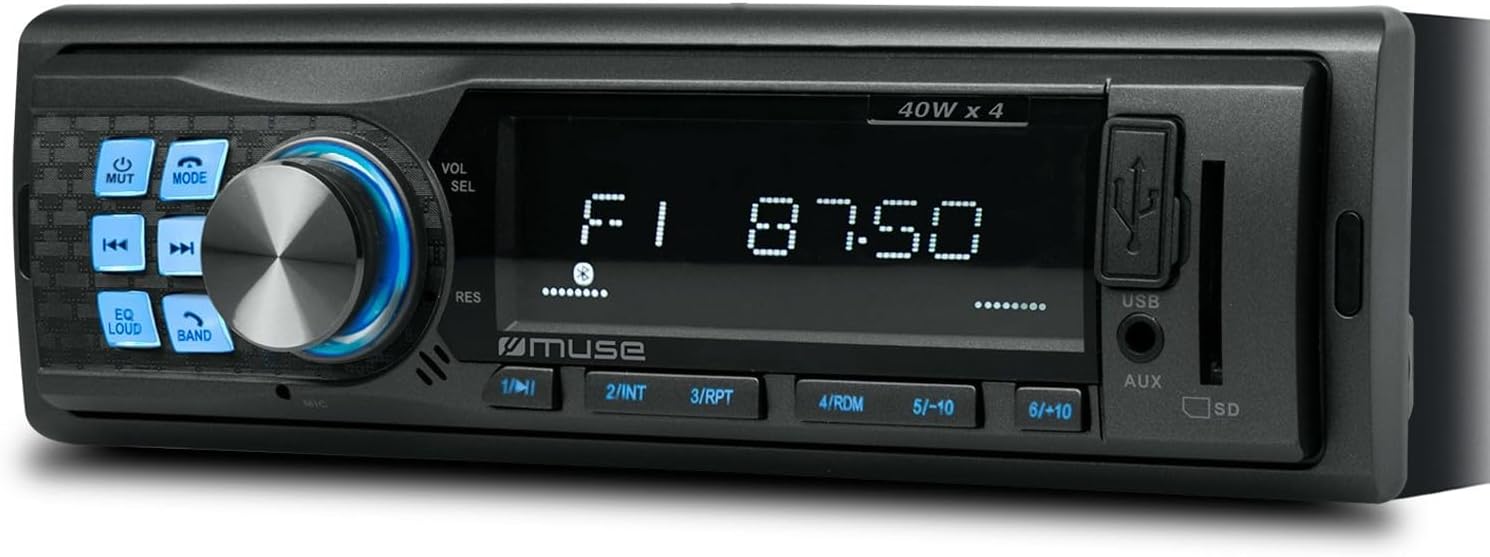
Figur 1: Forside view of the Muse M-195 BT car radio. This image displays the main unit with its central display, a large rotary knob for volume and selection, various function buttons (Mute, Mode, EQ, Loud, Band, Skip), and front-facing USB and AUX inputs, along with an SD card slot.
Sikkerhedsoplysninger
- Læs alle instruktioner omhyggeligt før installation og drift.
- Ensure proper wiring to prevent short circuits or damage. Consult a professional if unsure.
- Betjen ikke enheden på en måde, der distraherer dig fra kørslen.
- Undgå at udsætte enheden for ekstreme temperaturer, direkte sollys eller fugt.
- Forsøg ikke at skille enheden ad eller ændre den. Dette kan ugyldiggøre garantien og forårsage skade.
- Hold lydstyrken på et niveau, der gør det muligt at høre lyde udefra, f.eks. lyde fra udrykningskøretøjer.
Pakkens indhold
Kontroller venligst, at alle varer er til stede i pakken:
- Muse M-195 BT Car Radio Unit
- Monteringsmuffe
- Wiring Harness (ISO connector)
- Removal Keys (2x)
- Brugervejledning (dette dokument)
Opsætning og installation
1. Installation
The M-195 BT is designed for a standard 1-DIN dashboard opening (180x50mm). Ensure sufficient space behind the dashboard for wiring and ventilation.

Figure 2: Dimensions of the Muse M-195 BT car radio. The diagram illustrates the standard 1-DIN size, with a width of 185mm and a height of 58mm, crucial for proper fitment in a vehicle's dashboard.
- Prepare the Dashboard Opening: Remove the existing car radio or blanking plate from the 1-DIN slot.
- Install the Mounting Sleeve: Insert the supplied metal mounting sleeve into the dashboard opening. Bend the tabs on the sleeve outwards with a screwdriver to secure it firmly.
- Tilslut ledninger: Connect the car's wiring harness to the supplied ISO connector. Ensure correct connections for power (constant 12V, ignition 12V, ground), speaker outputs, and antenna.
- Gul ledning: Konstant 12V (batteri)
- Rød ledning: Ignition 12V (ACC)
- Sort ledning: Jord
- Blå ledning: Strømantenne / Amplifier Remote (Output)
- Højttalerkabler: Tilslut til tilsvarende bilhøjttalere (f.eks. hvid/hvid-sort til forreste venstre, grå/grå-sort til forreste højre, grøn/grøn-sort til bageste venstre, lilla/lilla-sort til bageste højre).
- Slide in the Unit: Carefully slide the M-195 BT unit into the mounting sleeve until it clicks into place.
- Test funktionalitet: Turn on the car ignition and test all functions of the radio (power, radio, USB, Bluetooth, sound output).
2. Første opstart
After successful installation, press the POWER / MODE button to turn on the unit. The display will illuminate. The unit will typically start in the last used mode (e.g., FM radio).
Betjeningsvejledning
1. Grundlæggende kontroller
- POWER/MODE Button: Press to turn the unit ON/OFF. Short press to cycle through modes (FM, USB, SD, AUX, Bluetooth).
- Volume Knob (VOL/SEL): Rotate to adjust volume. Press to enter menu settings (e.g., Bass, Treble, Balance, Fader, EQ).
- MUTE -knap: Mutes/unmutes audio output.
- EQ knap: Cycles through preset equalizer settings (e.g., Pop, Rock, Classic, Flat).
- LOUD Button: Activates/deactivates loudness compensation for enhanced bass and treble at low volumes.
- BAND-knap: In FM mode, cycles through FM bands (FM1, FM2, FM3).
- SKIP Buttons (◀◀ / ►►): In radio mode, short press to seek previous/next station. Long press for manual tuning. In USB/SD/BT mode, short press for previous/next track.
- Numeriske knapper (1-6): In radio mode, short press to recall preset stations. Long press to save current station to a preset.
2. Radiobetjening (FM)
- Trykke MODE until "FM" is displayed.
- Trykke BAND to select FM1, FM2, or FM3.
- Kort tryk ◀◀ or ►► for automatisk at søge den næste station med stærkt signal.
- Langt tryk ◀◀ or ►► to manually tune the frequency.
- To save a station: Tune to the desired station, then long press one of the numeric buttons (1-6) until the display confirms saving.
3. USB / SD Card Playback
- Insert a USB flash drive into the front USB port or an SD/MMC card into the SD card slot.
- The unit will automatically switch to USB/SD mode and begin playing compatible audio files (MP3). If not, press MODE at vælge.
- Bruge ◀◀ or ►► at springe spor over.
- Use numeric buttons for specific functions like 1/►►I (Play/Pause), 2/INT (Intro scan), 3/RPT (Repeat), 4/RDM (Random).
4. Bluetooth-betjening
The M-195 BT supports Bluetooth for audio streaming and hands-free calling.
- Parring:
- Sørg for, at Bluetooth er aktiveret på din mobilenhed.
- Trykke MODE on the car radio until "BT" or "Bluetooth" is displayed. The unit will enter pairing mode.
- On your mobile device, search for available Bluetooth devices. Select "M-195 BT" from the list.
- If prompted for a PIN, enter "0000" (default).
- Once paired, the display will show "CONNECTED" or similar confirmation.
- Lydstreaming (A2DP):
- After pairing, play music on your mobile device. Audio will stream through the car speakers.
- Bruge ◀◀ or ►► on the car radio to skip tracks.
- Hands-Free Calling (HFP):
- When a call comes in, the radio display will show "CALL" or the caller ID.
- Tryk på Svar button (often the Play/Pause button or a dedicated call button if available) to answer.
- Tryk på Afslut opkald knap for at lægge på.
- The built-in microphone will be used for conversations.
5. AUX -indgang
Connect an external audio device (e.g., MP3 player, smartphone) to the front 3.5mm AUX input using an audio cable.
- Connect the audio cable from your device to the AUX port on the car radio.
- Trykke MODE indtil "AUX" vises.
- Styr afspilning fra din eksterne enhed.
Opretholdelse
- Rensning: Use a soft, dry cloth to clean the unit's surface. For stubborn dirt, dampRengør kluden let med vand. Brug ikke slibende rengøringsmidler eller opløsningsmidler.
- Undgå væsker: Do not allow liquids to enter the unit, as this can cause damage.
- Temperatur: Undgå at udsætte enheden for ekstreme temperaturer, direkte sollys eller høj luftfugtighed.
- USB/SD Slot Care: Keep the USB and SD card slots free of dust and debris.
Fejlfinding
| Problem | Mulig årsag | Løsning |
|---|---|---|
| Ingen strøm | Forkert ledningsføring; Sprunget sikring; Løs forbindelse. | Check power (yellow, red) and ground (black) wire connections. Check vehicle's fuse box and the unit's fuse. Ensure connections are secure. |
| Ingen lyd | Volume too low; Mute activated; Incorrect speaker wiring; Damaged speakers. | Increase volume. Press MUTE button. Check speaker wire connections. Test with different speakers if possible. |
| Dårlig radiomodtagelse | Antenna not connected; Weak signal; Damaged antenna. | Ensure antenna is properly connected. Try tuning to a stronger station. Check antenna for damage. |
| USB/SD afspiller ikke | Uforenelig file format; USB/SD card corrupted; Incorrect mode selected. | Sikre files are MP3 format. Try a different USB/SD card. Press MODE to select USB/SD. |
| Bluetooth-parring mislykkedes | Bluetooth not enabled on device; Device too far; Incorrect PIN; Previous connection interference. | Ensure Bluetooth is ON on your device. Bring device closer. Re-enter PIN "0000". Delete previous pairings on your device and try again. |
Specifikationer
- Model: M-195 BT
- Strømudgang: 4 x 40 W
- Vise: MCD Multi-function
- Forbindelse: Bluetooth, USB, SD/MMC, AUX (3.5mm Jack)
- Understøttede lydformater: MP3
- Radiotuner: FM (18 presets)
- Håndfri opkald: Integreret mikrofon
- Dimensioner (L x B x H): 14 x 18.5 x 5.8 cm (ca. 1-DIN-standard)
- Vægt: 550 g
- før-ampLificerede udgange: 1 pair (RCA audio rear or sub)
Garanti og support
This product comes with a standard manufacturer's warranty. For detailed warranty terms and conditions, please refer to the warranty card included with your purchase or visit the official Muse website. For technical support, troubleshooting assistance beyond this manual, or service inquiries, please contact your retailer or the Muse customer service department.
Gem venligst dit købsbevis for garantikrav.


