Indledning
This manual provides comprehensive instructions for the installation, operation, and maintenance of your winees Smart Video Doorbell Camera. Please read this manual thoroughly before use to ensure proper functionality and safety.

Image: The winees Smart Video Doorbell Camera and its accompanying indoor chime unit.
Produktegenskaber
- 1080P Full HD and 2-Way Audio: Provides super-clear 1080p full HD resolution with a 170° wide-angle view. Enables real-time two-way communication with visitors via your smartphone.
- Smart PIR Motion Detection and IP65 Waterproof: Built-in PIR motion sensor detects movement and sends notifications to your phone. The device is IP65 waterproof, suitable for outdoor installation.
- 2.4G Wi-Fi & Night Vision: Supports 2.4GHz Wi-Fi connectivity (5GHz Wi-Fi not supported). Features infrared night vision for clear monitoring in low-light conditions.
- Remote Control on App & Free Wireless Chime Included: Manage the doorbell remotely and access playback video via the encrypted Cloud Service. The included chime offers 58 ringtones and adjustable volume.
- Secure Cloud Storage & Local Storage: Utilizes financial encryption for data security. Supports up to 128GB Micro SD card storage (not included) and cloud storage options.
Hvad er der i æsken
Kontroller venligst, at alle komponenter er til stede ved udpakning:
- winees Smart Video Doorbell Camera
- Indoor Wireless Chime
- Monteringsbeslag og skruer
- USB Charging Cable (for doorbell, if battery-powered)
- Brugervejledning (dette dokument)
- Hurtig startvejledning
Opsætningsvejledning
1. Charging the Doorbell (if applicable)
If your doorbell model is battery-powered, ensure it is fully charged before installation. Connect the doorbell to a USB power source using the provided cable until the indicator light shows a full charge.
2. Appinstallation og kontooprettelse
Download the official winees app from your smartphone's app store (iOS App Store or Google Play Store). Follow the in-app instructions to create an account and log in.
3. Connecting the Indoor Chime
The indoor chime connects wirelessly to your doorbell. Plug the chime into a standard power outlet. Refer to the video below for detailed pairing instructions.
Video: Instructions on how to connect the winees video doorbell chime, including volume adjustment, music selection, and pairing steps.
To pair the chime with the doorbell:
- Tilslut klokkespillet.
- Press and hold the "Set" button on the chime for approximately 3 seconds until it rings (e.g., a bird voice).
- Within 30 seconds, press the doorbell button twice. The chime should ring again, indicating successful pairing.

Image: The winees doorbell and chime, illustrating their interaction during the setup process.
4. Wi-Fi-forbindelse
Ensure your Wi-Fi network is 2.4GHz. The doorbell does not support 5GHz Wi-Fi. Follow the in-app instructions to connect your doorbell to your home Wi-Fi network. A recommended network environment is 32KB/S-2MB/S.
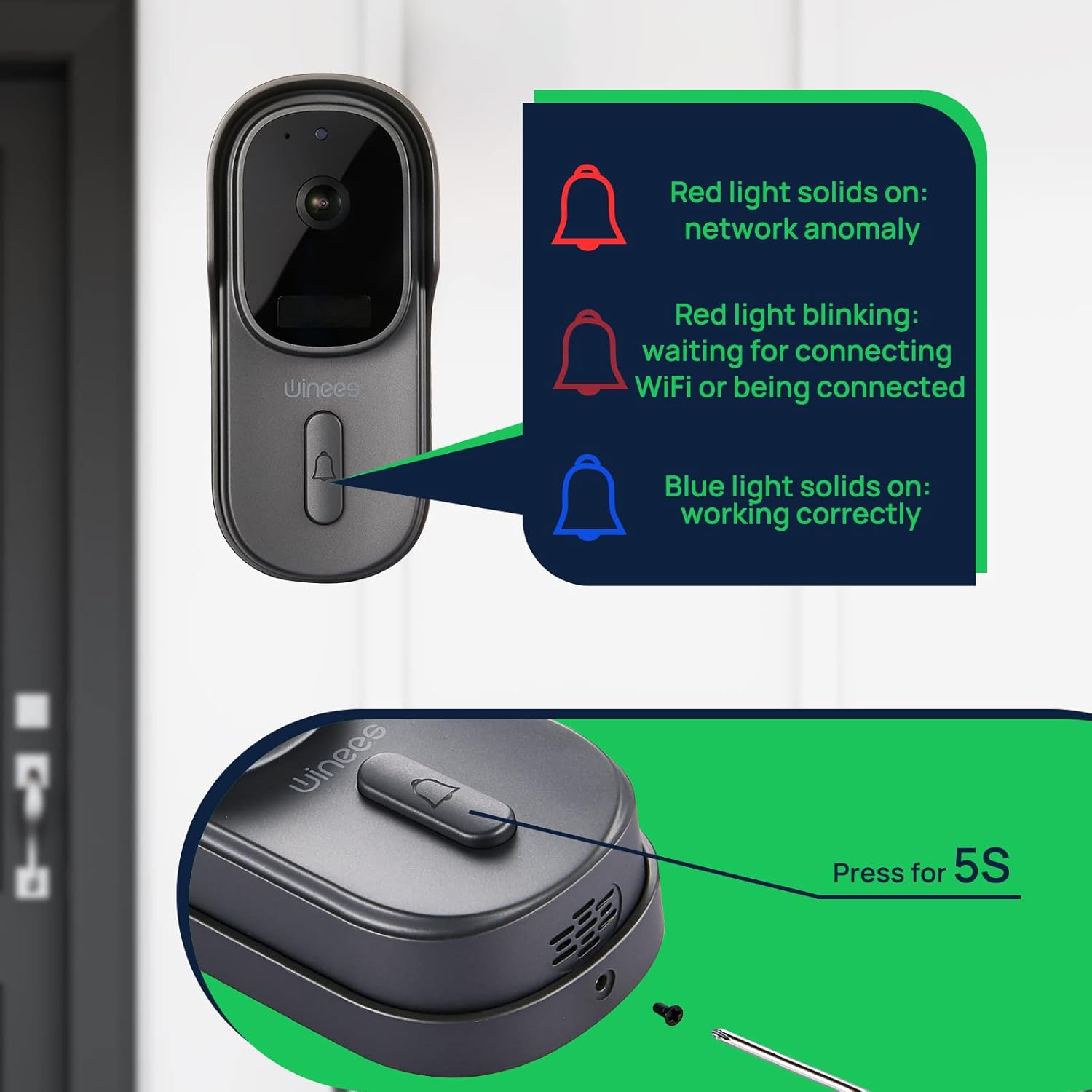
Image: Visual guide to doorbell status lights: Red solid (network anomaly), Red blinking (waiting for Wi-Fi connection), Blue solid (working correctly).
5. Fysisk installation
Choose a suitable location for your doorbell, typically near your front door. Use the provided mounting bracket and screws to securely attach the doorbell to the wall. Ensure the camera has a clear, unobstructed view.

Image: The doorbell installed outdoors, demonstrating its IP65 waterproof rating against rain.
Betjeningsvejledning
Levende View og to-vejs lyd
Open the winees app to access the live feed from your doorbell camera. When a visitor presses the doorbell or motion is detected, you will receive a notification. Tap the notification to view the live feed and use the two-way audio feature to communicate with the person at your door.
Indstillinger for bevægelsesdetektion
Adjust the sensitivity of the PIR motion sensor within the app settings to minimize false alerts. The 170° wide-angle view provides comprehensive coverage for motion detection.

Image: Illustrates the 170° ultra-wide angle view and the clear 1080P HD night vision capabilities of the doorbell camera.
Nattesyn
The doorbell automatically switches to infrared night vision in low-light conditions, ensuring clear video monitoring 24/7.
Opbevaringsmuligheder
Recorded videos can be stored securely in the encrypted Cloud Service or locally on a Micro SD card (up to 128GB, not included). Manage your storage preferences and review optaget footage gennem appen.
Smart Home-integration (Alexa)
The winees doorbell camera can integrate with smart home systems like Amazon Alexa. You can use voice commands to view your front door on compatible devices.

Image: A person interacting with an Alexa-enabled smart display, showing the doorbell camera feed, demonstrating smart home integration.
Opretholdelse
- Rensning: Tør forsigtigt kameralinsen og dørklokkens overflade af med en blød kludamp klud. Undgå slibende rengøringsmidler eller opløsningsmidler.
- Firmwareopdateringer: Regularly check the winees app for available firmware updates to ensure optimal performance and security.
- Batterilevetid (hvis relevant): Monitor the battery level through the app and recharge as needed to prevent interruptions in service.
- Wi-Fi-signal: Ensure your Wi-Fi router is within an optimal range for a stable connection.
Fejlfinding
Doorbell Not Connecting to Wi-Fi
- Sørg for, at dit Wi-Fi-netværk er 2.4 GHz. 5 GHz-netværk understøttes ikke.
- Check the Wi-Fi signal strength at the doorbell's location. Move the router closer or use a Wi-Fi extender if necessary.
- Bekræft, at den indtastede Wi-Fi-adgangskode i appen er korrekt.
- Genstart din Wi-Fi-router og dørklokken.
No Notifications or Delayed Notifications
- Check your phone's notification settings for the winees app to ensure notifications are enabled.
- Verify the doorbell's internet connection is stable.
- Juster bevægelsesdetektionsfølsomheden i appen.
Problemer med tovejslyd
- Ensure your phone's microphone is enabled for the winees app.
- Tjek lydstyrkeindstillingerne på både din telefon og i appen.
- A weak Wi-Fi signal can affect audio quality.
Chime Not Ringing
- Sørg for, at lydklokken er tilsluttet en fungerende stikkontakt.
- Re-pair the chime with the doorbell following the "Connecting the Indoor Chime" steps in the Setup Guide.
- Check the chime's volume settings.
For further assistance, please refer to the official winees support channels.
Specifikationer
| Feature | Detalje |
|---|---|
| Video opløsning | 1080p fuld HD |
| Viewi vinkel | 170° vidvinkel |
| Forbindelse | 2.4 GHz Wi-Fi (IEEE 802.11b/g/n) |
| Lyd | To-vejs lyd |
| Bevægelsesdetektion | Smart PIR sensor |
| Nattesyn | Infrarødt nattesyn |
| Vejrbestandighed | IP65 vandtæt |
| Opbevaringsmuligheder | Cloud Storage, Local Micro SD (up to 128GB, not included) |
| Strømkilde | Corded Electric (for chime), Battery (for doorbell, if applicable) |
| Farve | Mørkegrå |
| Varens vægt | 1.1 pund |
| Dimensioner | 5.91 x 4.45 x 4.17 tommer (pakke) |
Garanti og support
For warranty information, technical support, or further inquiries, please visit the official winees webwebsted eller kontakt deres kundeservice. Du kan også se den officielle brugsanvisning (IFU) i PDF-format for yderligere oplysninger:


