Indledning
This user manual provides detailed instructions for the operation and maintenance of your BSZHI A80 Portable Bluetooth Speaker. Please read this manual thoroughly before using the product to ensure proper function and longevity.
Hvad er der i æsken
- 1 x A80 Bluetooth Speaker
- 1 x USB-ladekabel
- 1 x AUX-kabel
- 1 x fjernbetjening
- 1 x brugermanual
Produkt overview og funktioner

The BSZHI A80 Portable Bluetooth Speaker, shown with its accompanying remote control. The speaker features a vibrant LED light display on the front and a control panel at the top.
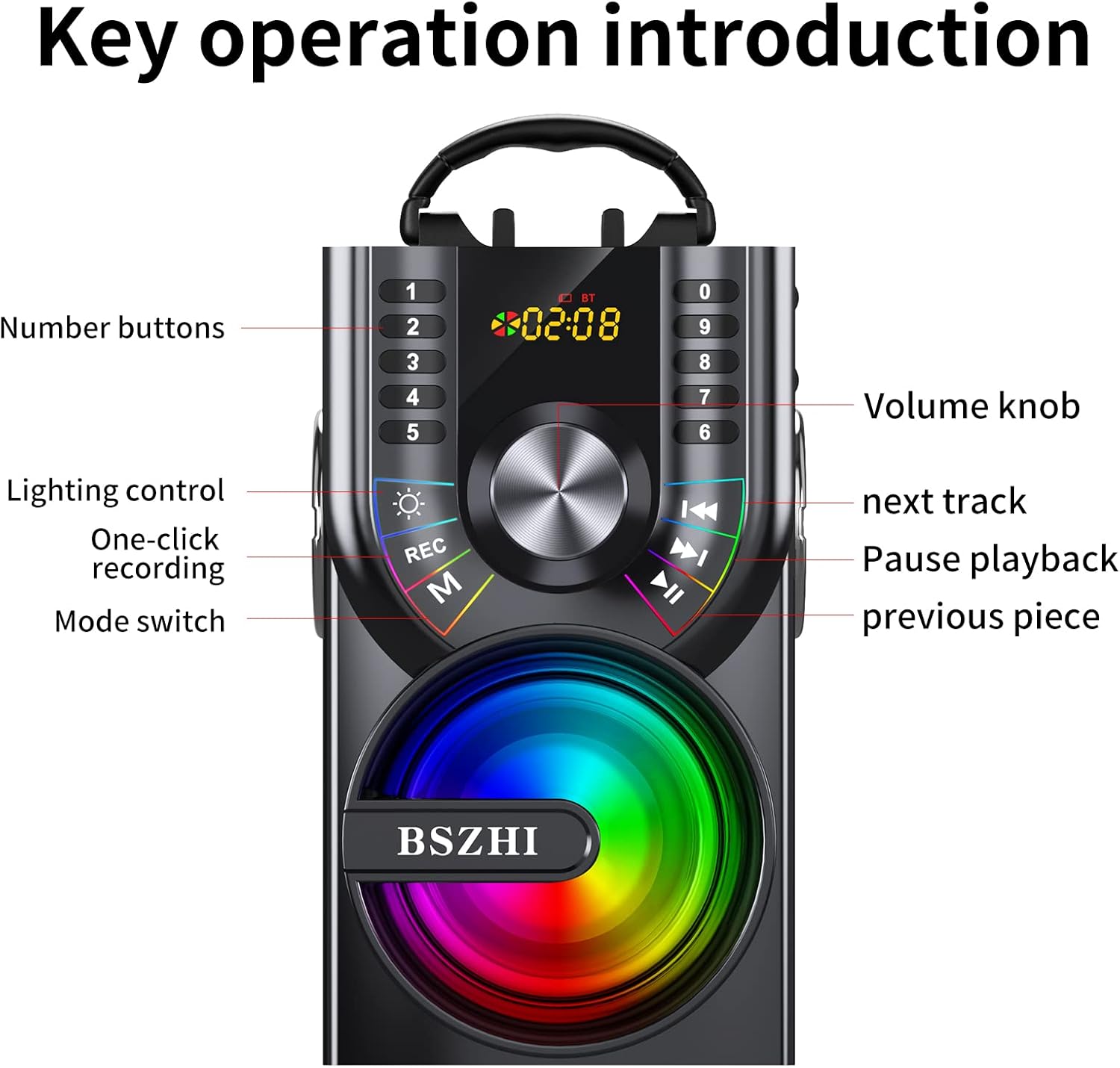
Detaljeret view of the speaker's control panel, highlighting the number buttons, volume knob, lighting control, one-click recording, mode switch, next track, pause/playback, and previous piece buttons.
- Kraftfuld lydudgang: Equipped with two 25W woofers and two 15W tweeters, delivering 80W of total output for heavy bass and surround stereo sound.
- Flere tilslutningsmuligheder: Supports Bluetooth 5.1 for wireless connection up to 100ft, AUX input (3.5mm), TF Card, and U-disk playback.
- Dynamiske LED-lys: Features colorful LED lights with multiple dynamic modes that synchronize with music rhythm.
- True Wireless Stereo (TWS): Allows pairing of two A80 speakers for a combined 160W stereo sound experience.
- FM-radio: Built-in FM radio function with automatic station search and manual input via remote control.
- Lang batterilevetid: Integrated 10800mAh rechargeable battery provides 8-20 hours of playtime depending on volume.
- Bærbart design: Features a hand-held pull ring for easy transport and a stand holder for mobile devices.
- Fjernbetjening: Fuldfunktionel fjernbetjening for nem betjening.
- Mikrofonindgang: Includes a 6.35mm microphone jack for karaoke or public speaking.
Opsætning
Opladning af højttaleren
Before first use, fully charge the speaker. Connect the provided USB charge cable to the speaker's charging port and a compatible USB power adapter (not included). The charging indicator will show the charging status.

The speaker is equipped with a large capacity battery for extended playtime. Ensure it is fully charged before use.
Betjeningsvejledning
Tænd/sluk
Locate the power button on the speaker's control panel. Press and hold to power on or off the device.
Lydstyrkekontrol
Adjust the volume using the large volume knob on the control panel or the volume buttons on the remote control.
Skift af tilstand
Press the 'M' (Mode) button on the speaker or the 'MODE' button on the remote control to cycle through available modes: Bluetooth, FM Radio, AUX, TF Card, and U-disk.
Bluetooth-forbindelse
- Tænd højttaleren. Den vil automatisk gå i Bluetooth-parringstilstand.
- Aktiver Bluetooth på din enhed (smartphone, tablet osv.).
- Søg efter "A80" in your device's Bluetooth list and select it to connect.
- En bekræftelseslyd vil indikere vellykket parring.

The speaker utilizes Bluetooth 5.1 technology for stable wireless connections up to 100 feet.
AUX-indgang
Connect one end of the 3.5mm AUX cable to the speaker's AUX port and the other end to the audio output of your external device (e.g., TV, computer, MP3 player). The speaker will automatically switch to AUX mode.
TF Card / U-disk Playback
Insert a TF card or U-disk (USB flash drive) containing audio files into the respective slot. The speaker will automatically detect and begin playing music from the storage device.
LED-lysstyring
Press the light control button (often indicated by a sun icon) on the speaker's control panel or the remote control to turn the LED lights on/off or cycle through different lighting modes.

The speaker features dynamic LED lights that enhance the listening experience, especially in low-light environments.
Ægte trådløs stereo (TWS) parring
To pair two A80 speakers for TWS stereo sound:
- Sørg for, at begge A80-højttalere er tændt og ikke er forbundet til nogen Bluetooth-enhed.
- On one speaker (this will be the primary speaker), long press the TWS pairing button (refer to the control panel diagram if available, or try the play/pause button if not specified).
- The speakers will attempt to connect to each other. A successful connection will be indicated by an audible prompt.
- Once paired, connect your device to the primary speaker via Bluetooth. Audio will now play through both speakers in stereo.
Betjening af FM-radio
- Switch the speaker to FM Radio mode using the 'M' (Mode) button.
- To automatically search and save available stations, long press the Play/Pause button.
- Brug knapperne Forrige/Næste nummer til at navigere gennem gemte stationer.
- Manual station input can be done using the number buttons on the remote control.
Brug af fjernbetjeningen
The included remote control provides convenient access to various speaker functions, including power, mode switching, volume adjustment, track control, LED light control, and FM radio tuning.

The wireless remote control allows for convenient operation of the speaker from a distance.
Opretholdelse
- Rensning: Brug en blød, tør klud til at rengøre højttalerens yderside. Brug ikke slibende rengøringsmidler eller opløsningsmidler.
- Opbevaring: Opbevar højttaleren et køligt, tørt sted væk fra direkte sollys og ekstreme temperaturer, når den ikke er i brug i længere perioder.
- Batteripleje: For at forlænge batteriets levetid bør du undgå at aflade batteriet helt ofte. Oplad højttaleren regelmæssigt, selvom den ikke er i brug.
- Vandeksponering: Denne højttaler er ikke vandtæt. Undgå udsættelse for vand eller høj luftfugtighed.
Fejlfinding
| Problem | Mulig løsning |
|---|---|
| Højttaleren tænder ikke. | Sørg for, at batteriet er opladet. Tilslut højttaleren til en strømkilde, og prøv igen. |
| Ingen lyd fra højttaleren. | Check the volume level on both the speaker and the connected device. Ensure the correct input mode is selected (Bluetooth, AUX, etc.). |
| Bluetooth-parring mislykkes. | Ensure the speaker is in Bluetooth pairing mode. Turn off and on Bluetooth on your device. Move the speaker closer to your device. Clear previous Bluetooth connections on your device. |
| FM-radiomodtagelsen er dårlig. | Adjust the speaker's position. Extend any external antenna if available. |
| Fjernbetjening virker ikke. | Kontrollér batteriet i fjernbetjeningen. Sørg for, at der ikke er nogen forhindringer mellem fjernbetjeningen og højttaleren. |
Specifikationer
| Feature | Detalje |
|---|---|
| Mærke | BSZHI |
| Modelnummer | A80 |
| Output Wattage | 80 watt |
| Antal kanaler | 4 (Two 25W woofers, two 15W tweeters) |
| Forbindelsesteknologi | Bluetooth 5.1, USB, AUX |
| Lydindgang | 3.5mm Microphone jack, AUX line-in |
| Batteri | 10800mAh litium-ion (inkluderet) |
| Spilletid | 8-20 timer (afhænger af spillevolumen) |
| Materiale | Træ, plastik |
| Varens vægt | 4.4 pund (2 kilo) |
| Produktmål (L x B x H) | 5.51 x 6.69 x 10 tommer |
| Impedans | 4 Ohm |

Internal components of the speaker, including the 3.5-inch subwoofer and two 2.5-inch tweeters, designed for powerful stereo bass.

Dimensions of the BSZHI A80 speaker, indicating its compact and portable design suitable for various uses.
Garanti og support
For any questions or support regarding your BSZHI A80 speaker, please contact customer service. The manufacturer aims to reply within 7-24 hours to provide assistance.
Note: Specific warranty details may vary by region and retailer. Please refer to your purchase documentation for precise warranty terms.


