Indledning
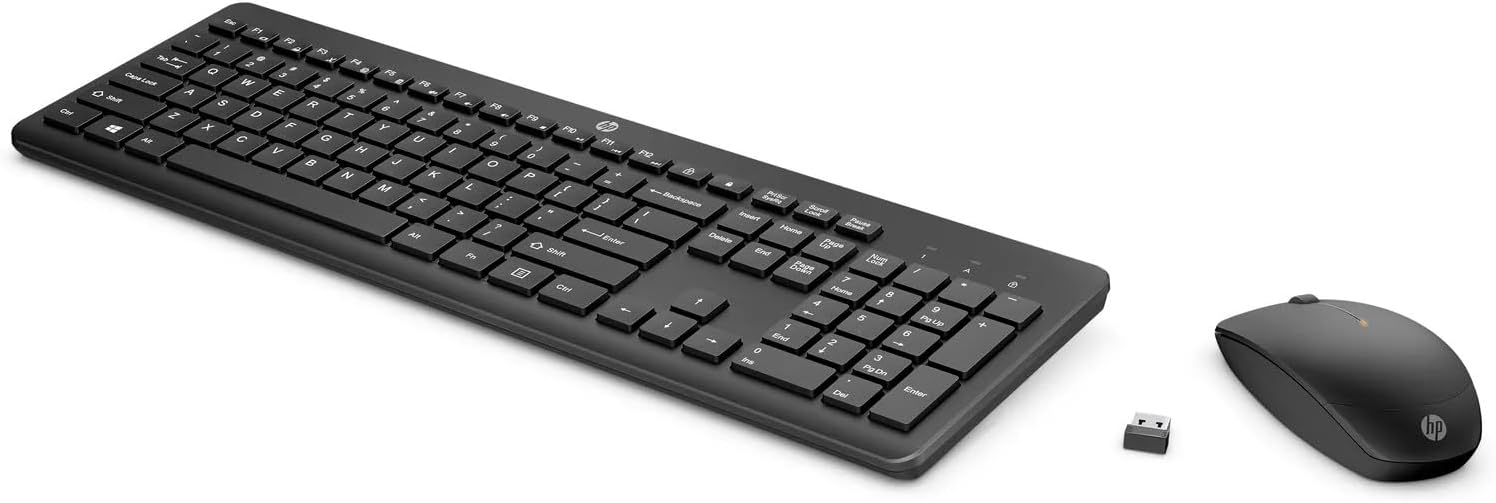
This manual provides instructions for setting up, operating, and maintaining your HP 235 Wireless Keyboard and Mouse Combo. Please read this guide thoroughly before using the product to ensure proper functionality and longevity.
Pakkens indhold
- HP Wireless Keyboard
- HP Wireless Mouse
- USB Type-A Wireless Receiver
- AA Batteries (pre-installed or included separately)
Opsætning
Follow these steps to set up your HP 235 Wireless Keyboard and Mouse Combo:
- Indsæt batterier: If not already installed, open the battery compartments on the underside of both the keyboard and the mouse. Insert the AA batteries, ensuring correct polarity. Close the compartments.
- Tilslut USB-modtager: Locate an available USB Type-A port on your computer. Insert the USB wireless receiver into the port. Your computer should automatically detect the device.
- Tænd: Turn on the keyboard and mouse using their respective power switches, usually located on the underside. The devices should connect automatically to the receiver.

Betjening af tastaturet
The HP 235 Wireless Keyboard features a standard layout with additional function keys.
- Standardnøgler: Use the alphanumeric keys for typing text and numbers.
- Funktionstaster (F1-F12): Disse taster kan have sekundære funktioner (f.eks. lydstyrkekontrol, medieafspilning, lysstyrkejustering), når de trykkes ned i kombination med Fn key. Refer to your computer's documentation for specific Fn key combinations.
- Numerisk tastatur: The dedicated numeric keypad on the right provides quick entry for numbers and calculations. Ensure Num Lock is active for numeric input.
Betjening af musen
The HP 235 Wireless Mouse provides precise cursor control.
- Venstre knap: Primary click function, typically used for selecting items or opening applications.
- Højre knap: Secondary click function, typically used for context menus.
- Scrollhjul: Roll the wheel to scroll through documents or web sider. Scrollhjulet kan også fungere som en midterste klikknap.
Opretholdelse
Proper maintenance ensures the longevity of your wireless combo.
- Rensning: Brug en blød, tør klud til at rengøre overfladerne på tastaturet og musen. For genstridigt snavs, tør letampSkyl kluden med vand. Undgå skrappe kemikalier eller slibende materialer.
- Udskiftning af batteri: When performance degrades (e.g., delayed response, intermittent connection), replace the batteries in both the keyboard and mouse with new AA batteries. Dispose of old batteries according to local regulations.
- Opbevaring: When not in use for extended periods, turn off the devices to conserve battery life. Store the USB receiver in a safe place, possibly inside the mouse's battery compartment if available.
Fejlfinding
If you encounter issues with your HP 235 Wireless Combo, try the following solutions:
| Problem | Løsning |
|---|---|
| Tastatur/mus reagerer ikke |
|
| Intermitterende forbindelse |
|
| Musemarkøren er uregelmæssig eller bevæger sig ikke jævnt |
|
Specifikationer
- Mærke: HP
- Model: 235
- Forbindelse teknologi: Wireless (USB Type A receiver)
- Operativsystemkompatibilitet: Windows 10
- Varens vægt: Cirka 1.83 pund (0.83 kg)
- Produktmål (LxBxH): Cirka 18 x 8.8 x 1.9 tommer (45.7 x 22.4 x 4.8 cm)
- Strømkilde: Batteridrevet (AA-batterier)
Garanti og support
For warranty information and technical support, please visit the official HP support website or contact HP customer service. Keep your purchase receipt for warranty claims.
Du kan finde mere information og supportressourcer på www.hp.com/support.