1. Introduktion
This manual provides detailed instructions for the assembly, operation, maintenance, and troubleshooting of your Oversteel ULTIMET Professional Gaming Chair. Please read this manual thoroughly before assembly and use to ensure proper function and safety.
2. Sikkerhedsadvarsler
- Sørg for, at alle komponenter er forsvarligt fastgjort før brug.
- Stå ikke på stolen.
- Brug ikke stolen, hvis nogen af delene er beskadigede eller mangler. Kontakt kundesupport for at få reservedele.
- Hold børn og kæledyr væk under montering. Små dele kan udgøre en kvælningsfare.
- Undgå at udsætte stolen for direkte sollys eller ekstreme temperaturer for at forhindre materialenedbrydning.
- Den maksimale vægtkapacitet for denne stol er 120 kg (264 lbs). Overskrid ikke denne grænse.
3. Pakkens indhold
Kontroller venligst, at alle dele er til stede, før monteringen påbegyndes. Hvis der mangler eller er beskadigede dele, bedes du kontakte kundesupport.
- Ryglæn
- Sædeunderlag
- Armlæn (2)
- Gas Lift Cylinder (Class 3)
- Gasliftdæksel
- Star Base (Nylon, 350mm)
- Hjul (5)
- Vipemekanisme
- Nakkepude
- Lændepude
- Hardware-sæt (skruer, skiver, unbrakonøgle)
4. Monteringsvejledning
Follow these steps carefully to assemble your Oversteel ULTIMET Gaming Chair.
- Fastgør hjul til stjernebase: Sæt hvert af de fem hjul ind i hullerne for enden af stjernebasen, indtil de klikker sikkert på plads.
- Indsæt gasløft: Placer gasløftcylinderen i det midterste hul på stjernebasen. Dæk den med gasløftdækslet.
- Attach Tilt Mechanism to Seat Base: Align the tilt mechanism with the pre-drilled holes on the underside of the seat base. Ensure the front of the mechanism faces the front of the seat. Secure with screws and washers from the hardware kit.
- Fastgør armlæn til sædebasen: Secure the armrests to the sides of the seat base using the provided screws. Do not overtighten initially to allow for minor adjustments.
- Fastgør ryglænet til sædebasen: Align the backrest brackets with the mounting points on the seat base and armrests. Secure with screws. Once all screws are in place, tighten all armrest and backrest screws firmly.
- Tilslut sæde til gaslift: Carefully place the assembled seat onto the gas lift cylinder, ensuring the center hole of the tilt mechanism aligns with the top of the gas lift. Apply gentle downward pressure to secure.
- Fastgør puder: Position the neck cushion and lumbar cushion as desired. The lumbar cushion typically attaches with straps around the backrest.

Billede: Side view of the chair, illustrating the recline mechanism and armrest attachment points.
5. Betjeningsvejledning
Your Oversteel ULTIMET Gaming Chair offers several adjustment options for personalized comfort.
5.1. Højdejustering
To adjust the chair's height, locate the lever on the right side, beneath the seat. While seated, pull the lever up to lower the chair. To raise the chair, stand up and pull the lever up. Release the lever at the desired height.
5.2. Backrest Recline
The backrest can recline up to 180 degrees. Locate the recline lever on the right side of the chair, near the seat. Pull the lever up and lean back to recline. Release the lever to lock the backrest in position. To return to an upright position, pull the lever and lean forward.
5.3. Armrest Adjustment (2D)
The armrests are 2D adjustable, meaning they can be adjusted in height and angle.
- Højde: Press the button on the side of each armrest and move the armrest up or down. Release the button to lock.
- Vinkel: Rotate the top of the armrest pad left or right to adjust its angle.
5.4. Tilt Mechanism
The chair features a tilt mechanism at the base. A knob beneath the seat (usually at the front) controls the tension of the tilt. Turn clockwise to increase tension (making it harder to tilt) and counter-clockwise to decrease tension (making it easier to tilt). A separate lever (often the same as the height adjustment lever, pushed inwards) can lock or unlock the tilt function.

Billede: Forside view of the Oversteel ULTIMET Gaming Chair, highlighting its ergonomic features and adjustable components.
6. Vedligeholdelse
Proper care will extend the life of your gaming chair.
- Rensning: For the breathable fabric, use a soft cloth dampened with mild soap and water. Avoid harsh chemicals or abrasive cleaners. Spot clean as needed.
- Inspektion: Kontrollér regelmæssigt alle skruer og bolte for at sikre, at de er stramme. Efterspænd om nødvendigt.
- Hjul: Rengør hjulene regelmæssigt for at fjerne støv og snavs, der kan hindre jævn bevægelse.
- Undgå overbelastning: Overskrid ikke den maksimale vægtkapacitet på 120 kg.
7. Fejlfinding
If you encounter issues with your chair, refer to the following common problems and solutions.
- Chair Sinks or Does Not Hold Height:
Mulig årsag: Gas lift cylinder malfunction.
Løsning: Sørg for, at højdejusteringshåndtaget er helt aktiveret. Hvis problemet fortsætter, skal gasliften muligvis udskiftes. Kontakt kundesupport. - Stolens vaklen:
Mulig årsag: Løse skruer eller ujævn montering.
Løsning: Check and tighten all assembly screws, especially those connecting the seat to the backrest and the tilt mechanism. Ensure the chair is on a flat, even surface. - Hjul ruller ikke jævnt:
Mulig årsag: Affald i hjul eller beskadigede hjul.
Løsning: Remove any hair or debris from the caster wheels. If casters are damaged, they may need replacement. - Backrest Does Not Recline or Lock:
Mulig årsag: Recline mechanism obstruction or malfunction.
Løsning: Ensure the recline lever is fully engaged. Check for any obstructions. If the mechanism is faulty, contact customer support.
8. Specifikationer
| Feature | Detalje |
|---|---|
| Mærke | Overstål |
| Model | ULTIMET (NAT-OV-ULTIMET-FBBLACK) |
| Farve | Black (Available in other colors: Black-White, Black-Blue, Grey-Grey, Grey-White, Grey-Blue) |
| Materiale | Premium breathable fabric, High-density foam, Nylon frame |
| Max vægtkapacitet | 120 kg (264 lbs) |
| Gaslift | Klasse 3 |
| Grundlag | 350mm Nylon Star Base |
| Hjul | 50 mm |
| Armlæn | 2D Adjustable (Height and Angle) |
| Ryglæn tilbagelænet | Op til 180 grader |
| Inkluderet tilbehør | Customizable Neck Cushion, Lumbar Cushion |
8.1. Dimensioner

Image: Chair dimensions in inches.
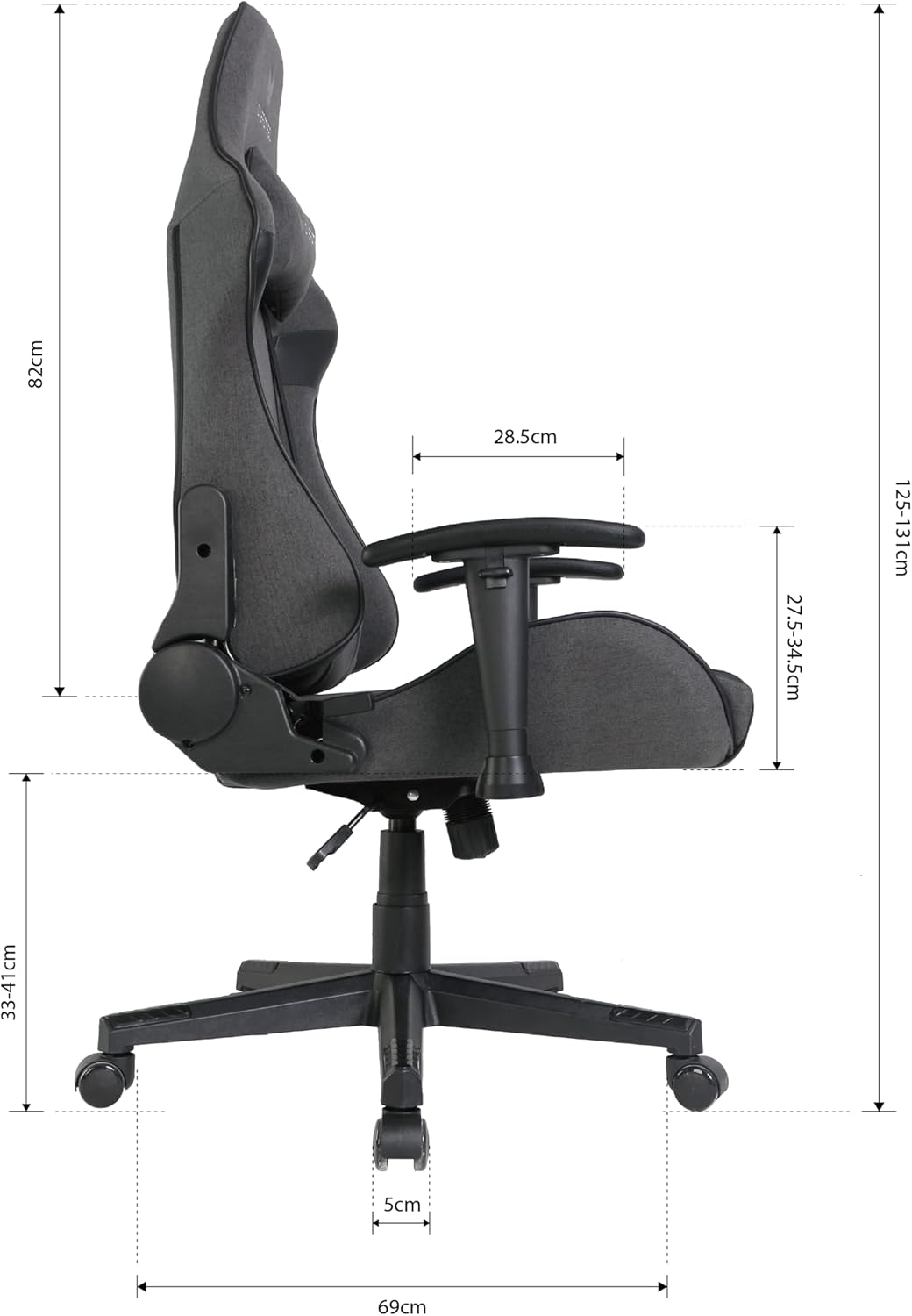
Image: Chair dimensions in centimeters.
- Overall Product Dimensions (approx.): 69 cm (D) x 55.5 cm (W) x 131 cm (H)
- Seat Height Range: 33 cm - 41 cm
- Ryglæn Højde: 82 cm
- Varevægt: 19.5 kg
9. Garantioplysninger
The Oversteel ULTIMET Professional Gaming Chair comes with a 3 års garanti from the date of purchase. This warranty covers manufacturing defects and material flaws under normal use. It does not cover damage resulting from misuse, accidents, unauthorized modifications, or normal wear and tear. Please retain your proof of purchase for warranty claims.
10. Kundesupport
For any questions, assistance with assembly, troubleshooting, or warranty claims, please contact Oversteel customer support through your retailer or the official Oversteel website. Please have your model number (NAT-OV-ULTIMET-FBBLACK) and proof of purchase ready when contacting support.


