1. Introduktion
This user manual provides detailed instructions for the SHREYANS 1D Wired Barcode Scanner, Model KP_306 NEW. It covers essential information regarding product setup, operation, maintenance, and troubleshooting to ensure optimal performance and longevity of your device. Please read this manual thoroughly before using the scanner.
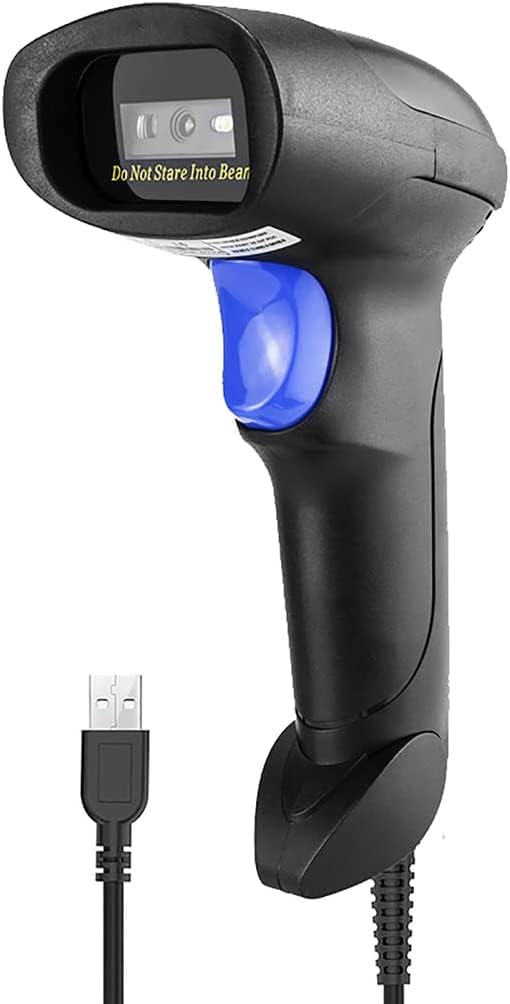
Figure 1: SHREYANS 1D Wired Barcode Scanner, Model KP_306 NEW.
2. Nøglefunktioner
- Advanced CCD Image Scanning Technology: Equipped with a CCD sensor for quick and accurate capture of 1D barcodes from both paper and digital screens.
- Durable and Anti-Shock Design: Constructed with high-quality ABS material, designed to withstand drops from up to 2 meters onto concrete surfaces, ensuring long-term reliability.
- Flere scanningstilstande: Features Key Trigger Mode, Auto-Induction Mode, and Continuous Mode for versatile operation.
- Broad 1D Barcode Compatibility: Supports a wide range of 1D barcode types including UPC-A, UPC-E, EAN-8, EAN-13, ISSN, ISBN, Code 128, GS1-128, Code39, Code93, Code32, Code11, UCC/EAN128, Interleaved 2 of 5, Industrial 2 of 5, Codabar(NW-7), MSI, Plessey, RSS, and China Post.
- Plug and Play-tilslutning: Simple USB 2.0 wired connection for immediate use with PCs and laptops, requiring no additional driver installation.

Figure 2: The scanner's robust anti-shock design, capable of withstanding drops.

Figure 3: The scanner's ability to decode damaged, reflective, colorful, and distorted barcodes.
3. Opsætning
3.1 Pakkens indhold
Bekræft at alle varer er til stede i pakken:
- 1 x SHREYANS 1D Wired Barcode Scanner
- 1 x USB-kabel
- 1 x Brugermanual (dette dokument)
3.2 Tilslutning af scanneren
The SHREYANS 1D Wired Barcode Scanner is designed for plug-and-play functionality. Follow these steps to connect it to your computer:
- Find en ledig USB-port på din pc eller bærbare computer.
- Connect the USB cable to the scanner's port.
- Plug the other end of the USB cable into the USB port on your computer.
- The scanner will automatically install necessary drivers (if required) and be ready for use. No additional software installation is typically needed.

Figure 4: Illustrates the simple USB 2.0 wired connection process for the scanner.
4. Betjeningsvejledning
4.1 Scanningstilstande
The scanner supports three operational modes:
- Key Trigger Mode: Tryk på udløserknappen for at aktivere scanningsstrålen og læse en stregkode. Slip knappen for at stoppe scanningen.
- Automatisk induktionstilstand: The scanner automatically detects a barcode placed within its scanning range and activates the beam to read it without requiring a trigger press.
- Kontinuerlig tilstand: The scan beam remains continuously active, allowing for rapid, successive scanning of multiple barcodes without repeatedly pressing the trigger.
4.2 Scanning af stregkoder
Sådan scanner du en stregkode:
- Ensure the scanner is properly connected to your computer.
- Open a text editor, spreadsheet, or POS application where you want the scanned data to appear.
- Ret scannerens vindue mod den stregkode, du vil scanne.
- Activate the scan beam according to your selected scanning mode (press trigger, or allow auto-induction/continuous mode to activate).
- A successful scan will typically be indicated by an audible beep and/or a visual confirmation (e.g., LED indicator). The barcode data will then appear in your active application.

Figure 5: Demonstrating the scanner's ability to read various 1D barcodes, including those that are damaged or distorted.
4.3 Supported 1D Barcode Types
The SHREYANS 1D Wired Barcode Scanner is compatible with the following 1D barcode symbologies:
- UPC-A, UPC-E, EAN-8, EAN-13
- ISSN, ISBN
- Code 128, GS1-128, Code39, Code93, Code32, Code11
- UCC/EAN128
- Interleaved 2 of 5, Industrial 2 of 5
- Codabar (NW-7)
- MSI, Plessey, RSS
- China Post
5. Pleje og vedligeholdelse
Proper care ensures the longevity and optimal performance of your barcode scanner:
- Rensning: Use a soft, dry cloth to clean the scanner's exterior. For the scanning window, use a soft, lint-free cloth lightly dampened with a mild, non-abrasive cleaner. Avoid harsh chemicals or abrasive materials.
- Opbevaring: Opbevar scanneren et køligt, tørt sted væk fra direkte sollys og ekstreme temperaturer.
- Håndtering: While the scanner has an anti-shock design, avoid unnecessary drops or impacts to prevent potential damage.
- Kabelpleje: Do not bend or twist the USB cable excessively. Ensure it is not pinched or placed under heavy objects.
6. Fejlfinding
If you encounter issues with your SHREYANS barcode scanner, refer to the following table for common problems and solutions:
| Problem | Mulig årsag | Løsning |
|---|---|---|
| Scanneren tænder ikke. | USB-kablet er ikke korrekt tilsluttet, eller USB-porten er defekt. | Sørg for, at USB-kablet er korrekt tilsluttet til både scanneren og computeren. Prøv en anden USB-port. |
| Scanneren læser ikke stregkoder. | Barcode is damaged, poorly printed, or not a supported 1D type. Incorrect scanning mode. | Ensure the barcode is clear and undamaged. Verify it is a supported 1D barcode type. Check the selected scanning mode and adjust if necessary. Ensure the scanner is aimed correctly. |
| Scannede data vises forkert. | Keyboard language settings mismatch or scanner configuration issue. | Check your computer's keyboard language settings. Refer to the scanner's programming guide (if available) for advanced configuration options. |
| Scanneren er langsom eller reagerer ikke. | Interference from other devices or system resource issues. | Disconnect and reconnect the scanner. Restart your computer. Ensure no other applications are heavily utilizing system resources. |
Hvis problemet fortsætter, bedes du kontakte kundesupport for yderligere assistance.
7. Tekniske specifikationer
| Feature | Specifikation |
|---|---|
| Mærke | SHREYANS |
| Modelnummer | KP_306 NEW |
| Forbindelsesteknologi | USB kabel |
| Strømkilde | Elektrisk med ledning |
| Kompatible enheder | Laptop, PC |
| Varens vægt | 200 g |
| Emnedimensioner (LxBxH) | 8 x 5 x 9 centimeter |
| Fabrikant | Shreyans Retail Solutions |
| Oprindelsesland | Indien |
8. Garanti og kundesupport
8.1 Garantioplysninger
This product comes with a standard manufacturer's warranty. For specific details regarding warranty coverage, duration, and terms, please refer to the warranty card included in your product packaging or contact SHREYANS customer support.
8.2 Kundesupport
For technical support, installation assistance, or any other inquiries, please contact our customer support team:
- Telefon: +91 22-40041231
- Mobil/WhatsApp: +91 9324776246
- E-mail: shreyanspos@gmail.com
Our support team is available 24/7 to assist you with any technical faults or problems.

Figure 6: SHREYANS 24/7 Customer Support Service details.

