Indledning
Thank you for choosing the Tribit FlyBuds 3 True Wireless Earbuds. This manual provides detailed instructions on how to set up, operate, maintain, and troubleshoot your earbuds to ensure optimal performance and longevity. Please read this manual carefully before using the product.
Pakkens indhold
Tjek venligst pakken for følgende varer:
- Tribit FlyBuds 3 True Wireless Earbuds (L/R)
- Opladningsetui
- USB-C ladekabel
- Flere størrelser ørepropper (S/M/L)
- Brugermanual
Produkt overview

Figur 1: Tribit FlyBuds 3 Earbuds and Charging Case. This image shows the pink charging case open with one earbud inside and the other earbud outside, displaying its design.
Figur 2: Tribit FlyBuds 3 Charging Case Controls. This image highlights the multi-function button on the charging case, indicating its uses for battery voltage check, re-pairing, and power output.
The Tribit FlyBuds 3 consist of two wireless earbuds and a portable charging case. The charging case not only protects and charges the earbuds but also functions as a power bank for other devices.
- høretelefoner Each earbud features a touch control area for managing playback, calls, and voice assistant.
- Opladningsetui: Equipped with LED indicators for battery status and a multi-function button for various operations including pairing and power output.
Opsætning
1. Opladning af øretelefoner og etuiet
Oplad ørepropperne og opladningsetuiet helt inden første brug.
- Opladning af etuiet: Connect the USB-C charging cable to the charging port on the case and a power source. The LED indicators on the case will show the charging progress.
- Opladning af øretelefoner: Place the earbuds into the charging case. They will automatically begin charging. The case LEDs will indicate the earbuds' charging status.

Figur 3: Long-lasting Battery. This image shows the earbuds inside the charging case, emphasizing the 100 hours of cycle playtime, 20 times recharge capability, and 5 hours of music playtime per charge.
The Tribit FlyBuds 3 offer up to 5 hours of music playback per charge, and the charging case provides an additional 100 hours of playtime, allowing for multiple recharges on the go.
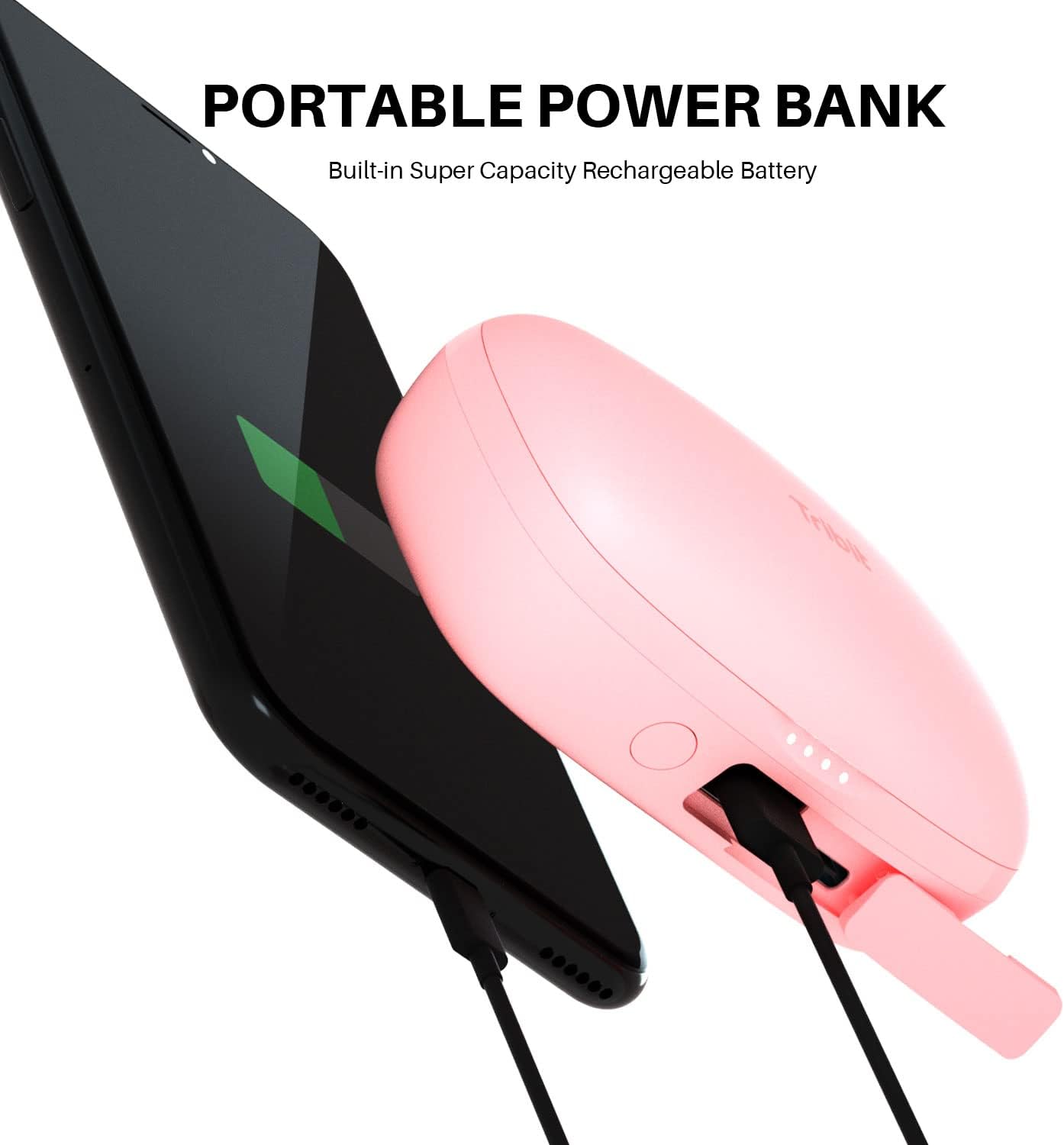
2. Brug af opladningsetuiet som powerbank
The charging case can also serve as a portable power bank for your smartphone or other small devices.
- Connect your device to the USB-A output port on the charging case using an appropriate cable.
- Press the multi-function button on the case to initiate charging for your connected device.

Figur 4: Portable Power Bank Feature. This image illustrates the Tribit FlyBuds 3 charging case connected via a cable to a smartphone, demonstrating its capability to charge other devices.
3. Parring med din enhed
The FlyBuds 3 feature one-step pairing for convenience.
- Indledende parring: Open the charging case. The earbuds will automatically enter pairing mode and connect to the last paired device. If no device is found, they will enter discovery mode.
- Connecting to a New Device: With the earbuds in the case and the lid open, press and hold the multi-function button on the charging case for 10 seconds until the LED indicators flash, indicating re-pairing mode. Then, select "Tribit FlyBuds 3" from your device's Bluetooth list.
Drift
1. Sådan tager du ørepropperne på
For optimal sound quality and comfort, choose the eartips that best fit your ears. Insert the earbuds into your ear canal and gently twist them to secure a snug fit.

Figur 5: Earbud in Ear. This image shows a person wearing one of the pink Tribit FlyBuds 3 earbuds, demonstrating its discreet and comfortable fit.

Figur 6: Close-up of Earbud Fit. A detailed view of the Tribit FlyBuds 3 earbud properly seated in a person's ear, highlighting its ergonomic design.
2. Tryk på Kontrolelementer
The Tribit FlyBuds 3 utilize touch controls for various functions. The touch control area is located on the outer surface of each earbud.
| Handling | Fungere |
|---|---|
| Enkelt tryk (V/H) | Afspil/Sæt musik på pause, Besvar/Afslut opkald |
| Dobbelttryk (højre øretelefon) | Næste spor |
| Dobbelttryk (venstre øretelefon) | Forrige spor |
| Tredobbelt tryk (højre øretelefon) | Lydstyrke op |
| Tredobbelt tryk (venstre øretelefon) | Lydstyrke ned |
| Tryk og hold (2s) | Afvis opkald, aktivér stemmeassistent |
Opretholdelse
Proper maintenance ensures the longevity and performance of your Tribit FlyBuds 3.
- Rensning: Rengør regelmæssigt ørepropperne og opladningsetuiet med en blød, tør og fnugfri klud. Brug ikke skrappe kemikalier eller slibende materialer.
- Ørespidser: Remove and clean the eartips with water and mild soap if necessary. Ensure they are completely dry before reattaching.
- Opladningskontakter: Periodically clean the charging contacts on both the earbuds and inside the case with a dry cotton swab to ensure proper charging.
- Vandtæthed: The FlyBuds 3 boast an IPX8 waterproof rating, meaning they are protected against prolonged immersion in water. However, it is recommended to dry them thoroughly after exposure to water before placing them back in the charging case to prevent damage to the charging contacts.
- Opbevaring: Når ørepropperne ikke er i brug, skal de opbevares i deres opladningsetui for at beskytte dem og holde dem opladede. Opbevares køligt og tørt, væk fra ekstreme temperaturer.
Fejlfinding
If you encounter issues with your Tribit FlyBuds 3, try the following solutions:
- Ørepropper parrer ikke:
- Sørg for, at begge øretelefoner er opladet.
- Place both earbuds back into the charging case, close the lid, and then open it again to re-initiate pairing.
- Forget "Tribit FlyBuds 3" from your device's Bluetooth settings and attempt to re-pair.
- Perform a factory reset (see below).
- Kun én øreprop virker:
- Sørg for, at begge øretelefoner er opladet.
- Place both earbuds back into the charging case and close the lid for 5 seconds, then open it again.
- Rengør opladningskontakterne på begge ørepropper og inde i etuiet.
- Ingen lyd eller lav lydstyrke:
- Skru op for lydstyrken på både din enhed og ørepropperne.
- Sørg for, at ørepropperne er korrekt tilsluttet din enhed.
- Try a different audio source or application.
- Opladningsproblemer:
- Sørg for, at ladekablet er korrekt tilsluttet.
- Prøv et andet opladningskabel eller en anden strømadapter.
- Rengør opladningskontakterne på ørepropperne og etuiet.
Fabriksindstilling
If the above steps do not resolve the issue, you can perform a factory reset:
- Placer begge ørepropper i opladningsetuiet.
- Press and hold the multi-function button on the charging case for 10 seconds until the LED indicators flash rapidly. This clears the pairing history.
- Remove "Tribit FlyBuds 3" from your device's Bluetooth list.
- Repeat the pairing process as described in the "Setup" section.
Specifikationer
| Feature | Detalje |
|---|---|
| Mærke | Tribit |
| Model | FlyBuds 3 |
| Forbindelsesteknologi | Trådløs (Bluetooth) |
| Formfaktor | In Ear |
| Batterilevetid (ørepropper) | Op til 5 timer |
| Samlet spilletid (med etui) | Op til 100 timer |
| Vandmodstandsniveau | IPX8 vandtæt |
| Kontrolmetode | Røre |
| Specifikke anvendelser af produktet | Film og spil |
Garanti og support
Tribit products are designed with quality and reliability in mind. For information regarding warranty coverage and customer support, please refer to the warranty card included in your product packaging or visit the official Tribit website. If you experience any issues not covered in this manual, please contact Tribit customer service for assistance.
Tribit Official Webwebsted: www.tribit.com


