1. Introduktion
Thank you for choosing the Bisofice Poooli Mini Thermal Photo Printer L1. This compact and portable printer allows you to print photos, labels, notes, and more directly from your smartphone via Bluetooth. This manual provides essential information for safe and effective use, including setup, operation, maintenance, and troubleshooting.
2. Sikkerhedsoplysninger
Læs venligst alle sikkerhedsinstruktioner, inden du bruger enheden, for at forhindre personskade eller beskadigelse.
- Keep the printer away from water and high humidity.
- Udsæt ikke printeren for ekstreme temperaturer eller direkte sollys.
- Undgå at tabe printeren eller udsætte den for kraftige stød.
- Use only the specified thermal paper. Other paper types may damage the print head.
- Forsøg ikke selv at skille printeren ad eller reparere den. Kontakt kundesupport for at få hjælp.
- Opbevares utilgængeligt for børn.
- Charge the printer using the provided USB cable and a compatible power adapter (not included).
3. Pakkens indhold
Bekræft at alle varer er til stede i din pakke:
- Bisofice Poooli Mini Thermal Photo Printer L1
- Thermal Paper Rolls (7 rolls total, including one pre-installed)
- USB opladningskabel
- Hurtig startvejledning

4. Produktet er slutview
Familiarize yourself with the components of your Poooli L1 printer.

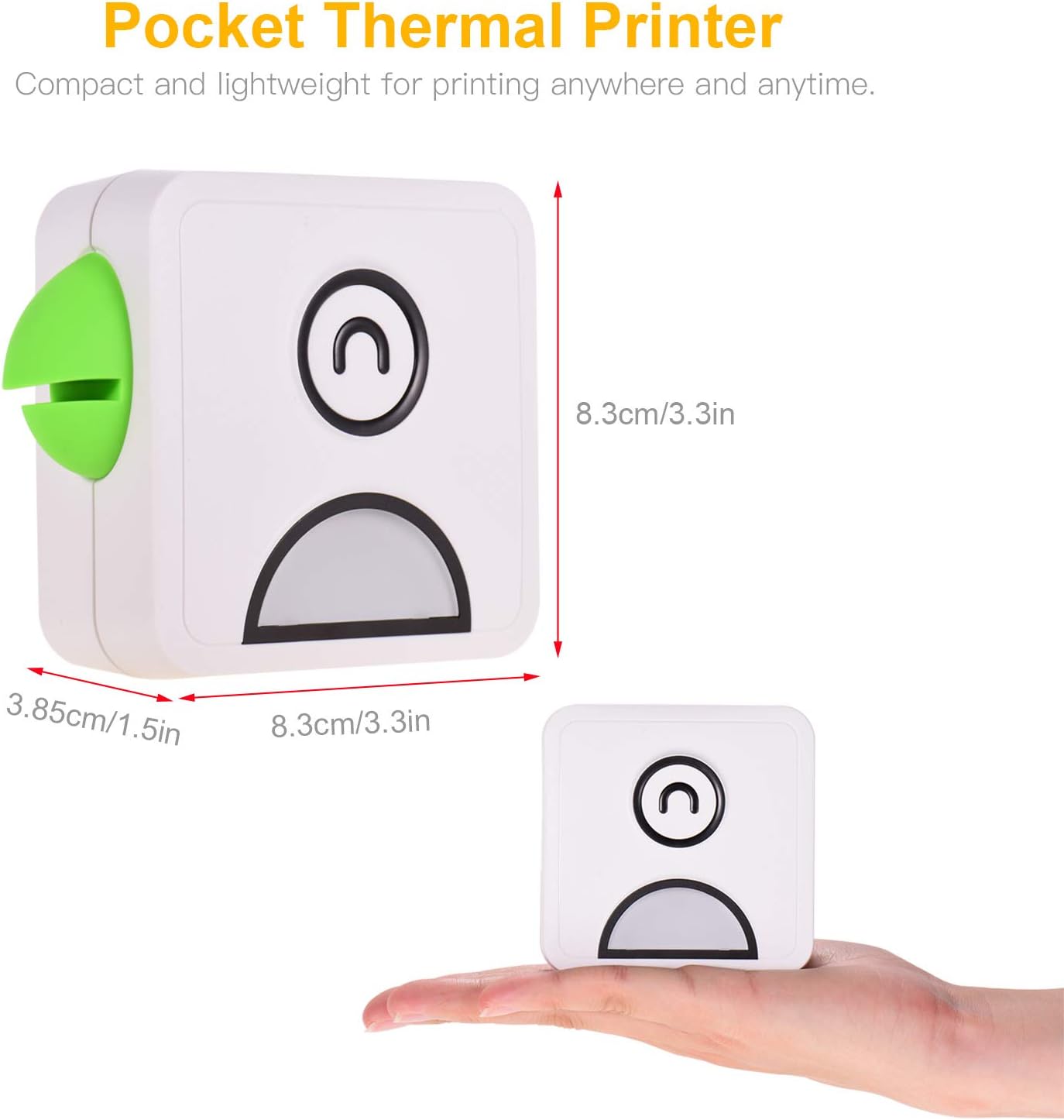
- Power knap: Located on the top surface, typically indicated by a circular icon.
- Papirudgangsåbning: Where printed thermal paper emerges.
- Integreret skærer: A safe and convenient mechanism for tearing off printed paper.
- USB opladningsport: For connecting the USB cable to charge the device.
- Indikatorlys: Provides status information (e.g., charging, connected, printing).
- Parrot Beak Design: A decorative and functional element, featuring a built-in magnet for attaching notes or securing the printer to metallic surfaces.

5. Opsætning
5.1 Opladning af printeren
Before first use, fully charge the printer. Connect the provided USB cable to the printer's charging port and the other end to a USB power adapter (e.g., phone charger) or a computer's USB port. The indicator light will show charging status (e.g., red for charging, green for fully charged).
5.2 Ilægning af termopapir
- Gently slide the printer cover to open it.
- Insert a roll of thermal paper into the compartment, ensuring the paper feeds out from the top.
- Pull a small length of paper out beyond the cutter.
- Luk printerdækslet godt, indtil det klikker på plads.
5.3 Appinstallation
The Bisofice Poooli L1 printer requires a dedicated mobile application for operation. Søg efter "Poooli" in your smartphone's app store (Google Play Store for Android, Apple App Store for iOS) and install it. The app is compatible with Android 5.0 or above and iOS 10 or above.
5.4 Bluetooth -parring
- Ensure the printer is charged and powered on. The indicator light may flash, indicating it's ready for pairing.
- Aktiver Bluetooth på din smartphone.
- Open the "Poooli" application.
- Within the app, navigate to the device connection or pairing section.
- Select the "Poooli L1" or a similar device name from the list of available Bluetooth devices.
- Once successfully paired, the printer's indicator light will typically turn solid blue or green, and the app will confirm the connection.

6. Betjeningsvejledning
The Poooli app provides various functions for printing. Ensure your printer is connected via Bluetooth before proceeding.
6.1 Udskrivning af fotos og billeder
- Open the Poooli app and select the "Photo Print" or "Image" option.
- Choose an image from your phone's gallery.
- Adjust the image as needed using the app's editing tools (e.g., filters, crop, rotate).
- Tryk på udskriftsikonet for at sende billedet til printeren.
6.2 Printing Text and Notes
The app supports printing various text-based content:
- Messages/Notes: Type or paste text directly into the app's note editor.
- Lister: Create to-do lists or shopping lists.
- OCR Text Recognition: Use the app to scan text from an image and print it.
- Web Trykning: Indtast en web address to print the content of a webside.


6.3 Using App Features
The Poooli app offers a variety of templates, emojis, and themes to customize your prints. Explore the app's interface to discover all available options for creative and functional printing.
7. Vedligeholdelse
7.1 Rengøring af printeren
For at opretholde optimal udskriftskvalitet og enhedens levetid:
- Sørg for, at printeren er slukket, inden den rengøres.
- Brug en blød, tør og fnugfri klud til at tørre printerens yderside af.
- If the print head appears dirty or print quality degrades, gently wipe the print head with a cotton swab lightly damprenset med isopropylalkohol. Lad det tørre helt før brug.
- Brug ikke slibende rengøringsmidler eller opløsningsmidler.
7.2 Replacing Thermal Paper
When the paper roll is depleted, follow the steps in section 5.2 "Loading Thermal Paper" to replace it with a new roll. Ensure you use thermal paper of the correct size (58mm width x 30mm diameter).

8. Fejlfinding
Hvis du støder på problemer med din printer, kan du se følgende almindelige problemer og løsninger:
| Problem | Mulig årsag | Løsning |
|---|---|---|
| Printeren tænder ikke. | Lavt batteri eller ingen opladning. | Charge the printer fully using the USB cable. |
| Kan ikke oprette forbindelse via Bluetooth. | Bluetooth is off on phone, printer is off, or not in pairing mode. | Ensure Bluetooth is enabled on your phone. Turn the printer off and on again. Re-attempt pairing through the Poooli app. |
| Poor print quality (faint, blank, or streaky prints). | Incorrect paper loading, low battery, dirty print head, or non-thermal paper. | Check if thermal paper is loaded correctly. Charge the printer. Clean the print head (see Section 7.1). Ensure you are using thermal paper. |
| Papirstop. | Forkert papirilægning eller fremmedlegeme. | Open the cover, carefully remove any jammed paper, and re-load the paper correctly. |
| App not detecting printer. | App issue, Bluetooth connection lost. | Restart the Poooli app. Disconnect and re-pair the printer in your phone's Bluetooth settings and then in the app. |
9. Specifikationer
| Feature | Detalje |
|---|---|
| Mærke | Bikontor |
| Modelnavn | L1 |
| Printteknologi | Termisk |
| Printer output | Monokrom (sort-hvid) |
| Opløsning | 200 DPI |
| Forbindelsesteknologi | Bluetooth 4.0 (Wireless), USB (for charging) |
| Kompatible enheder | Smartphones (Android 5.0+, iOS 10+) |
| Print Medium | Thermal Paper (Sticker, Label, Poster Paper) |
| Paper Roll Size | 58mm (width) x 30mm (diameter) |
| Batteri | 1000 mAh (indbygget litiumbatteri) |
| Batteriets energiindhold | 2 wattimer |
| Speciel funktion | Portable, Inkless Printing, Magnetic Design |
| Produktdimensioner | Ca. 8.3 x 8.3 x 3.85 cm (3.3 x 3.3 x 1.5 tommer) |
| Produktets vægt | Ca. 500 gram |
| Farve | White with Green accent (as pictured) |
10. Garanti og support
Specific warranty details are not provided in the product information. For warranty claims or technical support, please refer to the retailer's return policy or contact Bisofice customer service directly through their official webwebstedet eller de kontaktoplysninger, der er angivet med dit køb.


