StarTech.com 2 Port Dual Monitor HDMI KVM Switch
Model: SV231DHU34K6
1. Introduktion
This instruction manual provides detailed information on the installation, operation, and maintenance of your StarTech.com 2 Port Dual Monitor HDMI KVM Switch. This device allows you to control two computers from a single set of peripherals, including two HDMI monitors, a keyboard, a mouse, and other USB devices, supporting resolutions up to 4K at 60Hz.
2. Sikkerhedsoplysninger
Læs og forstå alle instruktioner, før du bruger dette produkt. Manglende overholdelse af disse instruktioner kan resultere i elektrisk stød, brand eller alvorlig personskade.
- Elektriske farer: Do not use damaged or frayed cables. Exposed wires can lead to electric shocks. Ensure all cables are properly connected and secured to prevent accidental disconnection.
- Varmeopbygning: Overloaded or tightly bundled cables can overheat and pose a fire hazard. Ensure adequate ventilation and avoid bundling power cables.
- Skade: Tag altid stikket ud af adaptere ved at holde i stikket, ikke i kablet. Hvis du trækker i kablet, kan du blotlægge strømførende ledninger, hvilket kan føre til elektrisk stød eller forbrændinger.
3. Produktet er slutview
The StarTech.com SV231DHU34K6 KVM switch is designed to streamline your workspace by enabling control of two computers with dual 4K HDMI displays and shared USB peripherals. Its robust steel housing ensures durability.
3.1. Nøglefunktioner
- Supports dual 4K (3840 x 2160) resolution at 60Hz per monitor.
- HDMI 2.0, HDCP 2.2, and HDR10 support.
- Integrated 2-port USB 3.0 Hub (5Gbps) for sharing peripherals.
- Four USB 2.0 HID ports for keyboard and mouse.
- Hotkey and front-panel push-button switching.
- EDID and HDCP signal emulation for fast, seamless switching.
- Supports stereo analog and 7.1 digital audio.
- OS Independent compatibility (Windows, Mac, Linux).
3.2. Frontpanel

Figur 1: Frontpanellayout
- HID USB Port: For connecting a keyboard or mouse.
- 5G USB Port: Til tilslutning af USB 3.0-enheder med høj hastighed.
- Computer Selection Buttons (1, 2): Press to switch to the corresponding computer.
- SELECT -knap: Used for various functions, including auto-scan activation.
3.3. Bagpanel
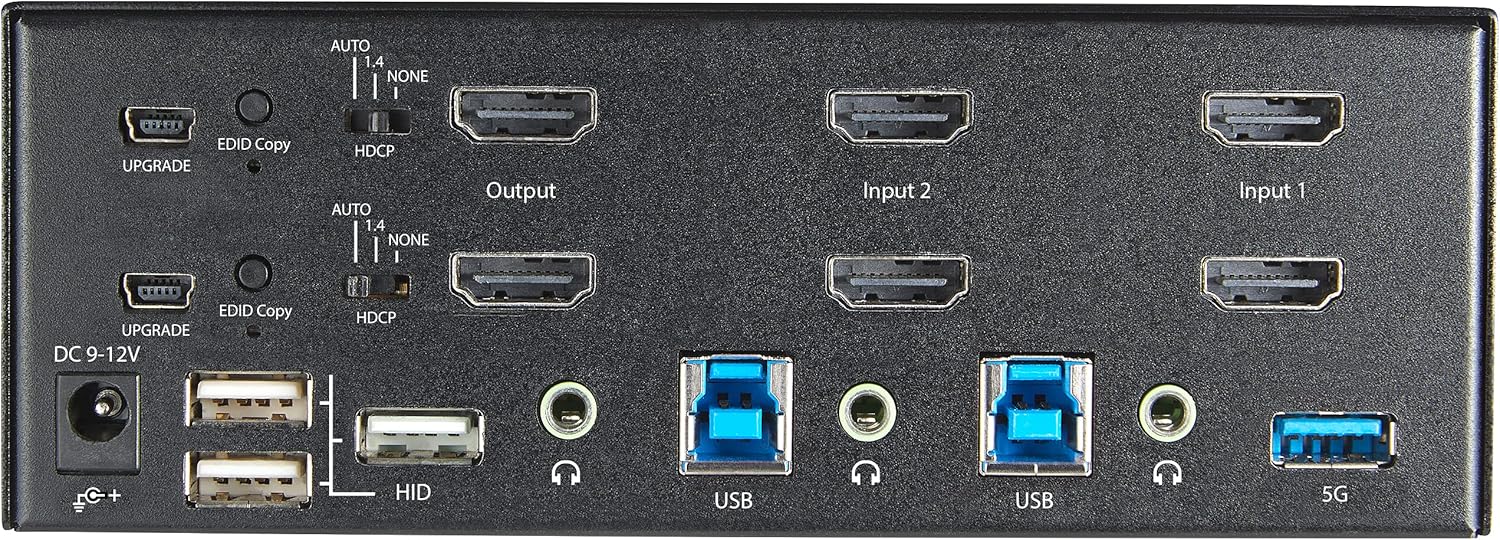
Figur 2: Layout på bagpanel
- DC 9-12V strømindgang: Tilslut den medfølgende strømadapter.
- OPGRADERINGsport: Til firmwareopdateringer.
- EDID Copy Button/Switch: Manages Extended Display Identification Data.
- HDCP switch: Manages High-bandwidth Digital Content Protection.
- Output (HDMI): Connect to your monitors.
- Input 1/Input 2 (HDMI): Connect to the HDMI outputs of your computers.
- USB (Type-B): Connect to the USB 3.0 ports of your computers.
- HID USB Ports (Type-A): For additional keyboard/mouse connections or other low-power USB devices.
- Audio Jacks (3.5mm): For connecting speakers/headphones and microphones.
- 5G USB Port (Type-A): Til tilslutning af USB 3.0-enheder med høj hastighed.
4. Opsætning
4.1. Hvad er der i æsken
- 1 x KVM Switch (SV231DHU34K6)
- 1 x Universal strømadapter (NA/JP, EU, UK, ANZ)
- 4 x gummifødder
- 1 x Hurtigstartguide
Note: HDMI cables, USB 3.0 Type-A to Type-B cables, and audio cables are not included and must be purchased separately.
4.2. Tilslutningsvejledning
Follow these steps to connect your KVM switch:
- Tilslut skærme: Connect your two HDMI monitors to the 'Output' HDMI ports on the rear panel of the KVM switch.
- Connect Computers (HDMI): Connect the HDMI outputs from Computer 1 to the 'Input 1' HDMI ports on the KVM switch. Repeat for Computer 2 and 'Input 2'. Ensure both HDMI outputs from each computer are connected for dual monitor support.
- Connect Computers (USB): Connect the USB 3.0 Type-B ports on the KVM switch to the USB 3.0 Type-A ports on Computer 1 and Computer 2 using appropriate USB 3.0 cables. These connections enable keyboard, mouse, and USB hub functionality.
- Tilslut ydre enheder:
- Connect your keyboard and mouse to the 'HID' USB ports on the front or rear panel.
- Connect other USB devices (e.g., printer, scanner, webcam) to the '5G' USB 3.0 ports on the front or rear panel.
- Tilslut lyd (valgfrit): If desired, connect your speakers/headphones and microphone to the 3.5mm audio jacks on the rear panel.
- Tilslut strøm: Connect the included universal power adapter to the 'DC 9-12V' power input on the rear panel, then plug it into a power outlet. The KVM switch will power on automatically.

Figure 3: KVM Switch with Ports for Connection
5. Betjening af KVM-switchen
5.1. Skift mellem computere
You can switch between connected computers using either the front-panel push buttons or hotkey commands.
- Front-Panel Buttons: Press the '1' or '2' button on the front panel to directly switch to Computer 1 or Computer 2, respectively.
- Hotkey Switching: Use keyboard hotkey combinations to switch computers. The default hotkey sequence is typically Scroll Lock, Scroll Lock, [1 or 2]. Refer to the Quick-Start Guide for a complete list of hotkey commands and customization options. A buzzer sound confirms the switch.
5.2. EDID and HDCP Emulation
The KVM switch includes EDID (Extended Display Identification Data) and HDCP (High-bandwidth Digital Content Protection) signal emulation. This feature ensures that your monitors remain synced and desktop settings are maintained when switching between computers, preventing display resolution changes or window rearrangement.
5.3. USB Hub Functionality
The integrated USB 3.0 hub allows you to share two USB 3.0 peripherals (connected to the 5G ports) and four USB 2.0 HID peripherals (connected to the HID ports) between the connected computers. Devices connected to these ports will function as if directly connected to the currently selected host computer.
5.4. Lydunderstøttelse
The KVM switch supports both digital audio (via HDMI, 7.1 Channel Audio) and separate 3.5mm stereo analog audio (2 Channel Audio). Ensure your displays and sources support the desired audio format for full compatibility.
6. Vedligeholdelse
For at sikre din KVM-switchs levetid og optimale ydeevne skal du følge disse vedligeholdelsesretningslinjer:
- Rensning: Brug en blød, tør klud til at rengøre enhedens yderside. Brug ikke flydende rengøringsmidler eller rengøringsmidler på aerosol.
- Ventilation: Ensure the KVM switch is placed in a well-ventilated area. Do not block any ventilation openings.
- Kabelstyring: Keep cables organized and untangled to prevent damage and ensure proper airflow. Avoid excessive bending or crimping of cables.
- Opbevaring: Når enheden ikke er i brug i længere perioder, skal den opbevares køligt og tørt, væk fra direkte sollys og ekstreme temperaturer.
7. Fejlfinding
Hvis du støder på problemer med din KVM-switch, kan du se følgende almindelige problemer og løsninger:
- Ingen visning eller forkert opløsning:
- Ensure all HDMI cables are securely connected to both the KVM switch and your computers/monitors.
- Verify that your HDMI cables are rated for 4K 60Hz if you are using 4K displays. Longer cables (e.g., over 3m/10ft) may require higher quality or active cables.
- Check the display settings on your computers to ensure they are configured for the correct resolution and refresh rate.
- Try power cycling the KVM switch and monitors.
- Tastatur/mus reagerer ikke:
- Ensure the USB Type-B cables are securely connected from the KVM switch to your computers.
- Verify that your keyboard and mouse are connected to the designated HID USB ports.
- Try connecting the keyboard/mouse directly to the computer to confirm they are functional.
- Some specialized keyboards/mice with advanced features may require direct connection or specific drivers.
- USB-enheder ikke fundet:
- Ensure the USB Type-B cables are connected from the KVM switch to your computers.
- Verify that the USB device is connected to the appropriate 5G USB 3.0 port.
- Some high-power USB devices may require an external power source or a powered USB hub connected to the KVM's 5G port.
- Lydproblemer:
- Kontroller alle 3.5 mm lydkabelforbindelser.
- Verify audio output settings on your computers.
- Ensure your monitors or audio devices support the HDMI audio format being sent.
- Slow Switching Time:
- The KVM switch is designed for fast switching. If experiencing delays, ensure EDID and HDCP emulation are functioning correctly.
- Ensure all cables are of good quality and properly seated.
If the problem persists after attempting these solutions, please contact StarTech.com technical support.
8. Specifikationer
| Kategori | Specifikation |
|---|---|
| Modelnummer | SV231DHU34K6 |
| KVM-porte | 2 |
| Monitors Supported | 2 |
| Videotype | HDMI 2.0 |
| Understøttede opløsninger | Op til 3840 x 2160 ved 60Hz |
| HDCP Support | HDCP 2.2 |
| HDR-understøttelse | HDR10 |
| USB Hub | 2-ports USB 3.0 (5 Gbps) |
| USB HID-porte | 4x USB 2.0 |
| Audio Support | HDMI (7.1 Channel), Analog Stereo (3.5mm) |
| Portvalg | Push Button, Hotkeys |
| Materiale | Stål |
| Farve | Sort |
| Produktmål (L x B x H) | 6.3 x 3.9 x 2.3 tommer (16.0 x 10.0 x 5.8 cm) |
| Produktets vægt | 1.8 lb (0.8 kg) |
| Strømkilde | AC-adapter (medfølger) |
| Input bindtage | 100 - 240 AC |
| Strømforbrug | 36W |
| Driftstemperatur | 0℃ til 40℃ (32℉ til 104℉) |
| Opbevaringstemperatur | -10℃ til 60℃ (14℉ til 140℉) |
| Fugtighed | 0 % til 80 % RH (ikke-kondenserende) |
9. Garanti og support
This StarTech.com KVM Switch (Model: SV231DHU34K6) is backed by a 2 års garantiStarTech.com tilbyder også gratis livstids teknisk support. For technical assistance or warranty claims, please visit the official StarTech.com webwebsted eller kontakt deres kundesupportteam.
For mere information, besøg: www.startech.com


