Indledning
This manual provides comprehensive instructions for the setup, operation, maintenance, and troubleshooting of your Poly Voyager 4310 UC Wireless Headset with Charge Stand. Designed for seamless connectivity across various devices, this single-ear headset offers clear audio and extended wireless freedom for both home and office environments.
Hvad er der i æsken
Bekræft at alle varer er til stede i din pakke:
- Poly Voyager 4310 UC trådløst headset
- Opladningsstander
- USB-A Bluetooth Adapter (BT700)
- USB opladningskabel
- Bæretaske

Image: The Poly Voyager 4310 UC Wireless Headset resting on its dedicated charge stand, showcasing its design and primary components.
Opsætning
1. Opladning af headsettet
Before initial use, fully charge your headset. Connect the charge stand to a power source using the provided USB charging cable. Place the headset onto the charge stand. The headset's LED indicator will show charging status.
- Opladningstid: Cirka 1.5 timer for en fuld opladning.
- Batterilevetid: Up to 24 hours of talk time on a full charge.
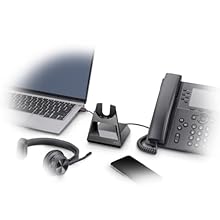
Image: An illustration showing the headset on its charge stand, connected to a laptop and a mobile phone, demonstrating connectivity options.
2. Connecting to PC/Mac via USB-A Bluetooth Adapter (BT700)
- Insert the BT700 USB-A Bluetooth adapter into an available USB port on your computer.
- The adapter's LED will flash red and blue, indicating pairing mode.
- Power on your headset. The headset will automatically attempt to pair with the adapter.
- Once paired, the adapter's LED will turn solid blue. A voice prompt will confirm "PC connected."
- Ensure the Poly Voyager 4310 UC is selected as the default audio device in your computer's sound settings and communication applications (e.g., Microsoft Teams, Zoom).
3. Connecting to Mobile Phone via Bluetooth
- With the headset powered off, press and hold the Power button until the headset's LED flashes red and blue, indicating pairing mode.
- On your mobile phone, navigate to Bluetooth settings and enable Bluetooth.
- Select "Poly V4310 Series" from the list of available devices.
- Once paired, the headset's LED will turn solid blue, and a voice prompt will confirm "Phone connected."
Betjening af headsettet
1. Bære headsettet
Position the headset with the ear cup comfortably over one ear. Adjust the headband for a secure fit. The microphone boom is flexible; position it approximately two finger-widths from the corner of your mouth for optimal voice pickup.

Image: A man wearing the Poly Voyager 4310 UC headset, demonstrating proper wearing style and microphone positioning.
2. Opkaldsstyring
- Besvar/afslut opkald: Press the Call Control button (usually located on the ear cup).
- Slå lyden fra/til: Press the dedicated Mute button on the microphone boom. A voice prompt will confirm "Mute on" or "Mute off."
- Lydstyrkekontrol: Use the Volume Up (+) and Volume Down (-) buttons on the ear cup.
3. Audio Quality and Noise Cancellation
The headset features dual-mic Acoustic Fence technology, designed to minimize background noise for your callers. This technology focuses on your voice, reducing distractions from your surroundings.
4. Trådløs rækkevidde
When connected via the BT700 USB adapter, the headset offers a wireless range of up to 50 meters (164 feet), allowing for mobility during calls. Range may vary based on environment and obstacles.
Opretholdelse
- Rensning: Use a soft, dry cloth to clean the headset and charge stand. Avoid using abrasive cleaners or solvents.
- Opbevaring: When not in use, store the headset on its charge stand or in the provided carrying pouch to protect it from dust and damage.
- Batteripleje: For optimal battery longevity, avoid fully discharging the battery frequently. Charge the headset regularly.
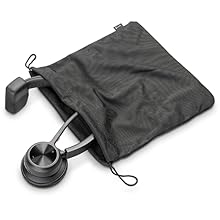
Image: The Poly Voyager 4310 UC headset neatly folded and placed inside its mesh carrying pouch for protection and portability.
Fejlfinding
| Problem | Mulig løsning |
|---|---|
| Headset not pairing with PC/Mac |
|
| Headset not pairing with mobile phone |
|
| Ingen lyd eller dårlig lydkvalitet |
|
| Mikrofon virker ikke |
|
| Kort batterilevetid |
|
Specifikationer
| Feature | Detalje |
|---|---|
| Modelnavn | VOYAGER 4310 UC |
| Forbindelsesteknologi | Bluetooth 5.2, USB |
| Trådløs kommunikation | Bluetooth |
| Hovedtelefonstik | USB |
| Bærestil | Single-ear (On Ear) |
| Mikrofon | Dual-mic with Acoustic Fence technology |
| Wireless Range | Up to 50 meters (164 feet) with BT700 adapter |
| Batterilevetid (taletid) | Op til 24 timer |
| Opladningstid | Cirka 1.5 timer for fuld opladning |
| Kompatible enheder | Laptops, Computers, Mobile Devices |
| Kontroltype | Mediekontrol, trykknap |
| Varens vægt | 122 gram (4.3 ounce) |
| Produktdimensioner | 4.6 x 7.4 x 8.3 tommer |
| Inkluderede komponenter | Headset, Charge Stand, USB-A Bluetooth Adapter (BT700), USB Cable |
Garanti og support
Your Poly Voyager 4310 UC Wireless Headset is covered by a manufacturer's warranty. For specific warranty details, registration, and technical support, please refer to the official Poly webwebstedet eller kontakt deres kundeservice. Gem din købsbevis til garantikrav.
Online support: Visit the official Poly support page for FAQs, software downloads, and contact information.


