Indledning
The BYTECH 3-in-1 Charging Cable (Model BYOPCA103BK) is a versatile USB cable designed for charging and syncing a wide range of electronic devices. It features a standard USB Type-A connector on one end and a multi-connector head on the other, providing Lightning, USB Type-C, and Micro USB compatibility. This cable offers a convenient solution for users with multiple device types, ensuring high-speed charging and data transfer.
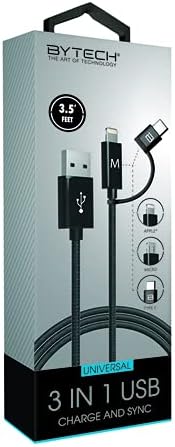
Image: The BYTECH 3-in-1 Charging Cable, showcasing its universal compatibility with various device types.
Opsætning og tilslutning
Using the BYTECH 3-in-1 Charging Cable is straightforward. Follow these steps to connect your devices:
- Identify the USB-A End: Locate the standard USB Type-A connector. This end typically connects to a power adapter (wall charger), a computer's USB port, or a power bank.
- Connect to Power Source/Computer: Insert the USB Type-A end firmly into a compatible USB port on your charging device or computer.
- Select the Appropriate Device Connector: The other end of the cable features three integrated connectors:
- Lyn: For Apple iPhone, iPad, and iPod devices.
- USB Type-C: For newer Android smartphones, tablets, laptops, and other USB-C enabled devices.
- Micro USB: For older Android smartphones, tablets, power banks, and various other electronic gadgets.
- Opret forbindelse til din enhed: Carefully insert the chosen connector into the charging/data port of your electronic device. Ensure it is inserted correctly to avoid damage.
- Bekræft forbindelsen: Your device should indicate that it is charging or connected for data transfer.
Betjeningsvejledning
This cable supports both charging and data synchronization, depending on the connected device and power source.
Opladning
- Connect the USB-A end to a compatible USB wall adapter, car charger, or power bank.
- Connect the appropriate device connector (Lightning, USB-C, or Micro USB) to your smartphone, tablet, or other compatible device.
- The cable is designed for high-speed charging, ensuring efficient power delivery to your device.
Datasynkronisering
- Connect the USB-A end to a USB port on your computer (PC or Mac).
- Connect the appropriate device connector to your smartphone or tablet.
- Your computer should recognize the connected device, allowing you to transfer files, photos, videos, and other data. Follow your device's specific instructions for data transfer.
Vedligeholdelse og pleje
To ensure the longevity and optimal performance of your BYTECH 3-in-1 Charging Cable, please follow these maintenance guidelines:
- Undgå at bøje: Do not excessively bend or crimp the cable, especially near the connectors, as this can damage internal wires.
- Korrekt afbrydelse: Træk altid i stikket, ikke i selve kablet, når du frakobler en enhed eller strømkilde.
- Hold tør: Protect the cable from moisture and liquids. Do not use it in wet environments.
- Rengør forsigtigt: If necessary, wipe the cable and connectors with a soft, dry cloth. Avoid using harsh chemicals or abrasive materials.
- Opbevaring: Store the cable in a cool, dry place, away from direct sunlight and extreme temperatures. Coiling it loosely can prevent tangles and damage.
- Inspicer regelmæssigt: Periodically check the cable and connectors for any signs of wear, fraying, or damage. Discontinue use if damage is observed.
Fejlfinding
If you encounter issues with your BYTECH 3-in-1 Charging Cable, try the following solutions:
- Enheden oplades ikke:
- Sørg for, at begge ender af kablet er forsvarligt forbundet.
- Prøv en anden strømadapter eller USB-port.
- Test the cable with a different device to rule out a device-specific issue.
- Check if the correct connector (Lightning, USB-C, Micro USB) is being used for your device.
- Langsom opladning:
- Ensure your power adapter provides sufficient output (e.g., 5V/2A or higher for faster charging).
- Avoid using the device heavily while charging.
- Close background applications on your device.
- Problemer med dataoverførsel:
- Ensure the USB-A end is connected to a computer's data-enabled USB port, not just a charging port.
- Check your device's settings to ensure it's set to "File Transfer" or "MTP" mode, not just "Charging."
- Try restarting both your device and computer.
- Kabelskade: If the cable appears frayed, bent, or damaged, discontinue use immediately and replace it.
Specifikationer
| Feature | Detalje |
|---|---|
| Mærke | Bytech |
| Modelnavn | 3 i 1 |
| Varemodelnummer | BYOPCA103BK |
| Connector Type | USB Type-A, USB Type-C, Lightning |
| Kabeltype | USB |
| Kompatible enheder | Laptop, personlig computer, tablet, smartphone |
| Speciel funktion | Høj hastighed |
| Anbefalede anvendelser | Opladning af elektroniske enheder |
| Farve | Sort |
| Connector Køn | Mand til Mand |
| Form | Flad |
| Antal pins | 8 |
| Indendørs/Udendørs brug | Indendørs |
| Antal genstande | 1 |
| Kundepakketype | coiled in protective tubing |
| Maksimal voltage | 5 volt |
| Ydermateriale | Plast/gummi |
| Fabrikant | BYTECH |
| UPC | 805112034765 |
| Pakkedimensioner | 7 x 5 x 3 tommer |
| Varens vægt | 1 pund |
| ASIN | B09BBK4X64 |
| Dato først tilgængelig | 27. juli 2021 |
Garanti og support
For warranty information or technical support regarding your BYTECH 3-in-1 Charging Cable, please refer to the manufacturer's official webwebstedet eller kontakt deres kundeserviceafdeling. Gem din købskvittering som købsbevis i tilfælde af garantikrav.
Manufacturer: BYTECH
For yderligere hjælp, besøg www.bytechintl.com (eksample link, actual link not provided in input).


