1. Introduktion
This manual provides comprehensive instructions for the safe and efficient use of your AKAI HA-TS50 50W Bluetooth Tower Speaker. Please read this manual thoroughly before operating the device and retain it for future reference.
2. Produktet er slutview
The AKAI HA-TS50 is a 50W Bluetooth Tower Speaker designed to deliver a rich audio experience. It features a wooden cabinet, a subwoofer, echo sound control, and multiple connectivity options.
2.1. Inkluderede komponenter
- 1N Main unit (AKAI HA-TS50 Tower Speaker)
- 1N fjernbetjening
- 1N Brugermanual/Garantikort
- 1N lydkabel
2.2. Nøglefunktioner
- Bluetooth 5.0-forbindelse: Offers stable wireless audio streaming up to 10 meters.
- 50 Watt RMS Audio Output: Delivers powerful sound with deep bass.
- Højttalerkonfiguration: Equipped with a 5.25" woofer and dual 4"x2 speakers.
- Fjernbetjening: Full-function infrared remote for convenient operation.
- Karaoke-support: Built-in microphone jack for karaoke functionality.
- Flere tilslutningsmuligheder: Supports Bluetooth, USB, AUX, and MIC inputs.
- FM-radio: Integrated FM radio for listening to your favorite stations.
- LED display: Modern LED display for mode, track, and volume status.
- Holdbart design: Stylish floor-standing wooden cabinet.

Dette billede viser forsiden view of the AKAI HA-TS50 Tower Speaker, showcasing its sleek black design, speaker grilles, control panel with LED display, and the included remote control.
Denne video giver et generelt overblikview of the AKAI HA-TS50 Tower Speaker, highlighting its design, sound capabilities, and various features.
3. Opsætning
Follow these steps to set up your AKAI HA-TS50 Tower Speaker:
- Udpakning: Fjern forsigtigt alle komponenter fra emballagen. Sørg for, at alle medfølgende dele er til stede.
- Placering: Place the speaker on a stable, flat surface. Ensure adequate ventilation around the unit.
- Strømtilslutning: Connect the AC power cord to the speaker's power input and then to a standard 220~240V / 50-60Hz AC power outlet.
- Første gang tændt: Switch on the power using the main power switch located at the rear of the speaker. The LED display on the front panel will illuminate.
- Lydforbindelser (valgfrit):
- AUX-indgang: To connect external audio devices (e.g., TV, PC, DVD player) using the provided audio cable, plug one end into the device's audio output and the other into the AUX input jacks (RCA L/R) on the rear of the speaker.
- Mikrofonindgang: For karaoke, connect a wired microphone to the MIC input jack on the rear panel.

This image illustrates the simple setup process for the AKAI HA-TS50 speaker, highlighting its power requirements (220-240V AC) and compact dimensions (63cm height, 15cm width, 27cm depth).
4. Betjeningsvejledning
4.1. Kontrolpanel og fjernbetjening
The speaker can be operated using the control panel on the front or the included remote control. The remote control offers full functionality from a distance of 8-10 meters.
- Power knap: Tænder eller slukker for højttaleren.
- Mode knap: Cycles through input modes (Bluetooth, USB, AUX, FM).
- Basknap: Justerer basniveauet.
- Lydstyrkeknap: Justerer masterlydstyrken.
- PREV/NEXT Buttons: Skips tracks in USB/Bluetooth mode or tunes FM stations.
- PLAY/PAUSE/SCAN Button: Plays/pauses audio, or initiates FM auto-scan.
4.2. Bluetooth-tilstand
- Tænd for højttaleren.
- Tryk på MODE button until "BT" appears on the LED display.
- On your Bluetooth-enabled device (smartphone, tablet, laptop), search for available Bluetooth devices.
- Select "AKAI HA-TS50" from the list to pair.
- Once paired, you can stream audio wirelessly. Adjust volume from both your device and the speaker.
4.3. USB-afspilning
- Insert a USB flash drive into the USB slot on the front panel.
- The speaker will automatically switch to USB mode and begin playing compatible audio files (MP3, WAV). If not, press the MODE -knappen for at vælge USB.
- Brug FORRIGE NÆSTE knapper til at navigere i spor og AFSPIL/PAUSE knap til afspilningskontrol.
4.4. AUX -indgang
- Connect your external audio device to the AUX input jacks on the rear panel using the audio cable.
- Tryk på MODE button until "AUX" appears on the LED display.
- Play audio from your connected device. Adjust volume using both the device and the speaker.
4.5. FM Radio
- Tryk på MODE button until "FM" appears on the LED display.
- For at automatisk scanne og gemme tilgængelige stationer skal du trykke på og holde AFSPIL/PAUSE/SCAN knappen. Højttaleren vil automatisk scanne og gemme stationer.
- Brug FORRIGE NÆSTE buttons to switch between saved FM stations.
4.6. Karaoke-funktion
- Connect a wired microphone to the MIC input jack on the rear panel.
- Ensure an audio source (Bluetooth, USB, AUX) is playing.
- Adjust the microphone volume and echo effect using the dedicated controls on the speaker (if available) or the remote.
This video demonstrates the various features and connectivity options of the AKAI HA-TS50 Tower Speaker, including its control panel, USB slot, and remote control functionality. It also shows the speaker being used for karaoke and connected to a television.
5. Vedligeholdelse
- Rensning: Brug en blød, tør klud til at rengøre højttalerens yderside. Brug ikke slibende rengøringsmidler, voks eller opløsningsmidler.
- Ventilation: Sørg for, at højttalerens ventilationsåbninger ikke er blokerede for at forhindre overophedning.
- Strømledning: Kontrollér regelmæssigt strømkablet for skader. Kontakt autoriseret servicepersonale, hvis det er beskadiget.
- Opbevaring: When not in use for extended periods, unplug the speaker and store it in a cool, dry place.
6. Fejlfinding
| Problem | Mulig årsag | Løsning |
|---|---|---|
| Ingen strøm | Netledning ikke tilsluttet; Strømafbryder slukket; Strømstik defekt. | Ensure power cord is securely connected. Turn on the power switch. Test the outlet with another device. |
| Ingen lyd | Volume too low; Incorrect input mode; Audio cable loose/damaged; Device volume low. | Increase speaker volume. Select correct input mode. Check audio cable connections. Increase volume on connected device. |
| Bluetooth-parringsfejl | Speaker not in BT mode; Device too far; Interference; Speaker already paired. | Ensure speaker is in BT mode. Move device closer. Turn off other Bluetooth devices. Disconnect from previous device. |
| USB afspilles ikke | USB-drev er ikke isat korrekt; Inkompatibelt file format; USB drive faulty. | Reinsert USB drive. Ensure files are MP3/WAV. Try a different USB drive. |
7. Specifikationer
| Feature | Detalje |
|---|---|
| Modelnavn | HA-TS50 |
| Udgangseffekt (RMS) | 50 watt |
| Højttaler type | Subwoofer, Tower |
| Subwoofer diameter | 5.25 tommer |
| Størrelse på satellithøjttaler | 4 Inches x 2 |
| Trådløs teknologi | Bluetooth 5.0 |
| Tilslutningsmuligheder | Bluetooth, USB, AUX, MIC |
| Kontrolmetode | Fjernbetjening, Betjening på enheden |
| Strømkilde | AC 220~240V / 50-60Hz |
| Produktmål (D x B x H) | 27D x 15B x 64.6H Centimeter |
| Varens vægt | 6 kilo |
| Materiale | Træ |
| Frekvensrespons | 20 KHz |
| Lydudgangstilstand | Stereoanlæg |
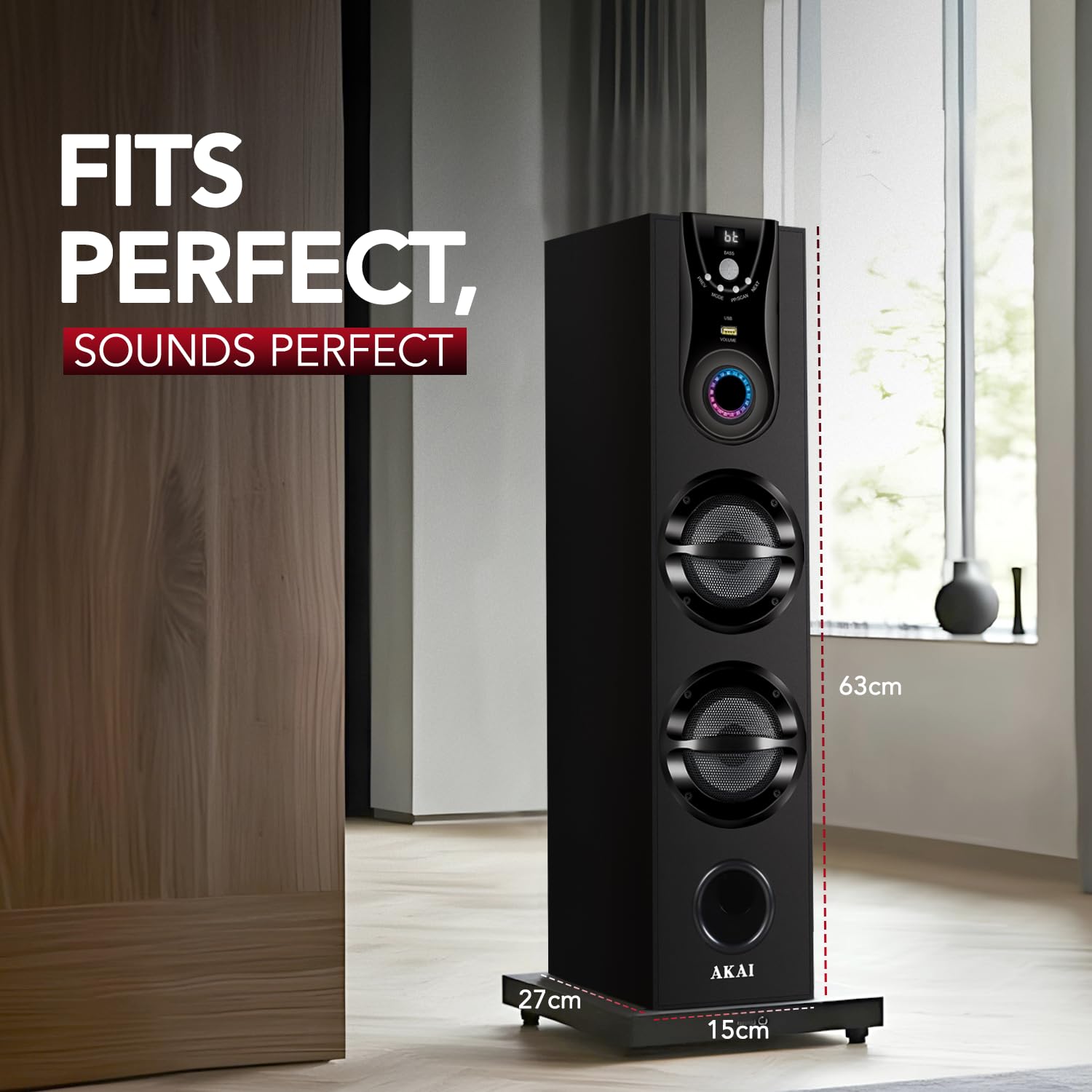
This image provides a visual representation of the AKAI HA-TS50 speaker's physical dimensions, indicating its height, width, and depth for proper placement consideration.
8. Garanti og support
Your AKAI HA-TS50 Tower Speaker comes with a 1 års begrænset garanti fra købsdatoen. Denne garanti dækker fabrikationsfejl og udførelse under normal brug.
For warranty claims, technical support, or service inquiries, please refer to the contact information provided on your warranty card or visit the official AKAI India webwebsted.
Servicecentre: AKAI offers over 500 service centers across India. For specific service center locations, please contact AKAI customer support.
- E-mail: esales@akaiindia.in
- Gratisnumre: +91 85448 40022, +91 85448 40033
This image displays a map of India with markers indicating the presence of over 500 AKAI service centers, along with contact details for support.


