1. Introduktion
Thank you for choosing the Moukey MTs8-2 Portable PA System. This manual provides essential information for the safe and efficient operation of your device. Please read it thoroughly before use and retain it for future reference. The MTs8-2 is a versatile portable speaker system designed for various applications, including parties, karaoke, lectures, and outdoor events, featuring an 8-inch subwoofer, 1-inch tweeter, wireless microphone, and multiple connectivity options.
2. Vigtige sikkerhedsoplysninger
- Strømkilde: Brug kun den angivne strømadapter. Sørg for, at lydstyrkentage is compatible before connecting.
- Vand og fugt: Do not expose the unit to rain or moisture. Keep liquids away from the device.
- Ventilation: Bloker ikke ventilationsåbningerne. Sørg for tilstrækkelig luftgennemstrømning omkring enheden.
- Varme: Hold enheden væk fra varmekilder såsom radiatorer, varmeregistreringsapparater, komfurer eller andre apparater, der producerer varme.
- Rensning: Afbryd strømmen før rengøring. Brug en tør, blød klud. Brug ikke flydende rengøringsmidler eller aerosoler.
- Service: Forsøg ikke selv at servicere dette produkt. Overlad al service til kvalificeret servicepersonale.
- Placering: Placer enheden på en stabil, plan overflade for at forhindre den i at falde.
- Børn: Opbevares utilgængeligt for børn. Små dele kan udgøre en kvælningsfare.
3. Pakkens indhold
Kontroller venligst, at alle nedenstående varer er inkluderet i din pakke:
- Moukey MTs8-2 Portable PA System
- Trådløs mikrofon
- Fjernbetjening
- Strømadapter
- Brugervejledning (dette dokument)

Image: Moukey MTs8-2 speaker, wireless microphone, and remote control.
4. Produktet er slutview
4.1 Hovedfunktioner
- 80-watt 8-inch subwoofer and 1-inch tweeter for omni-directional stereo sound.
- Built-in Bluetooth 5.0 for wireless audio streaming.
- TWS (True Wireless Stereo) function for connecting two MTs8-2 units.
- Supports USB, TF-card, AUX input, and FM radio.
- Integrated recording function.
- Portable design with pull rod and wheels for easy transport.
- Genopladeligt batteri til længerevarende brug.
- Includes wireless microphone and remote control.
4.2 Kontrolpanel og tilslutninger
Gør dig bekendt med kontrolpanelet for optimal betjening.

Image: Detailed diagram of the MTs8-2 control panel, highlighting various inputs and controls.
- MIKROFON IND: 6.35 mm indgang til kablet mikrofon.
- EKKO: Rotary knob to adjust microphone echo effect.
- M.VOL: Rotary knob to adjust microphone volume.
- LINJE IND: 3.5 mm AUX-indgang til eksterne lydenheder.
- TF: Slot for Micro TF-card playback.
- USB: Port for USB flash drive playback.
- POWER/Volume: Rotary knob to turn the unit ON/OFF and adjust master volume.
- DC 9V IN: Power input for charging and operating the unit.
- LED display: Shows current mode, track information, and battery status.
- Mode knap: Switches between Bluetooth, FM, AUX, USB, and TF modes.
- Afspil/pause/TWS-knap: Controls playback; long press for TWS pairing.
- Knapper til forrige/næste spor: Navigates tracks in media playback modes.
- REC-knap: Starter optagefunktionen.
5. Opsætning
5.1 Opladning af højttaleren
- Connect the provided power adapter to the "DC 9V IN" port on the speaker.
- Sæt adapteren i en almindelig stikkontakt.
- The LED display will indicate charging status. Allow several hours for a full charge before first use.
5.2 Opsætning af trådløs mikrofon
The included wireless microphone is pre-paired with the speaker. Simply insert batteries (not included) into the microphone and power it on. It should automatically connect to the speaker.
5.3 Indledende tænding
Rotate the "POWER/Volume" knob clockwise to turn on the speaker. The LED display will light up, indicating the current mode.
6. Betjeningsvejledning
6.1 Tænd/sluk og lydstyrkekontrol
- To power on, rotate the "POWER/Volume" knob clockwise.
- To power off, rotate the "POWER/Volume" knob counter-clockwise until it clicks.
- Adjust the master volume by rotating the "POWER/Volume" knob.
6.2 Valg af tilstand
Press the "Mode" button on the control panel or remote control to cycle through available modes: Bluetooth, FM Radio, AUX, USB, and TF Card.
6.3 Bluetooth -parring
- Turn on the speaker and switch to Bluetooth mode (the LED display will show "BLUE").
- Enable Bluetooth on your device (smartphone, tablet, etc.) and search for "MTs8-2".
- Select "MTs8-2" from the list of available devices to pair. A confirmation sound will indicate successful pairing.
- Du kan nu streame lyd trådløst fra din enhed til højttaleren.

Image: Visual representation of a successful Bluetooth connection between a smartphone and the MTs8-2 speaker.
6.4 TWS (ægte trådløs stereo) funktion
The TWS function allows you to connect two MTs8-2 speakers wirelessly for a stereo sound experience.
- Ensure both MTs8-2 speakers are powered on and in Bluetooth mode, without being connected to any other device.
- On one of the speakers, long-press the "Play/Pause/TWS" button. You will hear a prompt indicating TWS pairing mode.
- The two speakers will automatically search and connect to each other. A confirmation sound will indicate successful TWS pairing.
- Once paired, connect your Bluetooth device to one of the MTs8-2 speakers as described in Section 6.3. Audio will now play through both speakers in stereo.
6.5 USB/TF-kortafspilning
- Indsæt et USB-flashdrev eller TF-kort (op til 32 GB) med MP3-lyd files ind i den respektive port/slot.
- The speaker will automatically switch to USB or TF mode and begin playback. If not, press the "Mode" button to select the correct mode.
- Brug knapperne "Afspil/Pause", "Forrige" og "Næste" til at styre afspilningen.
6.6 AUX-indgang
- Connect an external audio device (e.g., MP3 player, laptop) to the "LINE IN" port using a 3.5mm audio cable (not included).
- Press the "Mode" button to select AUX mode.
- Styr afspilning og lydstyrke fra din tilsluttede enhed.
6.7 FM radio
- Press the "Mode" button to select FM Radio mode.
- Long-press the "Play/Pause" button to automatically scan and save available FM stations.
- Brug knapperne "Forrige" og "Næste" til at navigere gennem gemte stationer.
6.8 Brug og optagelse af mikrofon
- Trådløs mikrofon: Ensure the wireless microphone is powered on and connected. Adjust its volume using the "M.VOL" knob and echo effect using the "ECHO" knob.
- Kablet mikrofon: Connect a wired microphone (not included) to the "MIC IN" port. Adjust its volume and echo as above.
- Indspilning: Insert a USB flash drive or TF card. Press the "REC" button to start recording microphone input. Press "REC" again to stop recording. Recorded files will be saved to the USB drive/TF card.
7. Vedligeholdelse
- Rensning: Disconnect the speaker from the power source before cleaning. Use a soft, dry cloth to wipe the exterior. Do not use abrasive cleaners, waxes, or solvents.
- Opbevaring: Når højttaleren ikke er i brug i længere perioder, skal den opbevares køligt og tørt, væk fra direkte sollys og ekstreme temperaturer.
- Batteripleje: To prolong battery life, avoid fully discharging the battery frequently. Charge the unit regularly, even if not in use, to maintain battery health.
- Transport: Utilize the integrated pull rod and wheels for easy transportation. Avoid dropping or subjecting the unit to strong impacts.

Image: The MTs8-2 speaker being transported using its built-in handle and wheels, demonstrating its portability.
8. Fejlfinding
| Problem | Mulig årsag | Løsning |
|---|---|---|
| Ingen strøm | Batteriet er fladt; Strømadapteren er ikke tilsluttet eller defekt. | Charge the speaker using the provided power adapter. Ensure the adapter is securely connected to both the speaker and a working power outlet. |
| Ingen lyd | Volume too low; Incorrect mode selected; Device not paired (Bluetooth); Cable not connected (AUX). | Increase the master volume. Ensure the correct input mode is selected. Re-pair your Bluetooth device. Check AUX cable connection. |
| Bluetooth forbinder ikke | Speaker not in Bluetooth mode; Device too far; Interference; Speaker already connected to another device. | Ensure speaker is in Bluetooth mode. Move device closer to speaker. Disconnect from other Bluetooth devices. Try restarting both speaker and device. |
| Mikrofon virker ikke | Microphone not powered on; Batteries depleted (wireless mic); Mic volume too low; Incorrect input. | Ensure microphone is powered on and has fresh batteries. Increase "M.VOL" knob. Check if wired mic is securely plugged into "MIC IN". |
| TWS-parring mislykkedes | Speakers already connected to other devices; Not in Bluetooth mode. | Ensure both speakers are in Bluetooth mode and not connected to any other device. Try repeating the TWS pairing process. |
9. Specifikationer
| Feature | Detalje |
|---|---|
| Model | MTs8-2 |
| Udgangseffekt | 80 watt |
| Højttalerkonfiguration | 8-inch Subwoofer, 1-inch Tweeter |
| Forbindelse | Bluetooth 5.0, AUX (3.5mm), USB, TF Card, FM Radio |
| Mikrofonindgang | 6.35mm (for wired mic), Wireless Microphone support |
| TWS-funktion | Ja |
| Optagefunktion | Ja |
| Strømkilde | Battery Powered (Rechargeable), DC 9V In |
| Materiale | Plast |
| Dimensioner (L x B x H) | 28.5 x 23.5 x 48 cm (11.2 x 9.25 x 18.9 tommer) |
| Vægt | 4.3 kg (9.5 lbs) |
| Farve | Sort |
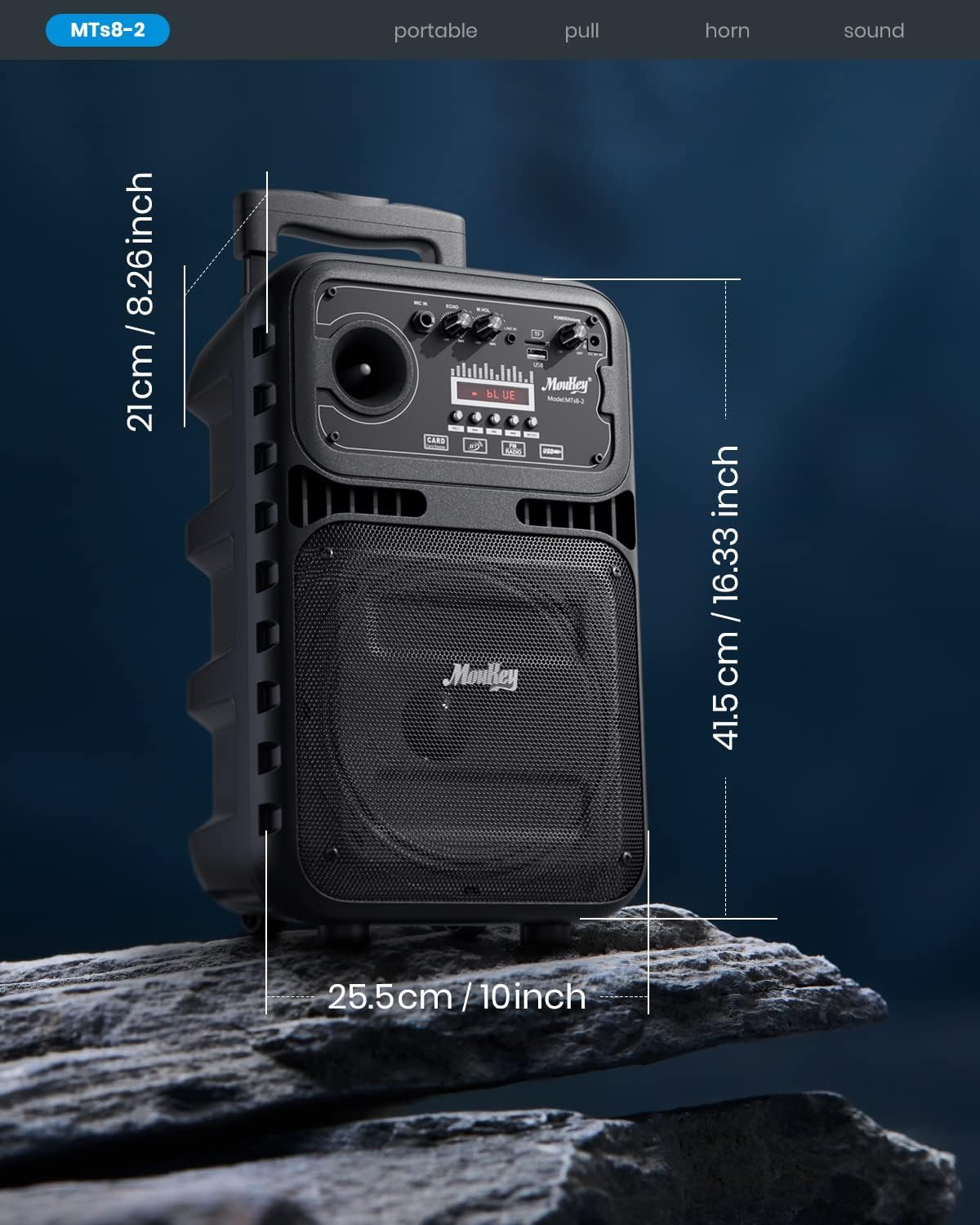
Image: Dimensions of the Moukey MTs8-2 Portable PA System.

Image: Internal components of the speaker, highlighting the 8-inch subwoofer and 1-inch tweeter.
10. Garanti og support
Moukey products are designed and manufactured to the highest quality standards. For warranty information, technical support, or customer service inquiries, please refer to the warranty card included with your product or visit the official Moukey webwebsted. Gem venligst din købsbevis til garantikrav.
Online support: For yderligere ressourcer og ofte stillede spørgsmål, besøg venligst Moukey-butik på Amazon.


