Indledning
This manual provides detailed instructions for the safe and efficient use of your iHome XT-45 True Wireless Earbuds. Please read this manual thoroughly before operating the device and retain it for future reference.
The iHome XT-45 True Wireless Earbuds offer a seamless audio experience with Bluetooth 5.0 connectivity, intuitive touch controls, and a portable charging case. Designed for comfort and convenience, these earbuds are suitable for various activities, including travel.

Figure 1: iHome XT-45 True Wireless Earbuds and Charging Case
The image displays the iHome XT-45 True Wireless Earbuds, black in color, resting within their open charging case. The case features a digital display indicating battery levels. The earbuds themselves are compact with a rounded tip design, ready for use.
Hvad er der i æsken
Sørg for, at alle varer er til stede ved udpakning:
- XT-45 ægte trådløse øretelefoner
- Charging Travel Case with Display
- 8 Ear Cushions in 3 Sizes (2 small, 2 large, 4 medium)
- USB Charging Cable (USB-C)
- Instruktionsmanual (dette dokument)
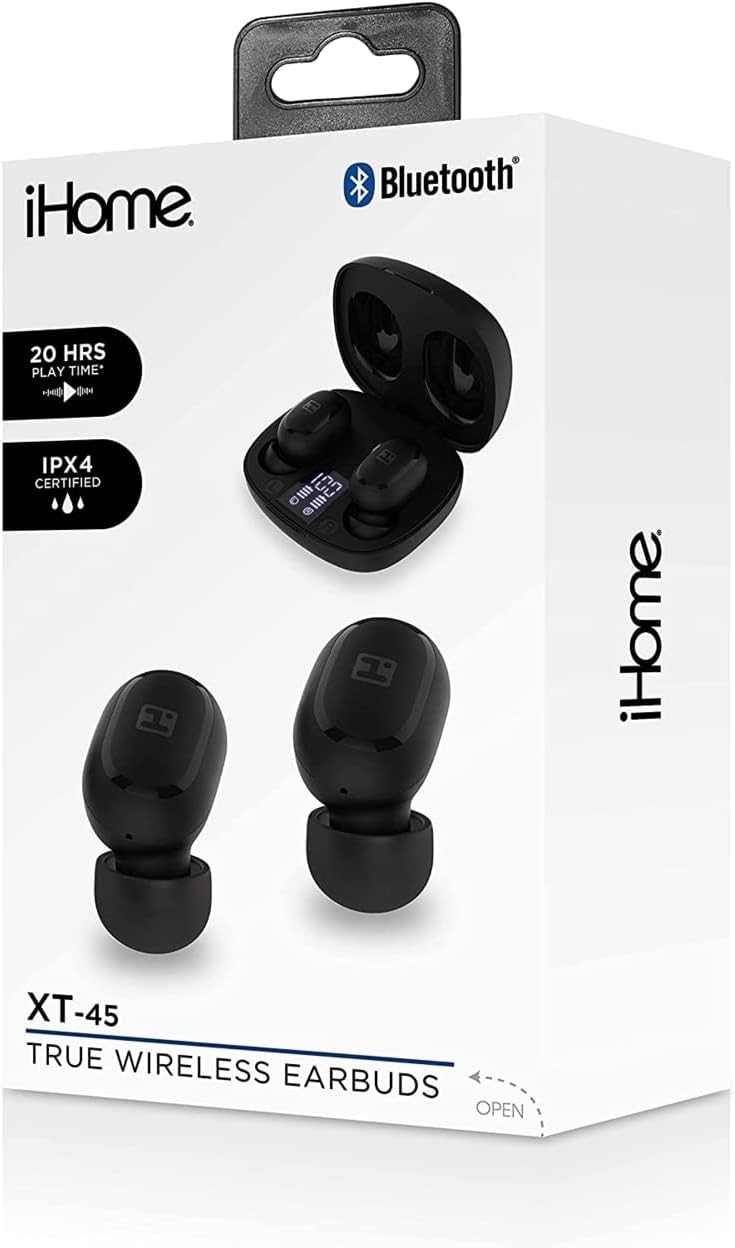
Figure 2: iHome XT-45 Product Packaging
This image shows the retail box for the iHome XT-45 True Wireless Earbuds. The box highlights features such as "20 HRS PLAY TIME" and "IPX4 CERTIFIED", along with a visual of the earbuds and charging case.
Opsætning
1. Opladning af øretelefoner og etuiet
Oplad ørepropperne og opladningsetuiet helt inden første brug.
- Placer ørepropperne i opladningsetuiet. Sørg for, at de er korrekt isat; magnetiske kontakter holder dem på plads.
- Connect the provided USB-C charging cable to the charging port on the case and plug the other end into a USB power source (e.g., computer, wall adapter).
- The case display will show the charging status. A full charge for both the case and earbuds takes approximately 1.5 hours.
- The case battery capacity is 300mAh, and each earbud has a 40mAh battery.
2. Parring med en Bluetooth-enhed
The iHome XT-45 earbuds use Bluetooth 5.0 for stable connectivity up to 33 feet.
- Åbn opladningsetuiet. Ørepropperne går automatisk i parringstilstand.
- Gå til Bluetooth-indstillingerne på din enhed (smartphone, tablet, bærbar computer).
- Søg efter tilgængelige enheder, og vælg "iHome XT-45" fra listen.
- Når forbindelsen er oprettet, vil din enhed indikere, at parringen er gennemført.
- Ørepropperne genopretter automatisk forbindelse til den sidst parrede enhed, når de tages ud af etuiet, hvis Bluetooth er aktiveret på enheden.
3. Tilpasning af ørepropperne
Proper fit is crucial for sound quality and comfort. The package includes 8 ear cushions in 3 sizes (small, medium, large).
- Select the ear cushion size that provides a snug and comfortable seal in your ear canal.
- Gently insert each earbud into your ear, twisting slightly until it feels secure.
- Adjust as needed to ensure the best audio experience and to prevent them from falling out during movement.

Figure 3: Earbud Placement
This close-up image illustrates an iHome XT-45 earbud, black in color, properly seated within the ear canal. The earbud's design is shown to fit snugly, ensuring optimal sound delivery and comfort.
Betjeningsvejledning
The iHome XT-45 earbuds feature intuitive touch controls for various functions.
Tryk på kontrolelementer
- Afspil/pause: Et enkelt tryk på begge øretelefoner.
- Næste nummer: Dobbelttryk på den højre øreprop.
- Forrige nummer: Dobbelttryk på den venstre øreprop.
- Lydstyrke op: Tryk tre gange på den højre øreprop.
- Skrue ned for lyden: Tryk tre gange på den venstre øreprop.
- Besvar/afslut opkald: Enkelt tryk på en af øretelefonerne under et indgående opkald eller et aktivt opkald.
- Afvis opkald: Tryk og hold en af øretelefonerne nede i 2 sekunder under et indgående opkald.
- Aktiver stemmeassistent: Tryk på en af øretelefonerne, og hold den nede i 3 sekunder.
Tænd/sluk
- Tænd: Ørepropperne tændes automatisk, når de tages ud af opladningsetuiet.
- Sluk: The earbuds automatically power off when placed back into the charging case and the lid is closed.

Figur 4: Nøglefunktioner ovenforview
This graphic provides a summary of the iHome XT-45 True Wireless Earbuds' main features. It highlights "EXTENDED PLAY TIME" (20 hours), "DEEP RICH SOUND", "BLUETOOTH MIC+CONTROLS", a "RECHARGEABLE CASE" with LED display, and a "STREAMLINED DESIGN" for portability. Package contents and contact information are also listed.
Opretholdelse
To ensure the longevity and optimal performance of your iHome XT-45 earbuds, follow these maintenance guidelines:
- Rensning: Regularly clean the earbuds and charging case with a soft, dry, lint-free cloth. Do not use abrasive cleaners, alcohol, or chemical solvents.
- Ørepuder: Remove and clean the ear cushions periodically. They can be gently washed with mild soap and water, then thoroughly dried before reattaching.
- Opladningskontakter: Sørg for, at opladningskontakterne på både ørepropperne og indersiden af etuiet er rene og fri for snavs for at opretholde korrekt opladning.
- Opbevaring: Når ørepropperne ikke er i brug, skal de opbevares i deres opladningsetui for at beskytte dem mod støv og skader. Opbevares køligt og tørt, væk fra ekstreme temperaturer.
- Vandtæthed: The product is not water resistant. Avoid exposure to water or excessive moisture.
Fejlfinding
If you encounter issues with your iHome XT-45 earbuds, refer to the following common solutions:
- Ørepropper parrer ikke:
- Sørg for, at begge øretelefoner er fuldt opladede.
- Sluk Bluetooth på din enhed, og tænd den derefter igen.
- Forget "iHome XT-45" from your device's Bluetooth list and attempt to pair again.
- Sæt ørepropperne tilbage i etuiet, luk låget, vent et par sekunder, og åbn dem derefter for at genstarte parringstilstand.
- Kun én øreprop virker:
- Sørg for, at begge øretelefoner er opladet.
- Place both earbuds back in the charging case, close the lid, and then remove them simultaneously. This often re-syncs them.
- Try resetting the earbuds (refer to the full manual if a specific reset procedure is available, otherwise, the above steps usually suffice).
- Øretelefoner oplader ikke:
- Kontroller USB-C-kablet og strømadapteren for skader.
- Ensure the charging contacts on the earbuds and case are clean and free of obstructions.
- Verify the charging case itself has power (check its display).
- Poor sound quality or low volume:
- Juster lydstyrken på både din enhed og ved hjælp af øreproppens berøringsknapper.
- Ensure the ear cushions provide a good seal in your ear. Try different sizes.
- Clean the earbud speaker grilles.
- Move closer to your paired device to avoid interference or exceeding the 33-foot range.
Specifikationer
| Modelnavn | HM-AU-BE-206-BK |
| Bluetooth version | 5.0 |
| Arbejdsafstand | Op til 33 fod (10 meter) |
| Højttaler størrelse | 6 mm |
| Frekvensrespons | 20Hz - 20kHz |
| Følsomhed | -90dB |
| Øretelefonbatteri | 2 x 40mAh |
| Taskebatteri | 300mAh |
| Earbuds Charge Time | 1.5 timer |
| Sagsbehandlingstid | 1.5 timer |
| Spilletid for øretelefoner | Op til 4 timer (ved medium volumen) |
| Opladningsstik | USB-C |
| Kontroltype | Touch-kontrol, lydstyrkekontrol |
| Mikrofon | Built-in Microphone Included |
| Vandmodstandsniveau | Ikke vandafvisende |
| Dimensioner (pakke) | 7.17 x 3.74 x 2.05 tommer |
| Varens vægt | 7 ounce (0.2 kilo) |
Produkt overview Video
Video 1: iHome XT-45 True Wireless Earbuds Overview
Denne video giver et visuelt overblikview of the iHome XT-45 True Wireless Earbuds. It showcases the earbuds and their charging case, highlighting key features such as Bluetooth 5.0, touch controls, USB-C charging, and the included ear cushions. The video demonstrates the product's design, functionality, and portability, emphasizing its suitability for daily use and travel. It also mentions the working distance, frequency response, speaker size, and sensitivity for clear audio reproduction.
Garanti og support
For warranty information and customer support, please refer to the official iHome webwebstedet eller kontakt deres kundeserviceafdeling. Gem din købsbevis til eventuelle garantikrav.
Manufacturer: iHome
For yderligere hjælp, besøg iHome-butik på Amazon.


