Indledning
This manual provides comprehensive instructions for the FANTECH GP12 Revolver USB Gaming Controller. Please read this manual carefully before using the product to ensure proper operation and to maximize your gaming experience.
Produkt overview
The FANTECH GP12 Revolver is a wired gaming controller designed for an immersive gaming experience on PC and PS3. It features a familiar console-like layout and dual vibration feedback motors.
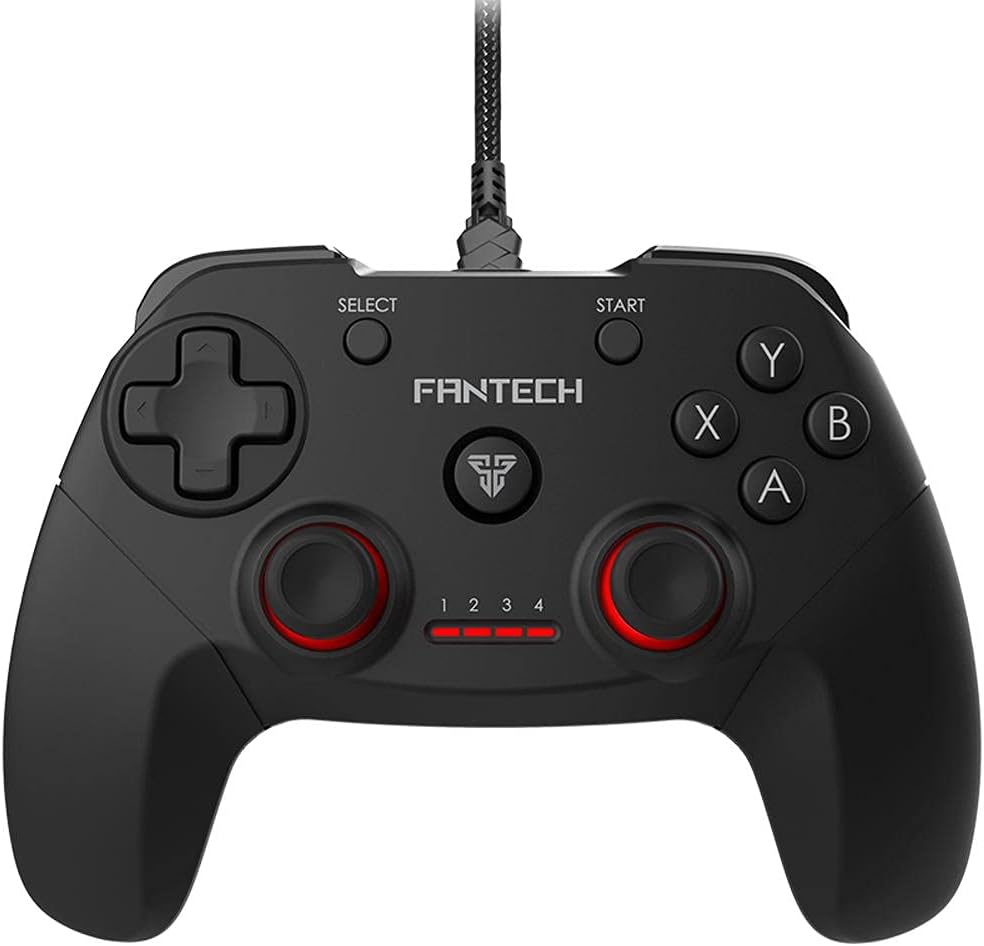
Billede: Forside view of the FANTECH GP12 Revolver USB Gaming Controller, showcasing dens ergonomiske design og knaplayout.
Nøglefunktioner:
- Familiar Console-Like Layout: Designed for intuitive control, allowing users to pick up and play without a steep learning curve. The controller's shape and button placement mimic traditional console gamepads.
- Dual Vibration Feedback Motors: Provides tactile feedback for in-game actions, enhancing immersion with every hit, crash, and explosion. The motors are strategically placed to deliver realistic sensations.
- Wide Game Compatibility: Compatible with thousands of games on PC and PS3, offering full control across various genres. Simply plug and play to enjoy your favorite titles.
- Ergonomisk greb: Crafted for comfortable long-term gaming sessions, reducing hand fatigue.
- 17 Knapper: Comprehensive button layout for versatile control, including action buttons, directional pad, analog sticks, and shoulder buttons.
- Kabelforbindelse: Reliable USB connection with a 1.8-meter cable, ensuring stable and lag-free gameplay.

Image: A user's hands comfortably gripping the FANTECH GP12 Revolver controller, demonstrating its ergonomic design for extended gameplay.

Image: The FANTECH GP12 Revolver controller with visual representations of vibration waves emanating from its sides, illustrating the dual vibration feedback feature.

Image: A person using the FANTECH GP12 Revolver controller while gaming on a PC setup, highlighting its compatibility with various gaming platforms.
Opsætning
Tilslutning af controlleren:
- Locate an available USB port on your PC or PlayStation 3 console.
- Insert the USB connector of the FANTECH GP12 Revolver controller firmly into the USB port.
- The system will automatically detect and install the necessary drivers. This process may take a few moments.
- Once installed, the controller's indicator lights will illuminate, signifying it is ready for use.
Note: For optimal performance, ensure your operating system (Windows 7, Windows 10, or PS3) is up to date.
Betjeningsvejledning
Grundlæggende kontroller:
The GP12 Revolver features a standard gamepad layout. Familiarize yourself with the button assignments for your specific game.
- Retningstastatur (D-pad): Used for precise directional input, typically for movement or menu navigation.
- Analoge pinde: Provide 360-degree movement and camera control. Pressing them down often activates additional functions (L3/R3).
- Handlingsknapper (A, B, X, Y): Primary interaction buttons for in-game actions such as jumping, attacking, or confirming selections.
- Skulderknapper (L1, R1) og aftrækkere (L2, R2): Located on the top of the controller, used for various actions like aiming, firing, or special abilities.
- START-knap: Bruges typisk til at sætte spil på pause eller til at få adgang til menuer i spillet.
- SELECT -knap: Often used for map access, inventory, or other secondary functions.
Vibrationsfeedback:
The dual vibration motors provide immersive feedback during gameplay. This feature is automatically activated in games that support vibration. You will feel vibrations during impacts, explosions, and other significant in-game events.
Opretholdelse
- Hold controlleren ren ved at tørre den af med en blød, tør klud.
- Undgå at udsætte controlleren for ekstreme temperaturer, fugtighed eller direkte sollys.
- Do not use abrasive cleaners or solvents on the controller.
- Store the controller in a safe place when not in use to prevent damage to the cable or buttons.
Fejlfinding
Controller reagerer ikke:
- Ensure the USB cable is securely connected to both the controller and the device (PC/PS3).
- Prøv at tilslutte controlleren til en anden USB-port.
- Restart your PC or PS3.
- Verify that the game you are playing supports gamepad input.
Vibration virker ikke:
- Confirm that the game you are playing supports vibration feedback.
- Tjek indstillingerne i spillet for at sikre, at vibration er aktiveret.
- Sørg for, at controlleren er korrekt tilsluttet.
Knapper fungerer ikke korrekt:
- Sørg for, at der ikke sidder snavs fast under knapperne.
- Test the controller with another game or on a different device to isolate the issue.
Specifikationer
Detailed technical specifications for the FANTECH GP12 Revolver USB Gaming Controller:

Image: Diagram showing the dimensions (154mm x 113mm x 58mm) and key technical specifications of the FANTECH GP12 Revolver controller.
| Feature | Detalje |
|---|---|
| Mærke | Fantech |
| Model | GP12 Revolver |
| Type | Kablet gamepad |
| Forbindelse | USB |
| Knapper | 17 stk |
| Feedback om vibrationer | Yes (Dual Motors) |
| Kabellængde | 1.8 meter |
| Dimensioner (L x B x H) | 154 x 113 x 58 mm (ca.) |
| Vægt | 170 gram (ca.) |
| Farve | Sort / Grå |
| Kompatible platforme | PC, PlayStation 3 (PS3) |
| Operativsystemer | Windows 7, Windows 10, PS3 |
Garanti & Support
For warranty information and technical support, please refer to the warranty card included with your product or visit the official Fantech webwebsted. Gem din købsbevis til garantikrav.
If you encounter any issues not covered in this manual, please contact Fantech customer support for assistance.


