1. Introduktion
Thank you for choosing the Elitech ETC-3000A Digital All-Purpose Temperature Controller. This device is designed for precise temperature management in various applications, offering reliable cooling, defrosting, and fan control functions. Please read this manual thoroughly before installation and operation to ensure correct usage and optimal performance.
Nøglefunktioner:
- Stable and reliable performance, approved for Electromagnetic Compatibility (EMC) testing.
- Easy and convenient parameter setting via a copy card.
- Limited input value to prevent misoperation.
- Multiple defrosting and fan management options.
- Versatile output functions: cooling, defrosting, and fan control.
2. Sikkerhedsoplysninger
For at sikre sikker drift og forhindre skader på enheden eller personskade, bedes du overholde følgende sikkerhedsforanstaltninger:
- Afbryd strømmen før installation, ledningsføring eller vedligeholdelse.
- Sørg for, at strømforsyningen voltage matches the controller's requirements (110V AC).
- Udsæt ikke controlleren for vand eller for høj luftfugtighed.
- Avoid installing the controller in areas with strong electromagnetic interference.
- Al ledningsføring skal udføres af en kvalificeret elektriker i overensstemmelse med lokale el-forskrifter.
- Do not attempt to repair or modify the controller yourself. Contact qualified service personnel.
3. Produktet er slutview
3.1 Beskrivelse af frontpanelet
The front panel features a digital display for temperature readings and status indicators, along with control buttons for setting parameters.

Figur 3.1: Forside view of the Elitech ETC-3000A Temperature Controller, displaying current temperature and control buttons.

Figure 3.2: Dimensions of the Elitech ETC-3000A Temperature Controller.
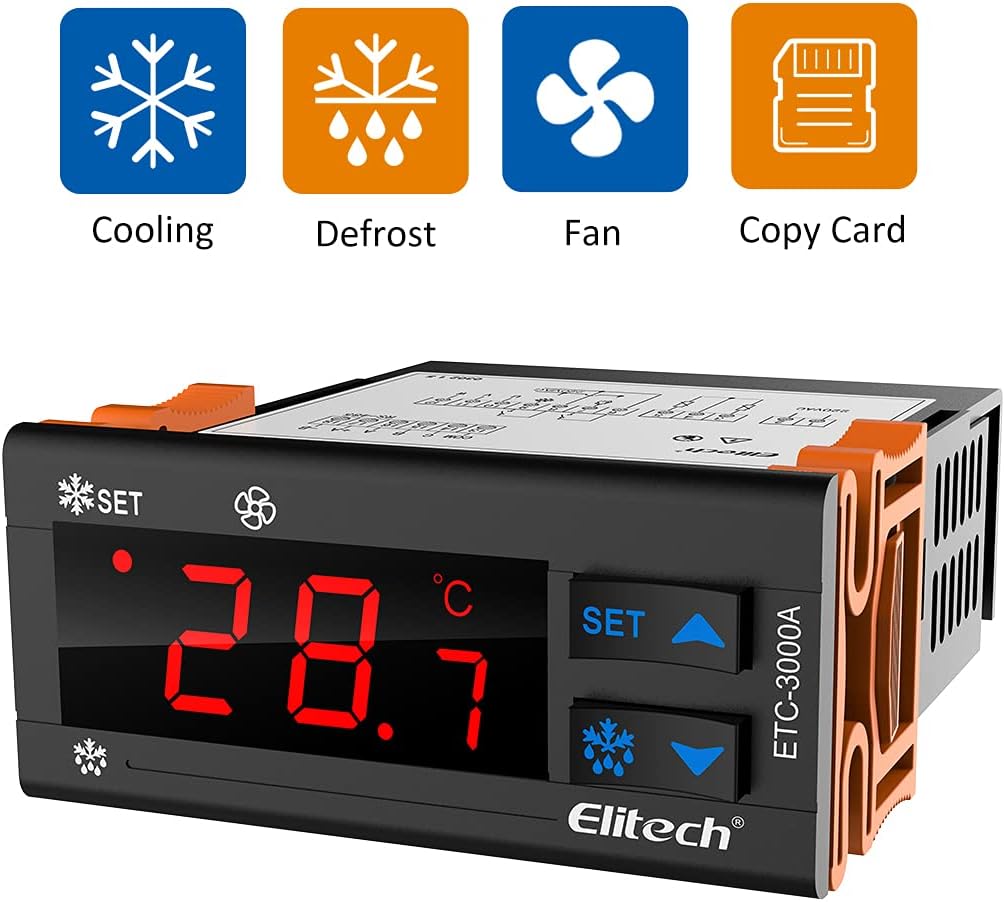
Figure 3.3: Operational icons for Cooling, Defrost, Fan, and Copy Card functions.
3.2 Bagpanel og ledningsterminaler
The rear panel houses the wiring terminals for power input, sensor connections, and output relays for controlling external devices.

Figur 3.4: Bagside view of the controller with wiring terminals and a port for the copy card.
4. Installation
4.1 Montering
The ETC-3000A is designed for panel mounting. Ensure adequate space for ventilation and access to wiring terminals. Cut an opening of appropriate size in the panel and secure the controller using the provided clips or mounting hardware.
4.2 Ledningsdiagram
Refer to the following diagram for correct wiring connections. Incorrect wiring can damage the unit or connected equipment.

Figure 4.1: Detailed wiring diagram for the ETC-3000A controller.
- Terminaler 1-4: Udgangsrelæer til kompressor, afrimning og ventilator.
- Terminaler 5-6: Power input (110V AC).
- Terminaler 7-8: Tilslutning af rumtemperaturføler.
- Terminal 9: Tilslutning af afrimningssonde.
- Kopier nøgleport: For parameter copying.
5. Opsætning og drift
5.1 Tænd
After completing all wiring, apply power to the controller. The display will show the current temperature measured by the room temperature probe.
5.2 Indstilling af temperatur
- Tryk på SÆT button once. The display will flash the current set temperature.
- Brug Up (▲) eller Ned (▼)-knapperne til at justere den ønskede temperatur.
- Tryk på SÆT button again to confirm and save the new setting.
5.3 Parameterkonfiguration
Advanced parameters for cooling differential, defrost cycles, fan operation, and more can be accessed and adjusted through a dedicated menu. Refer to the detailed parameter list in the full technical manual for specific codes and ranges. Parameters can also be set and copied using a copy card for quick configuration across multiple units.
6. Driftstilstande
6.1 Køletilstand
When the measured temperature rises above the set temperature plus the cooling differential, the compressor relay activates to initiate cooling. It deactivates when the temperature drops to the set point.
6.2 Defrosting Mode
The controller supports various defrosting modes (e.g., timed defrost, manual defrost). During defrost, the defrost relay activates, and the compressor typically turns off. The defrost cycle duration and frequency are configurable parameters.
6.3 Ventilatorstyring
The fan output can be configured to operate continuously, only during cooling, or to turn off during defrost cycles, depending on the application requirements.
7. Vedligeholdelse
Regular maintenance ensures the longevity and accurate operation of your temperature controller.
- Rensning: Tør frontpanelet af med en blød, damp klæde. Brug ikke slibende rengøringsmidler eller opløsningsmidler.
- Inspektion: Kontroller regelmæssigt ledningsforbindelserne for tæthed og tegn på slid eller korrosion.
- Sensorkontrol: Ensure temperature probes are clean and securely placed.
8. Fejlfinding
This section addresses common issues you might encounter with the ETC-3000A controller.
| Problem | Mulig årsag | Løsning |
|---|---|---|
| Display shows "HHH" or "LLL" | Temperature probe error (open circuit or short circuit) or out of range. | Check probe connection. Replace probe if damaged. Ensure temperature is within operating range. |
| Controlleren tænder ikke | Ingen strømforsyning eller forkert ledningsføring. | Verify power connection and voltage. Check wiring against diagram. |
| Compressor/Fan not activating | Incorrect temperature settings, parameter errors, or faulty wiring to the load. | Review set temperature and differential. Check relevant parameters. Inspect wiring to compressor/fan. |
| Defrost not initiating | Defrost parameters incorrectly set or defrost probe issue. | Check defrost cycle parameters (duration, interval). Verify defrost probe connection. |
9. Specifikationer
| Model: | ETC-3000A |
| Strømforsyning: | 110V AC |
| Skærmtype: | Digital |
| Driftstemperatur: | 20°C (Note: This is likely an example, actual range depends on probe) |
| Udgangsfunktioner: | Cooling, Defrosting, Fan |
| Batterier påkrævet: | Ingen |
| Farve: | Hvid |
| Fabrikant: | Elitech |
| UPC: | 781454242726 |
Note: The operating temperature of 20°C listed in the specifications is likely a default or example value. The actual measurable temperature range will depend on the specific temperature probe connected to the controller. Please refer to the probe's specifications for its operational range.
10. Garanti og support
Elitech products are manufactured to high-quality standards and are warranted against defects in materials and workmanship. For specific warranty terms and conditions, please refer to the warranty card included with your product or visit the official Elitech webwebsted.
Kundesupport:
For technical assistance, troubleshooting, or service inquiries, please contact Elitech customer support through their official webwebstedet eller kontaktoplysningerne på din produktemballage.


