1. Introduktion
Thank you for choosing the iPega PG-9076 Wireless Bluetooth Gamepad. This versatile controller is designed to provide an immersive gaming experience across multiple platforms. It supports both Bluetooth and 2.4GHz wireless connections, making it compatible with Android smartphones, tablets, Smart TVs, TV boxes, and Windows PCs (XP/7/8/10).
Please read this manual carefully before using the product to ensure proper operation and to maximize your gaming enjoyment.
2. Pakkens indhold
- 1 x iPega PG-9076 Wireless Bluetooth Gamepad
- 1 x USB ladekabel
- 1 x 2.4G trådløs modtager (USB-dongle)
- 1 x brugermanual
3. Produktet er slutview
Familiarize yourself with the layout and functions of your gamepad.

Figur 3.1: Top-down view of the iPega PG-9076 Gamepad. This image displays the directional pad (D-pad) on the left, two analog joysticks, action buttons (A, B, X, Y) on the right, and central function buttons including TURBO, START, SELECT, NEW, iCADE, and ANDROID mode buttons.
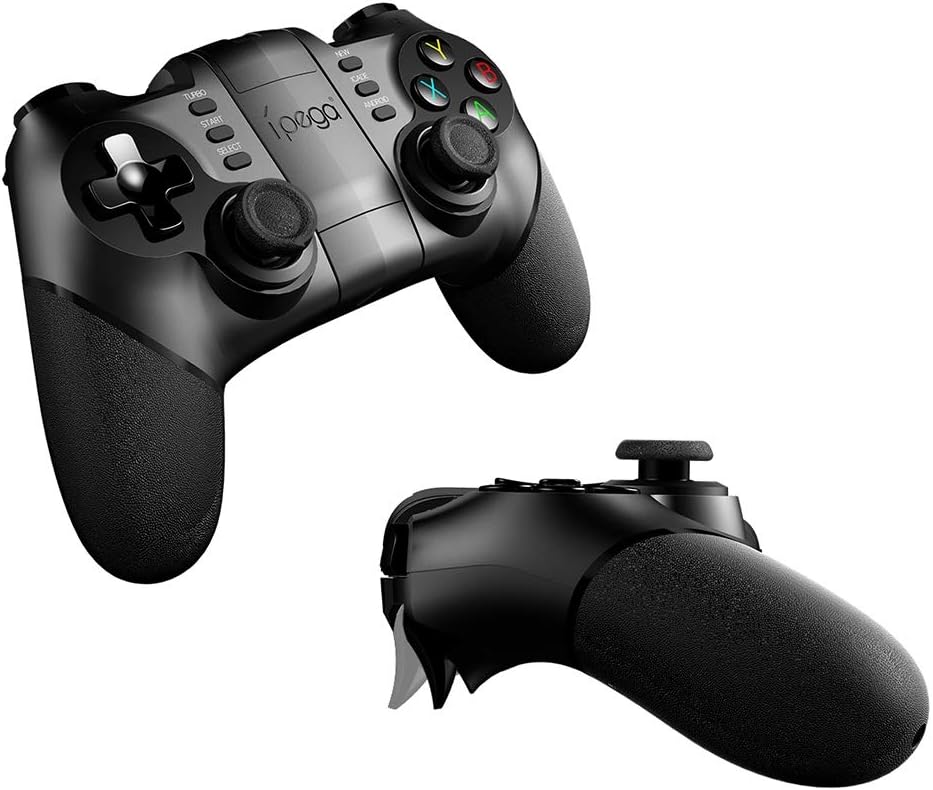
Figur 3.2: Vinklet view of the iPega PG-9076 Gamepad. This perspective emphasizes the ergonomic grips and the overall shape of the controller, designed for comfortable handling during extended gaming sessions.
- D-Pad: Retningspude til præcis bevægelse.
- Venstre/højre analoge pinde: Til 360-graders bevægelse og kamerakontrol.
- Handlingsknapper (A, B, X, Y): Til handlinger i spillet.
- L1/L2/R1/R2 Triggers/Shoulder Buttons: Located on the top of the gamepad.
- START/VÆLG-knapper: Standardknapper til spilstyring.
- TURBO knap: Activates continuous firing for assigned buttons.
- Mode Buttons (NEW, iCADE, ANDROID): Bruges til at skifte mellem forskellige driftstilstande.
- Hjemknappen: Central button for system functions.
- Telefonholder: Integrated adjustable holder for smartphones.
4. Opsætning
4.1. Opladning af gamepad'en
Before first use, fully charge the gamepad. Connect the supplied USB charging cable to the gamepad's charging port and the other end to a USB power source (e.g., computer USB port, USB wall adapter).
- The LED indicator will typically show charging status (e.g., red light on while charging, off when fully charged).
- En fuld opladning tager normalt cirka 2-3 timer.
4.2. Tilslutningstilstande
The PG-9076 supports multiple connection modes for various devices.
4.2.1. Bluetooth Connection (for Android/iOS/Smart TV/TV Box)
- Sørg for, at gamepad'en er slukket.
- Tryk og hold på ANDROID button (or relevant mode button for your device, e.g., iCADE for iOS if supported) and the HJEM button simultaneously until the LED indicator flashes rapidly. This puts the gamepad into pairing mode.
- On your device (smartphone, tablet, Smart TV, TV Box), go to Bluetooth settings and turn Bluetooth on.
- Søg efter available devices. You should see "PG-9076" or a similar name appear in the list.
- Select "PG-9076" to pair. The LED indicator on the gamepad will become solid once successfully connected.
- For iOS devices, some games may require specific iCADE mode. Refer to game instructions.

Figur 4.1: The iPega PG-9076 Gamepad with a smartphone securely mounted in its integrated holder, ready for mobile gaming. This image demonstrates the convenience of playing on a phone with a physical controller.
4.2.2. 2.4G Wireless Connection (for PC/Smart TV/TV Box)
- Plug the 2.4G wireless receiver (USB dongle) into an available USB port on your PC, Smart TV, or TV Box.
- Sørg for, at gamepad'en er slukket.
- Tryk og hold på NY button (or a specific PC mode button if available) and the HJEM button simultaneously until the LED indicator flashes rapidly.
- The gamepad should automatically connect to the receiver. The LED indicator will become solid when connected.
- Your system may automatically install necessary drivers.

Figur 4.2: The iPega PG-9076 Gamepad with a smartphone attached, and the 2.4G USB wireless receiver prominently displayed in the foreground. This illustrates the wireless connectivity option for devices like PCs and TV boxes.
5. Betjeningsvejledning
5.1. Tænd/sluk
- Tænd: Tryk på HJEM button. The gamepad will attempt to connect to the last paired device.
- Sluk: Tryk og hold på HJEM button for approximately 3 seconds until the LED indicator turns off. The gamepad will also automatically power off after a period of inactivity.
5.2. Gamepad Modes
The PG-9076 supports different modes to ensure compatibility with various games and platforms. Switch modes by holding the corresponding button (e.g., ANDROID, NEW, iCADE) and then pressing the HOME button to power on.
- Android standardtilstand: For most Android games.
- PC X-inputtilstand: For Windows PC games that support X-Input (common for modern PC games).
- iCADE Mode: For some older iOS games that specifically support iCADE protocol.
5.3. TURBO-funktion
The TURBO function allows a button to continuously fire when held down, useful for certain games.
- Press the button you wish to set to TURBO (e.g., A button).
- While holding that button, press the TURBO button once. The LED indicator may flash to confirm.
- To cancel TURBO for that button, repeat the process.
6. Vedligeholdelse
- Rensning: Brug en blød, tør klud til at rengøre gamepad'en. Brug ikke skrappe kemikalier eller slibende rengøringsmidler.
- Opbevaring: Opbevar gamepad'en et køligt, tørt sted væk fra direkte sollys og ekstreme temperaturer.
- Batteripleje: To prolong battery life, avoid fully discharging the battery frequently. Charge the gamepad regularly, even if not in use for extended periods (e.g., once every three months).
- Undgå dråber: Tab ikke gamepad'en eller udsæt den for kraftige stød, da dette kan beskadige de interne komponenter.
7. Fejlfinding
7.1. Gamepad opretter ikke forbindelse
- Tjek strøm: Sørg for, at gamepad'en er opladet og tændt.
- Korrekt tilstand: Verify you are in the correct connection mode (Bluetooth for mobile/TV, 2.4G for PC with dongle).
- Reparation: Delete the gamepad from your device's Bluetooth list and attempt to re-pair.
- Interferens: Flyt tættere på din enhed og væk fra andre trådløse enheder, der kan forårsage interferens.
- Dongle Check: If using 2.4G, ensure the USB dongle is securely plugged in and recognized by your device.
7.2. Knapper reagerer ikke
- Batteriniveau: Low battery can cause erratic behavior. Charge the gamepad.
- Genstart: Power off the gamepad and your device, then restart both and try connecting again.
- Spilkompatibilitet: Some games may not fully support external controllers or may require specific mapping. Check game settings.
7.3. Opladningsproblemer
- Cable/Port: Prøv et andet USB-kabel eller opladningsport.
- Strømkilde: Ensure the USB power source is functioning correctly.
8. Specifikationer
| Feature | Detalje |
|---|---|
| Model | PG-9076 |
| Forbindelse | Bluetooth, 2.4G trådløs |
| Kompatibilitet | Android (Phones, Tablets, Smart TV, TV Box), Windows (XP/7/8/10) |
| Dimensioner (forsendelse) | 17.8 x 13.4 x 6.8 cm |
| Vægt (forsendelse) | 302 gram |
| Producentreference | 2724709426067 |
9. Garanti og support
This product comes with a standard manufacturer's warranty. Please refer to the warranty card included in your package or contact your retailer for specific warranty terms and conditions.
For technical support or further assistance, please contact the customer service department of your place of purchase or visit the official iPega webwebsted for supportressourcer.


