Indledning
This manual provides detailed instructions for the safe and efficient operation of your Sanyo DVW7100 DVD/VCR Combo Player. Please read this manual thoroughly before using the unit and retain it for future reference. The Sanyo DVW7100 combines a DVD player with a 4-head Hi-Fi VCR, offering versatile media playback and recording capabilities.
Sikkerhedsoplysninger
For at sikre sikker drift og forhindre skader skal følgende forholdsregler overholdes:
- Udsæt ikke enheden for regn eller fugt.
- Bloker ikke ventilationsåbningerne. Sørg for tilstrækkelig plads omkring enheden for korrekt luftgennemstrømning.
- Do not place the unit on an unstable cart, stand, tripod, bracket, or table.
- Tag stikket ud af enheden under tordenvejr, eller når den ikke skal bruges i længere perioder.
- Overlad al service til kvalificeret servicepersonale.
- Undgå at placere tunge genstande oven på enheden.
Produkt overview
The Sanyo DVW7100 integrates both DVD and VCR functionalities into a single unit. Below is an image illustrating the front panel controls and features.
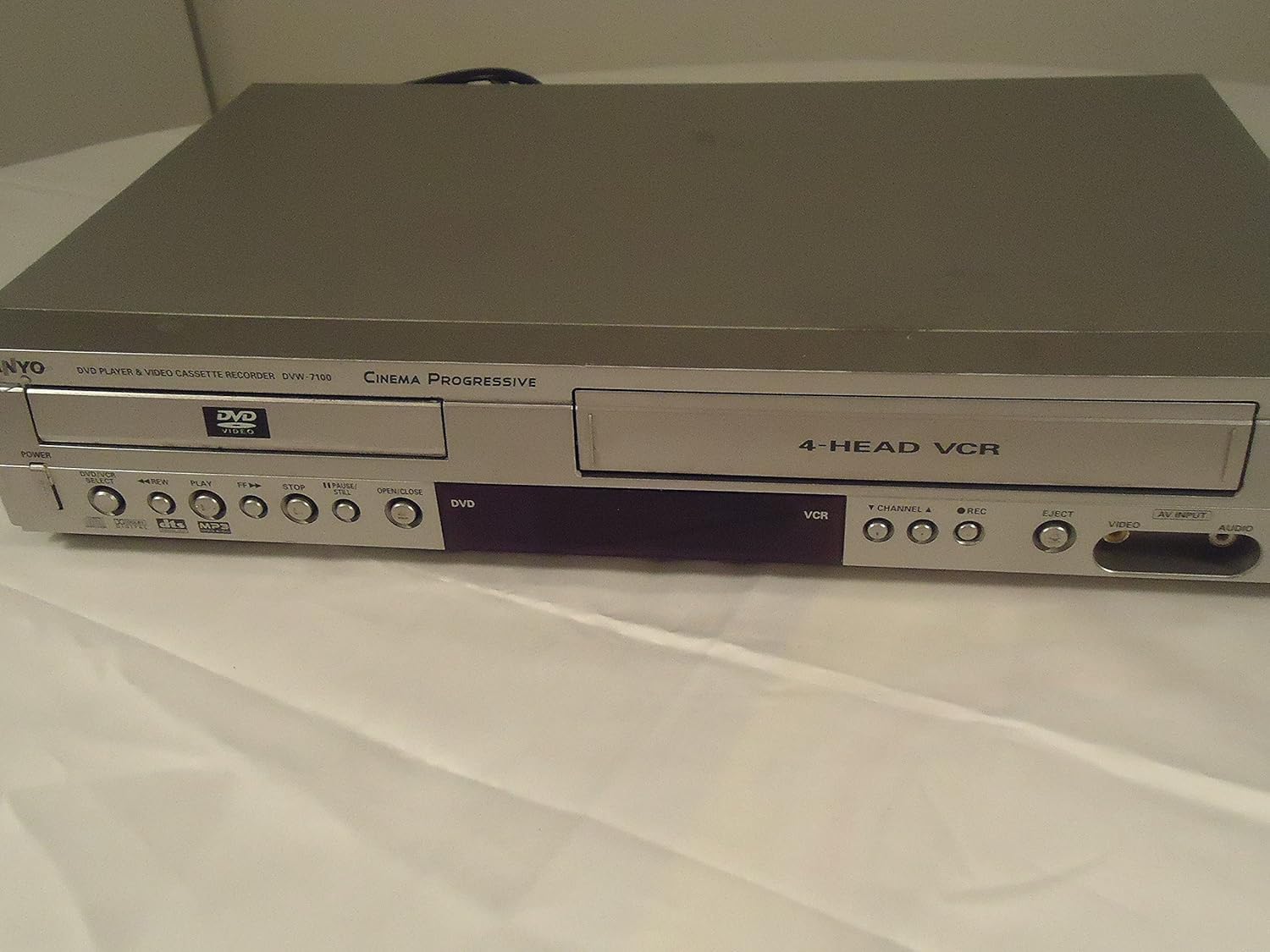
Billedbeskrivelse: Front view of the Sanyo DVW7100 DVD/VCR combo player. The left side features the DVD tray with 'DVD VIDEO' logo, and below it, buttons for POWER, DVD/VCR SELECT, REW, PLAY, FF, STOP, PAUSE/STILL, and OPEN/CLOSE. The right side shows the VCR slot labeled '4-HEAD VCR', with buttons for VCR functions including CHANNEL, REC, EJECT, and AV INPUT (Video and Audio jacks).
The front panel provides convenient access to essential controls for both DVD and VCR operations, including power, media selection, playback controls, and input ports.
Opsætning
1. Tilslutning til et fjernsyn
To connect your Sanyo DVW7100 to a television, use the appropriate audio/video cables. The unit supports Component, S-video, and RCA (Composite Video) connections.
- RCA (Composite Video) Connection: Connect the yellow video cable from the unit's 'VIDEO OUT' jack to the TV's 'VIDEO IN' jack. Connect the red and white audio cables from the unit's 'AUDIO OUT' jacks to the TV's 'AUDIO IN' jacks.
- S-videoforbindelse: Connect an S-video cable from the unit's 'S-VIDEO OUT' jack to the TV's 'S-VIDEO IN' jack. For audio, use the red and white RCA audio cables.
- Komponentvideotilslutning: Connect the red, green, and blue component video cables from the unit's 'COMPONENT VIDEO OUT' jacks to the TV's corresponding 'COMPONENT VIDEO IN' jacks. For audio, use the red and white RCA audio cables.
Ensure your TV is set to the correct input source (e.g., Video 1, S-Video, Component) to view the player's output.
2. Strømtilslutning
Plug the AC power cord into a standard 120V AC, 60 Hz wall outlet.
3. Indledende opsætning
Upon first power-on, the unit may prompt you to set the clock and other basic preferences. Follow the on-screen instructions using the remote control (if available) or front panel buttons. The unit features an auto clock set function.
Operating the DVD Player
1. Loading and Ejecting a DVD
- Tryk på DVD/VCR SELECT button to choose DVD mode.
- Tryk på ÅBN/LUK knappen for at åbne DVD-bakken.
- Place a DVD disc, label side up, into the tray.
- Trykke ÅBN/LUK again to close the tray. The disc will load, and playback may begin automatically or display a menu.
- To eject, press ÅBN/LUK.
2. Afspilningskontroller
- SPIL: Starts or resumes disc playback.
- STOP: Stopper afspilning.
- PAUSE/STILL: Pauserer afspilningen. Tryk igen for at genoptage.
- REW (Spol tilbage): Scans backward through the disc.
- FF (Spol frem): Scans forward through the disc.
3. Understøttede medier
The DVD player supports CD, CD-R, CD-RW, and MP3 discs in addition to standard DVDs.
Operating the VCR
1. Loading and Ejecting a Videocassette
- Tryk på DVD/VCR SELECT button to choose VCR mode.
- Insert a VHS videocassette into the VCR slot. The unit will automatically load the tape.
- To eject, press the UDSTØDE knap.
2. Afspilningskontroller
- SPIL: Starts or resumes tape playback.
- STOP: Stopper afspilning.
- PAUSE/STILL: Pauserer afspilningen. Tryk igen for at genoptage.
- REW (Spol tilbage): Spoler båndet tilbage.
- FF (Spol frem): Spoler båndet hurtigt frem.
3. Optagelse
The Sanyo DVW7100 is a 4-head Hi-Fi VCR recorder. To record:
- Ensure a blank or recordable videocassette is inserted.
- Select the desired input source (e.g., TV channel using the KANAL buttons, or an external device connected to the AV INPUT).
- Tryk på REC knappen for at starte optagelsen. Tryk på STOP for at afslutte optagelsen.
- Features like SP/EP auto recording and commercial skip function enhance the recording experience.
Opretholdelse
1. Rengøring af enheden
- Tør enhedens yderside af med en blød, tør klud.
- Do not use liquid cleaners or aerosol cleaners, as they may damage the finish or internal components.
- The VCR features an automatic head cleaner, reducing the need for manual cleaning of video heads.
2. Disc and Tape Care
- Hold diske i kanterne for at undgå fingeraftryk og ridser.
- Store discs and videocassettes in their cases when not in use, away from direct sunlight and extreme temperatures.
Fejlfinding
If you encounter issues with your Sanyo DVW7100, refer to the following common problems and solutions:
| Problem | Mulig årsag/løsning |
|---|---|
| Ingen strøm | Sørg for, at netledningen er sat ordentligt i en fungerende stikkontakt. |
| Intet billede/lyd | Check all audio/video cable connections. Ensure the TV is set to the correct input source. |
| Disc/Tape does not play | Ensure the disc/tape is inserted correctly. Clean the disc/tape if it appears dirty or damaged. Ensure the correct mode (DVD/VCR) is selected. |
| Poor picture quality (VCR) | The 4-head Hi-Fi VCR has an automatic head cleaner. If issues persist, the tape may be old or damaged. |
| Fjernbetjening virker ikke | Check batteries. Ensure no obstructions between the remote and the unit. Note: This renewed unit may not include a remote. |
Specifikationer
| Feature | Beskrivelse |
|---|---|
| Mærke | SANYO |
| Modelnavn | DVW7100 |
| Varens vægt | 11 pund |
| Produktdimensioner | 17 x 10.25 x 3.25 tommer |
| Farve | Grå |
| Medietype | CD, DVD |
| Understøttet lydformat | CD, CD-R, CD-RW, MP3 |
| Lydudgangstilstand | Stereoanlæg |
| Surround Sound Kanalkonfiguration | 5.1 |
| Connector Type | Component, S-video, RCA |
| Forbindelsesteknologi | HDMI, Composite Video (RCA) |
| Særlige funktioner | Auto clock set, Auto tracking, Tape remaining time display, Commercial skip function, Automatic head cleaner, Time search, 3D surround, 19 micron heads, Front A/V input jacks, Clock/counter display, MTS Hi-Fi stereo, SP/EP auto recording, Random and repeat playback, Super imposed on-screen displays, Icon menu on-screen displays, Trilingual on-screen display, Unified remote control, Zoom |
| Strømforsyning | 120 V AC, 60 Hz |
| Strømforbrug | 23W |
| Antenneterminal | 75 Ohm (F-Type) UHF/VHF/CATV |
Garanti og support
This Sanyo DVW7100 unit is a renewed product. Renewed products are typically backed by the Amazon Fornyet Garanti, which provides eligibility for replacement or refund if you are not satisfied with your purchase.
Vigtig bemærkning: This specific renewed unit is described as being in excellent working condition but does not include a remote control. Please consider this when planning your setup and operation.
For further support or warranty claims related to renewed products, please refer to the Amazon Renewed program details or contact Amazon customer service.


