1. Introduktion
Thank you for choosing the Behringer T-BUDS High-Fidelity True Wireless Stereo Earbuds. These earbuds are designed to provide an exceptional audio experience with the convenience of wireless connectivity and advanced features like Active Noise Cancellation (ANC). This manual will guide you through the setup, operation, and maintenance of your new T-BUDS.

Image: Behringer T-BUDS earbuds shown with their charging case, illustrating the product's design.
2. Hvad er der i æsken
Upon unboxing your Behringer T-BUDS, please ensure all the following components are present:
- Behringer T-BUDS True Wireless Stereo Earbuds (Left and Right)
- Opladningsetui
- USB Charging Cable (typically USB-C)
- Flere størrelser ørepropper (normalt S, M, L)
- Brugervejledning (dette dokument)
3. Opsætning
3.1 Indledende opladning
Before first use, it is recommended to fully charge both the earbuds and the charging case. Place the earbuds into the charging case. Connect the charging case to a USB power source using the provided USB cable. The indicator lights on the case will show charging status.

Image: The Behringer T-BUDS earbuds are securely placed within their open charging case, indicating readiness for charging or use.
Vigtig: Some users have reported small protective stickers on the charging terminals of the earbuds. Ensure these are removed before placing the earbuds in the case for charging, as they can prevent proper contact and charging.
3.2 Parring med en enhed
- Sørg for, at ørepropperne er opladet og placeret i opladningsetuiet.
- Open the charging case lid. The earbuds will automatically enter pairing mode, indicated by flashing lights (refer to product specific light indicators if available).
- Gå til Bluetooth-indstillingerne på din enhed (smartphone, tablet, computer).
- Søg efter new devices and select "Behringer T-BUDS" from the list.
- Når ørepropperne er forbundet, vil de indikere en vellykket parring (f.eks. en stemmemeddelelse eller et konstant lys).
The T-BUDS utilize Bluetooth 5.0 technology, providing a stable wireless connection up to 10 meters (33 feet).
3.3 Opnåelse af optimal pasform
For the best sound quality and active noise cancellation performance, a secure and comfortable fit is crucial. Experiment with the different sizes of ear tips provided to find the pair that creates a good seal in your ear canal.

Billede: En detaljeret view of the Behringer T-BUDS earbuds, highlighting their ergonomic design and ear tip.
4. Betjeningsvejledning
The Behringer T-BUDS feature intuitive touch controls on each earbud for easy management of audio playback and calls.
4.1 Tænd/sluk
- Tænd: Open the charging case lid, or take the earbuds out of the case. They will automatically power on and attempt to reconnect to the last paired device.
- Sluk: Sæt ørepropperne tilbage i opladningsetuiet, og luk låget. De slukker automatisk og begynder at oplade.
4.2 Musikafspilning
- Afspil/pause: Et enkelt tryk på begge øretelefoner.
- Næste nummer: Dobbelttryk på den højre øreprop.
- Forrige nummer: Dobbelttryk på den venstre øreprop.
- Lydstyrke op: Tryk tre gange på den højre øreprop.
- Skrue ned for lyden: Tryk tre gange på den venstre øreprop.
4.3 Opkaldshåndtering
- Besvar/afslut opkald: Et enkelt tryk på begge øretelefoner.
- Afvis opkald: Tryk på en af øretelefonerne, og hold den nede i 2 sekunder.
4.4 Stemmeassistent
- Aktiver stemmeassistent: Tryk og hold en af øretelefonerne nede i 3 sekunder (når du ikke er i gang med et opkald).
5. Active Noise Cancellation (ANC) and Transparent Mode
The T-BUDS feature state-of-the-art Active Noise Cancellation to reduce ambient noise, and a Transparent Mode to allow you to hear your surroundings without removing the earbuds.
- Toggle ANC/Transparent Mode: Press and hold the touch area on the venstre earbud for 2 seconds to cycle through ANC On, Transparent Mode, and ANC Off.
Note: Active Noise Cancellation is most effective at reducing consistent low-frequency sounds. Transparent Mode is useful for situational awareness, such as hearing announcements or conversations.
6. Opladning
The T-BUDS earbuds charge automatically when placed in the charging case. The case itself is charged via a USB-C port.
- Opladning af øretelefoner: Place both earbuds into their respective slots in the charging case. Close the lid. The earbuds will begin charging.
- Opladning af etuiet: Connect the provided USB-C cable to the charging port on the back of the case and the other end to a USB power adapter (not included) or a computer's USB port.
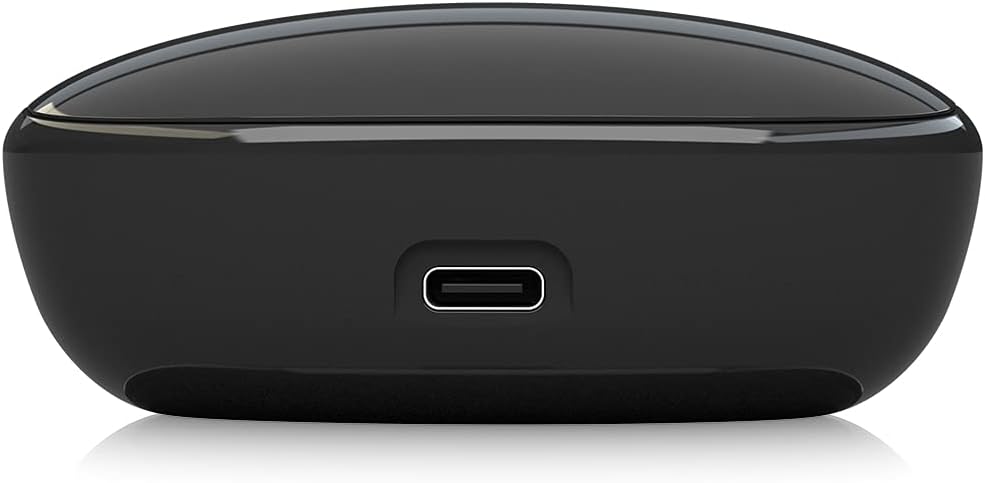
Image: The USB-C charging port located on the rear of the Behringer T-BUDS charging case, used for recharging the case's internal battery.
The charging case has LED indicators to show its battery level and charging status. Refer to the quick start guide for specific LED behaviors.
7. Vedligeholdelse
Proper maintenance will ensure the longevity and optimal performance of your T-BUDS.
- Rensning: Rengør regelmæssigt ørepropperne og opladningsetuiet med en blød, tør og fnugfri klud. Fjern ørepropperne og rengør dem med mild sæbe og vand. Tør dem derefter grundigt, inden de sættes på igen. Brug ikke skrappe kemikalier eller slibende materialer.
- Vandtæthed: The T-BUDS feature a splash-proof construction (IPX4 rating). This means they are resistant to splashing water from any direction, making them suitable for sports and workouts. However, they are not designed for submersion in water. Do not expose them to strong jets of water or prolonged immersion.
- Opbevaring: Når ørepropperne ikke er i brug, skal de opbevares i deres opladningsetui for at beskytte dem og holde dem opladede. Opbevares køligt og tørt, væk fra ekstreme temperaturer.
8. Fejlfinding
If you encounter issues with your Behringer T-BUDS, please refer to the following common solutions:
| Problem | Mulig årsag/løsning |
|---|---|
| Øretelefoner oplader ikke |
|
| Kan ikke parres med enheden |
|
| Ingen lyd eller dårlig lydkvalitet |
|
| Aktiv støjreduktion er ikke effektiv |
|
9. Specifikationer
| Feature | Detalje |
|---|---|
| Modelnavn | T-KNOPPER |
| Forbindelsesteknologi | Bluetooth |
| Trådløs kommunikationsteknologi | Bluetooth |
| Inkluderede komponenter | Opladningsetui |
| Materiale | Plast |
| Kompatible enheder | Enheder med Bluetooth -forbindelse |
| Kontroltype | Mediekontrol |
| Varens vægt | 70 gram (2.47 ounce) |
| Frekvensområde | 20 Hz - 20 kHz |
| Antal enheder | 2.0 tæller |
| Antal genstande | 1 |
| Audio driver type | Dynamisk Driver |
| Bluetooth rækkevidde | 10 meter (33 fod) |
| Bluetooth version | 5.0 |
| Farve på bæretaske | Sort |
| Ørestykke form | Afrundet spids |
| Fabrikant | Music Tribe USA |
| Produktdimensioner | 1.1 x 9.7 x 6.5 tommer |
| Oprindelsesland | Kina |
| ASIN | B098NHYVD9 |
| Varemodelnummer | 000-F6R00-00010 |
| Batterier | 1 Lithium Polymer batterier påkrævet (medfølger) |
| Farve | Sort |
| Øreplacering | In Ear |
| Formfaktor | In Ear |
| Støjkontrol | Aktiv støjreduktion |

Image: Regulatory and manufacturing information labels found on the Behringer T-BUDS charging case.
10. Garanti og support
Behringer products are designed for reliability and performance. For information regarding warranty terms and conditions, please refer to the warranty card included with your product or visit the official Behringer website. For technical support, product registration, or service inquiries, please contact Behringer customer support through their official channels.
You can visit the official Behringer Store for more information and support: Behringer-butik på Amazon


