1. Introduktion
Thank you for choosing OhO Smart Glasses, Model A8 PRO. These innovative sunglasses combine polarized UV400 protection lenses with an open-ear Bluetooth speaker system, allowing you to enjoy audio and manage calls while remaining aware of your surroundings. This manual provides essential information for setup, operation, maintenance, and troubleshooting to ensure optimal performance and longevity of your device.

Figure 1: OhO Smart Glasses Model A8 PRO, featuring a brown frame and black polarized lenses.
2. Pakkens indhold
Kontroller venligst, at alle varer er til stede i din pakke:
- OhO Smart Glasses (Model A8 PRO)
- Ladekabel (USB Type-C)
- Rengøringsklud
- Beskyttende etui
- Brugermanual
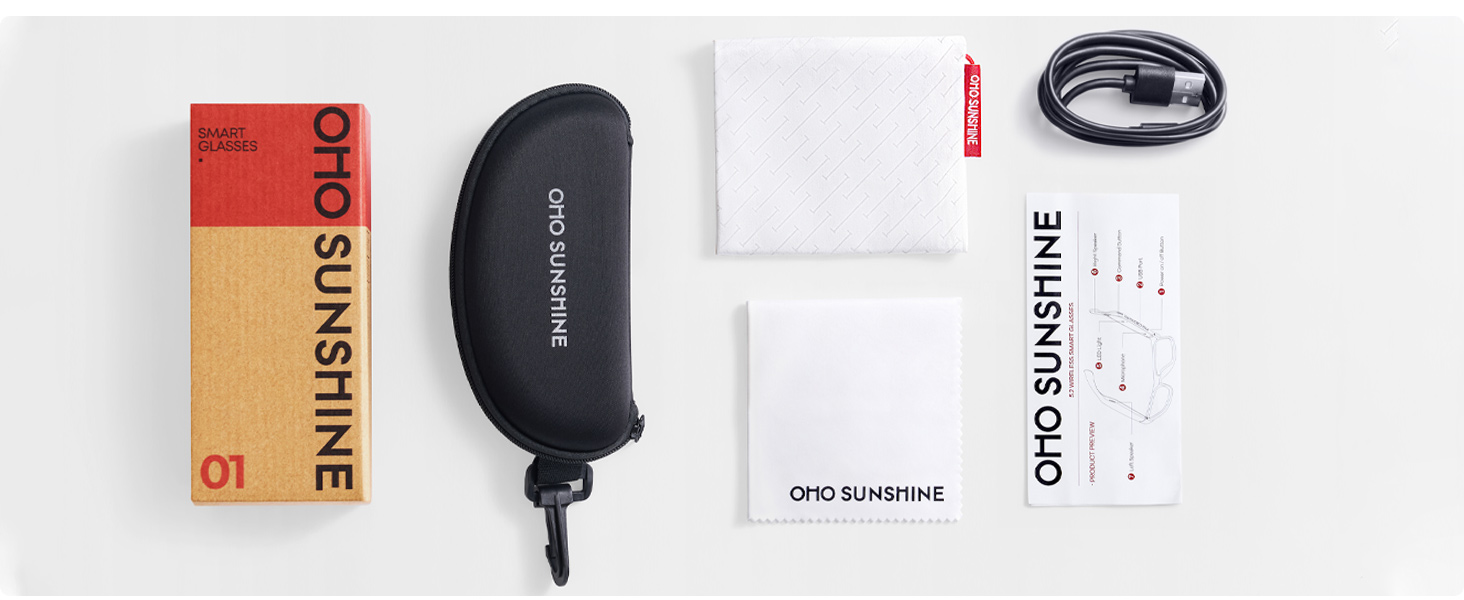
Figure 2: Included accessories with your OhO Smart Glasses.
3. Opsætning
3.1 Opladning af brillerne
Before first use, fully charge your OhO Smart Glasses. The glasses are equipped with a rechargeable Lithium Metal battery.
- Locate the USB Type-C charging port on the glasses frame.
- Connect the provided USB Type-C cable to the charging port.
- Tilslut den anden ende af kablet til en standard USB-strømadapter (medfølger ikke) eller en computers USB-port.
- The indicator light will show charging status (refer to LED indicator section for details). A full charge typically takes approximately 2 hours.

Figure 3: USB Type-C charging cable for your device.
3.2 Bluetooth -parring
To connect your OhO Smart Glasses to your smartphone or other Bluetooth-enabled device:
- Ensure the glasses are charged and powered off.
- Press and hold the power button on the glasses until the LED indicator flashes rapidly (usually blue and red), indicating pairing mode.
- On your smartphone, navigate to the Bluetooth settings and turn Bluetooth on.
- Søg efter available devices. The glasses will appear as 'OhO Smart Glasses' or a similar name.
- Select the glasses from the list to pair. Once connected, the LED indicator will typically show a slow blue flash or turn off, and you may hear an audible confirmation.
Figure 4: OhO Smart Glasses utilize Bluetooth 5.2 for stable connectivity.
4. Betjeningsvejledning
4.1 Tænd/sluk
- Tænd: Press and hold the power button for approximately 3 seconds until the LED indicator lights up and you hear a power-on prompt.
- Sluk: Press and hold the power button for approximately 5 seconds until the LED indicator turns off and you hear a power-off prompt.
4.2 Lydafspilning
Once paired with your device, you can stream audio directly to your glasses' open-ear speakers.
- Afspil/pause: Short press the multi-function button (often the same as the power button or a dedicated play/pause button).
- Næste nummer: Dobbelttryk på multifunktionsknappen.
- Forrige nummer: Tryk tre gange på multifunktionsknappen.
- Lydstyrke op: Tryk på lydstyrke op-knappen.
- Skrue ned for lyden: Tryk på lydstyrke ned-knappen.

Figure 5: Open-ear speaker system integrated into the glasses frame.
4.3 Opkaldshåndtering
The integrated microphone allows for hands-free phone calls.
- Besvar opkald: Tryk kort på multifunktionsknappen, når du modtager et opkald.
- Afslut opkald: Tryk kort på multifunktionsknappen under et opkald.
- Afvis opkald: Press and hold the multi-function button for 2 seconds when a call comes in.
4.4 Stemmekontrol
Activate your device's voice assistant (Siri, Google Assistant, Cortana) for hands-free commands.
- Aktiver stemmeassistent: Double-press the multi-function button (or refer to specific model instructions if different).

Figure 6: Hands-free voice control for convenient interaction.
5. Vedligeholdelse
5.1 Rengøring
- Brug den medfølgende rengøringsklud til forsigtigt at tørre linserne og stellet af.
- For stubborn smudges, use a lens cleaning spray specifically designed for eyewear. Avoid harsh chemicals or abrasive materials.
- Do not submerge the glasses in water. While they offer some water resistance (IP44), direct submersion can cause damage.
5.2 Opbevaring
- Når brillerne ikke er i brug, skal de opbevares i deres beskyttende etui for at forhindre ridser og skader.
- Avoid exposing the glasses to extreme temperatures (hot or cold) or direct sunlight for extended periods, as this can affect battery life and frame integrity.
5.3 Pleje af batterier
- For at forlænge batteriets levetid bør du undgå at aflade batteriet helt ofte.
- Charge the glasses regularly, even if not used for a long time, to maintain battery health.
6. Fejlfinding
| Problem | Mulig årsag | Løsning |
|---|---|---|
| Kan ikke tænde | Lavt batteri | Oplad brillerne helt. |
| Kan ikke parres via Bluetooth | Glasses not in pairing mode; Bluetooth off on device; already paired to another device | Ensure glasses are in pairing mode. Turn Bluetooth on your device. Disconnect from other devices. |
| Ingen lyd | Volume too low; not connected; audio source issue | Increase volume on glasses and connected device. Verify Bluetooth connection. Check audio source. |
| Stemmeassistenten svarer ikke | Incorrect activation; device settings | Ensure correct button press for activation. Check voice assistant settings on your connected device. |
7. Specifikationer
- Model: A8 PRO
- Mærke: Åh solskin
- Produktdimensioner: 6.3 x 5.71 x 1.85 tommer
- Varens vægt: 1.28 ounce
- Bluetooth version: 5.2
- Batteri: 1 Lithium Metal batteri (medfølger)
- Batterilevetid: Up to 10 hours of audio playback (approximate)
- Linsetype: Polarized, 100% UV400 Protection, Impact Resistant (ANSI/ISEA Z87.1-2015 standard)
- Lyd: Open-ear speaker system, HD Microphone
- Kontrollere: Voice control compatible with Siri, Cortana, Google Now
- Opladningsport: USB Type-C
- Vandtæthed: IP44 (stænksikker)

Figure 7: Key features including UV400 protection and glare blocking.
8. Garanti og support
For warranty information or technical support, please refer to the documentation included with your purchase or contact OhO sunshine customer service directly. Details for contacting support can typically be found on the manufacturer's webhjemmeside eller gennem din forhandler.


