1. Introduktion
This document provides detailed instructions for the Stemedu MP3 Playback and Voice Recording Module ST4572. This compact and lightweight module is designed for DIY projects, offering MP3 music playback and voice recording capabilities. It features simple operation and supports both USB download and TF card storage for audio files.
2. Produktkomponenter
The module typically includes the main circuit board, a speaker, a PIR infrared sensor, and a battery case. Please refer to the image below for a visual representation of the components.


3. Opsætning og montering
The module comes with various components that need to be connected. Ensure all connections are firm and stable.
3.1 Component Connections
Connect the speaker, PIR sensor, and battery case to the main module using the provided connectors. Pay attention to the polarity and correct ports as indicated on the module.

3.2 Batteriinstallation
The battery case requires 3 AA batteries (not included). Insert them according to the polarity markings inside the case.

4. Betjeningsvejledning
4.1 Basic Playback and Volume Control
The module features 5 buttons for controlling music playback and volume:
- Kort tryk: Afspil/Stop
- Langt tryk: Single song loop play
- Kort tryk: Forrige sang
- Langt tryk: Upward songs loop play
- Kort tryk: Næste sang
- Langt tryk: Downward songs loop play
- Lydstyrke -: Sænk volumen
- Volumen +: Øg volumen
4.2 PIR Infrared Sensor Operation
The PIR infrared sensor triggers audio playback when human body movement is detected. This feature is suitable for applications in public places such as shops, safety experience halls, construction sites, shopping malls, elevators, banks, ATM teller machines, and display areas.

5. File Ledelse
The module supports MP3 audio format. It has a built-in storage space of 4MB and supports an external TF card up to 8GB (TF card not included).
5.1 Uploading Audio Files
There are two methods to download songs or record:
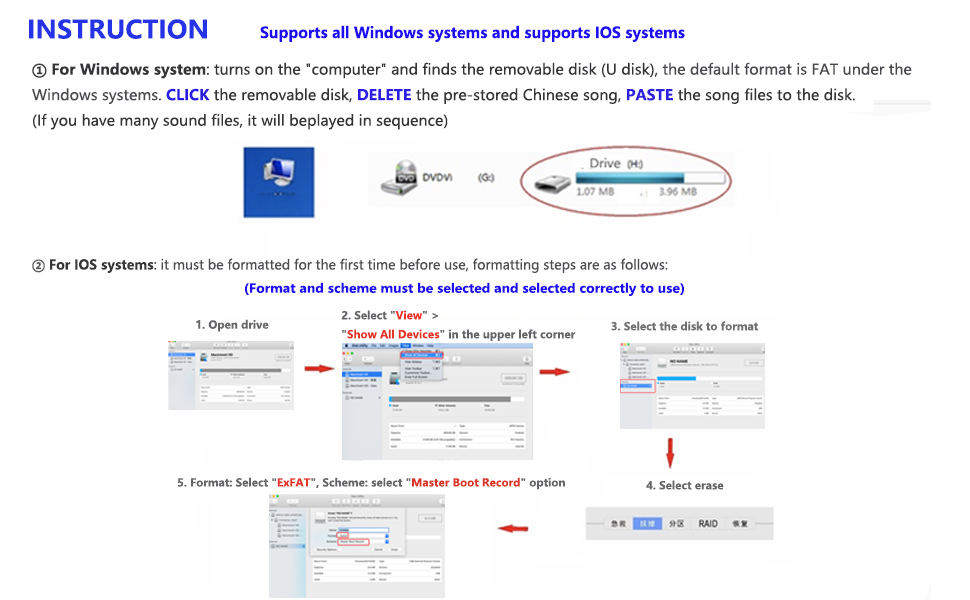
- Direct USB Download (for files less than 4MB): Connect the Micro USB port of the module to your PC or laptop's USB interface using a data cable. A disk named "no name" will appear. Open it and copy your MP3 songs to this disk.
- TF Card (for files larger than 4MB or additional storage): If the song is more than 4MB, copy the MP3 songs to a TF card, then insert the TF card into the card slot of the module.
Note: The songs or record format must be MP3.

5.2 Understøttet File Formats and Capacity
The module supports MP3 audio format. The internal memory is 4MB, and it can support TF cards up to 8GB. Ensure your audio files are in MP3 format for proper playback.
6. Fejlfinding
Her er løsninger på almindelige problemer, du kan støde på:
- Sensor not working: If the PIR sensor does not work, adjust the sensing distance by rotating the potentiometer on the PIR sensor first. The sensing distance is approximately 1-5 meters.
- Modulet genkendes ikke af computeren: Ensure the Micro USB cable you are using is a data cable. Some cables are only capable of charging and will not allow data transfer.
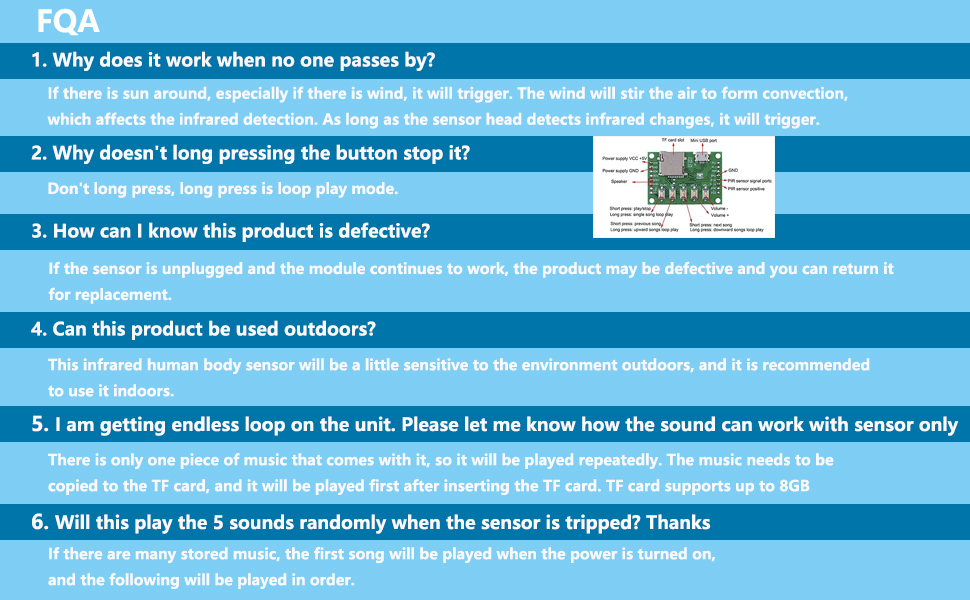
- Endless loop on the unit: If there is only one piece of music that comes with it, it will be played repeatedly. The music needs to be copied to the TF card, and it will be played first after inserting the TF card. TF card supports up to 8GB.
- Sensor triggers without anyone passing by: If there is sun around, especially if there is wind, it will trigger. The wind can stir the air to form convection, which affects infrared detection. As long as the sensor head detects infrared changes, it will trigger.
- Long pressing the button does not stop it: Long press is for loop play mode. Short press the button to stop playback.
- Product appears defective: If the sensor is unplugged and the module continues to work, the product may be defective.
- Kan dette produkt bruges udendørs? This infrared human body sensor will be a little sensitive to the environment outdoors, and it is recommended to use it indoors.
- Will this play 5 sounds randomly when the sensor is tripped? If there are many stored music files, the first song will be played when the power is turned on, and the following will be played in order.
7. Specifikationer
- Mærke: Stemedu
- Model: ST4572
- Hukommelseslagringskapacitet: 4 MB (built-in), supports up to 8GB TF card
- Hardwaregrænseflade: USB
- Kompatible enheder: Laptop (Windows recommended for direct USB transfer)
- Microphone Format: Indbygget
- Medieformat: MP3 lyd
- Varens vægt: 57 gram
- Digital optagelsestid: 640 minutes (approximate, depends on file size and compression)
- Mikrofonens driftstilstand: Mono
8. Vedligeholdelse
To ensure the longevity and optimal performance of your module:
- Hold modulet tørt og væk fra fugt.
- Undgå at udsætte modulet for ekstreme temperaturer.
- Handle components with care to prevent damage to delicate circuits and connectors.
- Use a soft, dry cloth to clean the module if necessary.
9. Produktvideoer
Watch these videos for additional guidance and demonstrations:
Stemedu 8MB Sound Module Button Control MP3 Music Player
This video from Stemedu demonstrates the button control and MP3 playback features of a similar sound module.
EZSound Multiplay Module Light Sensor How to Record & FAQs
This video provides a guide on how to record and addresses frequently asked questions related to a light sensor activated sound module.
EZSound Multiplay Chip Push Button How to Record & FAQs
This video offers instructions on recording and answers common questions for a push-button activated sound chip.
COSVOX Cosplay MP3 Sound Effects Module and Accessories
This video showcases a cosplay sound effects module, demonstrating its capabilities and accessories.
Recordable Voice Module
A demonstration of a recordable voice module, illustrating its basic recording functions.
Sound Module Recordable Sound Chip
This video demonstrates the features of a recordable sound chip module.
Push Button Recordable Sound Chip Plays Multiple Module
A video illustrating a push-button recordable sound chip capable of playing multiple audio files.
4 Minutes DIY Greeting Card Chip Music for Christmas Cards
This video demonstrates how to use a DIY greeting card chip for music, suitable for various creative projects.
10. Garanti og support
For warranty information and customer support, please refer to the product packaging or contact Stemedu customer service directly. Keep your purchase receipt for any warranty claims.

