1. Introduktion
This manual provides instructions for the installation, operation, and troubleshooting of your ARRIS Touchstone TM804G DOCSIS 3.0 Telephone Modem. The TM804G is designed to provide high-speed data access and up to four lines of Voice over IP (VoIP) telephone service over your cable network. It features DOCSIS 3.0 technology for enhanced internet speeds and reliability.
2. Nøglefunktioner
- DOCSIS 3.0 compliant for high-speed internet.
- Four (4) dedicated VoIP telephone ports.
- Supports download speeds up to 343 Mbps.
- Two independent 96MHz RF tuners.
- Ethernet connectivity for network devices.
3. Pakkens indhold
Bekræft, at din pakke indeholder følgende varer:
- ARRIS Touchstone TM804G Telephone Modem
- Strømadapter
- Ethernet kabel
- Dokumentation (hurtigstartguide, sikkerhedsoplysninger)
Note: A backup battery is sold separately and is not included in the standard package.
4. Fysiske egenskaber
4.1 Frontpanelindikatorer
The front panel of the TM804G modem features several LED indicators that provide status information.

Figur 1: Front view of the ARRIS Touchstone TM804G Telephone Modem. This image shows the modem's black casing with ventilation holes on top and a row of green LED indicator lights on the right side of the front panel.
| Indikator | Status | Beskrivelse |
|---|---|---|
| MAGT | Solid grøn | Modemet er tændt. |
| DS (nedstrøms) | Solid grøn | Nedstrømskanalen er tilsluttet. |
| USA (opstrøms) | Solid grøn | Opstrømskanalen er tilsluttet. |
| ONLINE | Solid grøn | The modem is registered and online. |
| FORBINDELSE | Solid grøn | An Ethernet device is connected. |
| TEL1-4 | Solid grøn | Telephone line is active. |
4.2 Porte på bagpanelet
Bagpanelet har alle nødvendige tilslutningsporte til modemet.
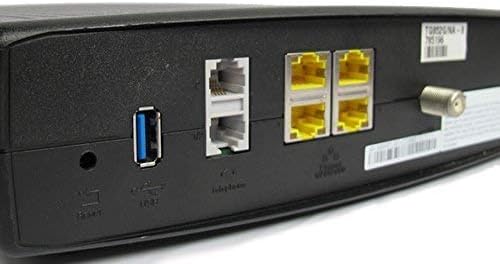
Figur 2: Bag view of the ARRIS Touchstone TM804G Telephone Modem. This image displays the back of the modem, featuring a coaxial cable connector, four yellow Ethernet ports, two grey telephone ports (RJ-11), a USB port, a reset button, and the power input.
- COAXIAL: Tilsluttes kabelstikkontakten i væggen.
- ETHERNET (LAN): Four (4) RJ-45 ports for connecting to a computer or router.
- TEL1-4 (RJ-11): Four (4) telephone ports for connecting to telephones or a home telephone wiring system.
- USB: (Functionality may vary or be disabled by your service provider).
- NULSTIL: Recessed button to reset the modem to factory defaults (use with caution).
- MAGT: Tilsluttes strømadapteren.
5. Opsætning og installation
Follow these steps to install your ARRIS Touchstone TM804G modem.
- Tilslut koaksialkabel: Connect one end of a coaxial cable to the COAXIAL port on the modem and the other end to a cable wall outlet. Ensure the connection is finger-tight.
- Tilslut Ethernet-kabel: Connect one end of the Ethernet cable to one of the ETHERNET ports on the modem and the other end to your computer's network port or your wireless router's WAN/Internet port.
- Connect Telephone Lines: If using telephone service, connect your telephone(s) or home telephone wiring to the TEL1, TEL2, TEL3, or TEL4 ports on the modem using standard RJ-11 telephone cables.
- Tilslut strømadapter: Tilslut strømadapteren til POWER-porten på modemmet, og sæt derefter adapteren i en stikkontakt.
- Tænd: The modem will automatically power on. Observe the front panel indicator lights. The POWER, DS, US, and ONLINE lights should eventually turn solid green, indicating a successful connection to the cable network and internet. The TEL lights will illuminate when telephone lines are active.
- Aktivér tjeneste: Contact your Internet Service Provider (ISP) to activate the modem. You will need to provide them with the MAC address and serial number, typically found on a label on the bottom or back of the modem.
Important: Do not connect the modem to a power outlet until all other connections are made.
6. Betjeningsvejledning
Once the modem is successfully installed and activated, it operates automatically.
- Internetadgang: Any device connected via Ethernet to the modem (or through a connected router) should have internet access once the ONLINE light is solid green.
- Telefonservice: If your service plan includes VoIP, connected telephones will have dial tone and function once the corresponding TEL lights are solid green.
- Overvågningsstatus: Refer to the front panel LED indicators (Section 4.1) to monitor the modem's operational status.
7. Vedligeholdelse
- Rensning: Keep the modem clean and free of dust. Use a soft, dry cloth to wipe the exterior. Do not use liquid cleaners or aerosols.
- Ventilation: Ensure the modem is placed in a well-ventilated area to prevent overheating. Do not block the ventilation holes.
- Firmwareopdateringer: Firmware updates are typically managed automatically by your Internet Service Provider. Do not attempt to manually update the firmware unless instructed by your ISP.
- Restarting the Modem: If you experience connectivity issues, try restarting the modem by unplugging the power adapter for 10-15 seconds and then plugging it back in.
- Gendan fabriksindstillinger: The recessed RESET button on the rear panel can be used to restore factory default settings. This should only be done if instructed by your ISP, as it will erase all custom configurations. To perform a factory reset, use a paperclip to press and hold the RESET button for at least 10 seconds.
8. Fejlfinding
If you encounter problems with your modem, refer to the following common issues and solutions.
| Problem | Mulig årsag | Løsning |
|---|---|---|
| Ingen strøm | Strømadapteren er ikke tilsluttet, eller der er en defekt stikkontakt. | Ensure power adapter is securely connected to the modem and a working electrical outlet. Check the POWER LED. |
| Ingen internetadgang | Coaxial cable loose, modem not activated, or ISP outage. |
|
| No Dial Tone on Phone | Telephone cable loose, TEL light off, or service issue. |
|
| Langsom internethastighed | Network congestion, old router, or ISP issue. |
|
For further assistance, contact your Internet Service Provider's technical support.
9. Specifikationer
| Modelnummer | TM804G |
| DOCSIS-standarden | DOCSIS 3.0 |
| Internet Download Speed | Op til 343 Mbps (afhængig af internetudbyder) |
| VoIP-porte | 4 (RJ-11) |
| Ethernet-porte | 4 (RJ-45) |
| Forbindelsesteknologi | Ethernet |
| Dimensioner (L x B x H) | Cirka 11.81 x 9.13 x 2.56 tommer |
| Vægt | Cirka 2.16 pund |
| Kompatible internetudbydere | Optimum, Mediacom (and others, check with your provider) |
10. Garanti og support
This product is offered as an Amazon Renewed item. Amazon Renewed products are professionally inspected and tested to work and look like new. They are eligible for replacement or refund under the Amazon Renewed Guarantee if you are not satisfied with your purchase.
For technical support, troubleshooting, or service-related inquiries, please contact your Internet Service Provider (ISP) directly. Your ISP is responsible for the activation, configuration, and ongoing support of the modem on their network.


