1. Introduktion
This manual provides detailed instructions for the installation, operation, and maintenance of the Vivotek ND9425P 16-Channel 4K UHD Network Video Recorder (NVR). This NVR is designed to manage and record video streams from up to 16 IP cameras, offering 4K UHD resolution support for high-quality surveillance. It is an integral component of a comprehensive security system, suitable for various applications requiring reliable video monitoring and recording.
Key features of the Vivotek ND9425P NVR include:
- Multimedia SoC CPU for efficient processing.
- Support for H.265, H.264, and MJPEG video codecs for flexible compression.
- Seamless recording capabilities.
- Smart Stream III optimization for bandwidth efficiency.
- Integrated PoE technology for simplified camera connectivity (when used with compatible PoE cameras).
2. Sikkerhedsoplysninger
Please read all safety instructions carefully before operating the device. Failure to follow these instructions may result in injury or damage to the product.
- Strømkilde: Use only the power adapter supplied with the NVR. Ensure the power outlet provides the correct voltage.
- Ventilation: Do not block any ventilation openings. Install the NVR in a well-ventilated area to prevent overheating.
- Miljø: Avoid exposing the NVR to water, moisture, extreme temperatures, or direct sunlight.
- Rensning: Afbryd strømmen før rengøring. Brug en tør, blød klud. Brug ikke flydende rengøringsmidler eller aerosolrengøringsmidler.
- Service: Forsøg ikke selv at servicere dette produkt. Overlad al service til kvalificeret servicepersonale.
- Kabler: Ensure all cables are properly connected and secured to prevent tripping hazards or accidental disconnections.
3. Pakkens indhold
Kontroller, at alle dele er til stede i pakken, før du fortsætter installationen:
- Vivotek ND9425P 16-Channel 4K UHD NVR Unit
- Strømadapter
- USB-mus
- Hurtig installationsvejledning
- Resource CD (containing full manual and software)
- Screws for HDD installation (if applicable)
- Ethernet kabel
Note: The package contents may vary slightly depending on the specific kit purchased. For example, some kits may include 8 x 2 MP Night Vision Dome Cameras and 8 x Ethernet Patch Cables.
4. Produktet er slutview
Dette afsnit giver en overview of the Vivotek ND9425P NVR's physical components and interfaces.
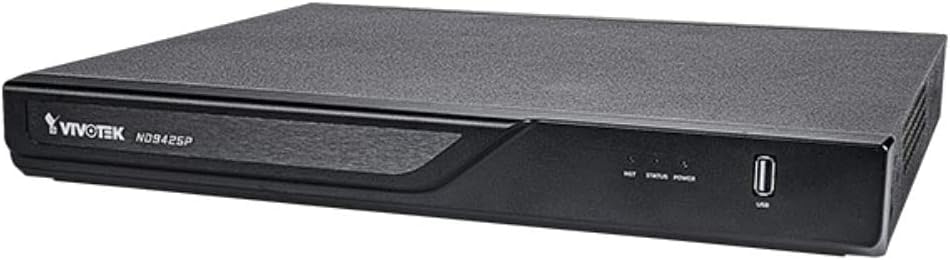
Figur 4.1: Vivotek ND9425P NVR Front Panel
The image displays the Vivotek ND9425P NVR unit, a compact black rectangular device. The front panel features the "VIVOTEK ND9425P" logo on the left, followed by three small indicator lights labeled "NET", "STATUS", and "POWER". On the far right of the front panel, there is a USB port, labeled "USB" below it. The top surface of the NVR has a textured finish.
4.1 Front Panel Indicators and Ports
- NET LED: Angiver netværksaktivitet.
- STATUS LED: Indicates system status (e.g., recording, error).
- STRØM-LED: Indikerer strømstatus.
- USB-port: For connecting a USB mouse, keyboard, or external storage devices for backup.
4.2 Porte på bagpanelet
The rear panel typically includes ports for power input, Ethernet (LAN), HDMI/VGA video output, audio input/output, and additional USB ports for peripheral connections.
5. Opsætning
5.1 Hardwareinstallation
- Installation af harddisk (hvis ikke forudinstalleret):
Unscrew the NVR cover. Carefully slide the hard drive into the bay and secure it with the provided screws. Reattach the cover.
- Tilslut kameraer:
Connect your IP cameras to the NVR's PoE ports (if available) or to your network switch. Ensure all cameras are powered on and accessible on the network.
- Opret forbindelse til netværk:
Tilslut et Ethernet-kabel fra NVR'ens LAN-port til din router eller netværksswitch.
- Tilslut skærm:
Tilslut en skærm til NVR'ens HDMI- eller VGA-udgangsport.
- Tilslut ydre enheder:
Tilslut USB-musen til en USB-port på NVR'en.
- Tænd:
Tilslut strømadapteren til NVR'ens strømindgang, og sæt den derefter i en stikkontakt. NVR'en tænder automatisk.
5.2 Initial Configuration Wizard
Upon the first boot, the NVR will typically launch an initial configuration wizard. Follow the on-screen prompts to:
- Opsæt administratoradgangskode.
- Configure network settings (DHCP or Static IP).
- Søg efter and add connected IP cameras.
- Indstil dato og klokkeslæt.
- Initialiser harddisken til optagelse.
6. Betjening af NVR'en
6.1 Live View
Efter den første opsætning viser NVR'en live-dataene view of connected cameras. You can switch between single-camera view og multikameragitter views.
6.2 Optagelseskonfiguration
Access the recording settings through the main menu to configure recording schedules and modes:
- Kontinuerlig optagelse: Optagelser 24/7.
- Optagelse af bevægelsesdetektering: Records only when motion is detected by the camera.
- Planlagt optagelse: Records during specific times of the day or week.
- Hændelsesoptagelse: Records based on specific events (e.g., alarm input).
6.3 Playback and Backup
Til review optaget footage:
- Navigate to the "Playback" section from the main menu.
- Vælg det/de ønskede kamera(er) og dato-/tidsinterval.
- Brug tidslinjen til at navigere gennem optagelser.
- To back up footage, insert a USB drive into the NVR's USB port and follow the on-screen instructions for export.
6.4 Fjernadgang
The Vivotek ND9425P NVR supports remote access via a web browser or dedicated mobile applications (e.g., VIVOCloud). Refer to the full user manual on the Resource CD for detailed instructions on setting up remote access, including port forwarding or P2P cloud services.
7. Vedligeholdelse
7.1 firmwareopdateringer
Regularly check for and install firmware updates to ensure optimal performance, security, and access to new features. Firmware updates can typically be performed via the NVR's web interface or through a USB drive.
7.2 Harddiskstyring
The NVR will automatically overwrite the oldest recordings when the hard drive is full. You can configure storage settings, check HDD health, and format the drive through the system settings.
7.3 Rengøring
Keep the NVR unit clean by gently wiping its exterior with a dry, soft cloth. Ensure ventilation openings are free from dust and obstructions.
8. Fejlfinding
| Problem | Mulig årsag | Løsning |
|---|---|---|
| Ingen strøm | Power cable disconnected; faulty power adapter; power outlet issue. | Check power cable connection; try a different power outlet; contact support if adapter is faulty. |
| Ingen videoudgang | HDMI/VGA cable loose; incorrect display input selected; NVR not booted. | Ensure display cable is secure; select correct input on monitor; wait for NVR to boot up. |
| Cameras Not Displaying | Network issue; camera not powered; incorrect camera IP address; camera not added to NVR. | Check network cables; ensure cameras are powered; verify camera IP settings; add cameras via NVR interface. |
| Ingen optagelse | Hard drive not initialized; recording schedule not set; HDD full. | Initialize HDD in settings; configure recording schedule; check HDD status. |
| Remote Access Fails | Network configuration issue; port forwarding not set up; firewall blocking. | Verify network settings; configure port forwarding on router; check firewall rules. |
For more detailed troubleshooting, refer to the comprehensive user manual provided on the Resource CD or visit the VIVOTEK support webwebsted.
9. Specifikationer
| Feature | Detalje |
|---|---|
| Modelnummer | ND9425P |
| Fabrikant | Vivotek USA |
| Produktdimensioner | 19.69 x 19.69 x 11.02 tommer |
| Varens vægt | 8.62 pund |
| Forbindelsesteknologi | Ethernet |
| Kompatible enheder | Kamera |
| Hukommelseslagringskapacitet | 64 GB (referring to internal flash/RAM, not HDD capacity) |
| Antal kanaler | 16 |
| video codecs | H.265, H.264, MJPEG |
| Understøttelse af maksimal opløsning | 4K UHD (as per product title) |
10. Garanti og support
For warranty information, please refer to the warranty card included with your product or visit the official VIVOTEK website. VIVOTEK provides technical support for its products. If you encounter issues that cannot be resolved using this manual or the troubleshooting section, please contact VIVOTEK customer support through their official webwebsted eller udpegede supportkanaler.
Official VIVOTEK Webwebsted: www.vivotek.com


