1. Introduktion
This manual provides detailed instructions for the installation, operation, and maintenance of your ANNKE 3K Add-On Security Bullet Camera, Model CR1CJ. Please read this manual thoroughly before using the product to ensure correct setup and optimal performance.
1.1 Produkt overview
The ANNKE CR1CJ is a 3K resolution bullet-style security camera designed for surveillance applications. It features full-color night vision, a built-in microphone for audio recording, and 4-in-1 signal compatibility (TVI/AHD/CVI/CVBS) for integration with various DVR systems. Its IP67 weatherproof rating ensures durability in outdoor environments.

Image 1.1: ANNKE 3K Bullet Security Camera CR1CJ. This image shows the front and side view of the white bullet camera with the ANNKE logo.
1.2 What's in the Package
Bekræft, at alle nedenstående varer er inkluderet i din pakke:
- 1x ANNKE 3K Full Color Night Vision Bullet Camera
- 1x 60ft/18.3m BNC Cable
- 1x Power Adapter for Camera
- 1x Screw Kit & Wall Sticker
- 1x Brugermanual (dette dokument)
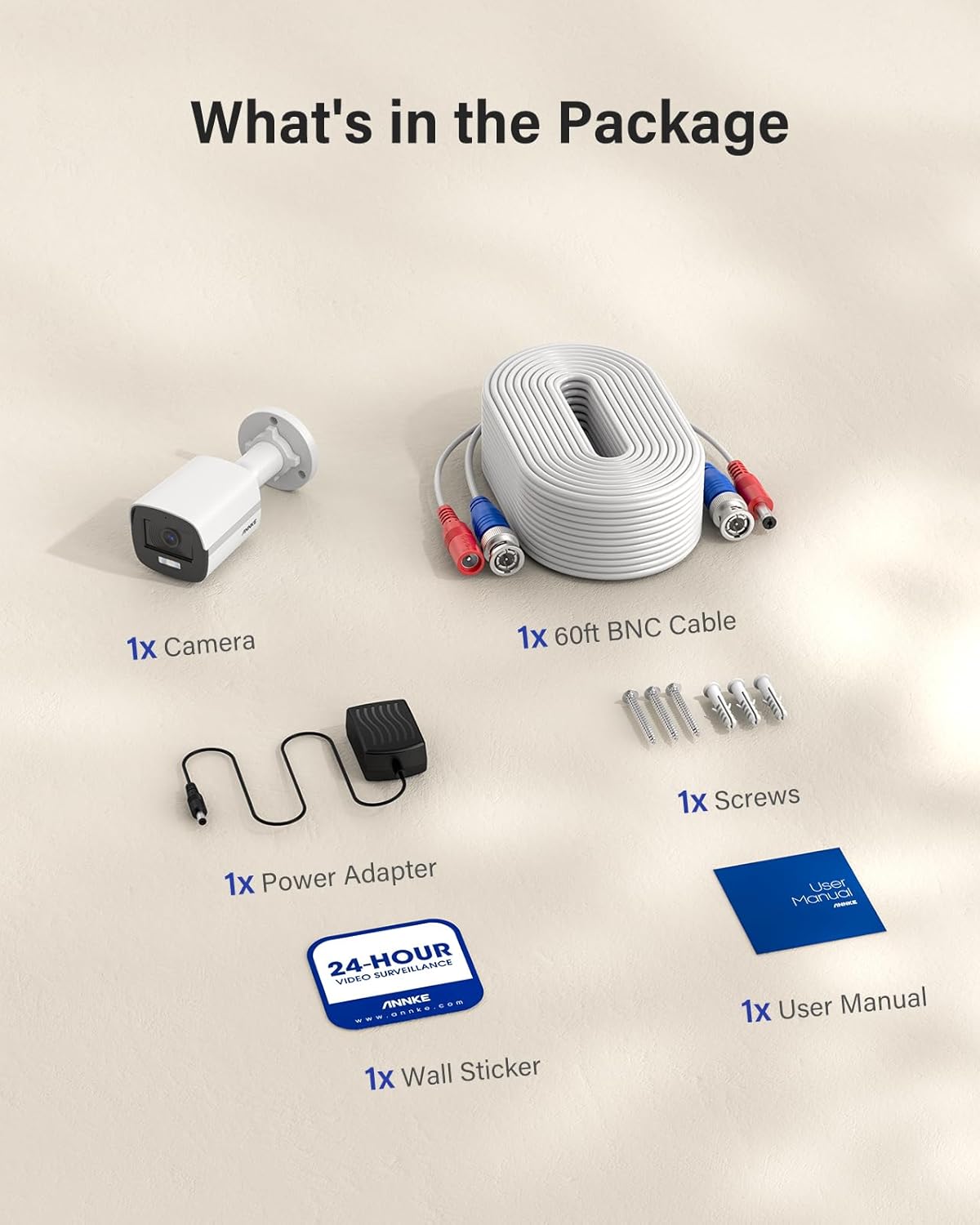
Image 1.2: Contents of the ANNKE 3K Bullet Security Camera package. Shows the camera, BNC cable, power adapter, screws, wall sticker, and user manual.
2. Specifikationer
The following table details the technical specifications of the ANNKE 3K Bullet Security Camera CR1CJ:
| Feature | Specifikation |
|---|---|
| Billedsensor | 3K CMOS Image Sensor |
| Video opløsning | 2960 (H) × 1665 (V) (16:9) |
| Signal System | PAL/NTSC |
| Billedhastighed | TVI: 3K@20 fps, 4 MP@25/30 fps, 1080p@25/30 fps; AHD: 5 MP@20 fps, 4 MP@25/30 fps; CVI: 4 MP@25/30 fps; CVBS: PAL/NTSC |
| Linse | 2.8mm fixed focal lens @ F1.2 |
| Min. Belysning | Color: 0.001 Lux @ (F1.0, AGC ON), 0 Lux with white light |
| Vinkel på View | Horisontal FOV: 102°, Lodret FOV: 56°, Diagonal FOV: 122° |
| Supplerende lys type | 1 Hvidt lys |
| Supplerende lysområde | Op til 20 m (65 fod) |
| Supplement Light Mode | IR light works normally, switches to white light when human or vehicle detected at night. |
| Bredt dynamisk område | Digital WDR |
| Støjreduktion | 2D-DNR |
| Lyd | Built-in mic (audio over coaxial cable) |
| Dag/nat tilstand | Farve |
| Video output | BNC, switchable TVI/AHD/CVI/CVBS |
| Boliger | Plast |
| Farve | Hvid |
| Driftskraft | 12 V DC ± 25 % |
| Forbrug | Maks. 2.9 W |
| Driftstemperatur | -40 °F – 140 °F / -40 °C – 60 °C |
| Indendørs/Udendørs brug | Indendørs/Udendørs |
| Vejrbestandig vurdering | IP67 |
| Dimensioner | 18.8 x 18.29 x 10.79 cm |
| Vægt | 762 g |
3. Opsætning og installation
3.1 Kamerakomponenter
Familiarize yourself with the main components of the camera:

Image 3.1: Diagram showing the camera's components: One-way Microphone, 2.8mm Lens, Supplement White Light, IP67 Housing, Video Output, Power Port, and Switch Button.
- One-way Microphone: Til lydoptagelse.
- 2.8 mm objektiv: Provides a 102° horizontal field of view.
- Supplement White Light: Illuminates for full-color night vision up to 20m.
- IP67 Housing: Durable and weatherproof enclosure.
- Video output: BNC connector for 3K video output.
- Strømport: 12V DC strømindgang.
- Skift knap: Used to switch video output signals (TVI/AHD/CVI/CVBS).
3.2 Montering af kameraet
- Vælg et passende sted til installation, idet du tager højde for det ønskede felt view and cable routing. The camera is rated IP67 for both indoor and outdoor use.
- Use the provided wall sticker as a template to mark the drilling positions.
- Bor forhuller, og isæt vægankre, hvis det er nødvendigt.
- Fastgør kamerabasen til monteringsfladen med de medfølgende skruer.
- Juster kameravinklen efter behov.
3.3 Tilslutning af kameraet
The camera requires connection to a compatible Digital Video Recorder (DVR) for operation. It cannot be used independently.
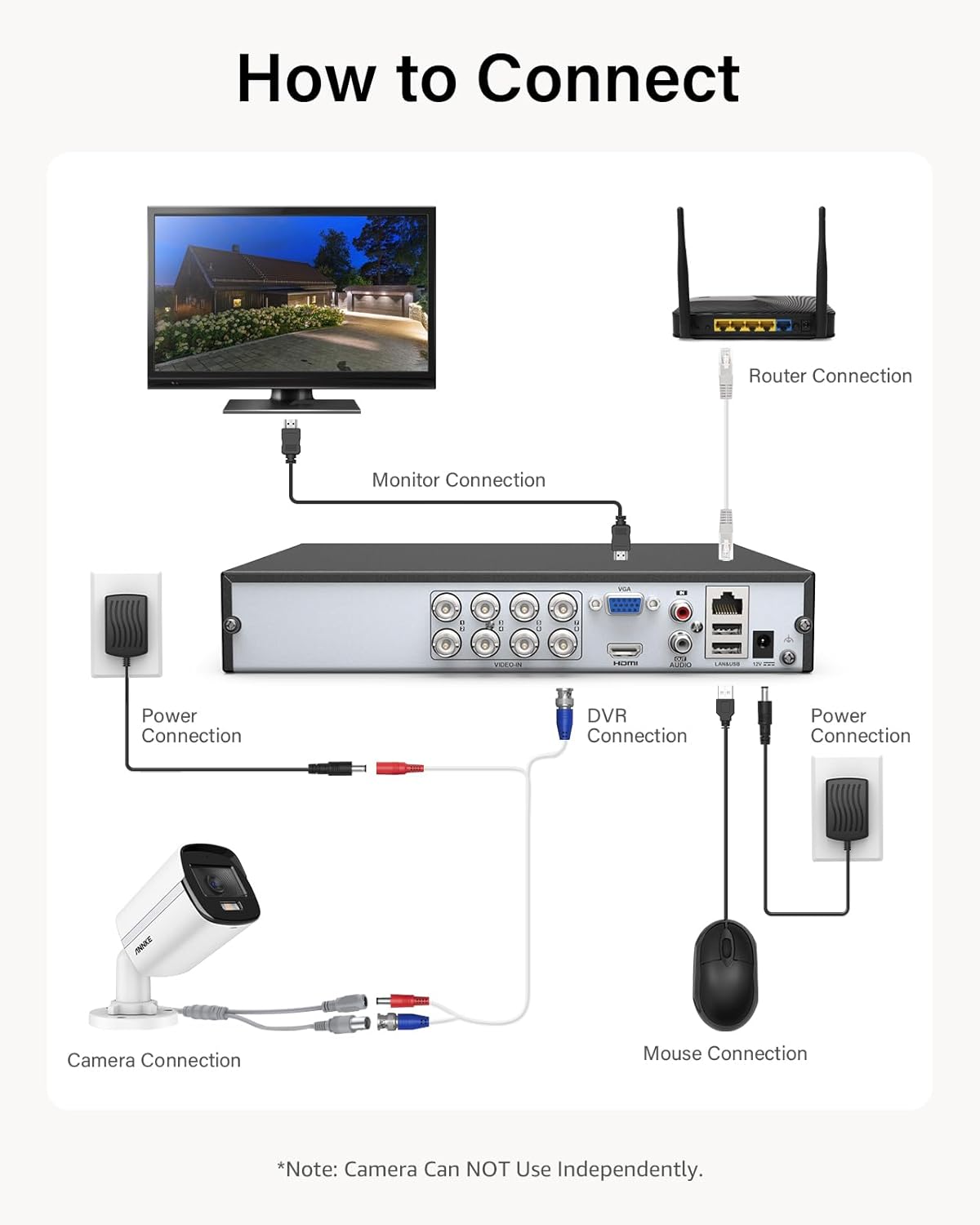
Image 3.2: Connection diagram for the ANNKE 3K Bullet Security Camera. Shows the camera connected via BNC cable to a DVR, which is connected to a monitor, router, and power. A mouse is also connected to the DVR.
- Connect one end of the 60ft BNC cable to the camera's video output port.
- Connect the other end of the BNC cable to a video input port on your DVR.
- Connect the provided power adapter to the camera's power port and then plug it into a power outlet.
- Ensure your DVR is properly connected to a monitor, power source, and network (if applicable).
3.4 Switching Video Output Signal (4-in-1)
This camera supports four different video signal types: TVI, AHD, CVI, and CVBS. You may need to switch the signal type to match your DVR.

Image 3.3: Diagram illustrating the 4-in-1 switchable signals (TVI, CVBS, CVI, AHD) for the ANNKE camera. Shows a camera on a pedestal with the signal types around it.
To switch the video output signal:
- Locate the switch button on the camera's cable (refer to Image 3.1).
- Press and hold the switch button for approximately 5 seconds to cycle through the available signal types (TVI, AHD, CVI, CVBS).
- Observe the image on your monitor connected to the DVR. Release the button when the correct signal type is displayed.
4. Betjening
4.1 Full Color Night Vision
The ANNKE CR1CJ camera features advanced full-color night vision technology. With an f/1.0 aperture and a dedicated white light illuminator, the camera can capture 3K full-color images even in low-light conditions (down to 0.01 lux) without relying solely on infrared.

Billede 4.1: Eks.ample of 3K full-color night vision. Shows a clear, color image of a street at night with a person and a car, illuminated by the camera's white light.
The camera's supplement light mode is designed to use IR light normally and switch to white light when human or vehicle motion is detected at night, providing clear color footage of events.
4.2 Indbygget mikrofon
The integrated microphone allows for one-way audio recording, which is transmitted over the coaxial cable along with the video signal. This feature enhances surveillance by providing audio context to video footage.

Image 4.2: Illustration of the built-in microphone feature. Shows a child speaking near the camera, with a speech bubble indicating audio capture.
4.3 Remote Access and Motion Detection
When connected to a compatible ANNKE DVR and configured with the ANNKE App, you can:
- Access live camera feeds remotely via iOS/Android smartphones, tablets, or computers.
- Receive instant app push notifications and email alerts when motion events are detected by the camera.
5. Vedligeholdelse
The ANNKE CR1CJ camera is designed for minimal maintenance due to its durable IP67 weatherproof housing.

Image 5.1: Illustration of the camera's IP67 weatherproof rating, showing it resistant to water and extreme temperatures (-40°C to 60°C).
- Rensning: Rengør kameralinsen regelmæssigt med en blød kludamp cloth to remove dust, dirt, or water spots that may affect image quality. Avoid abrasive cleaners.
- Kabelinspektion: Regularly inspect the BNC and power cables for any signs of wear, damage, or loose connections.
- Firmwareopdateringer: Tjek den officielle ANNKE-konto website for any available firmware updates for your camera or connected DVR to ensure optimal performance and security.
6. Fejlfinding
If you encounter issues with your ANNKE 3K Bullet Security Camera, refer to the following common problems and solutions:
- Intet billede på skærmen:
- Sørg for, at kameraet modtager strøm. Kontroller strømadapteren og stikkontakten.
- Verify the BNC cable is securely connected at both the camera and DVR ends.
- Confirm the camera's video output signal (TVI/AHD/CVI/CVBS) matches the input type supported by your DVR channel. Use the switch button to cycle signals if necessary.
- Check the DVR's settings to ensure the correct channel is selected and configured.
- Poor Image Quality / Distorted Image:
- Rengør kameralinsen.
- Check the BNC cable for damage or kinks. A faulty cable can degrade signal quality.
- Ensure the camera's signal type is correctly matched to the DVR.
- Verify the DVR supports 3K resolution or higher for optimal display.
- Ingen lydoptagelse:
- Ensure the camera is powered and connected via BNC cable. Audio is transmitted over the coaxial cable.
- Check your DVR's audio input settings for the corresponding channel. Ensure audio recording is enabled.
- Verify the DVR supports audio over coaxial (AoC) for the selected signal type.
- Night Vision Not Working / Not in Color:
- Ensure there is sufficient ambient light for color night vision. While effective in low light, extreme darkness may still result in monochrome images if the white light is not activated or insufficient.
- Check if the white light illuminator is obstructed.
- Verify motion detection settings on your DVR if the white light is configured to activate upon motion.
7. Garantioplysninger
ANNKE products typically come with a limited warranty. For specific warranty terms, conditions, and duration applicable to your ANNKE 3K Bullet Security Camera (Model CR1CJ), please refer to the official ANNKE webwebstedet eller garantikortet, der fulgte med dit køb. Gem din købsbevis til garantikrav.
8. Kundesupport
If you require further assistance or have questions not covered in this manual, please contact ANNKE customer support through their official website. You can typically find support resources, FAQs, and contact information at www.annke.com/support (eksample link, please verify actual URL).
When contacting support, please have your product model (CR1CJ) and purchase information ready.


