1. Introduktion
This manual provides comprehensive instructions for the installation, operation, and maintenance of your CAME AGT A200 S200 wired intercom handset, model 840CA-0010. Please read this manual thoroughly before using the product to ensure proper functionality and safety.
The AGT A200 S200 intercom handset is a wall-mounted device featuring a single button for door opening. It is designed for versatile wall installation, compatible with both horizontal and vertical 503 boxes, as well as Ø 60 mm round boxes. This intercom is specifically compatible with System 200.
2. Sikkerhedsoplysninger
- Afbryd altid strømmen før installation eller vedligeholdelse.
- Installation should be performed by a qualified technician in accordance with local electrical codes.
- Udsæt ikke enheden for overdreven fugt eller ekstreme temperaturer.
- Brug kun originale reservedele og tilbehør.
- Opbevares utilgængeligt for børn.
3. Pakkens indhold
Kontroller venligst, at alle varer er til stede i pakken:
- CAME AGT Intercom Handset (Model 840CA-0010)
- Monteringsskruer og vægdyvler
- Brugermanual
4. Produktet er slutview
The CAME AGT intercom handset is designed for clear communication and convenient door release. Below is an image illustrating the product's appearance and key features.
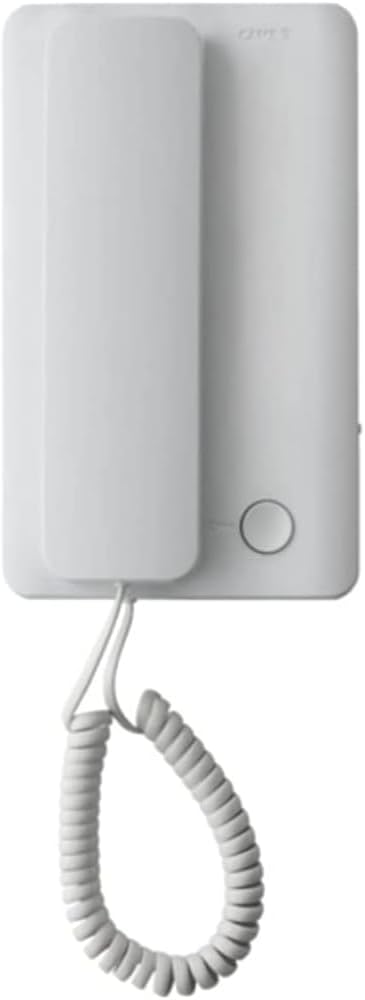
This image displays the CAME AGT intercom handset, featuring a clean white design. The handset is shown hanging from its base unit by a coiled cord. A single circular button is visible on the base unit, typically used for door release.
- Håndsæt: Used for speaking and listening.
- Basisenhed: Houses the electronics and mounting points.
- Dørudløserknap: A circular button on the base unit to activate the door lock release.
- Spiralledning: Forbinder håndsættet til baseenheden.
5. Opsætning og installation
The CAME AGT intercom handset is designed for wall-mounted installation. Ensure power is disconnected before proceeding.
- Forberedelse: Identify the desired mounting location. The unit is compatible with standard 503 electrical boxes (both horizontal and vertical orientations) and Ø 60 mm round boxes.
- Ledningsføring: Connect the intercom wires from your System 200 to the terminals on the back of the base unit. Refer to your System 200's wiring diagram for specific connections. Ensure all connections are secure and insulated.
- Montering: Secure the base unit to the wall box using the provided screws. Ensure the unit is level and firmly attached.
- Håndsætforbindelse: Connect the coiled cord from the handset to the designated port on the base unit.
- Tænd: Once installation is complete and all connections are verified, restore power to the intercom system.
- Test: Test the intercom by initiating a call from the outdoor unit and verifying two-way audio. Test the door release function.
6. Betjeningsvejledning
Using your CAME AGT intercom handset is straightforward:
- Besvare et opkald: When the intercom rings, lift the handset from its cradle. You can then speak to the visitor at the outdoor unit.
- Afslutning af et opkald: Place the handset back into its cradle to end the conversation.
- Åbner døren: During a call, or when the intercom is active, press the circular door release button on the base unit to unlock the door.
7. Vedligeholdelse og pleje
To ensure the longevity and optimal performance of your intercom handset, follow these simple maintenance guidelines:
- Rensning: Wipe the surface of the handset and base unit with a soft, dry cloth. For stubborn marks, a slightly damp en klud med mild sæbe kan bruges, efterfulgt af tørring. Undgå slibende rengøringsmidler eller opløsningsmidler.
- Ledningspleje: Avoid excessive pulling or twisting of the coiled cord to prevent damage.
- Inspektion: Periodically check for any loose connections or visible damage to the unit or wiring.
8. Fejlfinding
If you encounter issues with your intercom, refer to the following common problems and solutions:
| Problem | Mulig årsag | Løsning |
|---|---|---|
| No sound from handset | Loose wiring connection; Power issue; Faulty handset. | Check wiring connections at the base unit and System 200. Verify power supply. If problem persists, contact support. |
| Door release button not working | Wiring issue to door strike; Faulty button; System 200 issue. | Check wiring to the door strike. Ensure the System 200 is functioning correctly. |
| Intermitterende kommunikation | Loose connections; Interference. | Inspect all wiring connections. Ensure no strong electrical interference sources are nearby. |
Hvis problemet fortsætter efter at have forsøgt disse løsninger, bedes du kontakte kundesupport.
9. Specifikationer
Detailed technical specifications for the CAME AGT Intercom Handset 840CA-0010:
| Feature | Specifikation |
|---|---|
| Fabrikant | CAME AUTEL STUDIO SR |
| Produktmål (L x B x H) | 49 x 11.9 x 28.3 cm; 230 gram |
| Model reference | 840CA-0010 |
| Farve | Hvid |
| Strømtype | El-kabel |
| Batteri(er) inkluderet | Ingen |
| Nødvendigt batteri(er) | Ja |
| Tilgængelighed af reservedele | Oplysninger om reservedele er ikke tilgængelige |
| Kompatible enheder | System 200 |
| Telefontype | Kablet |
| Opkaldstype | Simple Keypad (referring to the single button) |
| Type svarsystem | Digital |
| Flerlinjedrift | Single-line Operation |
| Vis nummer | Ja |
10. Garanti og support
For warranty information and technical support, please refer to the documentation provided with your complete intercom system or contact your authorized CAME dealer. Keep your purchase receipt as proof of purchase.
For further assistance, you may visit the official Came webwebsted eller kontakt deres kundeserviceafdeling.


