1. Introduktion
The LiNKFOR 4 Port 3.5mm Stereo Audio Switch is a versatile device designed to manage audio connections between multiple sources and output devices. It functions as a 4-input, 1-output selector or a 1-input, 4-output splitter, allowing you to easily switch between audio signals without reconnecting cables. This passive device requires no external power supply and features a volume control knob for convenience.
This manual provides detailed instructions for setting up, operating, and troubleshooting your audio switch to ensure optimal performance.
2. Pakkens indhold
Kontroller venligst, at alle varer er til stede i din pakke:
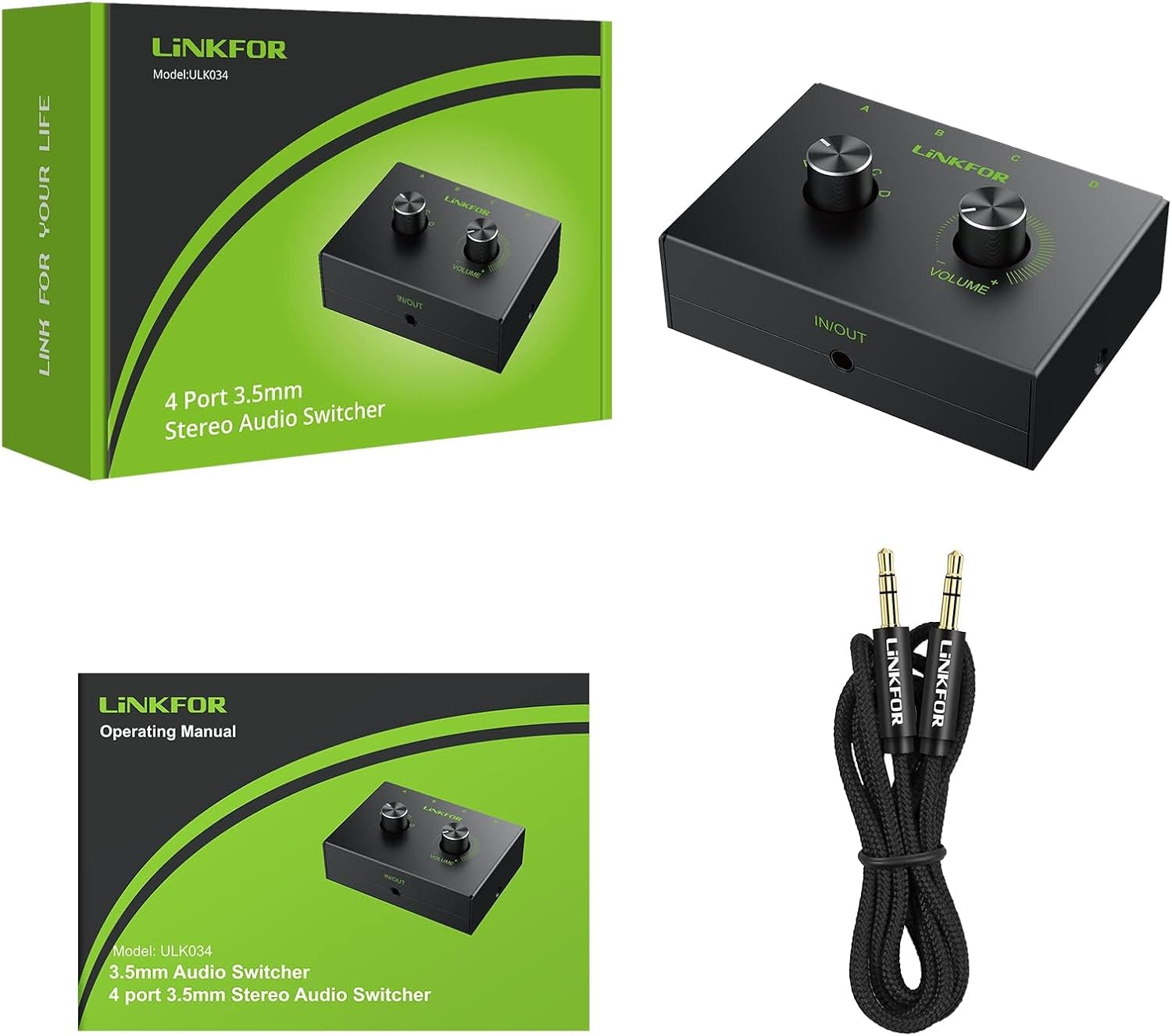
- 1 x LiNKFOR 4 Port 3.5mm Stereo Audio Switcher
- 1 x brugermanual
- 1 x 3.5mm Audio Cable (approximately 1 meter / 3.4 feet)
3. Produktet er slutview
Familiarize yourself with the components and controls of your LiNKFOR audio switch.

- 3.5mm (IN/OUT) A/B/C/D Ports: Four 3.5mm stereo audio jacks on the front panel for connecting audio sources or output devices.
- A/B/C/D Select Switch: A rotary knob on the top panel to select the active audio channel (A, B, C, or D).
- Lydstyrkekontrol: A rotary knob on the top panel to adjust the audio output volume.
- 3.5mm (IN/OUT) Main Port: A single 3.5mm stereo audio jack on the side panel for connecting the primary audio source or output device.


4. Opsætningsvejledning
The LiNKFOR audio switch supports two primary configurations:
4-Input, 1-Output Mode:
Connect up to four audio sources to a single output device.
- Connect your four audio sources (e.g., PC, phone, laptop, MP3 player) to the 3.5mm (IN/OUT) A, B, C, and D ports on the front panel of the switch using 3.5mm audio cables.
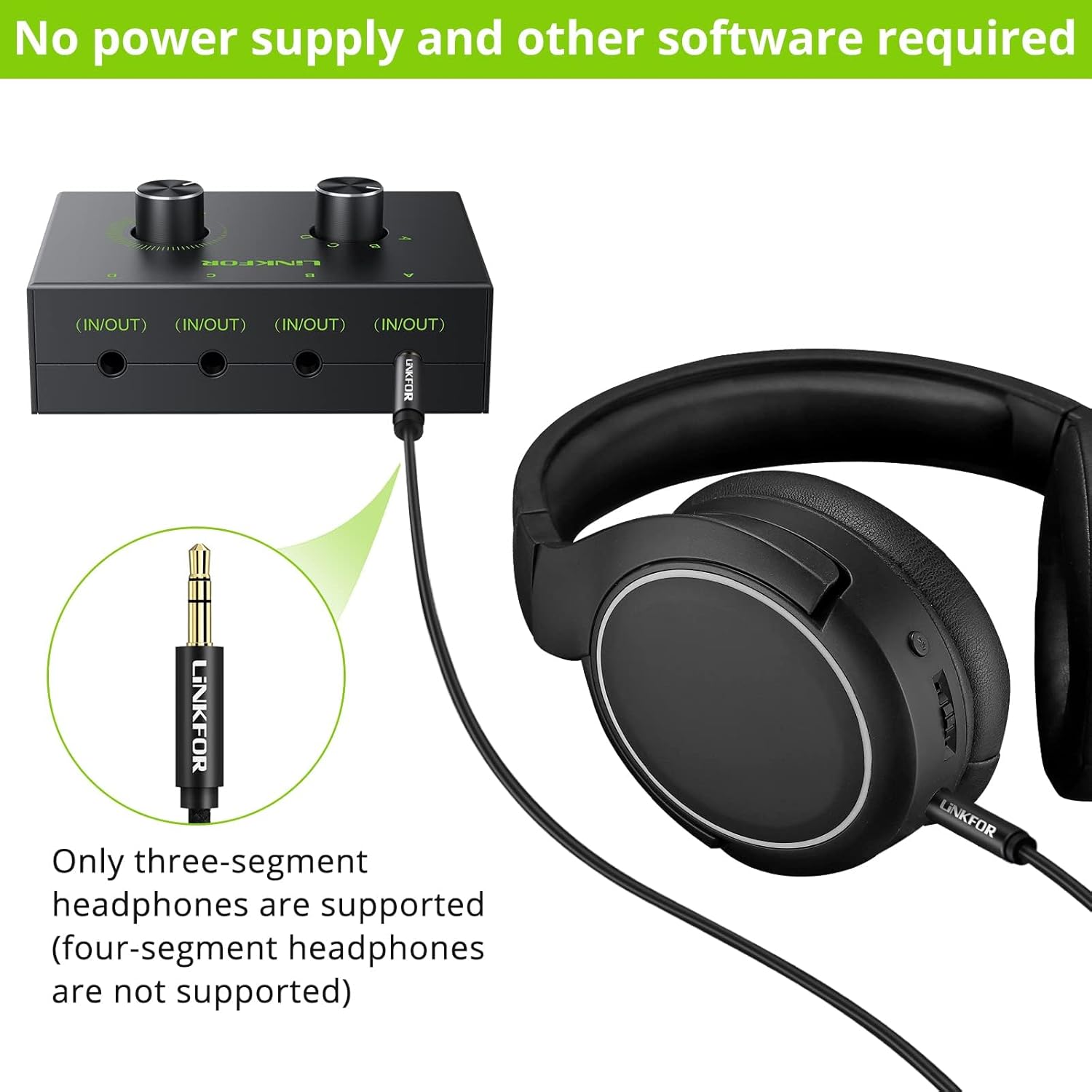
- Connect your single audio output device (e.g., speakers, headphones, sound bar) to the 3.5mm (IN/OUT) Main Port on the side of the switch using a 3.5mm audio cable.
1-Input, 4-Output Mode:
Connect a single audio source to up to four output devices.
- Connect your single audio source (e.g., PC, phone, laptop, MP3 player) to the 3.5mm (IN/OUT) Main Port on the side of the switch using a 3.5mm audio cable.
- Connect your four audio output devices (e.g., multiple speakers, headphones) to the 3.5mm (IN/OUT) A, B, C, and D ports on the front panel of the switch using 3.5mm audio cables.

Note: The device is passive and does not require a power supply. It is plug-and-play.
5. Betjening
Selecting Audio Channels:
Brug A/B/C/D Select Switch knob on the top panel to choose the desired audio channel. Rotate the knob to align the indicator with the corresponding A, B, C, or D port you wish to activate.
Justering af lydstyrke:
Brug Lydstyrkekontrol knob on the top panel to adjust the audio output level. Rotate clockwise to increase volume and counter-clockwise to decrease volume.
Important: Only one input or output can be active at a time. The switch does NOT support simultaneous 4-input or 4-output operation.
6. Kompatibilitet
The LiNKFOR 4 Port 3.5mm Stereo Audio Switch is compatible with a wide range of devices:
- Inputkilder: PC, Phone, Laptop, Blue-ray Players, MP3 Players, Tablets, etc.
- Outputenheder: Speakers, Headphones, Sound Bars, Amplivførere osv.
Hovedtelefonkompatibilitet: Denne enhed understøtter three-segment headphones (TRS). Four-segment headphones (TRRS, typically with a microphone function) are NOT supported.
7. Vigtige bemærkninger
- Ingen strømforsyning påkrævet: The device operates passively and does not need an external power adapter.
- Jordsløjfestøj: When connecting the 3.5mm audio switcher to multiple desktop computers or speakers, ground loop noise may occur. To resolve this, a ground loop noise isolator (not included) can be added between the audio switch and the affected output device.

8. Specifikationer
| Produktdimensioner | 4.33 x 3.34 x 1.45 tommer |
| Varens vægt | 5.6 ounce |
| Varemodelnummer | XUNVC558 |
| Mærke | LiNKFOR |
| Connector Type | 3.5 mm jack |
| Antal havne | 4 |
| Farve | Sort |
9. Fejlfinding
If you encounter issues with your LiNKFOR audio switch, please refer to the following common solutions:
- Ingen lyd:
- Ensure all 3.5mm audio cables are securely connected to both the audio switch and your devices.
- Verify that the correct channel (A, B, C, or D) is selected using the selector knob.
- Check the volume level on the audio switch and on your connected source/output devices. Increase if necessary.
- Confirm that your headphones are three-segment (TRS) type, as four-segment (TRRS) headphones are not supported.
- Test with different audio cables and devices to isolate the problem.
- Poor Sound Quality / Hum / Buzzing:
- If connecting to multiple desktop computers or speakers, ground loop noise may be present. Consider using a ground loop noise isolator (not included) to eliminate the hum.
- Sørg for, at alle kabelforbindelser er faste og ikke løse.
- Test with different audio cables, as faulty cables can introduce noise.
- Reduce the volume on the source device and increase it on the output device, or vice-versa, to find an optimal balance that minimizes noise.
10. Garanti og support
The LiNKFOR 4 Port 3.5mm Stereo Audio Switch comes with an 18 måneders fabriksgaranti fra købsdatoen.
For technical support, warranty claims, or further assistance, please refer to the contact information provided at your point of purchase or visit the official LiNKFOR webwebsted.


