Indledning
Thank you for choosing the WEKOME V25 TWS Wireless Bluetooth Earphones. This manual provides comprehensive instructions on how to set up, operate, and maintain your earphones to ensure optimal performance and longevity. Please read this manual carefully before using the product and retain it for future reference.
Pakkens indhold
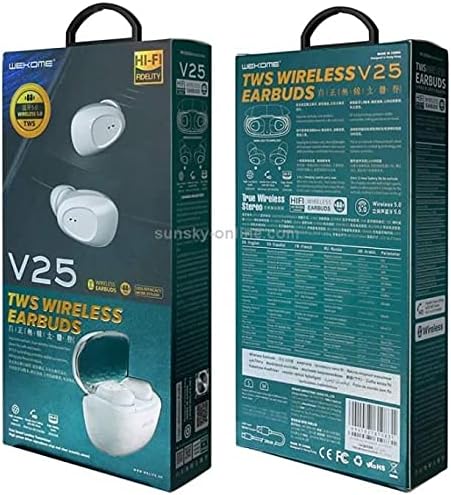
This image displays the front and back of the WEKOME V25 TWS Wireless Bluetooth Earphones retail packaging. The front shows the white earbuds and charging case, along with 'V25 TWS WIRELESS EARBUDS' branding. The back provides detailed specifications and features in multiple languages, including 'True Wireless Stereo' and 'Wireless 5.0' indicators.
Når du åbner pakken, skal du kontrollere, at alle varer er til stede og i god stand:
- WEKOME V25 TWS Wireless Bluetooth Earphones (Left and Right)
- Opladningsetui
- USB opladningskabel
- Brugermanual
- Ear Cushions (various sizes, as per product specifications)
Opsætningsvejledning
1. Opladning af øretelefoner og etuiet
Before first use, it is recommended to fully charge both the earphones and the charging case.
- Placer øretelefonerne i opladningsetuiet, og sørg for, at de er korrekt isat.
- Connect the USB charging cable to the charging port on the case and the other end to a 5V/1A USB power adapter (not included) or a computer's USB port.
- The indicator lights on the case and earphones will show charging status. Refer to the indicator light section for specific patterns.
- Once fully charged, disconnect the charging cable. A full charge typically takes 1-2 hours for the earphones and 2-3 hours for the case.
2. Parring med en Bluetooth-enhed
Høretelefonerne går automatisk i parringstilstand, når de tages ud af opladningsetuiet.
- Ensure the earphones are charged and remove them from the charging case. They will automatically power on and enter pairing mode (indicated by flashing lights).
- Gå til Bluetooth-indstillingerne på din Bluetooth-aktiverede enhed (smartphone, tablet, bærbar computer).
- Slå Bluetooth til, og søg efter tilgængelige enheder.
- Select "WEKOME V25" from the list of found devices.
- Once connected, the earphone indicator lights will stop flashing, and you may hear a "Connected" prompt.
- Høretelefonerne genopretter automatisk forbindelsen til den sidst parrede enhed, når de tages ud af etuiet, hvis Bluetooth er aktiveret på enheden.
Betjeningsvejledning
Grundlæggende kontrol
The WEKOME V25 earphones feature touch controls for easy management of music and calls.
| Fungere | Handling (venstre/højre øreprop) |
|---|---|
| Tænd | Take out of charging case |
| Sluk | Place back into charging case |
| Afspil/pause musik | Enkelt tryk |
| Næste spor | Dobbelttryk på højre øreprop |
| Forrige spor | Dobbelttryk på venstre øreprop |
| Besvar/afslut opkald | Enkelt tryk |
| Afvis opkald | Tryk og hold i 2 sekunder |
| Aktiver Voice Assistant | Tryk tredobbelt |
Iført øretelefoner
For optimal lydkvalitet og komfort skal du sørge for, at ørepropperne bæres korrekt.
- Identificér venstre (V) og højre (H) ørepropper.
- Før forsigtigt hver øreprop ind i den tilsvarende øregang.
- Rotate the earbud slightly until it fits snugly and comfortably.
- Experiment with different ear cushion sizes (if provided) to find the best fit for passive noise isolation and comfort.
Vedligeholdelse og pleje
Proper care will extend the life of your WEKOME V25 earphones.
- Rensning: Rengør regelmæssigt ørepropperne og opladningsetuiet med en blød, tør og fnugfri klud. Brug ikke skrappe kemikalier eller slibende materialer.
- Ørespidser: Remove ear tips and clean them with a damp klud og mild sæbe om nødvendigt. Sørg for, at de er helt tørre, før de sættes på igen.
- Opladningsporte: Keep the charging contacts on the earbuds and inside the case clean and free of debris. Use a dry cotton swab if needed.
- Opbevaring: Når de ikke er i brug, skal du altid opbevare øretelefonerne i deres opladningsetuiet for at beskytte dem mod støv, snavs og skader.
- Temperatur: Undgå at udsætte øretelefonerne for ekstreme temperaturer (varme eller kolde) eller høj luftfugtighed.
- Vandeksponering: These earphones are not waterproof. Avoid contact with water or other liquids.
Fejlfinding
If you encounter issues with your earphones, refer to the following common problems and solutions.
| Problem | Mulig løsning |
|---|---|
| Høretelefoner tændes ikke | Ensure earphones are charged. Place them in the charging case for a few minutes, then remove. |
| Kan ikke parres med enheden |
|
| Kun én øretelefon virker |
|
| Lav lydstyrke eller dårlig lydkvalitet |
|
| Ladeetui oplader ikke |
|
Hvis problemet fortsætter efter at have prøvet disse løsninger, bedes du kontakte kundesupport.
Specifikationer
Key technical specifications for the WEKOME V25 TWS Wireless Bluetooth Earphones:
| Feature | Detalje |
|---|---|
| Mærke | WEKOME |
| Modelnummer | V25 |
| Forbindelsesteknologi | Trådløs (Bluetooth) |
| Hovedtelefoner Form Factor | In Ear |
| Støjkontrol | Aktiv støjreduktion |
| Mikrofon | Inkluderet |
| Farve | Hvid |
| Inkluderede komponenter | Ørepuder |
| Kabelfunktion | Uden kabel |
| Fabrikant | WEKOME |
| Dato først tilgængelig | 31. maj 2021 |
Garanti og support
WEKOME products are designed and manufactured to the highest quality standards. For information regarding warranty coverage, technical support, or service inquiries, please refer to the warranty card included with your product or visit the official WEKOME webwebsted. Gem venligst din købsbevis til garantikrav.
For further assistance, you may contact WEKOME customer service through their official channels.


