1. Introduktion
This manual provides detailed instructions for the installation, operation, and maintenance of your Radioddity DB20-G GMRS Mobile Radio. Please read this manual thoroughly before using the device to ensure proper function and safety. The Radioddity DB20-G is a compact 20W GMRS mobile radio designed for vehicle communication, offering long-range capabilities and user-friendly features.

Image: The Radioddity DB20-G GMRS Mobile Radio unit with its connected speaker microphone.
2. Sikkerhedsoplysninger
Vigtig: Operation of this device requires a GMRS license. Ensure you possess the necessary license before transmitting.
- Do not operate the radio in explosive atmospheres (e.g., near flammable gas, dust, or powders).
- Undgå at udsætte radioen for direkte sollys i længere perioder eller ekstreme temperaturer.
- Do not attempt to disassemble or modify the radio. Repairs should only be performed by authorized personnel.
- Use only approved accessories and power sources.
- Hold en sikker afstand fra antennen under transmission for at minimere RF-eksponering.
3. Produktet er slutview
The Radioddity DB20-G is a compact GMRS mobile radio featuring a clear display and an integrated microphone with control buttons for ease of use in a vehicle. It supports UHF, VHF, and NOAA band scanning.
3.1 Pakkens indhold
Bekræft at alle varer er til stede i din pakke:
- 1 x DB20-G Base Station
- 1 x Speaker Microphone (with Mic Holder, Non-slip Mat, 2 Screws)
- 1 x Mobile Bracket (with 4 Fixing Screws, 2 x Pads)
- 1 x programmeringskabel
- 1 x 12V Car Charger
- 1 x Fuse (10A 250V)
- Brugermanual
- Additional assembly accessories

Image: The Radioddity DB20-G radio unit, speaker microphone, programming cable, 12V car charger, microphone holder, mount bracket, and various screws and pads.
3.2 Radio Unit Controls and Ports

Billede: Foran og bagpå views of the DB20-G radio unit with numbered labels for its components. Front panel includes Programming Cable/Microphone Jack, VFO/Channel Mode Switch, Main Channel button, Monitor button, LCD, Up/Down buttons, Menu button, Indicator, and Power On/Off/Volume Knob. Rear panel shows Antenna Jack and External Speaker Jack.
- Programming Cable/Microphone Jack: Connects the speaker microphone or programming cable.
- VFO/Channel Mode Switch (V/M): Toggles between Frequency (VFO) mode and Channel mode.
- Main Channel (MAIN): Selects the main operating channel.
- Monitor (MON): Opens the squelch to listen for weak signals.
- LCD: Color display showing channel information, frequency, and status.
- Op/Ned knapper: Naviger i menuer og juster indstillinger.
- Menu (FUN): Giver adgang til radioens menusystem.
- Indikator: Status lys.
- Power On/Off, Volume Knob: Tænder/slukker radioen og justerer lydstyrken.
- Antennestik: Connects the external antenna.
- Ekstern højttalerstik: Connects an optional external speaker.
3.3 Speaker Microphone Controls

Image: The speaker microphone with numbered labels for its components. Includes PTT button, Down button, Up button, Microphone, Indicator, and Number Keypad.
- PTT (Push-To-Talk): Tryk for at sende, slip for at modtage.
- Ned-knap: Navigates downwards in menus or decreases values.
- Op-knap: Navigates upwards in menus or increases values.
- Mikrofon: Til stemmeinput under transmission.
- Indikator: Status light on the microphone.
- Nummertastatur: For direct frequency entry, channel selection, and accessing various functions (SQL, TONE, SKIP, MON, SCAN, BLK, REV, POW, TOT, SUB, RPT, LAM, FUN, V/M, MAIN, DIL).
3.4 Vis information
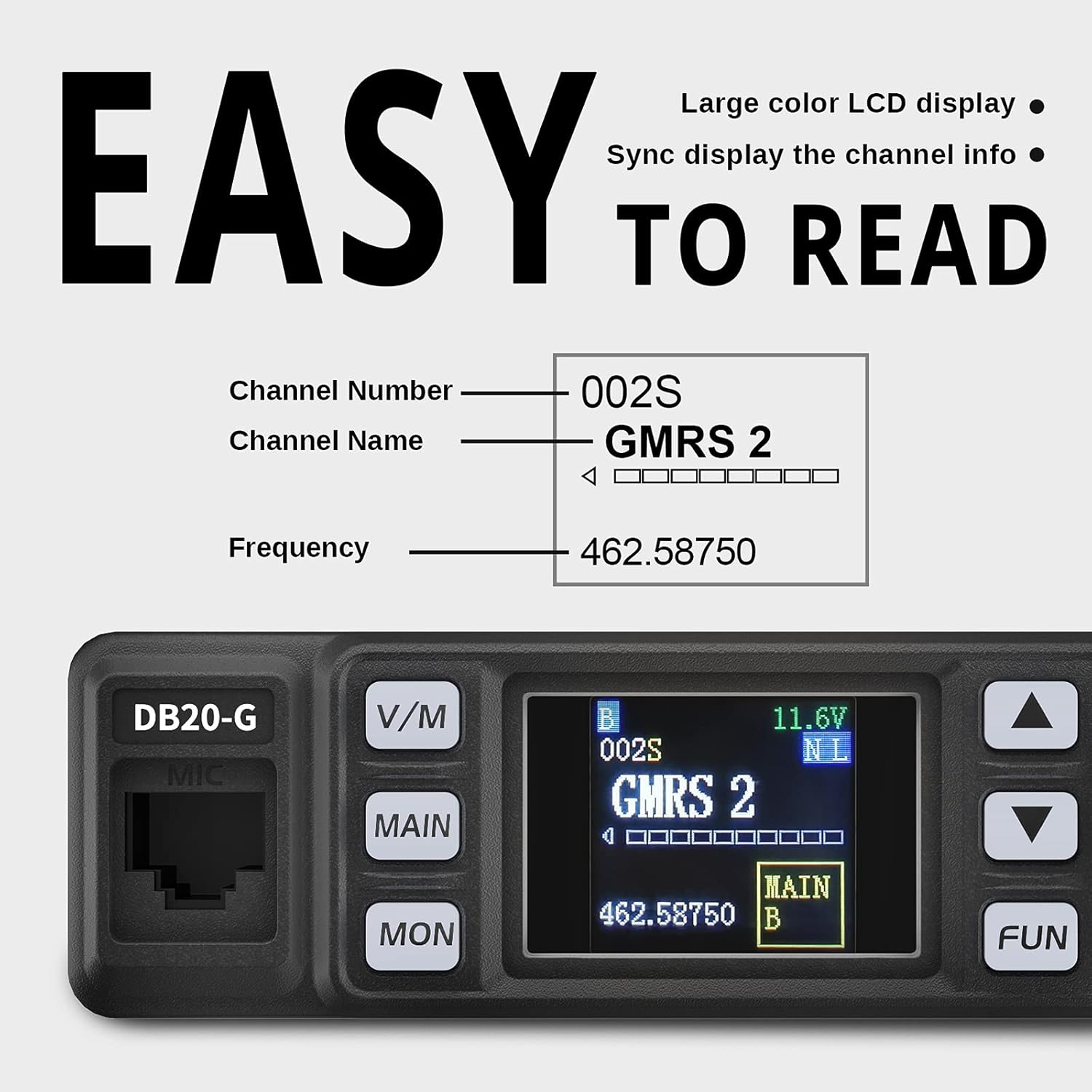
Billede: Et nærbillede view of the DB20-G's color LCD, clearly showing the Channel Number (002S), Channel Name (GMRS 2), and Frequency (462.58750).
The color LCD provides clear information, including:
- Kanalnummer
- Kanalnavn
- Driftsfrekvens
- Batteri Voltage
- Signalstyrkeindikator
- Send/modtag status
4. Opsætning og installation
4.1 Montering af radioen
The DB20-G is designed for mobile use and can be mounted in various vehicle locations. Use the provided mobile bracket and screws for secure installation.

Image: The compact Radioddity DB20-G GMRS Mobile Radio unit securely mounted in a vehicle's center console.

Image: A collage of three images demonstrating different installation options for the DB20-G radio within a vehicle, including connection via a cigarette lighter plug and placement in a center console.
4.2 Strømtilslutning
Connect the radio to your vehicle's 12V power source using the provided cigarette lighter plug. Ensure the connection is secure.
4.3 Antenneforbindelse
Connect a suitable GMRS antenna to the Antenna Jack on the rear of the radio unit. For optimal performance, ensure the antenna is properly tuned and mounted.
4.4 Speaker Microphone Connection
Plug the speaker microphone cable into the Programming Cable/Microphone Jack on the front of the radio unit.
5. Betjeningsvejledning
5.1 Tænd/sluk og lydstyrkejustering
Rotate the Power On/Off/Volume Knob clockwise to turn the radio on. Continue rotating to increase the volume. Rotate counter-clockwise to decrease volume and turn off the radio.
5.2 Kanal- og frekvensvalg
- VFO/Channel Mode: Tryk på V/M button to switch between Frequency (VFO) mode and Channel mode.
- Kanaltilstand: Use the Up/Down buttons on the radio or microphone to select a pre-programmed channel.
- VFO tilstand: Use the Up/Down buttons or the microphone keypad to enter a desired frequency.
5.3 Afsendelse og modtagelse
For at sende, tryk og hold nede PTT button on the speaker microphone and speak clearly into the microphone. Release the PTT button to receive.
5.4 Repeater-kanaler
The DB20-G includes 9 customizable GMRS repeater channels. These allow you to extend your communication range significantly by utilizing GMRS repeaters. You can program these channels with specific CTCSS/DCS tones for repeater access.

Image: The DB20-G radio display with a graphic indicating "9 DIY Repeater Channels" and a radio tower, illustrating the ability to switch repeater channels with different CTCSS/DCS tones.
5.5 Privatlivskoder (CTCSS/DCS)
The radio supports 1075 privacy codes (CTCSS/DCS) to help filter out unwanted conversations on the same channel, ensuring clearer communication.
5.6 Scanning
The DB20-G supports VHF/UHF and NOAA band scanning. To initiate scanning, refer to the specific instructions in the full programming guide or use the SCAN function on the microphone keypad.

Image: The DB20-G radio and microphone with text indicating "VHF/UHF SCANNING" and a list of frequencies, demonstrating its scanning capability.
5.7 Programmering
The DB20-G can be programmed using dedicated software and the provided programming cable. It is recommended to create separate frequency files for different bands (e.g., GMRS, VHF) to avoid conflicts during programming. Consult the software's instructions for detailed programming steps.
6. Vedligeholdelse
- Rensning: Brug en blød, damp klud til at rengøre radioens yderside. Brug ikke skrappe kemikalier eller opløsningsmidler.
- Antennepleje: Regularly check the antenna and its connection for damage.
- Opbevaring: When not in use for extended periods, store the radio in a dry, cool place.
7. Fejlfinding
| Problem | Mulig årsag | Løsning |
|---|---|---|
| Radioen tændes ikke | Loose power connection; Blown fuse; Vehicle power issue | Check power cable connection; Inspect and replace fuse if necessary; Verify vehicle's 12V power outlet is functional. |
| Kan ikke sende eller modtage | Incorrect frequency/channel; Antenna not connected; Squelch too high; GMRS license not active. | Verify frequency/channel settings; Ensure antenna is securely connected; Adjust squelch level; Confirm GMRS license status. |
| Dårlig lydkvalitet | Low signal strength; Interference; Volume too low/high | Check antenna connection and location; Move away from sources of interference; Adjust volume. |
| Programmeringsproblemer | Incorrect software settings; Mixed band frequencies in one file; Driver issues. | Ensure separate programming files for different bands (e.g., GMRS, VHF). Consult programming software documentation for correct settings and driver installation. |
8. Specifikationer

Image: The Radioddity DB20-G radio unit displaying its approximate dimensions: 3.9 inches (height), 4.9 inches (width), and 1.4 inches (depth).
| Feature | Specifikation |
|---|---|
| Modelnummer | DB20-G |
| Varens vægt | 15.8 ounce (0.45 kilo) |
| Produktdimensioner | 4.5 x 5 x 2 tommer |
| Display Type | Farve LCD |
| Antal kanaler | 500 |
| Frekvensområde | GMRS, UHF, VHF |
| Maksimal talerækkevidde | 20 Miles (open air) |
| Voltage | 13.8 volt (DC) |
| Vandmodstandsniveau | Vandtæt |
| Særlige funktioner | Lightweight, Long Range, Noise Reduction, Voice Operated Transmission (VOX) |
9. Garanti og support
The Radioddity DB20-G GMRS Mobile Radio comes with an 18 måneders garanti and lifetime support. For technical assistance, warranty claims, or further inquiries, please contact Radioddity customer service through their official channels.


