1. Introduktion
This manual provides comprehensive instructions for the UrbanX Universal Remote Control, designed for seamless compatibility with a wide range of Samsung Smart TV models, including LCD, LED, 3D, HDTV, and QLED televisions. This remote serves as a direct replacement for various original Samsung remote models, offering immediate functionality without complex setup procedures.
2. Produktet er slutview
The UrbanX Universal Remote Control is engineered for ease of use and reliable performance. Its ergonomic design ensures a comfortable grip, while its lightweight construction makes it convenient for everyday handling. The remote operates using infrared technology, providing stable signal transmission over a considerable distance.

Billede: Forside og bagside view of the UrbanX Universal Remote Control, showcasing its button layout and sleek black finish.
Nøglefunktioner:
- Universal kompatibilitet: Designed to work with a broad spectrum of Samsung Smart TV models.
- Ergonomisk design: Shaped for comfortable handling and reduced hand fatigue.
- Letvægt: Easy to hold and operate for extended periods.
- Infrarød kontrol: Reliable and stable signal transmission.
- Ingen programmering påkrævet: Ready to use immediately after battery insertion.

Image: A hand holding the UrbanX remote, with text indicating its ABS material, soft plastic buttons, lightweight, and ergonomic design.
3. Opsætning
Batteri installation:
- Find batterirummet på bagsiden af fjernbetjeningen.
- Slide the battery cover downwards or outwards to open.
- Isæt to (2) AAA-batterier, og sørg for, at de positive (+) og negative (-) poler er korrekt justeret med indikatorerne i batterirummet. (Bemærk: Batterier er ikke inkluderet og skal købes separat.)
- Skub batteridækslet tilbage på plads, indtil det klikker sikkert.

Billede: En detaljeret view of the remote control, highlighting the battery compartment and the infrared emitter at the top.
Indledende brug:
No programming or complex setup is required for this universal remote control. Once the batteries are correctly installed, the remote is ready for immediate use with your compatible Samsung Smart TV.
4. Betjeningsvejledning
To operate your Samsung Smart TV with the UrbanX Universal Remote Control, ensure there is a clear line of sight between the remote's infrared emitter and the TV's IR receiver. Point the remote directly at the television.
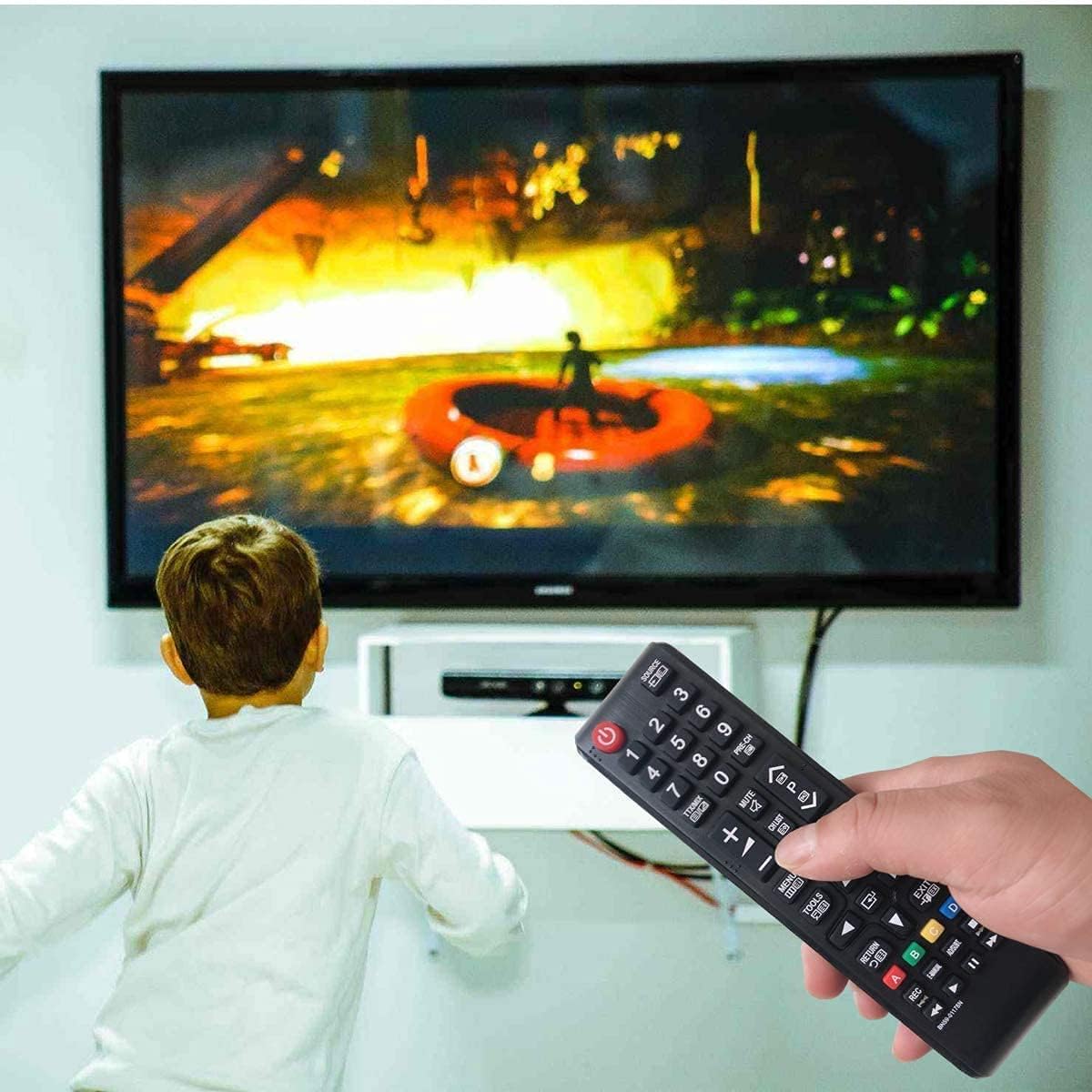
Image: A person holding the UrbanX remote control, pointing it towards a Samsung TV, demonstrating typical usage.
Knap funktioner:
| Knap | Fungere |
|---|---|
| Strøm (rød) | Tænder eller slukker for tv'et. |
| Kilde | Vælger inputkilder (HDMI, AV osv.). |
| Tastatur (0-9) | Direkte kanalvalg eller numerisk input. |
| VOL (+/-) | Justerer lydstyrken op eller ned. |
| STUM | Slår lyden fra eller til på tv'et. |
| CH (Op/Ned) | Skifter tv-kanaler op eller ned. |
| MENU | Giver adgang til tv'ets hovedmenu. |
| SMART HUB | Opens the Samsung Smart Hub for apps and services. |
| GUIDE | Viser den elektroniske programguide. |
| INFO | Viser oplysninger om det aktuelle program eller input. |
| Directional Pad (Up/Down/Left/Right) & OK | Navigerer i menuer og bekræfter valg. |
| TILBAGE | Går tilbage til den forrige skærm eller menu. |
| EXIT | Afslutter den aktuelle menu eller applikation. |
| Farvede knapper (A, B, C, D) | Kontekstafhængige funktioner i menuer eller applikationer. |
| Afspilningskontroller (Afspil, Pause, Stop, Spol tilbage, Spol frem) | Styrer medieafspilning. |
5. Kompatibilitet
The UrbanX Universal Remote Control is compatible with a wide range of Samsung Smart TV models. It has been tested and confirmed to work with models such as BN68-06708G, and is also compatible with the following specific models:
- BN59-01175N
- BN59-01199F
- AA59-00741A
- AA59-00786A
- AA59-00602A
- BN59-01247A
- AA59-00743A
- BN59-01175B
- AA59-00818A
- AA59-00603A
- BN59-01199G
- AA59-00622A
- AA59-00496A
- AA59-01180A
- BN59-01268D
- AA59-00666A
- AA59-01289A
- AA59-00600A
This remote is designed to cover all functions of the original remote for these models, ensuring seamless integration with your existing Samsung TV setup.

Image: A visual representation of various Samsung TV model numbers (e.g., UN32H5500AF, UN40H6350AF) that are compatible with this remote control.
6. Vedligeholdelse
Rensning:
Brug en blød, tør klud til at rengøre fjernbetjeningen. Ved genstridigt snavs, tør letampRengør kluden med vand eller et mildt, ikke-slibende rengøringsmiddel. Undgå at bruge skrappe kemikalier, opløsningsmidler eller slibende materialer, da disse kan beskadige fjernbetjeningens overflade eller interne komponenter.
Udskiftning af batteri:
Replace the AAA batteries when the remote's response becomes sluggish or it stops functioning. Always replace both batteries at the same time with new ones. Do not mix old and new batteries, or different types of batteries.
7. Fejlfinding
Fjernbetjeningen reagerer ikke:
- Tjek batterier: Ensure the batteries are inserted correctly with the correct polarity (+/-) and are not depleted. Replace them if necessary.
- Synslinje: Verify that there are no obstructions between the remote control and the TV's infrared receiver.
- Afstand: Sørg for, at du er inden for fjernbetjeningens effektive rækkevidde.
- TV-strøm: Confirm that the TV is powered on and functioning correctly.
En specifik knap virker ikke:
- Rens knap: Sometimes debris can get under a button. Gently press the button multiple times or try cleaning around it.
- Test Other Buttons: If other buttons work, the issue might be specific to that button or its function on the TV.
8. Specifikationer
| Attribut | Detalje |
|---|---|
| Produktdimensioner | 1 x 1 x 4 inches (approximately 25mm x 25mm x 102mm) |
| Varens vægt | 2.99 ounce (ca. 84.76 gram) |
| Modelnummer | BN59-01175N (Primary compatible model reference) |
| Farve | Sort |
| Maks. antal understøttede enheder | 1 (Designed for a single TV) |
| Kompatible enheder | Television, Home Theater (specifically Samsung Smart TVs) |
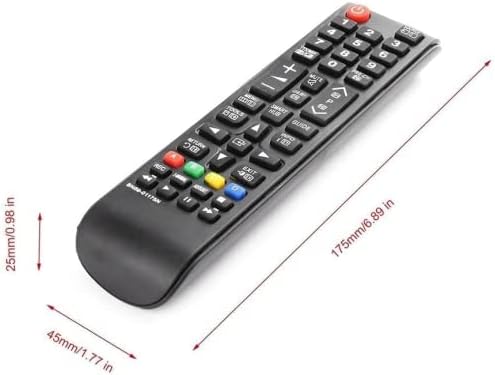
Image: A diagram illustrating the physical dimensions of the remote control in millimeters and inches.
9. Support
For further assistance or inquiries regarding your UrbanX Universal Remote Control, please refer to the contact information provided with your product packaging or visit the official UrbanX webwebsted for kundesupportressourcer.
