1. Introduktion
This manual provides comprehensive instructions for the installation, operation, and maintenance of your Revotech Mini Fisheye POE IP Camera (Model I706-3-P). Please read this manual carefully before using the product to ensure proper setup and functionality. This camera is designed for indoor security surveillance, offering high-definition video with a wide-angle view.

Billede 1.1: Forside view of the Revotech Mini Fisheye POE IP Camera.
2. Pakkens indhold
Bekræft, at alle nedenstående varer er inkluderet i din pakke:
- 1 x Revotech Mini Fisheye POE IP Camera
- 1 x Brugermanual (engelsk)
- 1 x Download Card
- 1 x sæt skruer
Note: A power unit is not included with this product. For POE functionality, a standard 802.3af 48V POE Switch is required. For non-POE use, a 12V 2A power supply is needed.

Image 2.1: Illustration of the items included in the product package.
3. Produktfunktioner
The Revotech Mini Fisheye POE IP Camera offers advanced features for effective surveillance:
- Høj opløsning: 3.0 Megapixel (2304 x 1296P) 1/3 inch CMOS Sensor for clear images at 20 frames per second.
- Vidvinkelobjektiv: 1.7mm fisheye lens provides a 170° viewing angle, covering a broad area.
- Strøm via Ethernet (POE): Supports 48V 802.3af POE, simplifying cable management.
- Dual Power Option: Includes an auxiliary connector for use with a conventional 12V 2A power supply as a non-POE IP camera.
- Effektiv kompression: Supports H.265/H.264 encoding, reducing bandwidth and storage requirements while maintaining image quality.
- Holdbar konstruktion: Har et metal-casing for forbedret holdbarhed.
- P2P Cloud Function: Enables remote viewing and playback via the "NVSEE Int 'I" app.
- Smart alarm: Motion detection with email alarm functionality.
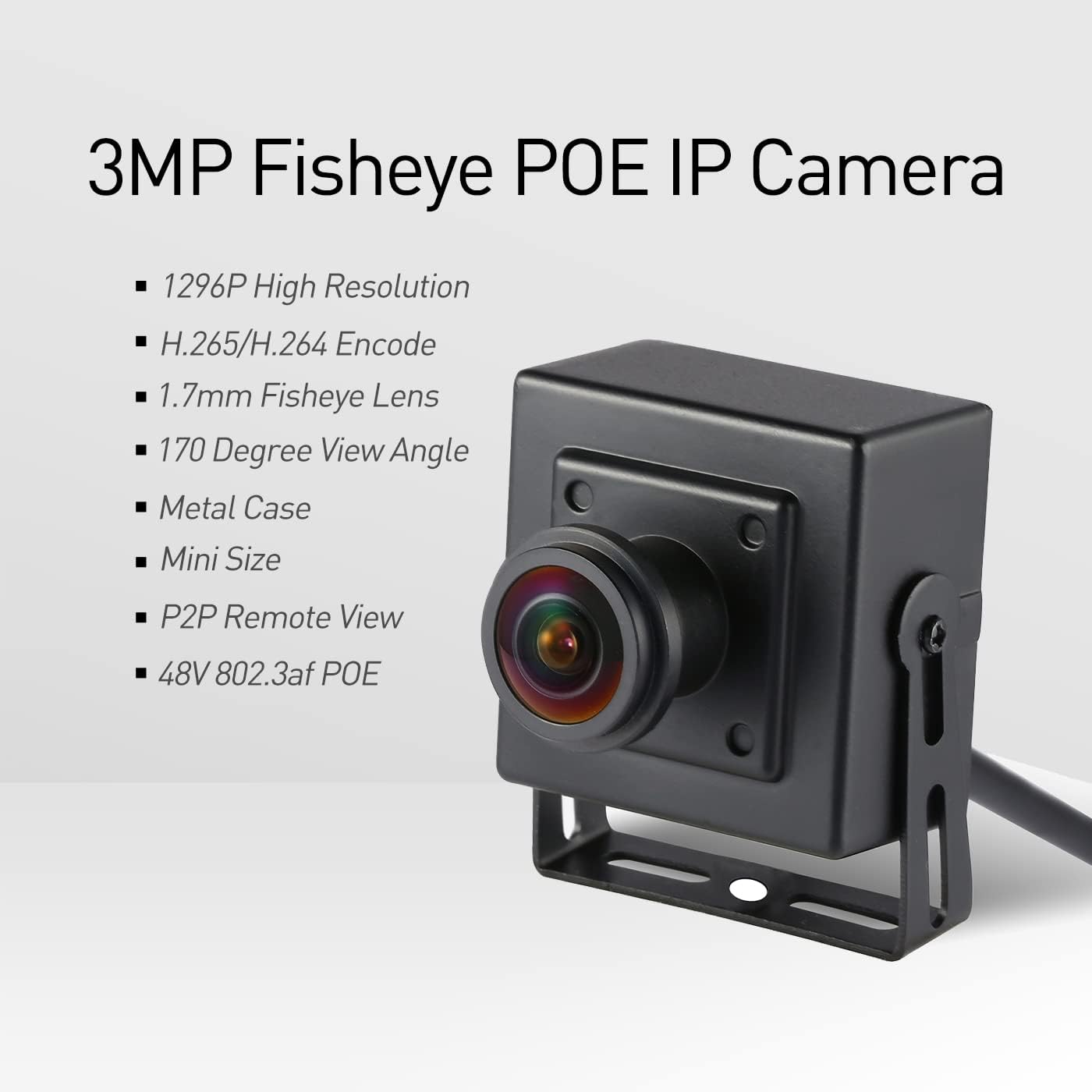
Billede 3.1: Overview of the camera's main features including resolution, lens type, and connectivity.

Image 3.2: Demonstrates the wide 170-degree field of view provided by the 1.7mm fisheye lens.

Image 3.3: Highlights the compact size of the camera, suitable for discreet installation.
4. Opsætning og installation
4.1 Fysisk installation
The camera is designed for indoor use and can be mounted on a ceiling or wall. Use the included screws to secure the camera in your desired location. The mounting bracket is adjustable to achieve the optimal viewvinkel.

Billede 4.1: Detaljeret view of camera dimensions, mounting bracket, camera cable, and connection ports (RJ45 and Auxiliary Power).
4.2 Tænd/sluk kameraet
The camera supports two power methods:
- Strøm via Ethernet (POE): Connect the camera's RJ45 port to a standard 802.3af 48V POE switch using an Ethernet cable. This provides both power and data connectivity.
- Hjælpekraft: If POE is not available, connect a 12V 2A DC power adapter (not included) to the auxiliary power port. Then, connect the RJ45 port to your network router or switch for data.
Important: Ensure your POE switch provides 48V 802.3af standard power. Using an incorrect power source may damage the camera.
4.3 Netværkskonfiguration
Upon initial connection to your network, the camera will typically obtain an IP address dynamically via DHCP. For advanced configurations or if using an NVR, you may need to access the camera's web interface or use dedicated software.
- NVR-integration: For NVR systems, the camera supports ONVIF. The default ONVIF port is 6688. If your NVR requires a different port, you may need to adjust settings within your NVR software.
- RTSP-stream: The camera provides an RTSP stream for integration with various video management systems (VMS). The default RTSP port is 8554.
4.4 Installation af apps og software
At administrere og view your camera remotely, install the recommended software:
- Mobil app: Download the "NVSEE Int 'I" app from your smartphone's app store (available for iOS and Android).
- PC-software: For Windows computers, use the CMS software. A download card is included in the package, or you may need to contact customer support for the latest download link. Note: This software is not compatible with MAC OS or Linux.
Image 4.2: Screenshot of the "NVSEE Int 'I" mobile application interface for remote camera viewing.

Image 4.3: Screenshot of the CMS software interface for managing and viewing multiple cameras on a Windows PC.
5. Betjeningsvejledning
5.1 Fjernbetjening Viewing og afspilning
Once the camera is connected to the internet and configured with the "NVSEE Int 'I" app or CMS software, you can access live footage and recorded videos remotely. The P2P Cloud Function simplifies this process, allowing access from anywhere with an internet connection.
- Open the "NVSEE Int 'I" app or CMS software.
- Vælg dit kamera fra enhedslisten.
- View live feed or access recorded footage til afspilning.
5.2 Bevægelsesdetektion og alarmer
The camera features motion detection capabilities. You can configure alert settings through the app or software to receive email notifications when motion is detected. This helps in monitoring specific areas for activity.
- Access the camera settings in the app or CMS software.
- Navigate to the motion detection or alarm settings.
- Enable motion detection and configure sensitivity levels.
- Set up email alerts by entering your email address and server details.
5.3 Videooptagelse
Video footage can be stored on a Network Video Recorder (NVR) or a connected computer running compatible software. The camera supports H.265 and H.264 compression formats.
- Ensure your NVR or computer has sufficient storage capacity.
- Configure recording schedules and methods (continuous, motion-triggered) through your NVR or VMS software.
6. Vedligeholdelse
- Rensning: Tør forsigtigt kameralinsen og huset af med en blød, tør klud. Undgå at bruge skrappe kemikalier eller slibende materialer.
- Firmwareopdateringer: Kontroller jævnligt producentens webwebstedet eller kontakt support for tilgængelige firmwareopdateringer for at sikre optimal ydeevne og sikkerhed.
- Temperatur: The camera operates within a temperature range of -25°C to 60°C. Avoid exposing the camera to extreme temperatures outside this range.
- Varmeafledning: It is normal for the camera to feel warm during operation, especially due to its compact size and metal casing. This is a normal characteristic and does not indicate a malfunction.
7. Fejlfinding
- Kamera tænder ikke:
- Ensure the POE switch is 802.3af standard and provides 48V.
- If using auxiliary power, verify the 12V 2A DC adapter is correctly connected and functional.
- Intet videofeed:
- Kontroller netværkskablets forbindelser.
- Verify the camera has an IP address and is reachable on the network.
- Ensure your NVR or software is configured with the correct ONVIF (6688) or RTSP (8554) ports.
- If using an NVR, confirm it supports 3MP resolution and H.265 encoding. If not, you may need to configure the camera to 1080P (2MP) and H.264.
- Problemer med app-/softwareforbindelse:
- Confirm your smartphone or PC is connected to the internet.
- Ensure the camera is properly connected to your network and has internet access for P2P functions.
- If the download link for CMS software is not working, contact Revotech customer support.
- Problemer med billedkvalitet:
- Rengør kameralinsen.
- Adjust the focus by gently rotating the mini-objective lens.
- Problemer med adgangskoder:
- If you forget your password, there is no visible reset button. You may need to consult the manufacturer's support for a factory reset procedure.
8. Specifikationer
| Feature | Detalje |
|---|---|
| Model nr. | I706-3-P-FHW |
| Opløsning | 2304 x 1296P (3.0 Megapixels) |
| Sensor | FH8852 + GC2053 |
| Minimum belysning | 0.1Lux @ (F1.2, AGC TIL) |
| Billedhastighed | 20 fps |
| Linse | 1.7 mm Fisheye |
| Linsetype | M12 |
| NVR ONVIF Port | 6688 |
| Compression Format | H.265/H.264 |
| Opbevaring | NVR eller computer |
| IP-adresse | Dynamisk (standard)/Statisk |
| Smart alarm | Motion detection, email alarm |
| Media Protocols | HTTP, TCP/IP, ICMP.RTSP, RTP, RTCP, SMTP, DHCP, DNS, PPPoE, NTP |
| Driftstemperatur | -25°C til 60°C |
| Driftsfugtighed | 10%~90% |
| Strømforsyning | POE (802.3af) or 12V DC |
| Dimensioner (cm) | 5.4 x 4.5 x 4 cm |
| Vægt | 0.2 kg |
| Materiale | Metal |
| Indendørs/Udendørs brug | Indendørs |
| Forbindelsesprotokol | Ethernet |
| Viewi vinkel | 170 grader |
| International Protection Rating | IP67 |
9. Garanti og support
For warranty information, technical support, or service inquiries, please refer to the contact information provided on the download card included in your package or visit the official Revotech webwebsted. Gem din købskvittering for garantikrav.
EU-reservedeles tilgængelighedsvarighed: 3 år.


