1. Introduktion
Thank you for choosing the PROXTEND X502 Full HD Webcam. This manual provides detailed instructions to help you set up, operate, and maintain your webcam for optimal performance. The X502 is designed to deliver clear 1080p video at 30 frames per second, featuring an omni-directional microphone and automatic low light correction for various lighting conditions.
2. Pakkens indhold
Kontroller venligst, at alle varer er til stede i din pakke:
- PROXTEND X502 Full HD Webcam (PX-CAM007)
- Integrated Universal Mounting Clip
- Brugervejledning (dette dokument)
3. Opsætning
Follow these steps to set up your PROXTEND X502 Webcam:
- Montering af Webcam:
De webcam features an integrated universal mounting clip. You can place the webcam on top of your computer monitor, laptop screen, or a flat surface. Adjust the clip to securely hold the webcam in position. The webcam also supports mini tripod mounting (tripod not included).
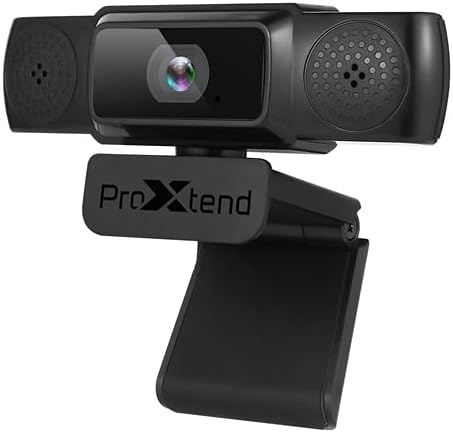
Image: The PROXTEND X502 Full HD Webcam shown with its universal mounting clip, suitable for monitors or flat surfaces.
- Tilslutning til din computer:
Sæt USB-kablet i stikkontakten webkameraet ind i en ledig USB-port på din computer. webcam is plug-and-play, meaning your operating system should automatically detect and install the necessary drivers. No additional software installation is typically required.
- Driver Installation Verification:
After connecting, allow a few moments for your computer to recognize the device. You can verify successful installation in your operating system's Device Manager (Windows) or System Information (macOS) under 'Cameras' or 'Imaging Devices'.
4. Betjeningsvejledning
Når webcam is set up, you can begin using it with various applications:
- Valg af Webcam:
Open your preferred video conferencing, streaming, or recording application (e.g., Zoom, Microsoft Teams, Skype, OBS Studio). Navigate to the application's video and audio settings. Select "PROXTEND X502" as your camera and microphone input device.

Billede: Forside view of the PROXTEND X502 Full HD Webcam, highlighting the lens and integrated microphones.
- Videokvalitet:
De webcam automatically adjusts for optimal image quality, including auto-focus and auto low light correction. Ensure adequate lighting for the best video performance. The 1920x1080p resolution at 30fps provides clear and smooth video.
- Lydkvalitet:
The integrated omni-directional microphone captures sound from all directions. Position yourself appropriately to ensure your voice is clearly picked up. Most applications allow you to adjust microphone input levels in their audio settings.
5. Funktioner
Key features of the PROXTEND X502 Full HD Webcam include:
- 1 / 2.7 ”CMOS-billedsensor
- 2 megapixel
- Resolution: 1920x1080 at 30 frames per second
- Retningsbestemt mikrofon
- Universal monteringsklips
- Mini Tripod Support
- Automatisk svag lyskorrektion
6. Specifikationer
Detailed technical specifications for the PROXTEND X502 Full HD Webcam:

Image: A visual representation of the PROXTEND X502 Full HD Webcam's key features and technical specifications.
| Feature | Specifikation |
|---|---|
| Billedsensor | 1/2.7" CMOS Image Sensor |
| Megapixel | 2 MP |
| Max opløsning | 1920x1080 |
| Video opløsning | 1920x1080 |
| Maks. FPS | 30 fps |
| Videoafkodningsformat | H.264/MJPG |
| Eksponeringstilstand | Auto |
| Hvidbalance | Auto |
| Gevinst | Auto |
| Kompensation ved svagt lys | Auto |
| Viewi vinkel | 77° |
| Brændvidde | 10 cm til det uendelige |
| Fokus Type | Auto |
| Mikrofon | Omni-directional |
| Lyd S.ampling Rate | 1 kanal 16bit 16K 32K 44.1K 48K |
| Lydformat | PCM, kompatibel UAC 1.0 |
| Interface | USB 2.0 |
| Kabellængde | 1.5 m |
| Kompatibel OS | Windows XP, Windows 7 (32bit/64bit), Windows 8, Windows 10, Android V5.0 or higher OS, MAC OS 10.6 or higher |
| Produktdimensioner | 12.7 x 7.62 x 5.08 cm |
| Produktets vægt | 453.59 g |
7. Fejlfinding
If you encounter issues with your PROXTEND X502 Webkamera, prøv følgende løsninger:
- Intet billede/video:
- Sørg for, at USB-kablet er korrekt tilsluttet til begge webkameraet og din computer.
- Prøv en anden USB-port på din computer.
- Genstart din computer.
- Check your application's settings to ensure the PROXTEND X502 is selected as the video input.
- Bekræft, at ingen andre applikationer bruger det i øjeblikket webcam.
- Ingen lyd/mikrofon virker ikke:
- Ensure the PROXTEND X502 is selected as the microphone input in your application's audio settings.
- Kontrollér din computers lydindstillinger for at sikre, at mikrofonen er aktiveret og ikke slået fra.
- Adjust the microphone input level in your system or application settings.
- Dårlig videokvalitet:
- Sørg for tilstrækkelig belysning i dine omgivelser.
- Rengør webTør kameralinsen forsigtigt af med en blød, fnugfri klud.
- Check your internet connection speed if streaming, as bandwidth can affect video quality.
8. Vedligeholdelse
For at sikre din levetid og optimale ydeevne webcam:
- Rensning: Tør forsigtigt af webcam lens with a soft, dry, lint-free cloth. Avoid using harsh chemicals or abrasive materials.
- Opbevaring: Når den ikke er i brug, skal du opbevare den webOpbevar kameraet på et rent, tørt sted væk fra ekstreme temperaturer og direkte sollys.
- Håndtering: Undgå at tabe webkameraet eller udsætte det for kraftige stød.
9. Garanti og support
The PROXTEND X502 Full HD Webkameraet leveres med et 7 års garanti, ensuring peace of mind regarding your purchase. For warranty claims, technical support, or any inquiries not covered in this manual, please refer to the contact information provided with your product packaging or visit the official PROXTEND webwebsted.
10. Overholdelsesoplysninger
This device complies with relevant regulatory standards for electronic equipment. For detailed compliance information, please refer to the product packaging or the official PROXTEND webwebsted.


