1. Produktet er slutview
Discover the ForceClima 12300 Connected Heating portable air conditioner, designed to adapt to your needs at any time with its portable design and five operating modes. It ventilates, cools, heats, and dehumidifies any room in your home, or allows for peaceful rest with its night mode. Featuring Wi-Fi control, a remote control, a touch panel, and an LED screen, it ensures you can enjoy the optimal environment with maximum comfort.

Billede 1.1: Forside view of the Cecotec ForceClima 12300 portable air conditioner.

Image 1.2: Another perspective of the Cecotec ForceClima 12300 portable air conditioner.
2. Sikkerhedsadvarsler
Please read all safety warnings and instructions carefully before using the appliance to prevent personal injury or damage to the product. Keep this manual for future reference.
- Udpakning: Remove the product from its box and remove all packaging materials. Ensure all components are present and undamaged.
- Placering: Place the unit on a stable, flat surface. Ensure adequate clearance around the unit for proper airflow.
- Strømforsyning: Tilslut kun apparatet til en jordet stikkontakt med den korrekte lydstyrke.tage som angivet på produktetiketten.
- Børn og kæledyr: Hold børn og kæledyr væk fra apparatet under drift.
- Opretholdelse: Forsøg ikke selv at reparere eller ændre apparatet. Kontakt kvalificeret servicepersonale for reparationer.
- Vand: Do not immerse the appliance in water or other liquids. Avoid spilling liquids on the unit.
- Ventilation: Ensure the exhaust hose is properly installed and vented outdoors to prevent heat buildup.
3. Produktfunktioner
- High Cooling/Heating Capacity: Portable air conditioner with a powerful 12000 BTU capacity, suitable for quickly and efficiently reaching desired temperatures in areas up to approximately 25 m². Features a heat pump for effective heating during winter.
- Wi-Fi-forbindelse: Configure the appliance remotely via Wi-Fi connection, allowing full control from your smartphone from anywhere.
- Flere hastigheder: Three fan speeds (Low, Medium, High) to adapt operation according to immediate needs.
- Fjernbetjening: Includes a remote control for convenient operation from any location without needing to approach the unit.
- Intuitive Display and Control: LED screen displays all possible configurations and highlights current settings for easy control. The top touch control panel provides practical and simple operation.
- Fem driftstilstande: Offers Fan mode, Cooling mode, Heating mode, Dehumidification mode, and Night mode.
- Høj affugtningskapacitet: Dehumidification mode can capture up to 26 liters per day, contributing to a healthier environment in your home.

12000 BTU Capacity

Opvarmning og afkøling

Wi-Fi-kontrol

Fjernbetjening og berøringskontrol

LED Display

5 driftstilstande

3 blæserhastigheder

affugtning
4. Opsætning og installation
Proper setup is crucial for the optimal performance of your portable air conditioner. Follow these steps for installation:
- Pakker ud: Carefully remove the air conditioner and all accessories from the packaging. Ensure you have the unit, exhaust hose, window kit, and remote control.
- Placering: Place the unit on a firm, level surface near a window and a grounded electrical outlet. Ensure there is at least 20 cm (8 inches) of space around the unit for proper air circulation.
- Installer vinduessæt:
- Saml vinduestætningspladesættet i henhold til din vinduestype (skydevindue eller karmvindue).
- Fastgør vinduessættet i det åbne vindue, og sørg for en tæt forsegling for at forhindre luftlækage.
- Fastgør udstødningsslange:
- Connect one end of the exhaust hose to the air outlet on the back of the unit.
- Connect the other end of the exhaust hose to the adapter in the window kit. Extend the hose as little as possible and avoid sharp bends to maximize efficiency.
- Drainage (Dehumidification/Cooling): For continuous drainage during dehumidification or cooling in high humidity, connect a drain hose (not included) to the continuous drain port and lead it to a floor drain or suitable container. Otherwise, the internal water tank will collect condensate and require manual emptying.
- Strømtilslutning: Sæt netledningen i en jordforbundet 230 volt stikkontakt.

Image 4.1: Proper placement of the unit with the exhaust hose connected to a window.
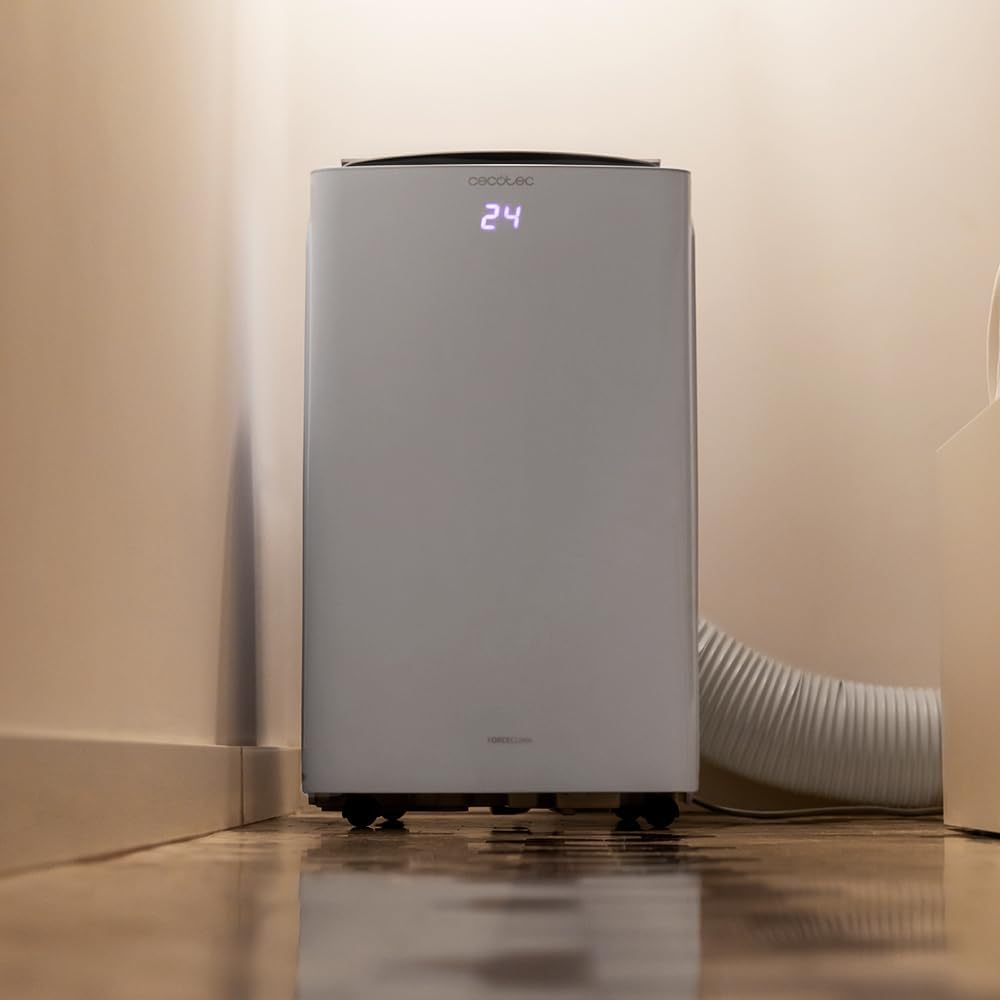
Image 4.2: Close-up of the exhaust hose connection at the base of the unit.
5. Betjeningsvejledning
Your ForceClima 12300 offers various ways to control its functions:
5.1. Betjening af kontrolpanelet
The touch control panel on top of the unit allows direct access to all functions.

Image 5.1: User interacting with the top control panel of the air conditioner.
- Power knap: Tryk for at tænde eller slukke enheden.
- Mode knap: Cycle through the 5 operating modes: Cooling, Heating, Fan, Dehumidification, and Night.
- Ventilatorhastighedsknap: Vælg den ønskede ventilatorhastighed: Lav, Mellem eller Høj.
- Temperaturjustering: Brug op/ned-pilene til at indstille den ønskede temperatur.
- Timer knap: Indstil en timer til automatisk TIL/FRA-drift.
5.2. Betjening af fjernbetjening
Den medfølgende fjernbetjening giver bekvem betjening på afstand.

Image 5.2: Remote control for the Cecotec ForceClima 12300.
- Alle funktioner, der er tilgængelige på kontrolpanelet, kan tilgås via fjernbetjeningen.
- Ensure the remote control is pointed towards the receiver on the unit.
- Install batteries (not included) as per the markings inside the battery compartment.
5.3. Wi-Fi og app-styring
Control your air conditioner from anywhere using the dedicated smartphone application.

Image 5.3: Smartphone displaying the Cecotec control application.
- Download den officielle Cecotec-app fra din smartphones appbutik.
- Follow the in-app instructions to pair your ForceClima 12300 unit with your Wi-Fi network.
- Once connected, you can remotely adjust modes, temperature, fan speed, and set schedules.

Image 5.4: The air conditioner seamlessly integrated into a home environment.
6. Vedligeholdelse
Regelmæssig vedligeholdelse sikrer dit klimaanlægs levetid og effektiv drift.
- Rengøring af luftfilteret:
- Sluk for enheden, og tag stikket ud før rengøring.
- Remove the air filter (location typically on the back or side, refer to diagrams in the full manual if available).
- Clean the filter with a vacuum cleaner or wash it gently with lukewarm water and mild detergent. Rinse thoroughly and allow it to air dry completely before reinserting.
- Clean the air filter every two weeks or more frequently if the unit is used often or in dusty environments.
- Afløbsvand:
- When the internal water tank is full, the unit will stop operating and an indicator light will illuminate.
- Placer en lav gryde eller bakke under afløbsporten nederst på bagsiden af enheden.
- Remove the drain plug to allow water to flow out. Replace the plug once the tank is empty.
- Rengøring af enhedens yderside: Tør ydersiden af med en blød, damp klud. Brug ikke skrappe kemikalier, slibemidler eller opløsningsmidler.
- Opbevaring: If storing the unit for an extended period, ensure the water tank is completely drained and the unit is clean and dry. Store it in a cool, dry place, preferably in its original packaging.
7. Fejlfinding
Før du kontakter kundesupport, bedes du læse følgende almindelige problemer og løsninger:
| Problem | Mulig årsag | Løsning |
|---|---|---|
| Enheden tænder ikke. | Ingen strøm, netledning frakoblet, afbryder udløst. | Kontroller strømtilslutningen, nulstil afbryderen. |
| Enheden kører, men køler/varmer ikke. | Air filter dirty, exhaust hose blocked/disconnected, room too large, doors/windows open. | Clean air filter, check hose connection, close doors/windows, ensure unit is sized for the room. |
| Vandlækage. | Drain plug loose, continuous drain hose blocked or improperly connected, water tank full. | Ensure drain plug is secure, check drain hose, empty water tank. |
| Enheden er støjende. | Enheden står ikke på en plan overflade, ventilatorblokering. | Placer på en plan overflade, og kontroller for blokeringer i ventilatorområdet. |
| Fjernbetjening virker ikke. | Batterier døde eller forkert isat, blokering mellem fjernbetjening og enhed. | Udskift batterierne, og sørg for frit udsyn til enhedens modtager. |
8. Specifikationer
Detailed technical specifications for the Cecotec ForceClima 12300 Connected Heating Portable Air Conditioner:
| Specifikation | Værdi |
|---|---|
| Mærke | Cecotec |
| Modelnummer | 05959 |
| Produktmål (L x B x H) | 47.5 x 40.5 x 88 cm |
| Vægt | 27 kilo |
| Energieffektivitetsvurdering | A |
| Årligt energiforbrug | 1.1 kilowatt-timer |
| Kølekapacitet | 12000 BTU |
| Magt | 1350 watt |
| Voltage | 230 volt |
| Støjniveau | 65 dB |
| Affugtningskapacitet | Op til 26 liter/dag |
| Dækningsområde | Ca. 25 m² |
| Installationstype | Vindue |
| Type | Transportabel |
| Særlige funktioner | Dehumidifier, Heating, Wi-Fi Control, Remote Control, LED Display |
| Farve | Hvid |
| Materiale | Plast |
| Inkluderede komponenter | 1 x Air conditioner; 1 x Window kit; 1 x Remote control; 1 x User manual |

Image 8.1: EU Energy Label for the ForceClima 12300, showing A-rated energy efficiency.
9. Garanti og support
For warranty information, technical support, or spare parts availability, please refer to the warranty card included with your product or contact Cecotec customer service directly. Information regarding spare parts availability was not provided at the time of this manual's creation.
You can typically find contact details for Cecotec customer support on their official webwebstedet eller i produktemballagen.


