1. Introduktion
This manual provides detailed instructions for the installation, operation, and maintenance of your IMOU IPC-F22AP 1080P Full HD Outdoor PoE Security Camera. This camera is designed for outdoor surveillance, featuring 1080P resolution, IP67 weatherproofing, night vision, human detection, and Power over Ethernet (PoE) connectivity. Please read this manual thoroughly before using the product to ensure correct setup and optimal performance.
2. Pakkens indhold
Bekræft at alle varer er til stede i din pakke:
- IMOU IPC-F22AP Camera
- Vandtæt stik
- Hurtig startguide (QSG)
- Installationspositionskort
- Skruepakke (til montering)
- Power Adapter (Note: This camera primarily uses Power over Ethernet (PoE). The included power adapter may be for initial setup or specific non-PoE configurations, if supported. Refer to the Setup section for details.)
3. Produktet er slutview
The IMOU IPC-F22AP camera offers robust features for reliable outdoor security monitoring.
3.1 Nøglefunktioner
- 1080P Full HD-opløsning: Optager klar og detaljeret videofootage.
- H.265 videokomprimering: Reduces bandwidth and storage requirements by 50% compared to H.264, without compromising video quality.
- IP67 Vejrbestandig: Designed to withstand various outdoor conditions, including rain, snow, and extreme temperatures.
- Nattesyn: Provides clear surveillance up to 30 meters (98 feet) in low-light or complete darkness.
- Power over Ethernet (PoE): Simplifies installation by delivering both power and data through a single Ethernet cable.
- Menneskelig detektion: Advanced algorithms detect human shapes, reducing false alarms from pets or inanimate objects.
- Lydoptagelse: Built-in microphone captures audio within the camera's vicinity.
- Flere opbevaringsmuligheder: Supports Network Video Recorder (NVR) and Cloud Storage for video recording.
- Customized Alarm Zone: Allows users to define specific areas for motion detection and alerts.
3.2 Kamerakomponenter

Billede 3.2.1: Front view of the IMOU IPC-F22AP camera, showing the lens and status indicator light.

Billede 3.2.2: Overview of key features including 1080P Full HD, H.265, 30m/98ft Night Vision, IP67 Weatherproof, Power over Ethernet, NVR & Cloud Storage, Human Detection, Alarm Zone, and Audio Recording.
4. Opsætning og installation
Follow these steps to set up and install your IMOU IPC-F22AP camera.
4.1 Powering the Camera (PoE)
The IPC-F22AP camera is designed to be powered via Power over Ethernet (PoE). This means both power and data are transmitted through a single Ethernet cable.
- Tilslut Ethernet-kabel: Tilslut den ene ende af et Ethernet-kabel til kameraets Ethernet-port.
- Tilslut til PoE-enhed: Connect the other end of the Ethernet cable to a PoE-enabled switch, NVR with PoE ports, or a PoE injector. Ensure the PoE device provides sufficient power (e.g., IEEE 802.3af/at compliant).
- Bekræft strøm: Once connected, the camera's status indicator light should illuminate, indicating it is receiving power.

Billede 4.1.1: Illustration of Power over Ethernet (PoE) connection, showing an Ethernet cable providing both data and power to the camera.
Important Note on Power Adapter: While a "Power Adapter" is listed in the package contents, customer feedback indicates this model primarily functions with PoE. If you intend to use a non-PoE power source, ensure it is a 12V DC adapter with adequate amperage (e.g., 1A or higher) and compatible with the camera's power input. However, PoE is the recommended and most reliable power method for this camera.
4.2 Fysisk installation
The camera is designed for wall mounting. Use the provided Installation Position Map and Screw Package.
- Vælg placering: Vælg en passende udendørs placering, der giver den ønskede viewing angle and is within reach of your Ethernet cable. Ensure the surface is sturdy enough to support the camera.
- Markér borepunkter: Use the Installation Position Map to mark the drilling points on the wall.
- Bore huller: Drill pilot holes at the marked positions. Insert wall anchors if necessary.
- Monter kamera: Secure the camera's mounting base to the wall using the provided screws.
- Juster vinkel: Loosen the adjustment screws on the camera's bracket to set the desired viewing angle, then tighten them to secure the camera in place.
- Vandtæt stik: For outdoor installations, use the waterproof connector for the Ethernet cable to protect against moisture ingress.
4.3 Initial Configuration (via Imou Life App)
The IMOU IPC-F22AP camera is controlled via the Imou Life app, available for Android and iOS devices.
- Download app: Download and install the "Imou Life" app from your device's app store.
- Opret konto: Open the app and create an Imou account or log in if you already have one.
- Tilføj enhed: Tap the "+" icon in the app to add a new device. Scan the QR code located on the camera or its packaging.
- Følg instruktionerne på skærmen: The app will guide you through the remaining steps to connect the camera to your network and complete the initial setup.
5. Betjeningsvejledning
Once configured, you can access and manage your camera using the Imou Life app.
5.1 Live View og afspilning
- Levende View: Åbn Imou Life-appen, og vælg dit kamera for at view det levende feed.
- Afspilning: Få adgang til optaget footage from your NVR or Cloud Storage through the app's playback function.

Billede 5.1.1: Visual comparison demonstrating the clarity of 1080P Full HD resolution compared to 720P HD.

Billede 5.1.2: Depiction of the camera's 24/7 protection, showing clear day vision and effective night vision up to 30 meters (98 feet).
5.2 Bevægelsesdetektion og advarsler
- Enable Human Detection: In the app settings, enable human detection to receive alerts only when a human figure is detected.
- Customize Alarm Zone: Definer specifikke områder inden for kameraets view where you want motion detection to be active. This helps to ignore irrelevant movements outside critical zones.
- Øjeblikkelige advarsler: Receive push notifications on your smartphone when motion is detected in the defined alarm zones.
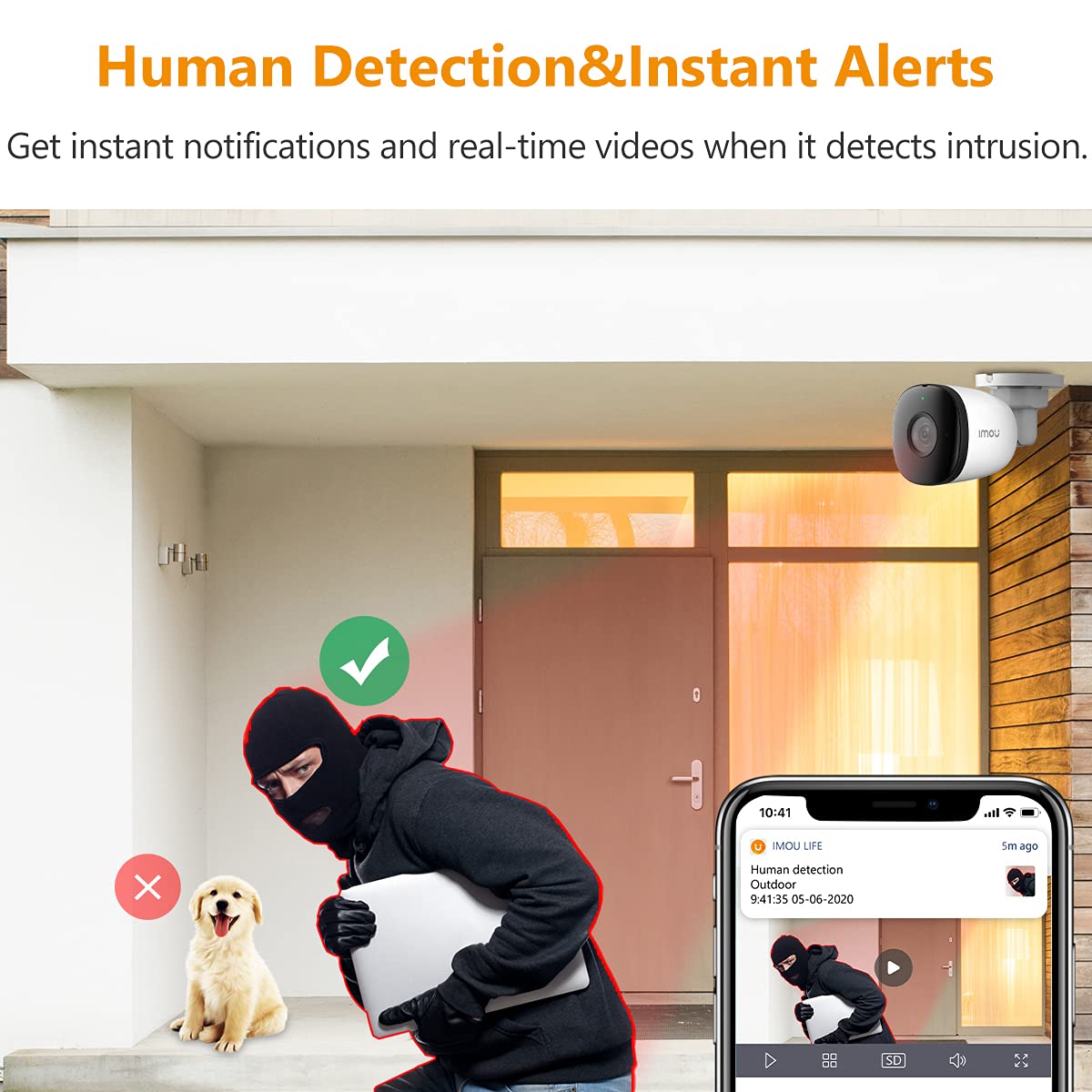
Billede 5.2.1: Example of human detection triggering an instant alert on a smartphone, distinguishing humans from other objects like pets.

Billede 5.2.2: Visual representation of customizing an alarm zone, highlighting a specific area for motion detection to prevent unwanted alerts.
5.3 Lydoptagelse
The camera's built-in microphone allows for audio recording. This feature can be enabled or disabled through the Imou Life app settings.

Billede 5.3.1: Depiction of the camera's audio recording capability, showing sound waves being picked up by the microphone.
5.4 Lagerstyring
- NVR-lagring: If connected to a compatible Network Video Recorder (NVR), recordings will be stored on the NVR's hard drive.
- Cloud Storage: Imou offers optional cloud storage services for secure off-site video backup. Refer to the Imou Life app for subscription details.

Billede 5.4.1: Icons representing the available cloud and NVR storage options for recorded video footage.
6. Vedligeholdelse
Regelmæssig vedligeholdelse sikrer kameraets levetid og optimale ydeevne.
- Rengøring af linsen: Gently wipe the camera lens with a soft, clean cloth to remove dust or smudges. Avoid abrasive materials or harsh chemicals.
- Tjek forbindelser: Periodically inspect the Ethernet cable and waterproof connector for any signs of wear or damage, especially in harsh weather conditions.
- Firmwareopdateringer: Check the Imou Life app regularly for available firmware updates. Keeping the firmware updated ensures access to the latest features and security enhancements.
- Miljøbeskyttelse: While the camera is IP67 weatherproof, ensure it is not submerged in water or exposed to extreme physical impact.

Billede 6.1.1: The IMOU IPC-F22AP camera demonstrating its IP67 weatherproof rating, shown functioning in stormy, snowy, and sunny conditions.
7. Fejlfinding
Hvis du støder på problemer med dit kamera, kan du se følgende almindelige problemer og løsninger.
| Problem | Mulig årsag | Løsning |
|---|---|---|
| Kameraet tænder ikke. |
|
|
| Cannot connect camera to the Imou Life app. |
|
|
| Poor video quality or intermittent connection. |
|
|
| Falske bevægelsesdetektionsalarmer. |
|
|
8. Specifikationer
| Feature | Detalje |
|---|---|
| Model | IPC-F22AP |
| Videooptagelsesopløsning | 1080p fuld HD |
| Effektiv videoopløsning | 1080 pixel |
| Videokomprimering | H.265 |
| Night Vision Range | 30 meter (98 fod) |
| International Protection Rating | IP67 Vejrbestandig |
| Forbindelsesteknologi | Kabelbaseret (Ethernet, PoE) |
| Strømkilde | Power over Ethernet (PoE), 12 Volts DC (if non-PoE adapter used) |
| Wattage | 5.5 watt |
| Særlige funktioner | Local Recording, Motion Sensor, Night Vision, Human Detection, Audio Recording |
| Opbevaringsmuligheder | NVR, Cloud Storage |
| Kontrolmetode | App (Imou Life - Android, iOS) |
| Monteringstype | Vægmontering |
| Dimensioner (L x B x H) | 14.7 x 7.4 x 7.4 centimeter |
| Varens vægt | 210 gram |
| Operativsystemkompatibilitet | Android, iOS |
| Fabrikant | Dahua teknologi |
9. Garanti og support
For garantioplysninger og teknisk support henvises til den officielle Imou-side. webwebstedet eller kontakt deres kundeservice. Gem din købskvittering til garantikrav.
- Fabrikant: Dahua teknologi
- Mærke: Imou
- Online support: Besøg den officielle Imou webwebsted for ofte stillede spørgsmål, fejlfindingsvejledninger og kontaktoplysninger.
- Udvidet garanti: Information regarding extended warranty options, such as those offered by Onsitego, can be found at the point of purchase or through relevant service providers.


