Indledning
This manual provides essential information for the safe and efficient use of your Xiaomi Mi 11 Lite smartphone. Please read this manual carefully before using the device to ensure optimal performance and to prevent damage.
The Xiaomi Mi 11 Lite is designed to offer a premium mobile experience with its ultra-thin and ultra-light design, powerful Snapdragon 732G processor, long-lasting 4250 mAh battery with 33W fast charging, and a versatile 64MP triple camera system. Its AMOLED DotDisplay screen provides vibrant visuals, and the durable glass and metal frame ensure a superior look and feel.
Opsætning
1. Udpakning og indledende inspektion
Carefully remove all components from the packaging. Verify that all items are present and undamaged. The standard package typically includes the Xiaomi Mi 11 Lite smartphone, a power adapter, a USB Type-C cable, a SIM eject tool, and a protective case.

Billede: Forside view of the Xiaomi Mi 11 Lite smartphone in Bubblegum Blue color. The phone features a punch-hole camera on the top left of the screen and slim bezels.
2. Isætning af SIM-kort og microSD-kort (valgfrit)
- Find SIM-kortbakken på siden af enheden.
- Sæt SIM-kortudløserværktøjet i det lille hul på bakken for at åbne det.
- Place your Nano-SIM card(s) and/or microSD card (if applicable) into the tray with the gold contacts facing down, ensuring correct orientation as indicated on the tray.
- Skub forsigtigt bakken tilbage i enheden, indtil den klikker på plads.

Billede: Side view of the Xiaomi Mi 11 Lite, highlighting the slim profile and the location of the SIM card tray on the left side of the device.
3. Opladning af batteriet
Before first use, fully charge the device. Connect the USB Type-C cable to the phone's charging port and the other end to the power adapter. Plug the power adapter into a wall outlet. The charging indicator will appear on the screen.
The Xiaomi Mi 11 Lite supports 33W fast charging. Use the original charger and cable for optimal charging speed and safety.
4. Tænd og indledende konfiguration
Press and hold the Power button (located on the right side of the device) until the Xiaomi logo appears. Follow the on-screen instructions to complete the initial setup, including language selection, Wi-Fi connection, Google account setup, and security settings.
Drift
1. Grundlæggende navigation
- Power knap: Tryk for at tænde/slukke skærmen. Tryk og hold nede for at tænde/slukke eller genstarte.
- Lydstyrkeknapper: Juster medielydstyrke, opkaldslydstyrke eller notifikationslydstyrke.
- Berøringsskærmbevægelser:
- Tryk på: Vælg et element, eller åbn en app.
- Stryg: Rul gennem skærme eller lister.
- At klemme: Zoom ind eller ud på billeder eller web sider.
- Langt tryk: Få adgang til kontekstmenuer eller flyt ikoner.
2. Kamerabrug
The Mi 11 Lite features a 64MP triple camera system. To open the camera app, tap the camera icon on the home screen or lock screen. Select different modes such as Photo, Portrait, Video, or Pro mode. Tap the shutter button to capture an image or start/stop video recording.
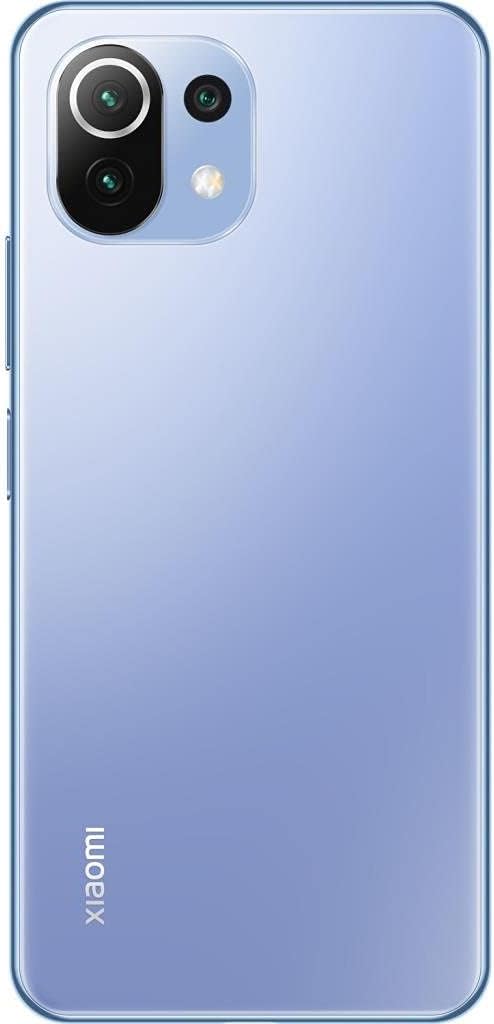
Billede: Bagside view of the Xiaomi Mi 11 Lite in Bubblegum Blue, showcasing the triple camera module located on the top left corner. The Xiaomi logo is vertically aligned on the bottom left.
3. Forbindelse
- Wi-Fi: Gå til Indstillinger > Wi-Fi for at oprette forbindelse til tilgængelige netværk.
- Bluetooth: Go to Settings > Bluetooth to pair with other Bluetooth devices like headphones or speakers.
- Mobildata: Sørg for, at dit SIM-kort er aktivt, og at mobildata er aktiveret i Indstillinger > SIM-kort og mobilnetværk.
Opretholdelse
1. Rengøring af enheden
Use a soft, lint-free cloth to clean the screen and body of the phone. Avoid using harsh chemicals, abrasive cleaners, or aerosol sprays, as these can damage the device's finish or internal components. The phone features a fingerprint-resistant coating on the back.
2. Batteripleje
- Undgå at udsætte enheden for ekstreme temperaturer (under 0 °C eller over 45 °C).
- Do not fully discharge the battery regularly. It is recommended to keep the battery level between 20% and 80% for optimal longevity.
- Brug kun originale eller certificerede opladere og kabler.
3. Softwareopdateringer
Søg regelmæssigt efter og installer softwareopdateringer for at sikre, at din enhed har de nyeste funktioner, sikkerhedsrettelser og forbedringer af ydeevnen. Gå til Indstillinger > Om telefonen > MIUI-version for at søge efter opdateringer.
Fejlfinding
- Enheden tænder ikke: Sørg for, at batteriet er opladet. Tilslut opladeren, og vent et par minutter, før du forsøger at tænde igen.
- Apps der går ned eller fryser: Close the problematic app and reopen it. If the issue persists, restart the device. Clear the app's cache or data in Settings > Apps.
- Dårlig batterilevetid: Check for background apps consuming power. Reduce screen brightness, disable unnecessary features like GPS or Bluetooth when not in use, and ensure the device is running the latest software update.
- Problemer med netværksforbindelse: Toggle Airplane mode on and off. Restart the device. Check if your SIM card is properly inserted. Contact your mobile carrier if the issue persists.
- Skærmen reagerer ikke: Force restart the device by holding the Power button for about 10-15 seconds.
Specifikationer
| Feature | Detalje |
|---|---|
| Mærke | XIAOMI |
| Modelnavn | Mi 11 Lite |
| Varenummer | M2101K9AG |
| RAM størrelse | 6 GB |
| Intern opbevaring | 128 GB |
| Processor | Snapdragon 732G |
| Display Type | AMOLED |
| Skærmstørrelse | 6.55 tommer |
| Skærmopløsning | 2400 x 1080 |
| Batterikapacitet | 4250 mAh (lithium-ion) |
| Cellulær teknologi | 4G |
| Dimensioner | 16 x 4 x 2 cm; 470 g |
Garanti og support
Garantioplysninger
This product comes with a 3-month warranty provided by the seller, Telmov. Please retain your proof of purchase for any warranty claims. The warranty covers manufacturing defects under normal use conditions.
Kundesupport
For technical assistance, troubleshooting, or warranty inquiries, please contact your point of purchase or refer to the official Xiaomi support channels. You can find more information on the official Xiaomi webwebsted: www.mi.com/global/service/support/


