
ECG DM-817
EKG DM-817 digitalt multimeter brugermanual
Model: DM-817
Indledning
The ECG DM-817 is an auto-ranging digital multimeter designed for precise electrical measurements. It features a 6000-count display and 3-5/6 digit resolution, making it suitable for a wide range of applications. This manual provides detailed instructions for the safe and effective operation, maintenance, and troubleshooting of your DM-817 multimeter.
Sikkerhedsoplysninger
Always observe the following safety precautions when using the DM-817 multimeter:
- Overskrid ikke de maksimale inputgrænser for nogen funktion.
- Vær yderst forsigtig, når du arbejder med voltages over 60V DC eller 30V AC RMS.
- Sørg for, at testledningerne er korrekt tilsluttet, og at funktionskontakten er i den korrekte position, før du foretager målinger.
- Brug ikke multimeteret, hvis det ser beskadiget ud, eller hvis testledningerne er flossede.
- Replace the battery and fuses only with the specified type and rating.
- Frakobl altid testledningerne fra kredsløbet, før du skifter funktioner.
- Overhold alle lokale og nationale sikkerhedsforskrifter.
ADVARSEL: Dette produkt indeholder kemikalier, der af staten Californien vides at forårsage kræft og fødselsdefekter eller anden reproduktionsskade. For mere information, besøg www.P65Warnings.ca.gov.
Pakkens indhold
Bekræft at alle varer er til stede i pakken:
- ECG DM-817 Digital Multimeter
- Testledninger (en rød, en sort)
- Bæretaske
- 2 x AAA-batterier (forinstalleret eller medfølger separat)
- Brugervejledning (dette dokument)

Image: The ECG DM-817 Digital Multimeter displayed alongside its included test leads, carrying case, and batteries.
Produkt overview
Familiarize yourself with the components of your DM-817 multimeter:

Billede: Forside view of the ECG DM-817 Digital Multimeter, showing the display, function dial, and input jacks.
- LCD-skærm: Shows measurement readings, units, and function indicators. Features a backlight for low-light conditions.
- Funktionsvælger: Rotary switch to select measurement functions (Voltage, Current, Resistance, Capacitance, Temperature, Frequency, Diode, Continuity).
- SELECT -knap: Toggles between AC/DC, Diode/Continuity, or other sub-functions within a dial setting.
- HOLD knap: Fryser den aktuelle aflæsning på displayet.
- Baggrundslys knap: Aktiverer eller deaktiverer displayets baggrundsbelysning.
- Indgangsstik:
- VΩHzCAP°C: Indgang for lydstyrketage, Resistance, Frequency, Capacitance, and Temperature measurements.
- mAµA: Input for milliampere og mikroamperestrømmålinger (sikring).
- 10A: Input for high current measurements up to 10A (fused).
- COM: Fælles (jord) indgang for alle målinger.
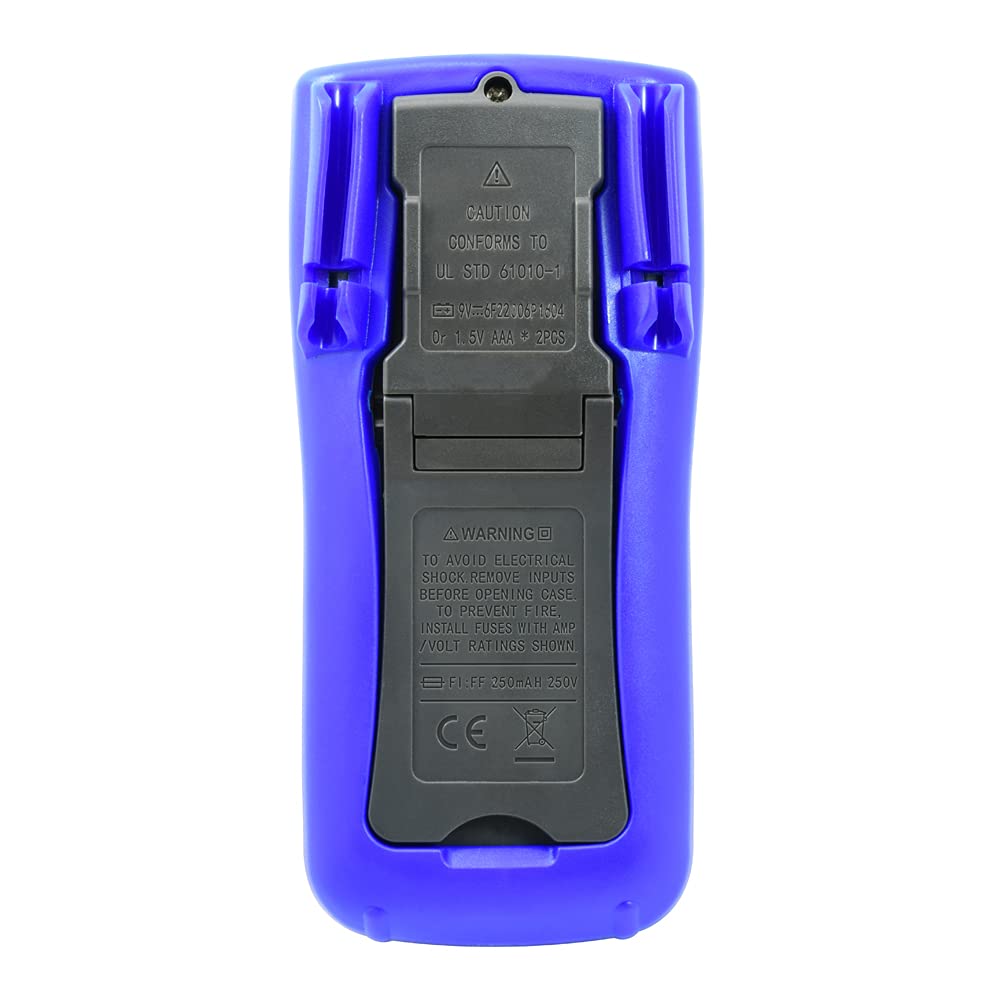
Billede: Bagside view of the ECG DM-817 Digital Multimeter, showing the battery compartment and kickstand.
The back of the multimeter features a battery compartment cover and a foldable kickstand for convenient hands-free operation.
Opsætning
Installation af batteri
The DM-817 requires two AAA batteries for operation. These are typically included. If not, or if the low battery indicator appears on the display, follow these steps:
- Sørg for, at multimeteret er slukket, og frakobl alle testledninger.
- Find batteridækslet på bagsiden af enheden.
- Brug en skruetrækker til at løsne skruen, der fastgør batteridækslet.
- Fjern dækslet.
- Isæt to AAA-batterier, og overhold den korrekte polaritet (+ og -) som angivet inde i batterirummet.
- Sæt batteridækslet på igen og fastgør det med skruen.
Betjeningsvejledning
Before any measurement, ensure the test leads are securely plugged into the correct input jacks and the function dial is set to the desired measurement type.
Måling DC Voltage (VDC)
- Plug the red test lead into the VΩHzCAP°C jack and the black test lead into the COM jack.
- Drej funktionsvælgeren til V (DC bindtage) position. The multimeter is auto-ranging.
- Tilslut testledningerne på tværs af den komponent eller det kredsløb, der skal måles, og overhold polariteten.
- Læs bindtage -værdi på LCD -displayet.
Måling AC Voltage (VAC)
- Plug the red test lead into the VΩHzCAP°C jack and the black test lead into the COM jack.
- Drej funktionsvælgeren til V~ (AC-volumentage) position. The multimeter is auto-ranging.
- Tilslut testledningerne på tværs af den komponent eller det kredsløb, der skal måles.
- Læs bindtage -værdi på LCD -displayet.
Measuring DC Current (DCA)
- Sluk for strømmen til kredsløbet.
- For currents up to 600mA, plug the red test lead into the mAµA jack. For currents up to 10A, plug the red test lead into the 10A jack. Plug the black test lead into the COM jack.
- Drej funktionsvælgeren til A (DC-strøm) position.
- Break the circuit and connect the multimeter in series with the circuit.
- Tilslut strøm til kredsløbet, og aflæs strømværdien på LCD-displayet.
- Turn off power and disconnect the multimeter before restoring the circuit.
Measuring AC Current (ACA)
- Sluk for strømmen til kredsløbet.
- For currents up to 600mA, plug the red test lead into the mAµA jack. For currents up to 10A, plug the red test lead into the 10A jack. Plug the black test lead into the COM jack.
- Drej funktionsvælgeren til A~ (AC-strøm) position.
- Break the circuit and connect the multimeter in series with the circuit.
- Tilslut strøm til kredsløbet, og aflæs strømværdien på LCD-displayet.
- Turn off power and disconnect the multimeter before restoring the circuit.
Measuring Resistance (Ω)
- Plug the red test lead into the VΩHzCAP°C jack and the black test lead into the COM jack.
- Drej funktionsvælgeren til Ω (Modstands)position.
- Sørg for, at kredsløbet er spændingsløst, før du måler modstanden.
- Tilslut testledningerne på tværs af den komponent, der skal måles.
- Aflæs modstandsværdien på LCD-displayet.
Measuring Capacitance (F)
- Plug the red test lead into the VΩHzCAP°C jack and the black test lead into the COM jack.
- Drej funktionsvælgeren til KASKET (Kapacitans) position.
- Sørg for, at kondensatoren er helt afladet før måling.
- Tilslut testledningerne over kondensatoren.
- Aflæs kapacitansværdien på LCD-displayet.
Measuring Temperature (°C/°F)
- Plug the temperature probe (if included, otherwise use appropriate adapter) into the VΩHzCAP°C and COM jacks, observing polarity.
- Drej funktionsvælgeren til ° C / ° F (Temperature) position.
- The display will show the ambient temperature. Place the probe on or near the object whose temperature is to be measured.
- Read the temperature value on the LCD display. Use the SELECT button to toggle between Celsius and Fahrenheit.
Measuring Frequency (Hz)
- Plug the red test lead into the VΩHzCAP°C jack and the black test lead into the COM jack.
- Drej funktionsvælgeren til Hz (Frequency) position.
- Tilslut testledningerne på tværs af signalkilden.
- Aflæs frekvensværdien på LCD-displayet.
Diode Test and Continuity Check
- Plug the red test lead into the VΩHzCAP°C jack and the black test lead into the COM jack.
- Drej funktionsvælgeren til Diode/Kontinuitet position.
- Diode test: Forbind den røde ledning til anoden og den sorte ledning til katoden på dioden. En fremadrettet voluminiumledningtage drop will be displayed. Reverse the leads; an open circuit (OL) should be displayed.
- Kontinuitetstjek: Connect the test leads across the circuit or component. If continuity exists (resistance below approximately 50Ω), the buzzer will sound.
Opretholdelse
Rensning
Tør sagen af med annonceamp en klud og et mildt rengøringsmiddel. Brug ikke slibemidler eller opløsningsmidler. Hold indgangsterminalerne fri for snavs og fugt.
Udskiftning af sikring
If the current measurement functions stop working, the fuses may need replacement. Always use fuses with the specified ratings:
- mAµA input: F1 250mA/250V fast-blow fuse.
- 10A input: F2 10A/250V fast-blow fuse.
To replace fuses:
- Sørg for, at multimeteret er slukket, og frakobl alle testledninger.
- Åbn batteridækslet som beskrevet i afsnittet "Batteriinstallation".
- The fuses are located inside the battery compartment. Carefully remove the old fuse.
- Insert a new fuse of the correct type and rating.
- Sæt batteridækslet på igen, og fastgør det.
Opbevaring
If the multimeter is not used for an extended period, remove the batteries to prevent leakage and damage to the unit. Store the multimeter in its carrying case in a cool, dry place away from direct sunlight and extreme temperatures.
Fejlfinding
| Problem | Mulig årsag | Løsning |
|---|---|---|
| Intet display eller svagt display | Døde eller lave batterier | Udskift batterierne. |
| "OL" (Overbelastning) vises | Input value exceeds range; incorrect function selected | Select a higher range (if manual ranging) or correct function. Ensure leads are connected properly. |
| Ingen strømmåling | Blown fuse; incorrect lead connection | Check and replace fuse if necessary. Ensure leads are in the correct current input jacks (mAµA or 10A). |
| Unøjagtige aflæsninger | Low battery; poor lead contact; external interference | Replace batteries. Ensure leads are clean and make good contact. Move away from strong electromagnetic fields. |
Specifikationer
The following table outlines the key specifications of the ECG DM-817 Digital Multimeter:

Image: Detailed specifications printed on the back of the ECG DM-817 product packaging.
| Måletype | Rækkevidde | Nøjagtighed |
|---|---|---|
| DC bindtage | 600mV til 1000V | ±(0.5% + 5 digits) to ±(0.8% + 5 digits) |
| AC Voltage (True RMS) | 600mV til 750V | ±(0.8% + 5 digits) to ±(1.2% + 10 digits) |
| DC-strøm | 600µA to 10A | ±(1.0% + 5 digits) to ±(2.0% + 30 digits) |
| AC strøm | 600µA to 10A | ±(1.2% + 5 digits) to ±(2.5% + 30 digits) |
| Modstand | 600Ω til 60MΩ | ±(0.8% + 5 digits) to ±(2.0% + 20 digits) |
| Kapacitans | 10nF to 6000µF | ±(3.5% + 20 digits) to ±(5.0% + 10 digits) |
| Frekvens | 10 Hz til 10 MHz | ±(0.1 % + 3 cifre) |
| Temperatur | -20°C til 1000°C / -4°F til 1832°F | ±(1.0% + 5 digits) to ±(2.0% + 5 digits) |
Generelle specifikationer:
- Vise: 6000 Counts, 3-5/6 Digit LCD with Backlight
- Automatisk sluk: Ja
- Data Hold: Ja
- Strømkilde: 2 x AAA batterier (medfølger)
- Dimensioner: 7.25 x 3.5 x 1.78 tommer
- Vægt: 1 pund
- Sikkerhedsvurdering: CAT IV 600V, CAT III 1000V
Garanti og support
For warranty information and technical support, please contact ECG customer service. Refer to the product packaging or the official ECG webhjemmeside for de seneste kontaktoplysninger.
Fabrikant: ECG, NTE
Ask a question about this manual
Ask about setup, troubleshooting, compatibility, parts, safety, or missing instructions. Manuals+ will review the question and use this page’s manual context to help answer it.