1. Introduktion
This manual provides detailed instructions for the safe and efficient use of your OverTop Aigo EROS Q MP3 Music Player. Please read this manual thoroughly before operating the device and retain it for future reference.
2. Pakkens indhold
Sørg for at alle varer er til stede i pakken:
- 1 x OverTop Aigo EROS Q MP3 Music Player
- 1 x USB-kabel
- 1 x Brugermanual (dette dokument)
- 1 x 16 GB TF-kort (forinstalleret eller inkluderet separat)
3. Produktet er slutview
Familiarize yourself with the components and controls of your Aigo EROS Q MP3 player.

Figur 3.1: Forside View. This image shows the front of the Aigo EROS Q MP3 player, featuring its 2-inch TFT display, circular navigation pad, and playback control buttons. The screen displays a music note icon, indicating its primary function.
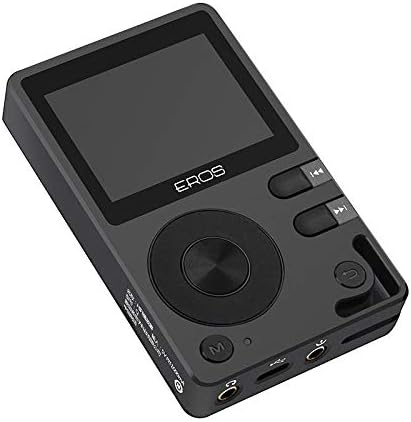
Figur 3.2: Vinklet View med kontroller. An angled perspective of the player, highlighting the screen, the prominent circular navigation pad, and the adjacent control buttons for play/pause, skip tracks, and menu access. The overall design is sleek and compact.

Figur 3.3: Nederste porte. Denne view displays the bottom edge of the device, clearly showing the 3.5mm headphone jack, the micro USB charging/data port, and the 3.5mm line out port. These ports are essential for audio output and connectivity.

Figure 3.4: Side Buttons. En sideprofile of the MP3 player, illustrating the placement of the volume control buttons (up/down) and potentially the power button. These buttons allow for quick adjustments during playback.

Figure 3.5: MicroSD Card Slot. En anden vinklet view, emphasizing the microSD card slot located on the side of the device. This slot allows for memory expansion up to 128GB, crucial for storing a large music library.

Figur 3.6: Bagside View. The back of the Aigo EROS Q MP3 player, featuring a minimalist design with a subtle, reflective emblem in the center. This view showcases the device's sleek and premium finish.

Figur 3.7: Øverst View. This image displays the top edge of the player, which includes regulatory markings and the model number 'Q', along with power input specifications (5V 1000mA).
4. Opsætning
4.1. Opladning af enheden
Before first use, fully charge the Aigo EROS Q. Connect the provided USB cable to the device's micro USB port and the other end to a USB power adapter (not included) or a computer's USB port. The device features a 1300mAh 3.7V lithium battery.
4.2. Indsættelse af et hukommelseskort
The device supports microSD (TF) cards up to 128GB. A 16GB TF card is included. Locate the microSD card slot on the side of the player (refer to Figure 3.5). Gently insert the card until it clicks into place. To remove, push the card in slightly until it springs out.
4.3. Overførsel af musik Files
Connect the Aigo EROS Q to your computer using the USB cable. The device will appear as a removable disk. Drag and drop your music files (APE, FLAC, WAV, WMA, ACC, DSD, DFF, AIFF, M4A, OGG, MP3, MP2) into the device's storage or the inserted TF card.
5. Betjeningsvejledning
5.1. Tænd/sluk
- For at tænde: Press and hold the Power button (refer to Figure 3.4) for a few seconds until the screen illuminates.
- For at slukke: Tryk på tænd/sluk-knappen og hold den nede, indtil sluk-meddelelsen vises, og bekræft derefter.
5.2. Grundlæggende navigation
Use the circular navigation pad and associated buttons (refer to Figure 3.1 and 3.2) to navigate through menus and select options on the 2-inch TFT display.
- Op/Ned/Venstre/Højre: Naviger gennem menupunkter.
- Midter knap: Bekræft valg.
- 'M'-knap: Gå til hovedmenuen eller gå tilbage til den forrige skærm.
5.3. Musikafspilning
From the main menu, select 'Music' to browse your audio files. The player supports a wide range of formats including APE, FLAC, WAV, WMA, ACC, DSD, DFF, AIFF, M4A, OGG, MP3, and MP2.
- Afspil/pause: Use the dedicated Play/Pause button.
- Næste / forrige nummer: Use the skip buttons.
- Lydstyrkekontrol: Use the volume buttons on the side of the device (refer to Figure 3.4).
5.4. Bluetooth-forbindelse
The Aigo EROS Q features Bluetooth 4.0 for wireless audio streaming.
- Go to the 'Bluetooth' menu on the device.
- Slå Bluetooth til.
- Scan efter tilgængelige enheder.
- Vælg dine Bluetooth-hovedtelefoner eller -højttalere fra listen for at parre.
5.5. USB DAC Functionality
The device can function as a USB Digital-to-Analog Converter (DAC) when connected to a computer, enhancing audio quality.
- Connect the Aigo EROS Q to your computer via the USB cable.
- On the player, select the 'USB DAC' mode when prompted.
- Your computer should recognize the player as an external audio device. Select it as the output device in your computer's sound settings.
5.6. OTG Support
The Aigo EROS Q supports On-The-Go (OTG) functionality, allowing it to connect to other USB devices (e.g., USB flash drives) for direct file transfer or playback, provided the connected device is compatible and an OTG adapter (not included) is used.
6. Vedligeholdelse
6.1. Rensning
Tør enheden af med en blød, tør klud. Brug ikke flydende rengøringsmidler eller slibende materialer, da de kan beskadige skærmen ellerasing.
6.2. Opbevaring
Store the player in a cool, dry place away from direct sunlight and extreme temperatures. If storing for an extended period, ensure the battery is partially charged (around 50%) to prolong its lifespan.
6.3. Batteripleje
Undgå at aflade batteriet helt for ofte. Oplad enheden regelmæssigt for at opretholde batteriets tilstand.
7. Fejlfinding
If you encounter issues with your Aigo EROS Q, refer to the following common solutions:
- Enheden tændes ikke: Sørg for, at batteriet er opladet. Tilslut til en strømkilde, og prøv igen.
- Ingen lyd: Check headphone connection, volume level, and ensure the audio file is not corrupted. If using Bluetooth, ensure it's paired correctly.
- Kan ikke overføre files: Ensure the USB cable is securely connected and the device is in the correct USB mode (e.g., Mass Storage). Try a different USB port or cable.
- Enheden fryser: Tryk og hold tænd/sluk-knappen nede i cirka 10-15 sekunder for at fremtvinge en genstart.
- Hukommelseskort ikke genkendt: Ensure the card is inserted correctly. Try reinserting or using a different compatible microSD card.
Hvis problemerne fortsætter, kontakt kundesupport for yderligere hjælp.
8. Specifikationer
| Feature | Specifikation |
|---|---|
| Modelnummer | xCc1030540 |
| Skærm | 2-inch TFT, 320 x 240 pixels |
| Hukommelseskapacitet | Expandable up to 128GB (via TF card) |
| Included TF Card | 16 GB |
| Strømforsyning | 1300mAh 3.7V lithiumbatteri |
| Understøttede lydformater | APE, FLAC, WAV, WMA, ACC, DSD, DFF, AIFF, M4A, OGG, MP3, MP2 |
| SNR (Signal-to-Noise Ratio) | 103 dB @ 1 kHz, ±2 dB |
| Frekvensrespons | 20 Hz - 20 kHz |
| Dynamisk rækkevidde | 98 dB |
| Hovedtelefonimpedans | 8 ~ 150 Ω |
| Analog udgang | 3.5 mm hovedtelefonstik |
| Linieudgang | 3.5 mm analog udgang |
| Forbindelse | USB, Bluetooth 4.0 |
| Kompatibel OS | Windows XP/Vista, Windows 7/OS 10, Linux 2.4.2 and later |
| Dimensioner | 90 x 55 x 15 mm |
| Farve | Sort |
9. Garanti og support
Specific warranty information for the OverTop Aigo EROS Q MP3 Music Player is not provided in this document. For details regarding warranty coverage, returns, or technical support, please refer to the product packaging, the seller's website, or contact OverTop customer service directly.


