1. Produktet er slutview
The NETUM NT-2055M is a high-speed, omnidirectional, hands-free 1D and 2D barcode scanner designed for various retail and library environments. It features automatic image sensing and can efficiently capture barcodes from physical labels, paper, and digital screens, even in low backlight conditions. Its compact size and intuitive design make it suitable for space-constrained areas.

Image: The NETUM NT-2055M desktop barcode scanner, black with a yellow ring around the scanning window.
Pakkens indhold
- NETUM NT-2055M Stregkodescanner til skrivebordet
- USB kabel
- Brugervejledning (dette dokument)

Image: The scanner, its USB cable, and the printed manual, illustrating the items included in the package.
2. Opsætning og installation
The NETUM NT-2055M scanner is designed for plug-and-play operation, requiring no additional drivers or software installation on most operating systems.
Tilslutning af scanneren
- Locate the USB port on the back of the scanner.
- Align the USB cable connector with the port and gently insert it until it clicks into place.
- Connect the other end of the USB cable to an available USB port on your computer (Windows, macOS, or Linux).
- The scanner will automatically be recognized by your system and be ready for use.
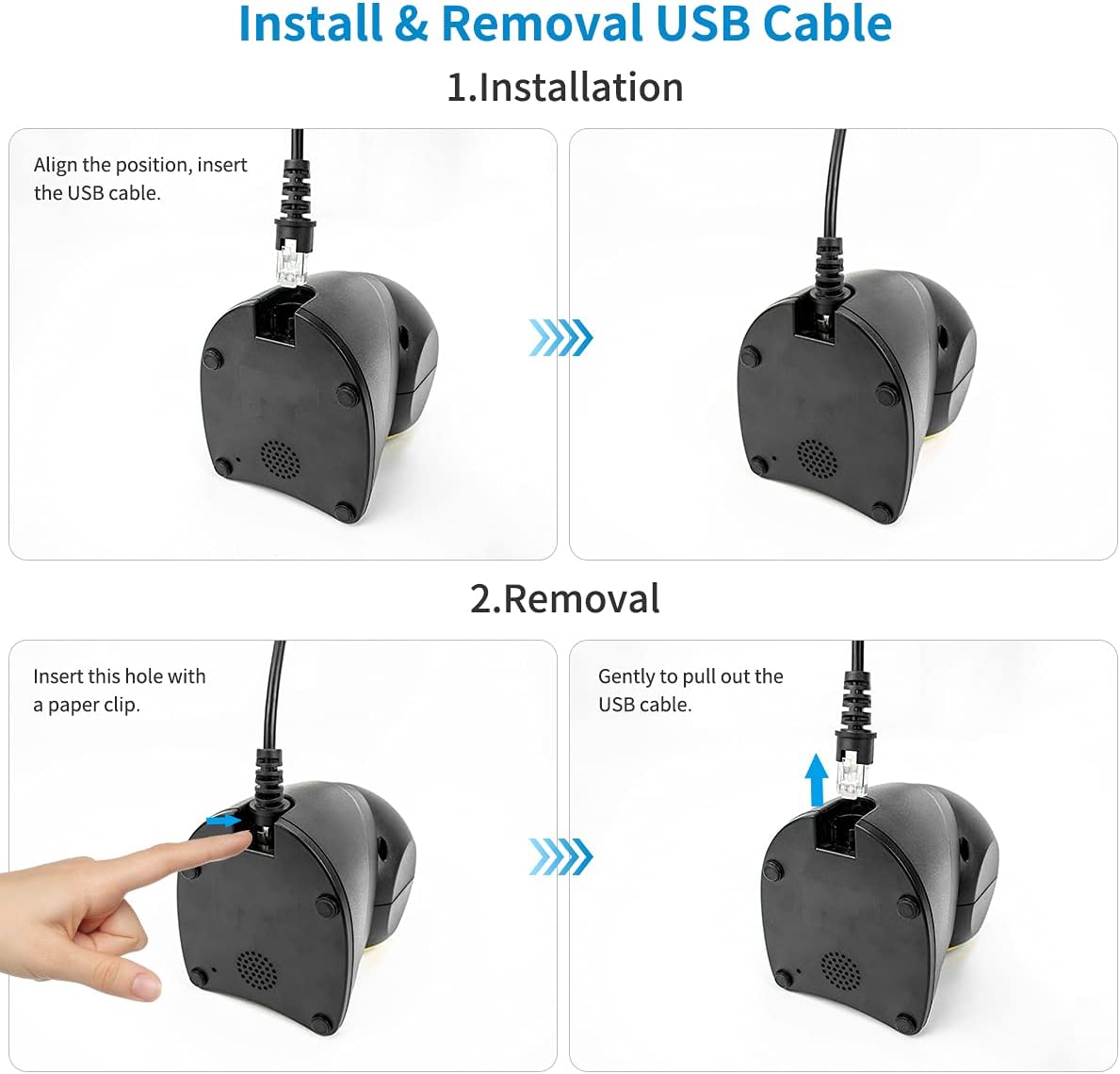
Image: A four-panel illustration showing how to install the USB cable by aligning and inserting it, and how to remove it by inserting a paper clip into a small hole and gently pulling the cable.

Image: The scanner connected via USB to a laptop, with icons indicating compatibility with Windows, macOS, and Linux operating systems, highlighting its plug-and-play functionality.
3. Betjeningsvejledning
The NT-2055M scanner is designed for ease of use with automatic sensing and broad decoding capabilities.
Automatic Sensing and Wake-up
The scanner features an automatic image sensing function. When a barcode is brought close to the scanning window, the scanner will automatically detect it, activate its scanning light, and read the barcode. After a period of inactivity, the scanner will enter a sleep mode to conserve energy and will automatically wake up when a barcode is presented again.

Image: The scanner in sleep mode (lights off) and then in active mode (lights on) as a hand presents a package with a barcode, demonstrating its automatic wake-up feature.
Afkodningsmuligheder
The scanner is capable of reading a wide range of 1D and 2D barcodes, including those that are colored, damaged, distorted, or reflective. It also supports scanning directly from digital screens.

Image: The scanner alongside examples of various barcode types it can read: colorful, damaged, distorted, and reflective barcodes, highlighting its robust decoding capabilities.
Screen Scanning Support
The NT-2055M can easily scan 1D, 2D, and QR codes displayed on mobile phone screens or computer monitors, making it versatile for various applications.

Image: A smartphone displaying a barcode being scanned by the NETUM scanner, with icons of various 1D and 2D barcode types (QR Code, Data Matrix, Maxicode, Aztec code, UPC/EAN, PDF417) that it supports.
Language and Volume Settings
The scanner supports automatic recognition of various keyboard languages, including UK, US, French, German, Hungarian, Italian, Japanese, Spanish, Russian, and Turkish. It also allows for virtual COM port settings, prefix or suffix additions, and volume adjustments for the buzzer.
4. Vedligeholdelse
Korrekt vedligeholdelse sikrer din stregkodescanners lange levetid og optimale ydeevne.
- Rengøring af scanningsvinduet: Brug en blød, fnugfri klud lidt dampened with water or a mild, non-abrasive cleaner to wipe the scanning window. Avoid harsh chemicals or abrasive materials that could scratch the surface.
- Generel rengøring: Tør scannerens yderside af med en tør eller let fugtig klud.amp klud til at fjerne støv og snavs.
- Kabelpleje: Ensure the USB cable is not kinked, pinched, or subjected to excessive strain.
- Opbevaring: Opbevar scanneren et køligt, tørt sted væk fra direkte sollys og ekstreme temperaturer, når den ikke er i brug.
5. Fejlfinding
If you encounter issues with your NETUM barcode scanner, try the following common troubleshooting steps:
- Scanneren svarer ikke:
- Sørg for, at USB-kablet er korrekt tilsluttet til både scanneren og computeren.
- Prøv at tilslutte scanneren til en anden USB-port på din computer.
- Genstart din computer.
- Unable to Scan Barcodes:
- Ensure the barcode is clean, clear, and not excessively damaged or distorted.
- Verify that the barcode is within the scanner's reading range and properly aligned with the scanning window.
- Check if the scanner's light is activating when a barcode is presented. If not, refer to the "Scanner Not Responding" steps.
- Confirm that the barcode type is supported by the scanner (refer to Specifications section).
- Forkert dataoutput:
- Check your computer's keyboard language settings to ensure they match the scanner's auto-recognized language.
- If using prefix/suffix settings, ensure they are configured correctly.
If the problem persists after trying these steps, please contact NETUM customer support for further assistance.
6. Specifikationer
| Feature | Detalje |
|---|---|
| Model | NT-2055M |
| Dimensioner (L x B x H) | 8.27 x 5.71 x 4.49 tommer (ca. 210 x 145 x 114 mm) |
| Varens vægt | 15 ounce (ca. 425 gram) |
| Forbindelsesteknologi | USB kabel |
| Strømkilde | Elektrisk med ledning |
| Kompatible enheder | Desktop, Laptop (Windows, macOS, Linux) |
| Afkodningsevne (1D) | UPC/EAN [UPCA/UPCE/ EAN-8/ EAN-13, ISBN (Bookland), ISSN], Code 39 (Standard, Full ASCII, Trioptic, Code 32 (Italian Pharmacode), Code 128, Code 93, Codabar, 2 of 5 (Interleaved 2 of 5, Discrete 2 of 5, Matrix 2 of 5, Code11), MSI Plessey, GS1 DataBar (Omnidirectional, Truncated, Stacked, Stacked Omnidirectional, Limited, Expanded, Expanded Stacked) |
| Afkodningsevne (2D) | PDF417, MicroPDF417, Composite Codes (CC-A, CC-B, CC-C), Aztec (Standard, Inverse), Maxicode, Data Matrix/ ECC 200 (Standard, Inverse), QR Code (Standard, Inverse, Micro) |
| Særlige funktioner | Automatic Image Sensing, Screen Scanning, Adjustable Buzzer Volume, Prefix/Suffix Setting, Auto Keyboard Language Recognition (UK, US, French, German, Hungarian, Italian, Japanese, Spanish, Russian, Turkish), 30-degree rotating head. |

Billede: Detaljeret view of the scanner showing its dimensions (145mm height, 90mm width, 101mm depth) and highlighting key components like the buzzer, indicator light, USB port, and non-slip base. The scanning head can rotate 30 degrees.
7. Garanti og support
Warranty information for your NETUM NT-2055M barcode scanner is typically provided with the product packaging or can be found on the official NETUM webwebsted. Gem venligst din købsbevis til garantikrav.
For technical support, troubleshooting assistance beyond this manual, or warranty inquiries, please visit the official NETUM support channels or contact their customer service department. Contact details are usually available on the manufacturer's webwebsted eller i produktdokumentationen.