1. Introduktion
This manual provides essential instructions for setting up, operating, and maintaining your ENHANCE Colmi V23 Smart Watch. Please read this manual thoroughly before using the device to ensure proper function and longevity.

Figure 1.1: ENHANCE Colmi V23 Smart Watch
2. Sikkerhedsoplysninger
Disclaimer: This device is not a medical device and is not intended to replace a Sphygmomanometer (an instrument for measuring blood pressure). Individuals with hypertension or other medical conditions should consult their doctor before using this device for health monitoring purposes.
3. Hvad er der i æsken
- 1x ENHANCE Colmi V23 Smart Watch
- 1x ladekabel
- 1x brugermanual
4. Opsætning
4.1 Opladning af smarturet
Before initial use, fully charge your smart watch. Connect the magnetic charging cable to the charging points on the back of the watch and plug the USB end into a power adapter (not included) or a computer's USB port. A full charge typically takes approximately 2 hours.

Figur 4.1: Opladning af smarturet
4.2 Appinstallation og parring
- Download "Da Fit" application from your device's app store (compatible with iOS 9.0 and above, Android 4.0 and above). You can also scan the QR code provided in the included manual to download the app.
- Åbn Da Fit-appen på din smartphone.
- Follow the in-app instructions to add a new device. Select the V23 Smart Watch from the list of available devices to pair.
- Sørg for, at Bluetooth er aktiveret på din smartphone under parringsprocessen.
5. Betjening af smarturet
5.1 Navigation på berøringsskærm
The ENHANCE Colmi V23 features a 1.3-inch HD color full touch screen for easy operation. Swipe left, right, up, or down to navigate through menus and functions. Tap to select options.

Figure 5.1: Touch Screen Interface Overview
5.2 Tilpasning af urskiver
Personalize your smart watch with over 100 watch faces available through the Da Fit application. You can also create custom watch faces using your own photos.
- Åbn Da Fit-appen på din smartphone.
- Navigate to "Add a Device" > "WATCH FACES".
- Select an existing watch face or choose "Edit" to customize with a picture.
- Select your desired picture, adjust its position, and save.
Figur 5.2: Tilpasning af urskiver
5.3 Meddelelser
Receive call, message, email, and app notifications directly on your smart watch. (Note: The watch cannot answer or make calls.)

Figure 5.3: Call and Message Reminders
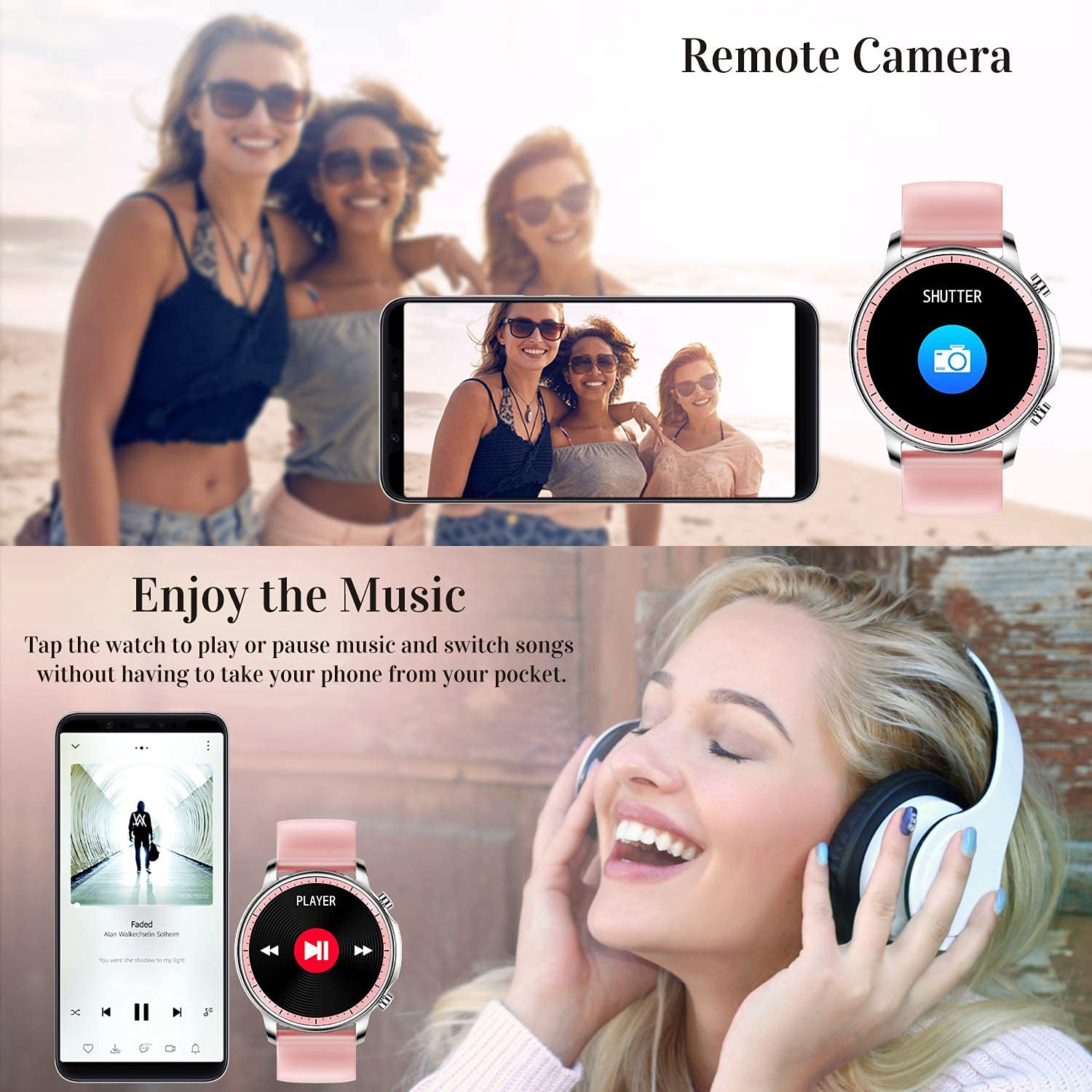
5.4 Musikkontrol
Control music playback on your smartphone directly from your watch. Tap to play/pause or switch songs without needing to access your phone.
5.5 Fjernkamera
Use your smart watch as a remote shutter for your smartphone camera. This feature allows you to take photos from a distance.

Figure 5.4: Remote Camera and Music Control
6. Funktioner
6.1 Sundhedsovervågning
- Heart Rate (HR) Monitor: Overvåger kontinuerligt din puls hele dagen.
- Blodtryksmåler (BP): Provides blood pressure readings. (Refer to safety disclaimer in Section 2).
- Blodoxygen (SpO2) monitor: Måler blodets iltmætning.
- Sleep Tracker: Records sleep information, including deep sleep, light sleep, and awake time, to help you understand your sleep patterns.
- Kvindesundhedssporing: Offers features for tracking female health cycles.

Figure 6.1: Heart Rate and Blood Pressure Monitoring

Figure 6.2: Smart Sleep Monitoring
6.2 Aktivitetssporing
The smart watch offers 7 data record modes to track various sports activities:
- Gåture
- Løb
- Cykling
- Basketball
- Fodbold
- Badminton
- Springer over
This feature helps you monitor your exercise data and gain insights into your fitness levels.

Figure 6.3: Smart Watch Functions Overview
6.3 Smarte påmindelser
- Stillesiddende påmindelse: Reminds you to move and stay active after periods of inactivity.
- Vækkeur: Indstil alarmer direkte på dit ur.
6.4 Andre funktioner
- Stopur
- Fun Game
7. Vedligeholdelse
7.1 Vandtæthed
The ENHANCE Colmi V23 Smart Watch is IP68 waterproof, making it resistant to daily wet conditions such as hand washing or light rain. Avoid prolonged submersion in water, hot water, or steam, and do not operate buttons underwater.
7.2 Rengøring
Tør uret og remmen regelmæssigt af med en blød, tør klud. Brug om nødvendigt en let tør klud.amp kluden og tør den derefter grundigt. Undgå at bruge skrappe kemikalier eller slibende materialer.
7.3 Pleje af batterier
To prolong battery life, avoid fully discharging the battery frequently. Charge the watch when the battery level is low. Store the watch in a cool, dry place when not in use for extended periods.
8. Fejlfinding
- Uret tænder ikke: Sørg for, at uret er fuldt opladet. Tilslut det til opladeren i mindst 30 minutter.
- Uret parres ikke med telefonen: Make sure Bluetooth is enabled on your phone and the watch is within range. Restart both the watch and your phone, then try pairing again through the Da Fit app.
- Unøjagtige sundhedsdata: Sørg for, at uret sidder tæt på dit håndled, ikke for stramt eller for løst. Rengør sensoren på bagsiden af uret. Husk, at denne enhed ikke er et medicinsk instrument.
- Notifikationer vises ikke: Check notification settings in the Da Fit app and your phone's system settings to ensure permissions are granted for the app to display notifications.
9. Specifikationer
| Mærke | FORBEDRE |
| Model | V23 Smart watch |
| Produktdimensioner | 1.03 x 2 x 4.15 cm |
| Varens vægt | 42 g |
| Skærmstørrelse | 1.3 tommer |
| Opløsning | 240 x 230 |
| Display Type | Digital LCD |
| Batterikapacitet | 200 mAh (litiumpolymer) |
| Opladningsmetode | Magnetic Wire Charging |
| Trådløs type | Bluetooth |
| Kompatible enheder | Mobile Phone (Android 4.0+ & iOS 9.0+) |
| Operativsystem | Android & iOS |
| Vandmodstand | IP68 |
| Materiale | Plast |
10. Garanti og support
For warranty information and customer support, please refer to the documentation included with your product or contact ENHANCE customer service. The included user manual contains details regarding warranty terms and contact information.


