Indledning
This manual provides detailed instructions for the safe and efficient operation, maintenance, and troubleshooting of your BE COOL Air Cooler, Model BCP5AC2101F. Please read this manual thoroughly before using the appliance and keep it for future reference.
Vigtige sikkerhedsinstruktioner
- Sørg altid for, at apparatet er placeret på en stabil og plan overflade.
- Nedsænk ikke apparatet, ledningen eller stikket i vand eller andre væsker.
- Tag stikket ud af stikkontakten, før du rengør, fylder eller udfører nogen form for vedligeholdelse.
- Hold apparatet utilgængeligt for børn og kæledyr.
- Bloker ikke luftindtag eller -udtag. Sørg for tilstrækkelig ventilation omkring enheden.
- Brug kun rent vand fra hanen i vandtanken. Tilsæt ikke kemikalier eller tilsætningsstoffer.
- Hvis netledningen er beskadiget, skal den udskiftes af producenten, dennes serviceagent eller lignende kvalificerede personer for at undgå en fare.
- Dette apparat er kun til indendørs husholdningsbrug.
Produkt overview
Familiarize yourself with the components of your BE COOL Air Cooler.

Figur 1: Forside view of the BE COOL Air Cooler, showing the main fan grille, water level indicator, and "BE COOL" logo.

Figure 2: Top control panel with buttons for Timer, Cool, Speed, and On/Off, along with indicator lights.

Figure 3: Diagram illustrating key features: integrated dust filter, timer function, and remote control operation.
Opsætning
1. Udpakning
Carefully remove the air cooler from its packaging. Retain the packaging for future storage or transport.
2. Montering af hjulene
The appliance comes with 4 castor wheels for easy mobility. Insert each wheel into the designated slots at the bottom of the unit until they click securely into place.
3. Fyldning af vandtanken
The BE COOL Air Cooler features a 5-liter water tank. For cooling and humidifying functions, the tank must be filled with water.
- Sørg for, at apparatet er taget ud af stikkontakten.
- Locate the water tank opening, typically at the bottom rear or side of the unit.
- Carefully pour clean tap water into the tank. Do not exceed the "MAX" fill line indicated on the water level indicator.
- For enhanced cooling, you may add ice packs (not included) to the water tank if available.
- Close the water tank opening securely.
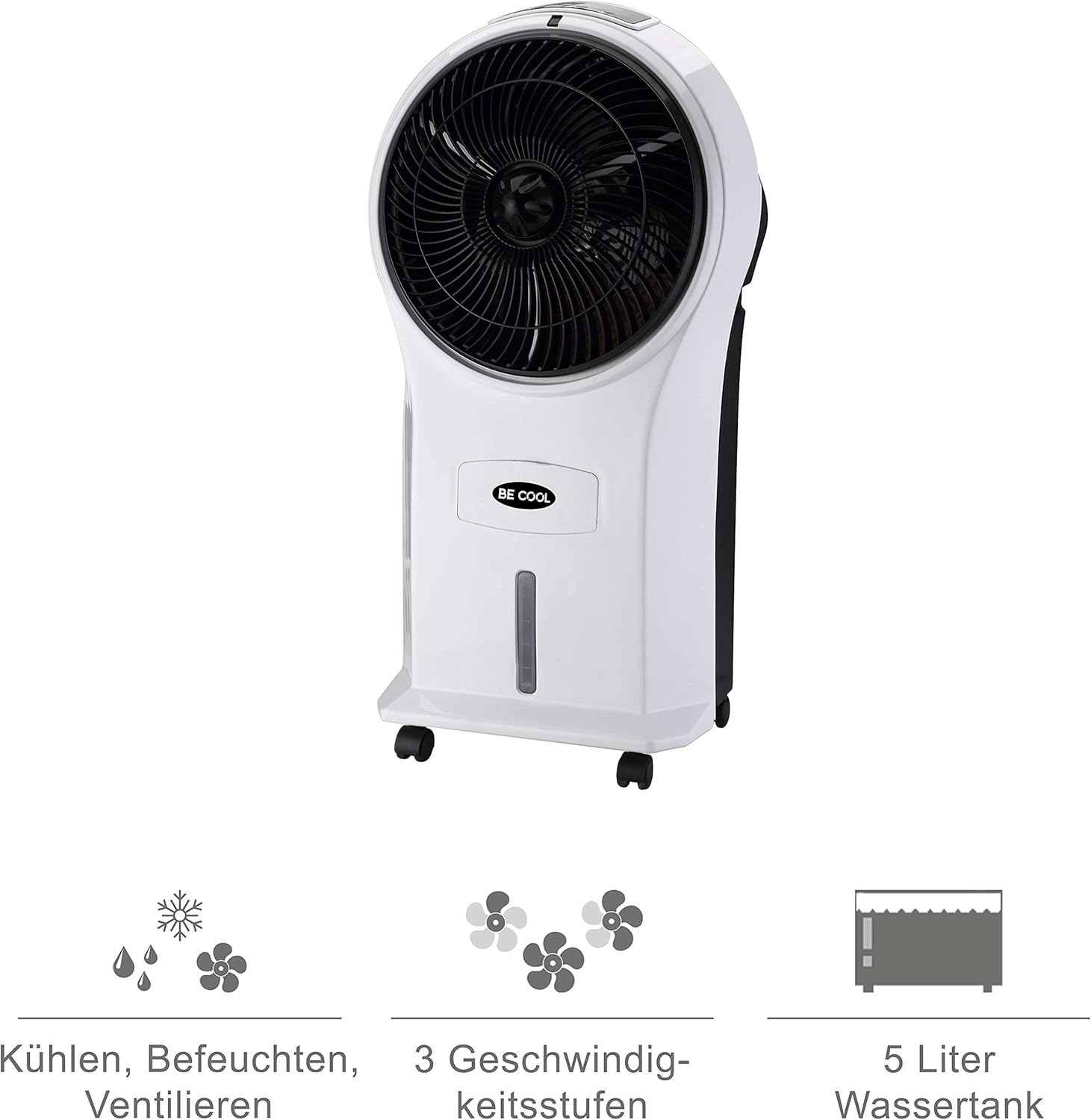
Figure 4: Visual representation of the 3-in-1 functions (cooling, humidifying, ventilating), 3 speed levels, and the 5-liter water tank capacity.
Betjeningsvejledning
1. Tænd/sluk
Plug the power cord into a suitable electrical outlet. Press the Til/Fra knappen på kontrolpanelet eller fjernbetjeningen for at tænde eller slukke enheden.
2. Justering af ventilatorhastighed
Tryk på Hastighed button repeatedly to cycle through the three available fan speeds: Low, Medium, and High. The corresponding indicator light will illuminate.
3. Cooling and Humidifying Function
To activate the cooling and humidifying function, ensure the water tank is filled. Press the Afkøle button. The unit will begin to draw water from the tank to cool and humidify the air. This function can reduce room temperature by up to 8°C.
4. Timer funktion
The air cooler features a 7-hour timer. Press the Timer button repeatedly to set the desired operating time in increments (e.g., 1 hour, 2 hours, 4 hours, up to 7 hours). The unit will automatically turn off once the set time has elapsed.
5. Brug af fjernbetjening
The included remote control allows for convenient operation from a distance. Ensure the remote control has batteries installed (batteries not included). Point the remote control towards the front of the air cooler when operating.
6. Air Purification
The integrated filter helps to purify the air by trapping dust, pollen, mites, bacteria, and unpleasant odors, contributing to a cleaner indoor environment.

Figure 5: The BE COOL Air Cooler positioned in a bedroom, demonstrating its compact size and portability.

Figure 6: The BE COOL Air Cooler in an office environment, highlighting its suitability for various indoor spaces.
Opretholdelse
Regelmæssig vedligeholdelse sikrer optimal ydeevne og levetid for din luftkøler.
1. Rengøring af luftfilteret
The air filter should be cleaned regularly, especially if the unit is used frequently or in dusty environments.
- Tag apparatet ud af stikkontakten.
- Locate and remove the air filter, usually found at the back of the unit.
- Rengør forsigtigt filteret med en blød børste eller støvsuger for at fjerne støv. Skyl med lunkent vand og et mildt rengøringsmiddel for at opnå en grundigere rengøring.
- Lad filteret lufttørre helt, før du sætter det i enheden igen.
2. Rengøring af vandtanken
To prevent mold and mildew growth, clean the water tank weekly or as needed.
- Unplug the appliance and empty any remaining water from the tank.
- Tør indersiden af tanken af med en blød klud dampafsluttet med en mild rengøringsmiddelopløsning.
- Rinse the tank thoroughly with clean water to remove any detergent residue.
- Lad tanken lufttørre helt, før du genopfylder eller opbevarer enheden.
3. Udvendig rengøring
Tør ydersiden af enheden af med en blød, damp klæde. Brug ikke slibende rengøringsmidler eller opløsningsmidler.
4. Opbevaring
If storing the air cooler for an extended period, ensure the water tank is empty and clean, and the unit is dry. Store it in a cool, dry place, preferably in its original packaging.
Fejlfinding
Se dette afsnit for almindelige problemer og deres løsninger.
| Problem | Mulig årsag | Løsning |
|---|---|---|
| Enheden tænder ikke. | Ingen strømforsyning; Tænd/sluk-knappen er ikke trykket ned. | Check if the power cord is securely plugged in. Press the On/Off button. |
| Ingen kølende effekt. | Water tank empty; Cool function not activated. | Fill the water tank. Press the Cool button. |
| Svag luftstrøm. | Air filter clogged; Fan speed set too low. | Clean the air filter. Increase the fan speed. |
| Ubehagelig lugt. | StagRent vand i tanken; Beskidt filter. | Empty and clean the water tank. Clean or replace the air filter. |
| Fjernbetjening virker ikke. | Batterier døde eller forkert isat; Blokering mellem fjernbetjening og enhed. | Replace batteries. Ensure no obstructions and point directly at the unit. |
Specifikationer
- Model: BCP5AC2101F
- Type: 3-in-1 Evaporative Air Cooler (Cooler, Humidifier, Fan)
- Strømforbrug: 45 watt
- Luftstrømskapacitet: 17.5 cubic meters per minute (1050 m³/h)
- Vandtankkapacitet: 5 liter
- Blæserhastigheder: 3 (Lav, Medium, Høj)
- Timer: Op til 7 timer
- Kontroltype: Remote Control, Manual Buttons
- Dimensioner (L x B x H): 31.5 x 27 x 61 cm (12.4 x 10.6 x 24 tommer)
- Vægt: 2.9 kilo (6.4 lbs)
- Farve: Hvid/sort
- Inkluderede komponenter: Main unit, Remote control, 4 Castor wheels
Garanti og support
For warranty information or technical support, please refer to the warranty card included with your purchase or contact Be Cool customer service. Keep your proof of purchase for warranty claims.
For further assistance, you may visit the official Be Cool store on Amazon: Be Cool Store


